


Reena Sommer | 14 Dec 2024


In today's economic climate, businesses are facing some real challenges. The ups and downs in the economy have CFOs and business managers watching their spending like never before. At the same time, businesses are searching for solutions that improve efficiency and cut costs. Computerized Maintenance Management System (CMMS) software has long been recognized as an effective tool that helps organizations streamline maintenance operations in almost any industry. Finding a CMMS software that meets the requirements of the business but is also easy on the budget is the new mission. The cost-saving benefits that CMMSs are expected to deliver must be weighed against the costs of implementing them. The return on investment (ROI) must exceed the initial investment, implementation, and ongoing costs. Businesses today are looking for software that delivers speed to value where an ROI can be realized in months, not years.
This article explores the financial challenges businesses face when choosing top CMMS software and highlights affordable solutions that deliver strong value without sacrificing maintenance management software features. With more CMMS vendors entering the market, increased competition has resulted in flexible pricing and lower-cost options for organizations of all sizes. Today, cost-conscious businesses can compare a wide range of CMMS software options based on pricing, functionality, scalability, and total cost of ownership. These considerations also apply when evaluating preventive maintenance software or work order software to improve maintenance operations, asset reliability, and productivity.
What’s Involved When Investing in a CMMS?

Companies evaluating the Top CMMS Software of 2026 should consider more than features —cost and deployment options have an impact. One of the key decisions is choosing between cloud-based CMMS software or on-premise CMMS. While both provide similar maintenance management capabilities, they differ in upfront costs, implementation expenses, hardware requirements, IT resources, and ongoing maintenance. Understanding these differences can help businesses choose the best CMMS software for their operation and budget in 2026.
Cloud-based CMMS software is available through a centralized online platform hosted on remote servers. It provides users with easy access to maintenance data, work orders, and asset information from any location with internet connectivity. A cloud-based CMMS is available by subscription and does not require hardware or in-house tech to monitor and upgrade it.
On the other hand, on-premise CMMSs are installed and hosted locally on the organization's servers, providing greater control and customization but requiring in-house maintenance of the software infrastructure. On-premise CMMSs appeal to organizations that place a high priority on security and greater control over their maintenance management system. Choosing an on-premise CMMS requires a significant upfront investment in the software, licensing fees, hardware, and tech to manage the system’s implementation, ongoing operation, and upgrades.
Apart from choosing from the two deployment models just described, it’s important to note that there are many options and price points in the CMMS marketplace. Making an informed and cost-effective selection can benefit from using several strategies, such as:
- Carefully evaluate your organization’s maintenance needs to select a CMMS that aligns with its specific requirements without unnecessary features that could inflate costs.
- Prioritize functionalities that directly contribute to operational efficiency and cost savings.
- Cloud-based CMMS solutions are usually more cost-effective than on-premise alternatives, especially in the short term, as they don’t require additional hardware other than a computer, internet access, and mobile devices (which almost everyone already has).
- Invest in comprehensive employee training to ensure staff can maximize the CMMS's capabilities, leading to better utilization and increased ROI over time. Most CMMS providers have extensive online training resources available 24/7 to users, and significant costs can be saved by taking advantage of remote web-conference training instead of on-site. Check out this article to learn more about CMMS user training.
Establishing Priorities
When budget constraints are a primary concern when selecting a CMMS, focusing on key features that offer the most value is essential. Here are key CMMS features to consider placing on your “must-have” list:
- Core Maintenance Functionality. Ensure the CMMS covers essential maintenance functions, such as work order management, preventive maintenance scheduling, and asset management. These core features are fundamental for efficient maintenance operations and should be present in a cost-effective solution.
- User-Friendly Interface. A user-friendly interface reduces the learning curve and training costs. Choose a CMMS that is intuitive and easy to navigate, allowing users to adopt and utilize the system quickly without extensive training.
- Mobile Accessibility. Opt for a CMMS with mobile capabilities, enabling technicians to access and update maintenance data in the field. This feature enhances efficiency, reduces paperwork, and can streamline processes cost-effectively. Make sure that the mobile app is an app that can be downloaded on your mobile device and not simply a website that users need to log in to through a browser. Also, look for a CMMS mobile app with push notifications, QR code scanning, and offline mode if users work in areas with poor internet connectivity.
- Cloud-Based Deployment. Cloud-based CMMS solutions often have lower upfront costs than on-premise alternatives. They eliminate the need for significant infrastructure investments and offer scalability, making them cost-effective for budget-conscious organizations.
- Scalability and Flexibility. Choose a CMMS that can grow with your organization. Scalable solutions allow you to expand functionalities as needed, avoiding switching to another CMMS software when your business grows.
- Reporting and Analytics. Robust reporting and analytics features help track key performance indicators (KPIs) and identify areas for improvement. Optimizing maintenance processes and resource allocation can contribute to long-term cost savings.
- Integration Capabilities. Look for a CMMS that can integrate with other business systems, such as Enterprise Resource Planning (ERP) software or procurement systems. CMMS integration reduces data silos and enhances overall organizational efficiency.
By prioritizing these features, companies can develop a path to balance functionality and budget considerations. By doing so, business owners can ensure they invest in a CMMS that meets their essential maintenance needs without unnecessary costs.
Beyond the Price Tag: Hidden Costs and Long-Term Savings with CMMS Software
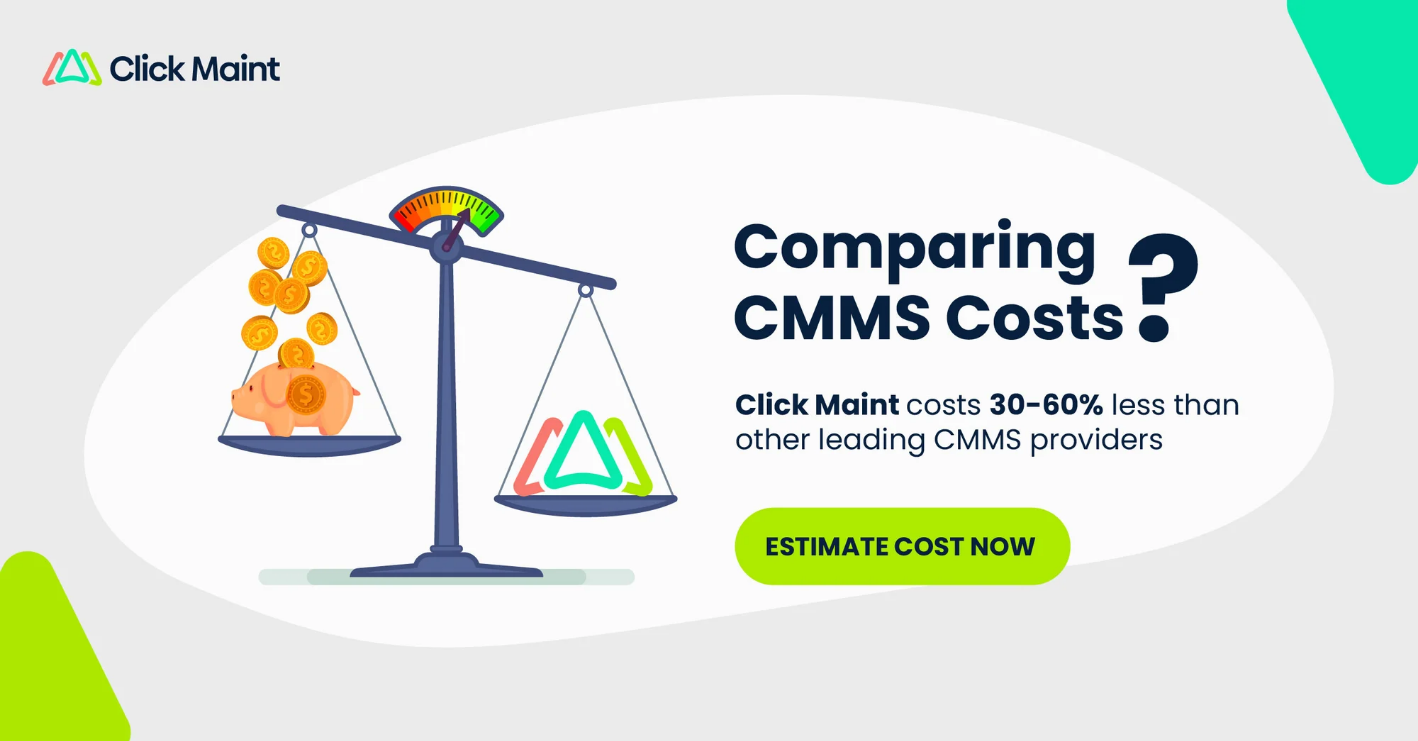
While finding a low-cost CMMS solution is important for businesses, it’s equally important to consider the hidden costs associated with implementation and operation. Many organizations overlook expenses such as onboarding, data migration, system integration, and ongoing support, which can inflate the overall cost significantly. These factors can make what appears to be a "budget-friendly" or free CMMS software much more expensive in the long run. Therefore, businesses should assess the total cost of ownership (TCO), not just upfront subscription fees, to make a cost-effective decision.
In the long term, however, a well-implemented CMMS can deliver substantial savings by reducing equipment downtime, streamlining maintenance processes, and extending asset life cycles. A cloud-based CMMS, for instance, can minimize IT infrastructure costs and reduce the need for in-house tech support while also providing scalability that adapts as your business grows. By improving predictive maintenance and optimizing resource allocation, a CMMS can contribute to operational efficiency, leading to significant ROI over time. For cost-conscious businesses, these benefits often far outweigh the initial investment.

CMMS Products for Cost-Conscious Businesses
Click Maint
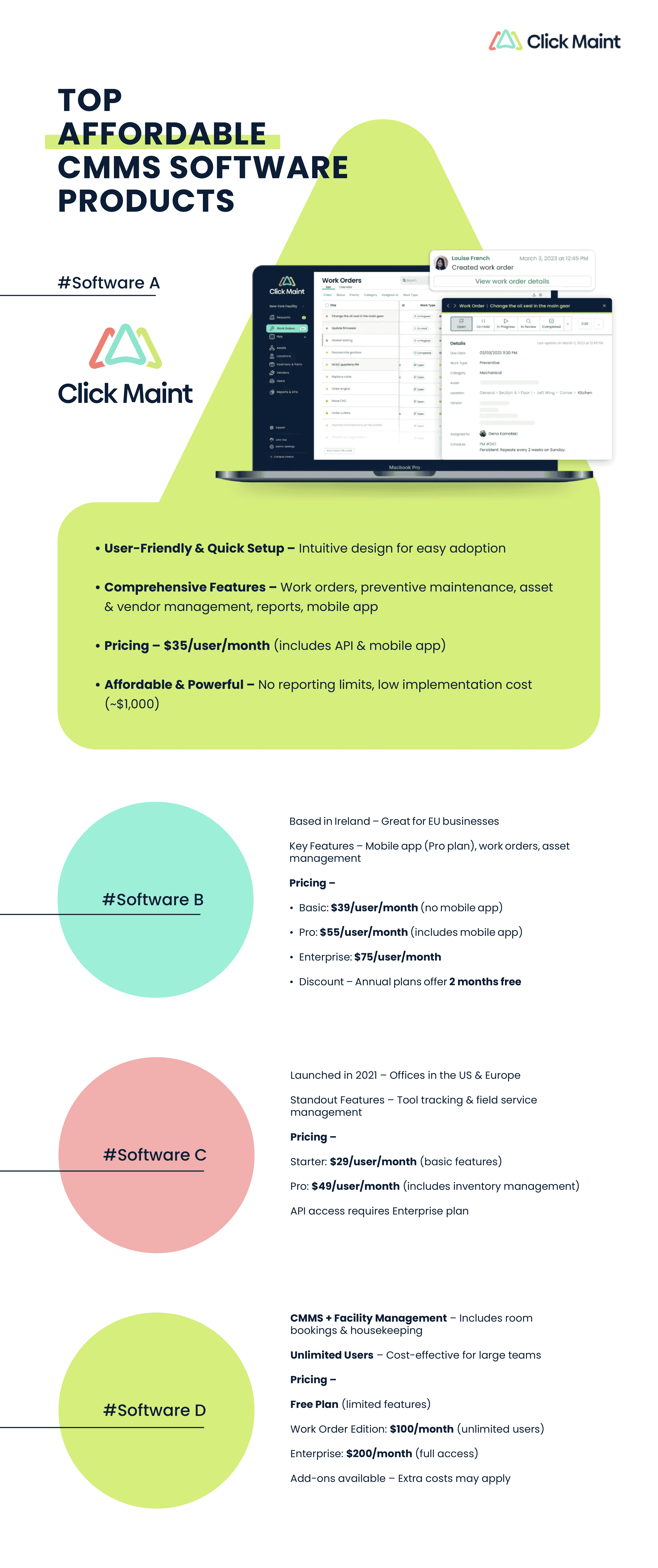
Click Maint stands out for its user-centric design and seamless implementation. It prides itself on an intuitive interface, ensuring users can navigate the system effortlessly, promoting quick adoption and reducing training time. The platform's commitment to user-friendliness doesn't compromise its functionality, making it an ideal choice for businesses seeking a powerful, easy-to-use, and affordable CMMS.
Click Maint CMMS offers users all the key features to streamline maintenance operations. Software features include a request portal, work orders, preventive maintenance, asset and parts management, vendor management, reports and KPIs, and a user-friendly mobile app. Click Maint is affordable, making it an accessible solution for organizations of all sizes. The ease of adoption further solidifies Click Maint as a top choice for those seeking a powerful, easy-to-use CMMS that's affordable.

Pricing
One of the best things about Click Maint is its price. Click Maint costs only USD 35/month per user. Pricing is straightforward and includes the following features: request and work order management, preventive maintenance, asset and inventory management, reports, and KPIs. This price includes access to the mobile app and API for integrating with other applications. At USD 35/month per user, Click Maint allows users to track time and labor, parts, and other costs, and there are no limitations on reporting timeframes like many of the other CMMS providers. What’s more, implementation and onboarding fees are very competitive. Most implementations can be done for $1,000 or less.
Zoidii
Zoidii, located in Dublin, Ireland, is relatively new and will enter the CMMS marketplace in 2020. It offers standard CMMS features, including mobile app functionality. For businesses in the EU, Zoidii is in your backyard. This CMMS is well suited for a variety of industries but seems particularly good for manufacturing businesses. It has a unique interface that is intuitive and easy to navigate.
Pricing
Zoidii offers three plans: Basic at 39 USD/user, Professional at 55 USD/user, and Enterprise at 75 USD/user per month. The basic plan has all the key features suitable for smaller operations. However, it does not include the mobile app. Businesses wanting a mobile app would need the Professional plan at 55 USD per user monthly. Zoidii offers a good discount for an annual commitment, which works out to 2 months free compared to the monthly subscription. Implementation fees apply if customers need assistance. These fees are not published on its website.

WorkTrek
WorkTrek is one of the newest CMMS products, and it is making some waves. It was founded in 2021 and has offices in Croatia and the US. WorkTrek has all the key features needed for a CMMS, the UI looks great, and the price is affordable. Key features include service requests, work orders, preventive maintenance, inspections, vendor management, custom workflows, reports, and KPIs. The features that stand out are tool tracking and field service management.
Pricing
WorkTrek offers three plans depending on the complexity and size of the maintenance operation. Pricing ranges from USD 29/month to USD 49/month per user for the Starter and Professional plans. The Starter plan has the basics and appears suitable for smaller operations where inventory management is not a priority. The Professional plan offers more robust inventory management capabilities. Both plans include unlimited service requesters and access to the mobile app. If you want to integrate WorkTrek with other applications through its API, you would require the enterprise plan and need to speak to their sales team for pricing.
MaintenanceCare
MaintenanceCare began in 2003 when a group of tech enthusiasts came together to create a tool to streamline work orders for professionals worldwide. Since then, the company has grown and reports having thousands of users from various industries. The company is more expansive than most CMMSs, offering facility management features such as room bookings, housekeeping, and virtual spaces in addition to standard CMMS features.
Pricing
MaintenanceCare provides three plans, one of which is “free forever” but is limited to two features. Its Work Order Edition is priced at 100 USD/month with unlimited users and is restricted to work order-related and reporting features plus mobile app functionality. Its top plan, the Enterprise Edition, is priced at 200 USD/month with unlimited users and offers a broader range of features and mobile app functionality. MaintenanceCare offers many additional features as add-ons, like room booking and visitor management, but it is unclear if these come at an additional cost. For large teams, having unlimited users is very attractive for cost-conscious buyers.
The pricing table shows the lowest cost per user and the features available at that price point. CMMS providers offer additional features at higher price points. Check the provider's website for the most recent pricing information and features and services available.
Final Thoughts on Affordable CMMS
With hundreds of CMMS solutions available today, finding Top Rated CMMS Software that balances affordability, functionality, and ease of use is challenging. Increased competition among CMMS providers has made maintenance management tools more accessible to small and mid-sized businesses with limited budgets. The right CMMS can help your team streamline work orders, automate preventive maintenance, improve asset management, and reduce maintenance costs.
Ready to find the right CMMS for your business? Explore the affordable CMMS solutions compared above and see how these Top Rated CMMS Software can help your maintenance team improve efficiency, control costs, and keep assets running reliably.
Small businesses with adequate tech capabilities could also consider open-source options captured in the following blogs:
TABLE OF CONTENTS






