


Reena Sommer | 30 Jun 2026
Share this page:


CMMS vs Excel: The True Cost of Using Spreadsheets for Maintenance Management
Introduction
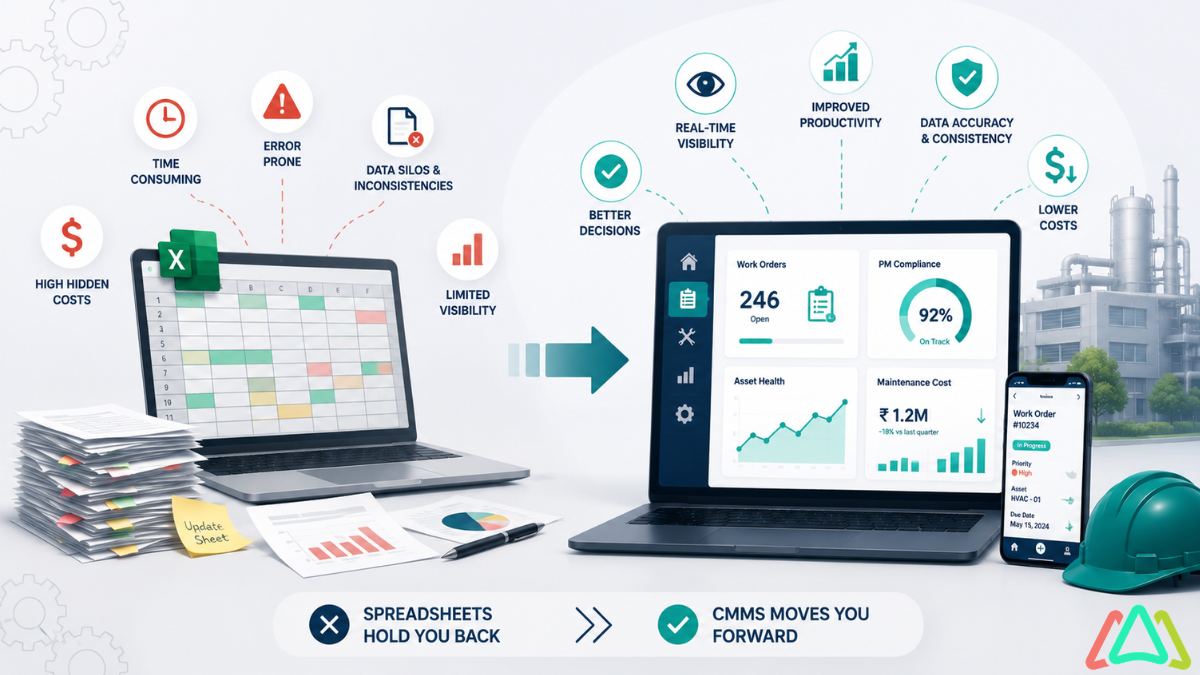
For many organizations, maintenance tracking starts with a spreadsheet. It is easy to build, familiar to most teams, and usually available at no extra cost. But as maintenance activities grow, the practical difference between CMMS and Excel becomes much more important. What works for a small list of assets can become difficult to manage when work orders, preventive maintenance, parts, technicians, and reporting all need to stay aligned.
This article is designed for maintenance managers, operations leaders, facility teams, and small businesses evaluating whether a maintenance spreadsheet is still enough. Rather than treating spreadsheets as always wrong or software as always necessary, the goal is to explain where Excel maintenance management works, where it breaks down, and when it makes sense to replace spreadsheets with CMMS.
Why Teams Use Excel
Excel remains common in maintenance operations because it offers immediate structure and customization, helping teams start quickly without complex setup. In many cases, a team does not begin with formal software. Instead, someone builds a simple asset list, adds due dates for preventive maintenance, and begins tracking tasks. Over time, that file becomes the central tool for maintenance planning.
A maintenance spreadsheet is a practical first step because it offers immediate structure without requiring implementation work. Teams can customize columns, filters, and formulas to match local processes. For organizations with only a few assets or a single technician, that flexibility can be useful.
Common reasons teams choose Excel
- Accessibility: Excel is already installed or readily available in most businesses.
- Familiarity: Supervisors, coordinators, and technicians usually know the basics of spreadsheets.
- Low upfront cost: There may be no immediate software purchase to justify.
- Flexibility: Teams can create sheets for assets, PM schedules, spare parts, and downtime logs.
- Speed: A spreadsheet can be built in a day, while software selection and setup take longer.
For these reasons, recognizing spreadsheet limitations can help maintenance teams feel more confident in selecting the right approach as their needs grow, ensuring better visibility and accountability.
Spreadsheet Limitations
The main challenge with spreadsheets is that they require extensive manual data entry, which is time-consuming and error-prone. Since maintenance work is active, time-sensitive, and collaborative, a spreadsheet records data but does not effectively manage the surrounding process. As the volume of maintenance increases, these limitations become more apparent and problematic.
Where spreadsheet-based tracking becomes difficult
- Version control: Multiple copies, emailed files, and edited tabs create confusion over which file is current.
- Lack of automation: PM schedules, overdue tasks, and follow-ups often require manual updates.
- Difficult reporting: Building KPI reports from raw spreadsheet entries can take significant administrative effort.
- Weak audit trail: It may be hard to see who changed what, when, and why.
- No real-time visibility: Supervisors may not know the status of the current task unless someone manually updates the file.
- Limited workflow support: A sheet can list work, but it does not naturally assign, escalate, approve, or close work orders.
These limitations explain why the debate over CMMS vs. Excel often intensifies as a team reaches a certain level of complexity. Once there are more technicians, more assets, more locations, or stricter documentation needs, the spreadsheet becomes less of a tool and more of a workaround.
|
Category |
Excel Maintenance Management |
CMMS |
|
Setup |
Fast to start with basic templates and custom columns |
Requires planned setup of assets, users, schedules, and workflows |
|
Automation |
Manual formulas, reminders, and recurring task updates |
Built-in scheduling, notifications, triggers, and status changes |
|
Work Orders |
Usually tracked as rows in a sheet |
Structured work orders with assignments, priorities, and completion records |
|
Reporting |
Requires manual sorting, formulas, and separate report creation |
Dashboards and standardized reporting are typically built in |
|
Collaboration |
Can create conflicts, duplicate edits, or unclear ownership |
Shared system with user roles, status tracking, and centralized records |
|
Scalability |
Becomes harder to manage as assets, sites, and users grow |
Designed to support more assets, history, and process complexity |
In short, a spreadsheet can store maintenance information, but it does not reliably coordinate maintenance operations. That distinction is central to understanding the difference between CMMS and Excel in a real-world working environment.
Risks of Manual Tracking
Manual tracking introduces operational risks because it relies on people to remember to update, review, and communicate information. Even disciplined teams can struggle when work moves quickly, and missed updates can disrupt scheduling, labor planning, purchasing, compliance, and uptime.
Common operational risks
- Missed preventive maintenance: PMs can be overlooked if recurring dates are not refreshed or reviewed promptly.
- Data entry errors: Incorrect dates, asset IDs, or status notes can create confusion and rework.
- Delayed repairs: Requests may sit in email or on paper before someone enters them into the spreadsheet.
- Compliance and documentation gaps: Proving that work was completed can be difficult without a strong record trail.
- More reactive work: When PM execution slips, teams often spend more time responding to breakdowns.
- Knowledge loss: If the spreadsheet owner leaves, valuable process knowledge leaves with them.
These risks are not always dramatic at first. Often, they show up gradually: a PM gets postponed, an asset history becomes incomplete, a technician repeats troubleshooting because past notes are missing, or leadership asks for a report that takes hours to assemble. That slow accumulation is part of the true cost of spreadsheet maintenance management.
In many cases, organizations continue using a maintenance spreadsheet longer than they should because the cost is hidden. The spreadsheet itself looks inexpensive, but the surrounding effort is not. Time spent cleaning data, reconciling versions, chasing updates, and manually preparing reports can become a regular burden.
Benefits of CMMS
A computerized maintenance management system is designed to support the full maintenance process, inspiring maintenance professionals to adopt more efficient, coordinated, and transparent practices beyond basic record-keeping.
Key benefits of a CMMS
- Work order management: Create, assign, prioritize, track, and close work in one system.
- Preventive maintenance scheduling: Automate recurring PMs based on time, meter readings, or other triggers.
- Asset history: Maintain maintenance records, failure notes, labor, and parts usage for each asset.
- Mobile access: Technicians can update work from the field instead of waiting to return to a desk.
- Dashboards and reporting: View backlog, completion rates, downtime patterns, and asset trends more easily.
- Inventory and parts visibility: Track parts use and availability alongside maintenance activity.
- Standardization: Use consistent workflows, priorities, checklists, and documentation practices.
- Better planning: Improve labor coordination, scheduling discipline, and resource forecasting.
One of the strongest reasons to replace spreadsheets with CMMS is not simply convenience. It is the ability to move from administrative tracking to managed execution. When work requests, PM schedules, asset records, and technician updates live in one place, maintenance leaders can make decisions with more confidence and less manual effort.
|
Maintenance Activity |
Manual Spreadsheet Process |
CMMS Workflow |
|
Submit a repair request |
Email, verbal request, or note that someone later enters manually |
Request entered directly into the system with date, asset, and priority |
|
Assign work |
The supervisor updates a row and informs the technician separately |
Work order assigned in the system with status and ownership |
|
Schedule PM |
Calendar reminders or manual date formulas |
Recurring PM automatically generated by schedule rules |
|
Track completion |
The technician reports back, and someone updates the spreadsheet later |
Technician updates job status and notes directly in the record |
|
Review asset history |
Search across tabs or files for past entries |
Open one asset record to view the complete maintenance history |
|
Create management reports |
Build reports manually from filtered data |
Use dashboard views and standardized reports |
This does not mean every CMMS implementation is effortless. Software still requires setup, process discipline, and user adoption. However, if a team is already spending substantial time maintaining spreadsheets, coordinating work through side channels, or addressing documentation gaps, a CMMS often consolidates that effort into a more controlled, scalable system.
When Excel Still Works
A balanced view of CMMS vs Excel should acknowledge that Excel is not automatically the wrong choice. There are situations where it remains practical, especially when maintenance demands are simple, and the organization is still evaluating its process maturity.
Excel may still work when:
- The team is very small, such as one technician or one coordinator.
- Asset count is low, and equipment is not highly critical.
- Tracking needs are temporary, such as for a pilot program or short-term project.
- The organization only needs simple logs, not a full work order workflow.
- Leadership is still defining the budget and software requirements before making a larger decision.
In these cases, Excel maintenance management can serve as a useful bridge. It helps teams define asset lists, PM intervals, naming conventions, and reporting expectations before moving into a dedicated system.
The important question is whether Excel can work at all. The better question is whether it still works without creating growing administrative strain or operational risk. A team should seriously consider whether to replace spreadsheets with CMMS when any of the following become true:
- There are frequent missed or overdue PMs.
- Multiple people need to update and review maintenance data daily.
- Leadership wants faster reporting on backlog, downtime, or asset performance.
- Technicians are losing time to paperwork or duplicate data entry.
- Audit, compliance, or customer documentation requirements are increasing.
- The organization manages multiple sites, many assets, and a growing maintenance backlog.
How to decide: Use a spreadsheet if maintenance is simple, stable, and low-risk. Move to a CMMS when maintenance becomes collaborative, recurring, compliance-sensitive, or too time-consuming to manage manually. If the spreadsheet is no longer just recording work but is actively slowing work down, it is time to evaluate switching.
The true cost of CMMS vs. Excel is not just about software pricing. It is about missed visibility, manual effort, process inconsistencies, and the growing risk of relying on a tool not built for active maintenance management. A maintenance spreadsheet can be a useful starting point, but many teams eventually reach a point where a CMMS provides better control, planning, and long-term performance.
FAQ
Is Excel good enough for maintenance management?
Excel can be sufficient for simple environments with few assets, a limited workload, and one or two people managing maintenance. It becomes less effective when teams need recurring PM automation, stronger accountability, easier reporting, or multi-user coordination.
What is the difference between a maintenance spreadsheet and a CMMS?
A maintenance spreadsheet mainly stores information in rows and columns. A CMMS manages the maintenance process by automating and tracking work orders, schedules, assignments, asset history, notifications, and reporting in a structured system.
When should a company replace spreadsheets with CMMS?
A company should consider changing when spreadsheets cause missed PMs, delayed updates, limited visibility, or excessive manual reporting. The need to replace spreadsheets with a CMMS usually becomes clear when maintenance complexity outpaces the spreadsheet's capacity.
Is CMMS only for large maintenance teams?
No. While large organizations often benefit significantly, smaller teams can also gain value by managing critical assets, improving documentation, or adopting more disciplined preventive maintenance. The right choice depends more on process needs than team size alone.
Can Excel support preventive maintenance?
Yes, to a point. Teams can use dates, filters, and formulas to track recurring PM tasks. However, preventive maintenance in Excel is usually manual, making it harder to manage reliably as task volume and asset count increase.
How does CMMS improve visibility?
A CMMS centralizes asset records, work order status, PM schedules, technician activity, and reporting. This makes it easier for supervisors and managers to see what is due, what is overdue, what has been completed, and where maintenance time is being spent.
What is the highest hidden cost of spreadsheet maintenance management?
The highest hidden cost is usually staff time. Manual updates, report preparation, version control, follow-up communication, and incomplete records create an ongoing administrative load. Over time, that effort can be more costly than the spreadsheet itself appears to be.
TABLE OF CONTENTS





Keep Reading
General managers are responsible for keeping operations productive, controlling costs, ...
22 Sep 2026
General managers are responsible for keeping operations productive, controlling costs, ...
22 Sep 2026
CMMS Checklist for Operations Managers: What to Evaluate Before You Buy Choosing the right ...
22 Sep 2026
Maintenance managers in manufacturing handle a demanding set of responsibilities: maintaining ...
22 Sep 2026
Managing maintenance across a school, college, university, or multi-building campus quickly ...
21 Sep 2026
Handling a single property presents its own set of challenges, but juggling several ...
21 Sep 2026
Maintenance supervisors have a lot to manage every day. They assign work orders, coordinate ...
21 Sep 2026
Maintenance-as-a-Service (MaaS) is transforming how organizations manage their equipment and ...
17 Sep 2026
Click Maint CMMS is a computerized maintenance management system built to help churches ...
16 Sep 2026
Plant managers face constant pressure to keep production moving while controlling operating ...
16 Sep 2026
Every day, facility managers juggle numerous responsibilities. Work orders need attention, ...
16 Sep 2026
Equipment breakdowns cost more than the repair bill. Lost production, overtime labor, and ...
15 Sep 2026
Maintenance as a Service (MaaS) is one of the newer concepts in maintenance management that ...
11 Sep 2026
Choosing a CMMS is a high-stakes decision. Get it right, and your maintenance team moves from ...
3 Sep 2026
Construction Management Software: A Step-by-Step Guide by Click Maint Construction teams ...
3 Sep 2026
Construction Management Software By Click Maint Construction companies live and die by ...
3 Sep 2026
Restaurant CMMS: The Best Maintenance Software for Restaurants and the Food Industry When ...
1 Sep 2026
Educational facilities endure heavier wear and tear than most other buildings. Balancing ...
1 Sep 2026
Parts Inventory Management Software by Click Maint Searching for parts inventory management ...
1 Sep 2026
Work Order Management Software If you're responsible for equipment upkeep, responding to ...
28 Aug 2026