



Reena Sommer | 21 Sep 2026


Managing maintenance across a school, college, university, or multi-building campus quickly becomes complicated. Maintenance teams need to handle work orders, preventive maintenance, equipment, building assets, parts, inspections, and requests from staff, all while keeping facilities safe and operational.
CMMS software for education facilities gives maintenance teams one system for organizing these responsibilities. Instead of relying on spreadsheets, paper forms, emails, and separate systems, educational facilities can lean on computerized maintenance management systems (CMMS) to centralize maintenance information.
But not every CMMS is designed for the same needs.
This CMMS software checklist for education facilities covers the key features and capabilities schools, colleges, and universities should evaluate before selecting maintenance management software.

Quick CMMS Checklist for Education Facilities
When comparing CMMS software, look for:
- Easy work order management
- Easy submission & management of maintenance requests via login, portal, or email
- Preventive maintenance scheduling
- Asset and equipment tracking
- Maintenance history reporting
- Parts and inventory management
- Mobile access for technicians
- QR codes for assets, spaces, parts storage
- Inspection and maintenance checklists
- Reports and maintenance analytics
- Multi-building or multi-location management
- User-friendly dashboards
- Role-based user access
- Vendor and contractor management]
- SSO & API
- Fast implementation and training
- Responsive customer support
- Pricing that fits your maintenance operation
A CMMS that covers these areas can help educational facilities move from reactive maintenance toward a more organized preventive maintenance strategy.
1. Work Order Management
Work order management should be one of the first features schools evaluate in CMMS software.
Educational facilities receive maintenance requests for classrooms, HVAC systems, lighting, plumbing, restrooms, cafeterias, athletic facilities, offices, laboratories, and other areas.
Your CMMS should make it easy to:
- Create work orders
- Assign technicians
- Set priorities
- Add due dates
- Track work order status
- Record labor and materials
- Attach photos and documents
- Review completed work
Centralizing this information gives facility managers better visibility into what needs attention and what has already been completed.
2. Maintenance Request Management
Teachers, administrators, custodial staff, and other employees may be the first people to notice maintenance problems.
A good CMMS for schools should provide a simple way for authorized users to submit maintenance requests without complicated processes.
For example, someone could report a leaking faucet, damaged classroom equipment, lighting problem, or broken door. The maintenance team can then review the request and convert it into a work order when appropriate.
This helps reduce requests getting lost in emails, phone calls, handwritten notes, or conversations.
3. Preventive Maintenance Scheduling
Preventive maintenance is especially important for educational facilities because schools depend on many building systems and pieces of equipment.
Look for preventive maintenance software that allows maintenance teams to create recurring schedules for assets such as:
- HVAC equipment
- Boilers
- Pumps
- Generators
- Fire and safety equipment
- Kitchen equipment
- Plumbing systems
- Doors
- Elevators
- Athletic facility equipment
- Vehicles and grounds equipment
A CMMS can automatically generate scheduled maintenance tasks so technicians know what work is coming up.
This helps school facility managers identify maintenance needs earlier and reduce dependence on emergency repairs.
4. Asset and Equipment Management
Schools can have hundreds or thousands of maintainable assets spread across multiple buildings.
Your education CMMS software should provide a central asset database.
Look for the ability to record information such as:
- Asset name
- Asset identification number
- Location
- Manufacturer
- Model
- Serial number
- Installation date
- Warranty information
- Maintenance procedures
- Documents and manuals
- Work order history
- Life expectancy
- Replacement cost
- Salvage value
Having this information available in one place makes it easier for technicians to understand an asset before starting maintenance or repair work.
5. Complete Maintenance History
Before selecting a CMMS, ask:
Can we quickly see the maintenance history for each asset and location?
Maintenance history can help facility managers understand how often equipment requires service and what repairs have already been performed.
For example, if an HVAC unit repeatedly requires repairs, its maintenance history gives the facility team information that can support future repair-or-replacement decisions.
A strong CMMS should connect work orders, preventive maintenance activities, costs, notes, and asset records.
6. Mobile CMMS Access
Maintenance technicians rarely spend their entire day sitting at a desk.
They may be working in classrooms, mechanical rooms, athletic facilities, parking areas, residence buildings, or elsewhere on campus.
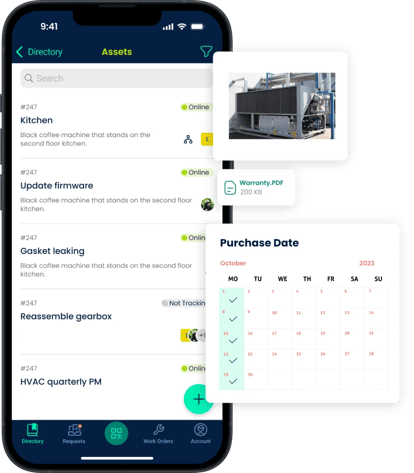
A mobile-friendly CMMS allows technicians to access maintenance information while working in the field.
Look for capabilities that let technicians:
- View assigned work orders
- Update work order status
- Add notes
- Record labor
- Add parts
- Upload photos
- Review asset information
- Complete maintenance checklists
Mobile access can reduce the need to return to an office just to update maintenance records.
7. QR Codes and Asset Labels
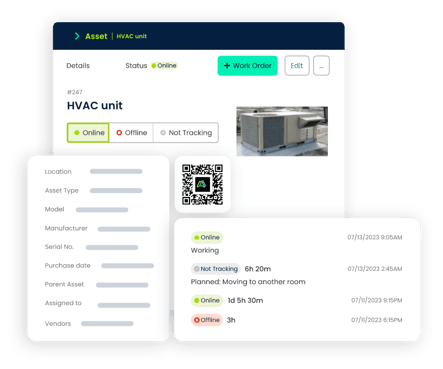
QR codes can make maintenance information easier to access.
A technician can scan a code attached to an asset and quickly retrieve relevant information from the CMMS.
Depending on the system, this could include:
- Asset details
- Maintenance history
- Open work orders
- Preventive maintenance tasks
- Manuals or documents
This is particularly useful on large campuses where maintenance teams manage equipment across many rooms and buildings.
8. Parts and Maintenance Inventory Management
Maintenance work can be delayed when the required replacement part is unavailable.
Schools should consider a CMMS with maintenance inventory management capabilities.
Useful features include:
- Parts tracking
- Inventory quantities
- Storage locations
- Parts associated with assets
- Parts used on work orders
- Reorder information
- Inventory usage history
- Ability to reconcile quantities with cycle counts
Connecting parts inventory with maintenance work gives facility managers better visibility into what maintenance supplies are being used.
9. Inspection and Maintenance Checklists
Educational facilities often perform recurring inspections and standardized maintenance procedures.
A CMMS should make it possible to create repeatable checklists for activities such as:
- Building inspections
- HVAC inspections
- Equipment inspections
- Seasonal maintenance
- Classroom checks
- Grounds maintenance
- Safety-related maintenance tasks
Digital checklists can help maintenance teams follow consistent procedures and document completed work.
10. Multi-Building and Multi-Campus Management
This capability becomes especially important for school districts, colleges, and universities.
The CMMS should allow maintenance teams to organize assets and work by:
District → Campus → Building → Area → Asset
Facility managers should also be able to filter maintenance information by location.
This makes it easier to manage maintenance across elementary schools, secondary schools, administrative buildings, athletic facilities, residence buildings, and other locations from a centralized system.
11. Reporting and Maintenance Analytics
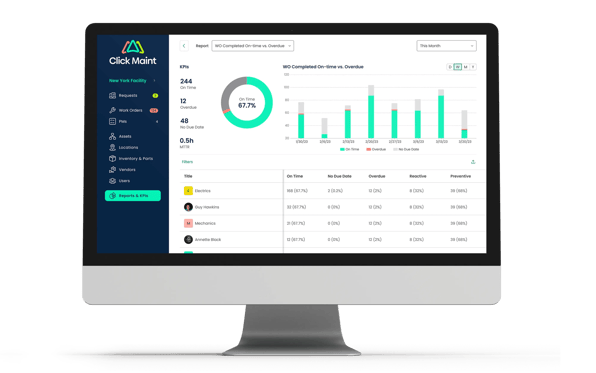
Maintenance data becomes much more useful when facility managers can turn it into actionable reports.
Look for reporting capabilities covering areas such as:
- Open work orders or backlog
- Completed work orders
- Overdue maintenance
- Preventive versus reactive maintenance
- Asset maintenance history with downtime
- Maintenance costs
- Technician workload
- Parts usage
- Work order completion times
These reports can help school facility managers understand maintenance performance and identify areas that may need attention.
12. Ease of Use
Powerful software provides limited value if maintenance teams find it difficult to use.
Before purchasing CMMS software for education facilities, evaluate how quickly technicians, facility managers, and requesters can learn the system.
Ask vendors:
- How long does implementation typically take?
- How much training is required?
- Can technicians easily use the system from a mobile device?
- How many steps are required to create or complete a work order?
- Is the dashboard easy to understand?
- What customer support is available?
A simpler system can make CMMS adoption easier for maintenance teams with different levels of technical experience.
13. Pricing and Scalability
Price should be evaluated alongside functionality and expected usage.
Schools should understand:
- Subscription costs
- User limits
- Implementation costs
- Training costs
- Support options
- Contract requirements
- Available features by plan
- Costs associated with adding users or locations
Also consider future needs.
A small educational facility may initially need basic work orders and preventive maintenance. Over time, it may want to expand its use of asset management, inventory, reporting, and multi-location capabilities.
Questions to Ask During a CMMS Demo
Before selecting a vendor, bring this checklist to your CMMS demonstration and ask:
- Can staff submit maintenance requests easily?
- Can technicians manage work orders from mobile devices?
- Can we schedule recurring preventive maintenance?
- Can we track assets by building and location?
- Can we view the complete maintenance history of an asset?
- Can technicians scan QR codes to access asset information?
- Can we track maintenance parts and inventory?
- Can we build inspection and maintenance checklists?
- Can we manage multiple schools or campuses?
- What maintenance reports are available?
- How long does implementation typically take?
- What training and support are included?
- How does pricing change as our team grows?
The answers make it easier to compare CMMS platforms using requirements that matter to your educational facility rather than choosing based on a long feature list.
How Click Maint Supports Education Facility Maintenance
Click Maint CMMS software is designed to help maintenance teams centralize everyday maintenance activities such as work orders, maintenance requests, preventive maintenance, asset information, and maintenance records.
For educational facilities, a centralized CMMS can provide maintenance teams with a clearer view of work occurring across classrooms, buildings, equipment, and other campus areas.
Schools evaluating Click Maint should compare its available capabilities with their specific requirements, number of facilities, maintenance workflows, reporting needs, and budget.
Explore Click Maint for Education Facilities
Looking for a simpler way to organize school and campus maintenance?
See how Click Maint CMMS software for education facilities can help your team manage maintenance requests, work orders, preventive maintenance, and assets from one centralized system.
Take the quick 2-minute interactive Click Maint product tour to see how the software works.
Frequently Asked Questions About CMMS for Education
What is CMMS software for education facilities?
CMMS software for education facilities is a maintenance management system used by schools, colleges, universities, and other educational organizations to organize work orders, preventive maintenance, assets, maintenance requests, and related maintenance information.
What is the best CMMS software for schools?
The appropriate CMMS depends on the school's size, number of buildings, maintenance team, budget, and required functionality. Schools should compare work order management, preventive maintenance, asset tracking, mobile access, reporting, ease of use, implementation, support, and pricing.
Can schools use CMMS software for preventive maintenance?
Yes. CMMS software can schedule recurring preventive maintenance and create maintenance tasks for equipment and building systems based on configured schedules.
Can a CMMS manage multiple school buildings?
CMMS platforms with multi-location capabilities can organize assets, work orders, and preventive maintenance across multiple buildings or campuses. This can be particularly useful for school districts, colleges, and universities.
What should schools look for when buying CMMS software?
Schools should prioritize ease of use, work orders, maintenance requests, preventive maintenance, asset management, mobile accessibility, inventory tracking, reporting, multi-location management, implementation, support, and pricing.
Who uses CMMS software in educational facilities?
Depending on the organization, users can include facility managers, maintenance managers, maintenance technicians, operations teams, custodial teams, administrators, and staff members submitting maintenance requests.
Final CMMS Selection Checklist
Before making a decision, confirm that the CMMS meets your facility's most important requirements:
☐ Work order management
☐ Maintenance requests
☐ Preventive maintenance scheduling
☐ Asset and equipment tracking
☐ Asset maintenance history
☐ Mobile access
☐ QR codes and asset labels
☐ Parts and inventory management
☐ Inspection checklists
☐ Reporting and analytics
☐ Multi-building management
☐ Easy-to-use interface
☐ Implementation and training
☐ Customer support
☐ Suitable pricing and scalability
The goal is not simply to find software with the longest feature list. Educational facilities should choose a CMMS that fits how their maintenance teams actually work and provides the information needed to manage facilities efficiently.
For schools, colleges, universities, and other educational organizations evaluating maintenance software, Click Maint is one option to include in the comparison.
Explore Click Maint CMMS software and take the 2-minute interactive product tour to see how it can support your education facility maintenance operations.
Looking for a CMMS to Simplify Facility Maintenance?

TABLE OF CONTENTS






