


Reena Sommer | 20 Oct 2026


MaintainX is a popular maintenance management platform that helps businesses organize work orders, preventive maintenance, equipment records, and daily maintenance operations. However, not every maintenance team needs the same features, subscription structure, or level of complexity.
Small manufacturers, healthcare facilities, schools, property managers, and maintenance departments across the United States are increasingly focused on finding affordable CMMS software that delivers essential functionality without unnecessary costs.
If your organization is comparing MaintainX competitors, five alternatives worth evaluating in 2026 are Click Maint, Fiix, UpKeep, Limble CMMS, and Maintenance Care.
For teams that prioritize affordability, ease of use, and essential maintenance functionality, Click Maint stands out as a compelling option.
This guide compares these platforms, explains their strengths and limitations, and provides a practical checklist to help you select the right maintenance management software.

What Are the Best Affordable Alternatives to MaintainX in 2026?
The best MaintainX alternative depends on your maintenance budget, number of users, equipment requirements, and daily workflows.
|
CMMS software |
Best for |
Key advantage |
|
Click Maint |
Small and mid-sized maintenance teams |
Affordable, high user adoption, fast implementation, comprehensive core functionality |
|
Fiix |
Growing manufacturing operations |
Flexible & robust maintenance management capabilities |
|
UpKeep |
Mobile maintenance teams |
Mobile-first work order workflows |
|
Limble CMMS |
Teams needing configurable processes |
Maintenance workflow customization |
|
Maintenance Care |
Facilities and property maintenance |
Unlimited users, many modules including space managment |
These five platforms offer different approaches to maintenance management. Before selecting one, compare the features included in each subscription, onboarding requirements, customer support, and long-term costs.
Why Are Businesses Looking for MaintainX Alternatives?
Businesses explore alternatives to MaintainX for several reasons.
1. Maintenance software pricing
Small maintenance teams need software that fits their operating budgets. Subscription costs become more significant as additional technicians, supervisors, and administrators require access. When comparing pricing, businesses should examine total costs rather than advertised entry-level rates alone.
2. Essential features across different plans
Some maintenance management platforms divide functionality across multiple subscription tiers. Organizations should confirm whether work orders, preventive maintenance, inventory management, asset tracking, reporting, and mobile access are included in their selected plan.
3. Ease of use for maintenance technicians
Maintenance software should simplify daily work rather than introduce unnecessary administrative steps. Technicians need straightforward ways to receive assignments, review equipment information, update work orders, and record completed maintenance.
4. Software implementation and training
Maintenance managers need systems that fit existing operations. A complicated implementation process increases training requirements and delays adoption. Smaller organizations generally benefit from straightforward setup and clear maintenance workflows.
5. Different industry requirements
Manufacturing plants, schools, healthcare facilities, commercial buildings, and nonprofit organizations have different maintenance priorities. The right CMMS should support the organization's equipment, maintenance schedules, reporting needs, and operational structure.
1. Click Maint — Best for Affordable, Easy-to-Use CMMS Software
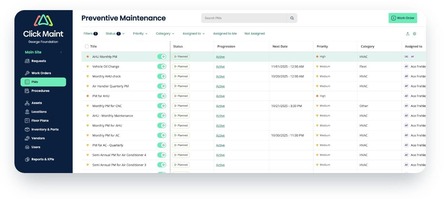
Click Maint is a strong MaintainX alternative for small and mid-sized businesses seeking essential maintenance management features without the complexity of multiple subscription tiers.
Click Maint helps maintenance managers, technicians, and facility teams organize work orders, preventive maintenance, equipment, spare parts, and maintenance requests from one platform.
Its main advantage is the amount of maintenance functionality included at its published price.
Key Click Maint features
- Work order management: Create, assign, prioritize, and track maintenance tasks.
- Preventive maintenance software: Schedule recurring inspections, servicing, and preventive maintenance activities.
- Asset management: Track equipment details, maintenance history, downtime, and repair costs.
- Flexible location hierarchy configuration - users can create up to 10 location levels
- Interactive floor plans and site maps
- Inventory management: Monitor spare parts, stock levels, and inventory usage.
- Mobile CMMS: Access maintenance information through iOS and Android devices.
- QR code scanning: Access equipment records and submit maintenance requests.
- Maintenance request portal: Allow employees to submit requests without requiring paid technician accounts.
- Reports and analytics: Track maintenance KPIs, including MTTR, MTBF, work order completion, and equipment downtime.
These capabilities are listed in Click Maint's Professional subscription.
Click Maint pricing in 2026
PROFESSIONAL PLAN — ANNUAL BILLING
$35
USD per user/month
Monthly billing is also available. Unlimited maintenance requesters are included, and a 30-day free trial requires no credit card.
Implementation and data migration services may involve additional fees.
Why choose Click Maint over MaintainX?
MaintainX's Essential plan starts at $20 per user per month with annual billing, while Premium costs $65 per user per month with annual billing. Its Premium tier adds parts inventory, purchasing, and additional maintenance capabilities.
Click Maint's $35 plan provides inventory management, asset management, preventive maintenance, work orders, and reporting together. Click Maint offers more flexibility with location management with flexible location hierarchy configuration and also offers interactive floor plans and site maps.
For a team that requires these features, Click Maint offers a lower published per-user price than MaintainX Premium.
Best for: Small manufacturing companies, schools, healthcare facilities, churches, property maintenance teams, and organizations seeking affordable CMMS software.
Potential limitation: Companies requiring sophisticated enterprise asset management, specialized industrial integrations, or advanced predictive maintenance should verify that Click Maint meets their technical requirements.
2. Fiix — Best for Growing Manufacturing Maintenance Teams
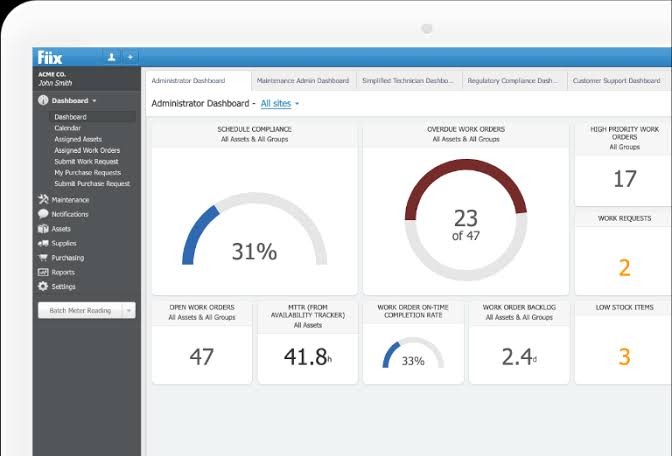
Fiix is a cloud-based CMMS platform designed to help maintenance teams organize work orders, preventive maintenance, equipment, and maintenance data.
Fiix is worth evaluating for manufacturers planning to expand their maintenance programs or manage more complex equipment operations.
Key features
- Work order creation and management
- Preventive maintenance scheduling
- Asset and equipment management
- Parts and inventory tracking
- Mobile maintenance access
- Maintenance reporting and analytics
- Advanced capabilities in higher subscription tiers
Fiix pricing in 2026
Fiix publishes a Free plan, Basic at $45 per user per month, and Professional at $75 per user per month. Its Professional tier adds features such as multi-site management, custom analytics, and additional purchasing capabilities.
Best for: Manufacturing organizations looking for a CMMS with options for expanding into more advanced maintenance management.
Potential limitation: Advanced functionality is distributed across higher-priced subscription tiers, increasing costs for some growing teams.
3. UpKeep — Best for Mobile Maintenance Management
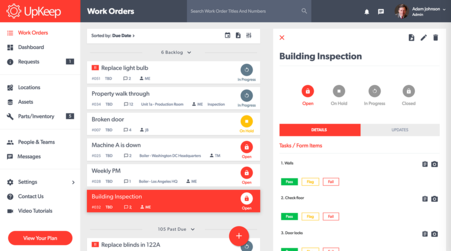
UpKeep is a mobile-focused CMMS solution designed to help technicians and managers organize maintenance tasks.
It is a relevant alternative for businesses with technicians working across buildings, production floors, or multiple locations.
Key features
- Mobile work order management
- Asset tracking
- Preventive maintenance scheduling
- Maintenance request management
- Parts and inventory functionality in applicable plans
- Maintenance performance reporting
UpKeep pricing
UpKeep offers multiple subscription tiers. Buyers should confirm current pricing directly with the vendor and compare the specific plan that includes their required preventive maintenance and inventory features.
Best for: Mobile maintenance teams, field-based technicians, and facilities with distributed maintenance operations. Potential limitation: Some advanced features require higher subscription tiers.
4. Limble CMMS — Best for Customizable Maintenance Workflows
Limble CMMS helps organizations manage work orders, preventive maintenance, assets, and maintenance workflows.
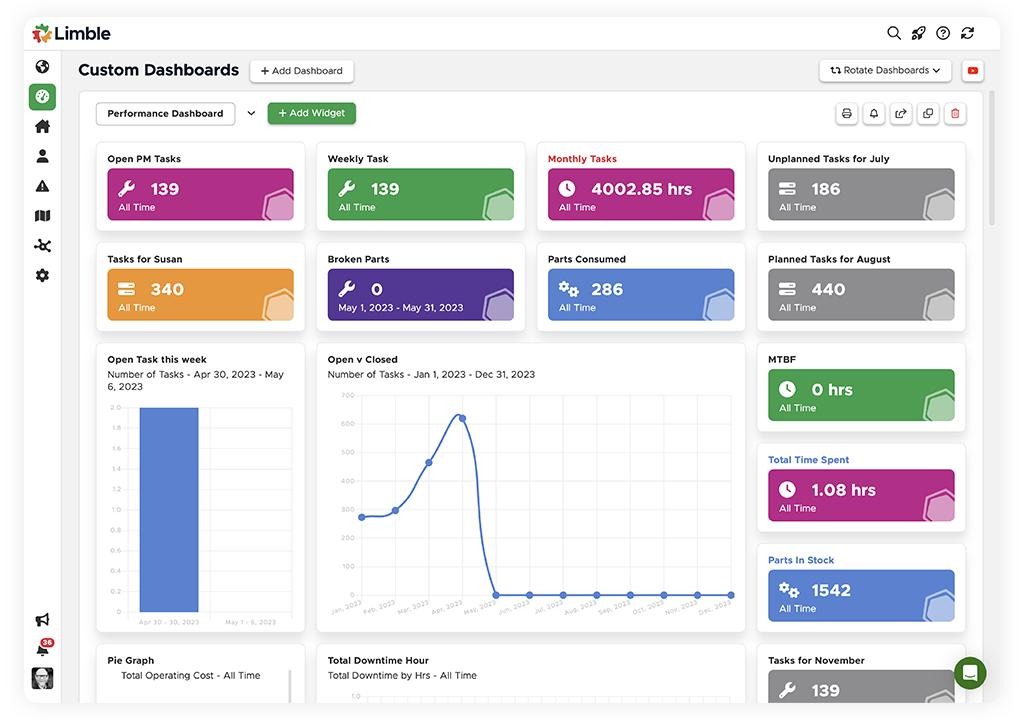
Limble is worth considering for teams that want configurable maintenance processes and a structured approach to preventive maintenance.
Key features
- Work order management
- Preventive maintenance scheduling
- Asset maintenance records
- Mobile maintenance access
- Maintenance dashboards
- Inventory management in eligible plans
- Configurable maintenance workflows
Limble pricing in 2026
Limble's published 2026 cost guide lists Standard at $28 per user per month and Premium+ at $69 per user per month. The higher tier includes additional inventory management and time-tracking capabilities.
Best for: Maintenance departments looking for configurable workflows and a range of subscription options.
Potential limitation: Organizations requiring inventory management and other advanced features should evaluate the total cost of higher-tier subscriptions.
5. Maintenance Care — Best for General Facility Maintenance
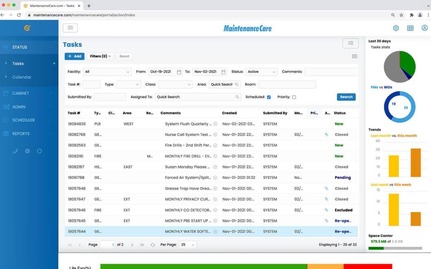
Maintenance Care is another MaintainX alternative for organizations managing routine facility repairs, equipment servicing, and maintenance requests. It is particularly relevant to businesses comparing straightforward maintenance software for buildings and general facilities.
Key capabilities to evaluate
- Work order management
- Preventive maintenance scheduling
- Equipment maintenance records
- Maintenance requests
- Facility maintenance tracking
- Reporting and maintenance documentation
Maintenance Care pricing
Contact Maintenance Care for current pricing and a detailed explanation of the features included in its available plans.
Best for: Facilities, property maintenance departments, and organizations managing recurring building maintenance tasks.
Potential limitation: Manufacturing businesses with specialized equipment or integration requirements should confirm whether the software supports their operations.
Click Maint vs MaintainX: Which Offers Better Value in 2026?
Price alone does not determine the best maintenance management software. The more useful comparison is the cost of a plan that includes the features your team actually needs.
|
Feature |
Click Maint Professional |
MaintainX Essential |
MaintainX Premium |
|
Work orders |
Included |
Included |
Included |
|
Recurring preventive maintenance |
Included |
Included |
Included |
|
Parts inventory |
Included |
Not included |
Included |
|
Maintenance requesters |
Unlimited |
Unlimited |
Unlimited |
|
Mobile access |
Included |
Included |
Included |
|
Maintenance reporting |
Included |
Limited analytics |
Advanced analytics |
|
Annual-billing monthly rate |
$35/user |
$20/user |
$65/user |
Example: Maintenance software costs for five users
CLICK MAINT
$175
per month
MAINTAINX ESSENTIAL
$100
per month
MAINTAINX PREMIUM
$325
per month
For five paid users, Click Maint costs an illustrative $2,100 per year compared with $3,900 for MaintainX Premium, based on published annual-billing rates.
That represents $1,800 in annual subscription savings, or approximately 46%, for this specific comparison. The plans are not feature-identical, so businesses should evaluate functionality, implementation, support, and integration requirements before making a purchase decision.
What Should You Look for in an Affordable MaintainX Alternative?
When evaluating affordable CMMS software, maintenance managers should prioritize practical features that improve daily operations.
1. Easy-to-use work order software
Technicians should be able to receive assignments, review instructions, update work order statuses, and record completed repairs without complicated processes.
2. Preventive maintenance scheduling
The system should support recurring equipment inspections, maintenance schedules, and automated task generation.
3. Equipment and asset management
A CMMS should maintain equipment records, repair histories, and important asset details.
4. Inventory management
For organizations managing spare parts, inventory tracking helps monitor availability, reduce unnecessary purchases, and identify items requiring replenishment.
5. Mobile access and QR code scanning
Mobile access helps technicians manage maintenance work from equipment locations rather than returning to a desk.
6. Transparent pricing
Compare the cost of all required functionality, including paid users, implementation, onboarding, data migration, and additional modules.
7. Customer reviews and support
Independent customer reviews provide useful information about usability, product reliability, and customer service. For example, Capterra listed Click Maint at 4.8 out of 5 from 125 reviews in its September 2026 comparison data. Review ratings change over time and reflect individual customer experiences.
When Should You Switch From MaintainX to Another CMMS?
Switching maintenance management software is a significant decision. A business should evaluate alternatives when its current system no longer meets operational or financial requirements.
Common signs include:
- Increasing subscription costs: Required functionality sits outside the current plan or becomes expensive as the team grows.
- Low technician adoption: Maintenance staff continue relying on spreadsheets, paper forms, or informal communication.
- Missing essential features: Inventory management, equipment tracking, or reporting requirements are not met by the existing subscription.
- Complex maintenance workflows: Routine work order updates take more steps than the team needs.
- Changing business requirements: The organization needs different reporting, maintenance request processes, or support arrangements.
Before switching, document your current processes and compare the cost of remaining on MaintainX against the full cost of implementing another CMMS.
How to Switch From MaintainX to Click Maint: A Simple 6-Step Process
Switching from MaintainX to Click Maint is a straightforward process with guidance from the Click Maint team. Follow these six steps to evaluate the software, migrate your maintenance data, and prepare your team for a successful transition.
Step 1: Schedule a Personalized Demo With Click Maint
Start by booking a personalized demonstration with a Click Maint Account Executive (AE). During the demo, explore key features, including work order management, preventive maintenance, asset tracking, inventory management, and reporting.
Discuss your current MaintainX workflows, maintenance challenges, and specific software requirements to understand how Click Maint fits your operations.
CTA: Book Your Personalized Click Maint Demo
Step 2: Get a Customized Quote Based on Your Requirements
After the demonstration, request a customized quote from Click Maint based on your organization's needs.
Pricing considerations include the number of users, required software functionality, and implementation requirements.
The Click Maint team will help you review your requirements and understand the proposed costs before making a decision.
CTA: Request Your Customized Click Maint Quote
Step 3: Start Your 30-Day Click Maint Trial
Experience Click Maint with a 30-day trial to evaluate the software using your actual maintenance workflows.
Explore work order creation, preventive maintenance scheduling, equipment management, and reporting. Involve your maintenance managers and technicians to assess ease of use and functionality.
CTA: Start Your 30-Day Click Maint Trial
Step 4: Migrate Your Maintenance Data From MaintainX to Click Maint
Once the trial meets your expectations, begin the data migration process.
Export your existing maintenance data from MaintainX, including available asset records, maintenance schedules, and work order information.
Work with your dedicated Click Maint Customer Success Manager (CSM) to organize and import the supported data into Click Maint. Your CSM will assist with onboarding and help your team prepare for the transition.
Step 5: Complete User Acceptance Testing (UAT)
Before fully launching Click Maint, conduct User Acceptance Testing to confirm that the software supports your team's daily maintenance operations.
Test important workflows, including maintenance request submissions, technician assignments, preventive maintenance schedules, and reporting.
Share feedback with your Click Maint CSM and make necessary configuration adjustments to align the system with your operational requirements.
Step 6: Complete Administrator and End-User Training
The final step is to train administrators, maintenance managers, supervisors, and technicians.
Administrator training focuses on system configuration, user management, reporting, and maintenance workflows.
End-user training covers everyday activities such as creating work orders, updating task statuses, recording equipment maintenance, and completing preventive maintenance assignments.
With support from the Click Maint team, your organization will be prepared to transition to the new maintenance management system.
Frequently Asked Questions About MaintainX Alternatives
What is the best affordable alternative to MaintainX in 2026?
Click Maint is a strong alternative for small and mid-sized maintenance teams seeking essential CMMS features at a competitive price. Fiix, UpKeep, Limble, and Maintenance Care are also worth evaluating depending on industry requirements.
Is Click Maint less expensive than MaintainX?
Click Maint's $35 per-user monthly rate with annual billing is lower than MaintainX Premium's $65 rate, but higher than MaintainX Essential's $20 rate. The best value depends on the features your team needs.
Which MaintainX alternative is best for small manufacturing companies?
Click Maint and Fiix are worth evaluating for small manufacturing operations. Both support work orders, preventive maintenance, asset tracking, and inventory-related workflows, with differences in subscription structure and advanced functionality.
Which affordable CMMS software includes inventory management?
Click Maint includes inventory management in its Professional Plan. Fiix also offers inventory functionality, while other platforms provide inventory features according to their subscription tiers.
Is there a free alternative to MaintainX?
Fiix offers a free CMMS plan with limits, and MaintainX itself offers a free Basic plan. Businesses should compare feature restrictions and user requirements before choosing a free platform.
Is Click Maint easy to use for maintenance technicians?
Click Maint emphasizes straightforward work order workflows, mobile maintenance access, and QR code scanning. Organizations should test these features with their own technicians during the free trial.
How do I choose between Click Maint and MaintainX?
Compare the total cost for your maintenance team, preventive maintenance functionality, inventory requirements, technician experience, reporting, integrations, and customer support. A trial using real maintenance tasks provides a more reliable comparison than feature lists alone.
Final Verdict: Which Affordable MaintainX Alternative Should You Choose?
The best MaintainX alternative depends on your maintenance team's size, industry, software budget, and required features.
Fiix offers options for growing manufacturing operations. UpKeep emphasizes mobile maintenance workflows. Limble supports configurable maintenance processes. Maintenance Care is worth evaluating for general facility maintenance.
For small and mid-sized businesses looking for a balance of affordability, ease of use, and essential CMMS functionality, Click Maint is a particularly strong option.
Its $35 USD per-user monthly starting rate with annual billing includes work orders, preventive maintenance, asset management, inventory, mobile access, and reporting in one plan.
Rather than choosing software based on the longest feature list, maintenance managers should select the solution that fits their daily operations, supports technician adoption, and delivers sustainable value.
Looking for an Affordable, Easy-to-Use MaintainX Alternative?
See how Click Maint helps maintenance teams manage work orders, preventive maintenance, equipment, and inventory in one affordable platform.

TABLE OF CONTENTS






