



Reena Sommer | 14 Oct 2026


Facility maintenance software and Microsoft Excel both help organizations organize maintenance information, but they serve different operational needs.
Excel provides a spreadsheet-based method for recording maintenance tasks, equipment details, inspection dates, and repair costs. Facility maintenance software provides a centralized system for managing work orders, scheduling preventive maintenance, tracking assets, and monitoring maintenance performance.
For small facilities with limited maintenance activities, Excel provides a simple starting point. However, as maintenance requests increase, spreadsheets become harder to manage, update, and share across teams.
Facility maintenance software is the better choice for organizations that need automated maintenance scheduling, real-time work order tracking, equipment maintenance history, and centralized reporting.
Solutions such as Click Maint CMMS Software help facility managers replace disconnected spreadsheets with organized digital maintenance workflows.
Facility Maintenance Software vs Excel: Key Differences
|
Feature |
Excel Spreadsheets |
Facility Maintenance Software |
|
Work order management |
Manual tracking |
Centralized digital work orders |
|
Preventive maintenance |
Manual scheduling and reminders |
Automated recurring schedules |
|
Equipment maintenance history |
Separate spreadsheet records |
Centralized asset history |
|
Maintenance requests |
Manual entry |
Digital request submission |
|
Technician assignments |
Manual communication |
Direct work order assignments |
|
Real-time status tracking |
Requires manual updates |
Status updates within the system |
|
Inventory management |
Manual stock records |
Integrated spare parts tracking |
|
Mobile access |
Mobile spreadsheet access |
Technician-focused mobile workflows |
|
Reporting |
Manual formulas and charts |
Built-in maintenance reports |
|
Multi-location management |
Multiple files or complex workbooks |
Centralized location-based records |
|
Maintenance costs |
Manual calculations |
Work order and asset cost tracking |
|
Scalability |
Increasing spreadsheet complexity |
Designed for expanding maintenance operations |
Excel remains useful for simple maintenance logs and financial analysis. However, dedicated facility maintenance management software offers greater operational control when multiple employees, assets, and locations are involved.

Why Do Facility Managers Use Excel for Maintenance Tracking?
Many organizations begin managing maintenance operations with Excel because it is familiar, flexible, and widely available.
Facility managers create spreadsheets to record maintenance requests, preventive maintenance schedules, equipment information, and repair expenses.
A typical facility maintenance spreadsheet includes:
- Equipment name and asset identification number
- Facility location
- Maintenance request date
- Description of the maintenance problem
- Assigned maintenance technician
- Maintenance priority
- Repair status
- Completion date
- Labor and replacement parts costs
For organizations managing a small number of assets, this approach provides basic visibility into maintenance activities.
However, spreadsheet-based maintenance management creates operational challenges as the number of work orders and maintenance responsibilities grows.
7 Limitations of Using Excel for Facility Maintenance Management
1. Manual Work Order Tracking
Excel requires maintenance managers to enter requests, update work order statuses, and communicate assignments manually.
When facility employees report maintenance problems through emails, phone calls, or text messages, requests become scattered across multiple communication channels.
A maintenance technician might complete a repair without updating the spreadsheet. Another request might remain unresolved because nobody assigned responsibility.
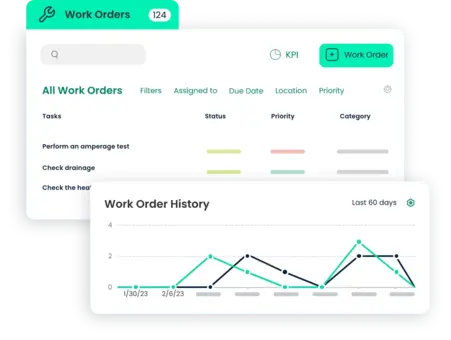
How facility maintenance software solves this problem:
Work order software centralizes maintenance requests and technician assignments.
Facility managers track each request from submission through completion, reducing the risk of missed maintenance tasks.
2. Missed Preventive Maintenance Tasks
Preventive maintenance is essential for keeping facility equipment operating reliably.
Facility managers must regularly inspect and service equipment such as:
- HVAC systems
- Electrical equipment
- Plumbing systems
- Elevators
- Fire safety equipment
- Lighting systems
- Building automation equipment
Excel-based preventive maintenance schedules depend on manual tracking, formulas, calendar reminders, or additional automation.
As maintenance schedules become more complex, the risk of overdue tasks increases.
How preventive maintenance software helps:
Preventive Maintenance Software supports recurring maintenance schedules, assigned tasks, and maintenance records.
Facility managers organize preventive maintenance activities without manually creating every recurring work order.
3. Limited Equipment Maintenance History
Facility managers need accurate equipment maintenance records to evaluate asset reliability and repair expenses.
Excel spreadsheets frequently store equipment information across separate worksheets or files.
Finding the complete maintenance history of a particular HVAC unit, boiler, or electrical system requires searching multiple records.
How CMMS software helps:
CMMS software connects maintenance records to individual assets.
Maintenance managers review previous repairs, inspections, work orders, and associated costs from a centralized equipment record.
This information supports better repair-versus-replacement decisions.
4. Poor Communication Between Maintenance Teams
Excel does not provide a complete maintenance communication workflow by default.
Facility employees submit requests through different channels, while maintenance managers communicate assignments through emails, phone calls, and messaging applications. This creates confusion about maintenance priorities and responsibilities.
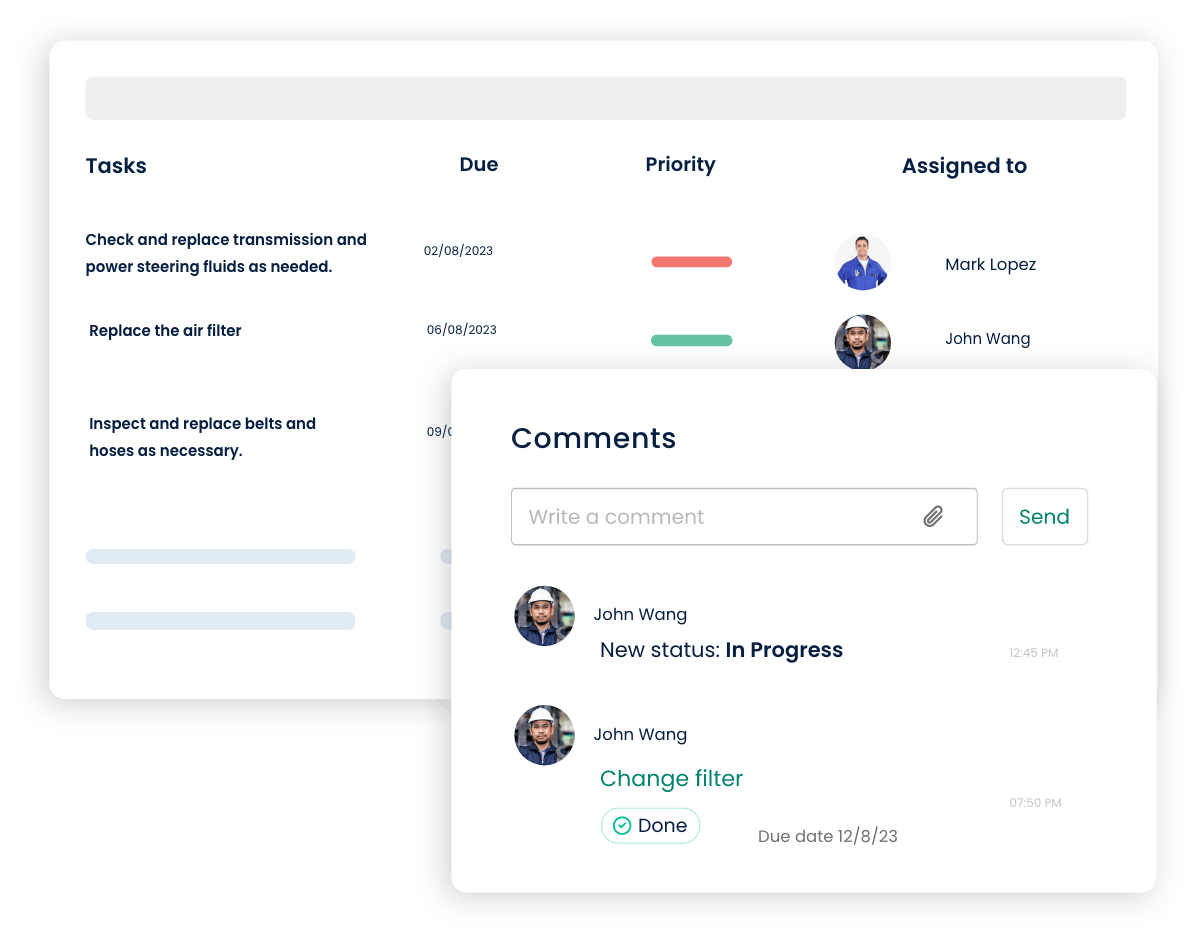
How facility maintenance software helps:
A centralized maintenance platform gives facility managers and technicians a shared record of assigned work.
Technicians review task descriptions, update progress, and document completed maintenance activities.
5. Difficult Maintenance Cost Tracking
Tracking maintenance expenses is essential for managing facility budgets.
Excel supports financial calculations, but collecting accurate maintenance costs requires consistent manual entry.
Maintenance managers must combine labor expenses, spare parts costs, contractor invoices, and equipment repair records.
How maintenance management software helps:
Facility maintenance software connects maintenance activities with relevant work order and asset records.
This provides a clearer picture of maintenance spending and helps identify equipment with recurring repair expenses.
6. Challenges Managing Multiple Facilities
Organizations operating multiple buildings face additional maintenance coordination challenges.
Schools, healthcare facilities, churches, property management companies, and commercial building operators frequently manage maintenance across different locations.
Excel-based tracking becomes increasingly difficult when each location maintains separate spreadsheets.
How facility management software helps:
Facility management software centralizes maintenance records across buildings and locations.
Maintenance directors gain visibility into open work orders, preventive maintenance schedules, and equipment maintenance activities.
7. Limited Maintenance Reporting
Excel provides powerful reporting and charting functionality, but maintenance reports require accurate data, formulas, and ongoing maintenance of the workbook.
Facility managers spend additional time consolidating information before evaluating maintenance performance.
How CMMS software helps:
CMMS software provides maintenance reporting tools for tracking operational performance.
Common maintenance KPIs include work order completion rates, preventive maintenance compliance, equipment downtime, mean time to repair (MTTR), and maintenance costs.
These insights support data-driven facility maintenance decisions.
When Should a Facility Replace Excel With Maintenance Software?
Facility managers should consider replacing spreadsheets when manual maintenance tracking begins affecting productivity, equipment reliability, or service quality.
Here are seven signs that indicate the need for dedicated maintenance management software.
- Maintenance requests arrive through multiple disconnected channels.
- Preventive maintenance tasks are regularly missed or completed late.
- Maintenance technicians struggle to identify work order priorities.
- Equipment maintenance records are incomplete or difficult to locate.
- Facility managers spend excessive time updating spreadsheets.
- Maintenance costs are difficult to track across assets and locations.
- The organization is expanding its facilities, equipment, or maintenance team.
If several of these problems exist, transitioning to CMMS software provides a structured approach to maintenance management.
How Does Facility Maintenance Software Improve Work Order Management?
Work order management is one of the most important differences between Excel and facility maintenance software. Consider a commercial building where an employee reports a malfunctioning air conditioning unit.
Managing the Request With Excel
The employee contacts the facility manager through email.
The manager opens a spreadsheet, records the issue, and contacts a technician.
After completing the repair, the technician reports the work through another email.
The facility manager manually updates the spreadsheet and records the repair cost.
This process requires multiple communication steps and manual updates.
Managing the Request With Click Maint
With Click Maint, the maintenance request is entered into the system. The facility manager reviews the request, assigns a technician, and sets the work order priority. The technician accesses the work order, completes the repair, and records relevant maintenance details.
The completed work order becomes part of the equipment maintenance history. This centralized workflow improves maintenance visibility and reduces administrative work.
Explore Click Maint Work Order Software to learn more.
Facility Maintenance Software vs Excel for Preventive Maintenance
Preventive maintenance helps facilities reduce equipment breakdowns and extend asset life. However, managing preventive maintenance through spreadsheets becomes challenging when organizations maintain hundreds of assets.
|
Preventive Maintenance Task |
Excel |
CMMS Software |
|
Schedule HVAC inspections |
Manual schedule |
Recurring maintenance schedule |
|
Assign technicians |
Manual communication |
Digital task assignment |
|
Track inspection completion |
Spreadsheet updates |
Work order completion records |
|
Review maintenance history |
Search previous records |
Asset-linked maintenance history |
|
Identify overdue tasks |
Manual filters and formulas |
Maintenance status reporting |
|
Track maintenance costs |
Manual data entry |
Linked work order cost records |
Preventive maintenance software provides a more structured process for facilities with recurring maintenance requirements.
How Much Money Does Facility Maintenance Software Save Compared With Excel?
The financial value of facility maintenance software depends on the organization's maintenance workload, equipment downtime, labor costs, and software expenses.
Savings generally come from reduced administrative work, better preventive maintenance completion, improved equipment reliability, and more efficient technician assignments.
Example: Annual Administrative Cost Savings
Consider a facility maintenance team spending 10 hours per week updating spreadsheets, communicating work orders, and preparing maintenance reports.
Assume:
|
Cost Factor |
Example Value |
|
Administrative time |
10 hours per week |
|
Average labor cost |
$30 per hour |
|
Annual working weeks |
52 |
|
Annual administrative cost |
$15,600 |
|
Assumed time reduction with CMMS |
40% |
|
Potential annual labor value saved |
$6,240 |
In this illustrative scenario, the organization reduces administrative work by four hours per week.
The resulting annual labor value is approximately $6,240, before accounting for software costs, implementation, training, or additional operational benefits. These figures represent a hypothetical example rather than guaranteed savings. Actual financial results depend on workflow improvements and employee adoption.
Organizations should evaluate both direct cost reductions and the value of maintenance staff spending more time on equipment and facility upkeep.

How to Move From Excel to Facility Maintenance Software
Transitioning from spreadsheets to a CMMS requires preparation, but a structured implementation process helps facility managers organize maintenance information.
Step 1: Review Existing Maintenance Spreadsheets
Identify spreadsheets containing work orders, equipment records, preventive maintenance schedules, and inventory information.
Remove duplicate entries and outdated information.
Step 2: Create an Accurate Asset List
Prepare a centralized list of facility equipment.
Include asset names, identification numbers, locations, equipment descriptions, and relevant maintenance information.
Step 3: Establish Maintenance Priorities
Identify critical equipment requiring regular preventive maintenance.
Prioritize assets that affect building safety, business operations, or service delivery.
Step 4: Configure Work Order Workflows
Establish maintenance request categories, priority levels, technician assignments, and work order completion procedures.
Step 5: Import Maintenance Data
Transfer relevant maintenance records into the selected CMMS using supported import methods.
Verify data accuracy before fully transitioning away from existing spreadsheets.
Step 6: Train Maintenance Employees
Provide practical training on submitting requests, assigning work orders, completing maintenance tasks, and reviewing equipment records.
Step 7: Monitor Maintenance Performance
Track work order completion, preventive maintenance compliance, equipment downtime, and maintenance costs.
Use these results to improve maintenance processes over time.
Why Choose Click Maint Instead of Excel for Facility Maintenance?
Click Maint provides an alternative to spreadsheet-based facility maintenance tracking.
Designed for organizations seeking practical maintenance management software, Click Maint brings essential maintenance operations into one centralized system.
Easy-to-Use Work Order Management
Facility managers create, assign, prioritize, and track maintenance work orders without maintaining separate spreadsheets.
Preventive Maintenance Scheduling
Recurring preventive maintenance schedules help facility teams organize inspections, servicing, and routine equipment maintenance.
Asset and Equipment Management
Click Maint provides centralized equipment records and maintenance history to support asset tracking.
Maintenance Inventory Management
Facility maintenance teams organize spare parts and track maintenance inventory through dedicated inventory management functionality.
Mobile Maintenance Management
Maintenance technicians access work orders and record maintenance activities from mobile devices.
Maintenance Reporting
Facility managers review maintenance activities and operational information through reporting tools.
Affordable Maintenance Management
Click Maint positions itself as an affordable CMMS solution for small and growing maintenance teams.
Organizations should review current pricing and subscription options to determine the most suitable plan.

Click Maint Awards and Industry Recognition
Software reputation is an important consideration when choosing a CMMS to replace Excel.
Click Maint has received recognition across software review platforms, including Capterra, Software Advice, and G2.
Recognition highlighted on Click Maint's published materials includes Capterra ease-of-use recognition and Software Advice FrontRunner recognition.
Facility managers should review current customer ratings, product reviews, and award dates directly on the relevant platforms before purchasing.
These reviews provide additional insight into software usability, customer experiences, and implementation expectations.
Which Industries Benefit From Replacing Excel With Facility Maintenance Software?
Facility maintenance software supports organizations managing equipment, buildings, and recurring maintenance tasks.
Manufacturing Facilities
Manufacturing companies use CMMS software to organize production equipment maintenance, work orders, and preventive maintenance schedules.
Schools and Educational Facilities
School maintenance teams track classroom repairs, HVAC maintenance, plumbing issues, and maintenance requests from teachers and staff.
Healthcare Facilities
Healthcare facility managers organize building maintenance, equipment inspections, and preventive maintenance records.
Churches and Nonprofit Organizations
Churches and nonprofits manage building repairs, maintenance requests, inspections, and limited maintenance budgets.
Commercial Property Management
Property managers use facility maintenance software to organize tenant maintenance requests, contractor assignments, and building maintenance activities.
Hotels and Hospitality Facilities
Hotel maintenance teams track guest-related maintenance requests, room repairs, equipment servicing, and preventive maintenance.
Frequently Asked Questions About Facility Maintenance Software vs Excel
Is Excel good for facility maintenance management?
Excel works for basic maintenance logs, small asset lists, and simple maintenance schedules. Dedicated facility maintenance software provides stronger work order workflows, preventive maintenance scheduling, and centralized maintenance records.
What is the best alternative to Excel for facility maintenance?
CMMS software is a practical alternative to Excel for organizations managing recurring maintenance tasks, multiple technicians, and equipment maintenance records. Click Maint is one option for teams seeking affordable, easy-to-use maintenance management software.
Why is CMMS software better than Excel?
CMMS software connects work orders, equipment records, preventive maintenance, technician assignments, and reporting within one system. Excel requires more manual configuration and administration to provide similar workflows.
Is facility maintenance software worth it for small businesses?
Facility maintenance software is worth evaluating when maintenance administration, missed tasks, and equipment downtime create costs greater than the expected investment in the system.
How do I transfer maintenance data from Excel to CMMS software?
Start by cleaning existing spreadsheets, organizing asset information, standardizing maintenance records, and confirming the CMMS provider's supported data import process.
Does CMMS software replace Excel completely?
CMMS software replaces many operational maintenance spreadsheets. Excel remains useful for custom financial analysis, ad hoc reporting, and other business tasks.
What is the difference between facility maintenance software and CMMS software?
CMMS software focuses on work orders, preventive maintenance, asset tracking, and maintenance operations. Facility management software is a broader category that also includes solutions for space planning, leases, energy management, and other building operations.
Final Verdict: Facility Maintenance Software or Excel?
Excel provides a familiar starting point for recording maintenance information. However, as facility operations expand, manual spreadsheets become increasingly difficult to maintain.
Facility maintenance software is the stronger long-term solution for organizations managing recurring work orders, preventive maintenance, multiple assets, and maintenance teams.
Click Maint helps facility managers organize maintenance requests, technician assignments, preventive maintenance schedules, equipment records, and inventory within one platform.
For organizations struggling with disconnected spreadsheets and manual maintenance tracking, moving to a dedicated CMMS creates a more structured approach to facility maintenance management.
Ready to Replace Excel With Facility Maintenance Software?
Stop tracking work orders, preventive maintenance, and equipment records across multiple spreadsheets.
Discover how Click Maint helps facility managers organize maintenance operations, improve visibility, and reduce manual administrative work.
Explore Click Maint Facility Management Software and see how a centralized maintenance system supports your facility team.
TABLE OF CONTENTS






