



Reena Sommer | 22 Oct 2026


Small Canadian maintenance teams need affordable, easy-to-use work order management software that simplifies repairs, preventive maintenance, and equipment tracking without adding unnecessary complexity.
Whether managing a manufacturing plant, school, healthcare facility, commercial building, or nonprofit organization, maintenance managers need a reliable way to organize requests, assign technicians, and monitor daily maintenance activities.
Many small maintenance departments still depend on spreadsheets, paper work orders, emails, and text messages. These disconnected processes create missed requests, delayed repairs, and limited visibility into maintenance performance.
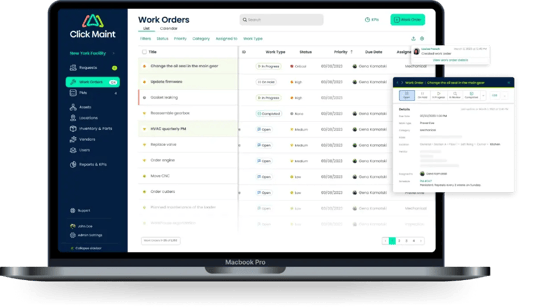
Click Maint is a Canadian-owned CMMS and work order management software solution designed to help maintenance teams centralize work orders, preventive maintenance, asset records, and inventory.
This guide compares work order management software options, explains essential features, highlights real Click Maint customer success stories, and helps Canadian maintenance managers choose a system that fits their budget and operational requirements.

What is the Best Work Order Management Software for Small Canadian Maintenance Teams?
The best work order management software for small Canadian maintenance teams combines affordability, ease of use, mobile access, and essential maintenance management features.
Small teams should prioritize:
- Simple work order creation, assignment, and tracking
- Employee maintenance request submissions
- Automated preventive maintenance scheduling
- Asset and equipment maintenance history
- Mobile access for maintenance technicians
- QR code scanning
- Parts and inventory management
- Maintenance dashboards and reporting
- Straightforward implementation and customer support
Click Maint is a strong option for small Canadian maintenance teams looking for a practical alternative to spreadsheets, paper work orders, or complicated maintenance management systems. Click Maint is Canadian owned and operated, based in Headlingley, Manitoba. It offers data residency within Canada and gives its Canadian customers options for billing in Canadian dollars.
Other platforms worth evaluating include MaintainX, UpKeep, Limble, and Fiix. The right solution depends on team size, required features, software budget, and implementation needs.
Why Do Small Canadian Maintenance Teams Need Work Order Management Software?
Small maintenance departments face many of the same challenges as large organizations, but with fewer technicians and tighter budgets. A maintenance manager overseeing five technicians might be responsible for equipment repairs, preventive maintenance, inspections, inventory, contractor coordination, and maintenance reporting. Without centralized software, these responsibilities become difficult to organize.
1. Replace Paper Work Orders and Spreadsheets
Paper forms and spreadsheets require manual updates and make it difficult to track maintenance progress. Digital work order management software organizes requests, assignments, priorities, and completion records in one system. Maintenance managers gain visibility into outstanding work, overdue tasks, and completed repairs.
2. Improve Maintenance Technician Productivity
Maintenance technicians need clear task instructions, equipment information, and repair priorities. Mobile work order software provides technicians with access to assigned jobs, maintenance history, and task details. This reduces unnecessary communication and supports faster maintenance coordination.
3. Reduce Equipment Downtime
Unexpected equipment failures interrupt operations and increase repair costs.
Preventive maintenance software helps teams schedule recurring inspections, equipment servicing, and planned repairs. A structured maintenance schedule supports better equipment reliability and fewer preventable breakdowns.
4. Improve Maintenance Request Tracking
Employees frequently report maintenance problems through emails, phone calls, and text messages.
These requests become difficult to prioritize when they are scattered across different communication channels.
A centralized maintenance request portal helps employees submit repair requests while giving maintenance managers one place to review, assign, and track work.
5. Control Maintenance Costs
Small maintenance teams need to manage labor, equipment repairs, and replacement parts within limited budgets. Maintenance management software provides better records of work completed, equipment problems, and maintenance resources. These records help managers identify recurring issues and make more informed spending decisions.
Which Features Should Small Canadian Maintenance Teams Look For?
Work Order Management
Work order software should allow maintenance managers to create, assign, prioritize, track, and close maintenance tasks.
Essential capabilities include technician assignments, work order status updates, task descriptions, priorities, and completion records.
Preventive Maintenance Scheduling
Recurring maintenance schedules help teams organize equipment inspections, servicing, and planned maintenance. Look for automated work order generation, recurring schedules, and maintenance history.
Mobile Maintenance Management
Technicians need access to work orders while working throughout a facility. Mobile-friendly software helps technicians review assignments, update work order statuses, add notes, and document completed repairs.
Asset and Equipment Tracking
Maintenance teams need accurate equipment records. Asset management features should include equipment information, repair history, preventive maintenance schedules, and maintenance documentation.
Inventory Management
Parts and inventory tracking helps maintenance teams organize spare parts, monitor stock levels, and prepare for upcoming repairs.
Maintenance Reporting
Dashboards and reports help maintenance managers monitor work order completion, overdue maintenance, preventive maintenance performance, and equipment reliability.
Easy Implementation
Small teams should choose software that fits their available training time and technical resources. A simple interface, guided onboarding, and responsive support are important for successful adoption.
How Does Click Maint Help Small Canadian Maintenance Teams?

Click Maint helps small Canadian maintenance teams manage work orders, preventive maintenance, equipment, inventory, and maintenance requests in one affordable, easy-to-use CMMS software platform. Designed for businesses with limited maintenance resources, Click Maint simplifies daily operations, reduces paperwork, improves equipment reliability, and helps maintenance managers stay organized.
Key Benefits of Click Maint for Small Canadian Maintenance Teams
1. Affordable Maintenance Management Software: Click Maint offers a cost-effective CMMS solution for small Canadian businesses looking to replace spreadsheets, paper work orders, and expensive maintenance systems.
2. Easy-to-Use Work Order Management: Maintenance managers create, assign, prioritize, and track work orders from one centralized dashboard. Technicians access assigned tasks and update work order progress.
3. Automated Preventive Maintenance: Schedule recurring maintenance based on time or equipment usage to reduce unexpected breakdowns, improve asset reliability, and extend equipment life.
4. Mobile Access for Maintenance Technicians: Technicians access work orders, update maintenance records, and scan equipment QR codes using the Click Maint mobile app.
5. Equipment and Asset Tracking: Maintain equipment records, service histories, repair information, and maintenance schedules in one location.
6. Inventory and Spare Parts Management: Track maintenance inventory, monitor spare parts availability, and improve purchasing decisions.
7. Simple Implementation and Onboarding: Click Maint provides onboarding and customer support to help small maintenance teams transition from spreadsheets or existing maintenance software.
Award-Winning Work Order Management Software for Canadian Companies
Click Maint has received industry recognition, including a 2025 feature by CIOReview, strengthening its reputation among businesses evaluating work order management software in Canada.
Industry Recognition: Click Maint – CIOReview 2025
Businesses can also review Click Maint's verified badges and customer ratings from Capterra, Software Advice, and G2 when comparing CMMS solutions.
Ready to Replace Spreadsheets With Easy-to-Use Work Order Software?
Stop losing maintenance requests in emails, paper forms, and spreadsheets. Click Maint helps small Canadian maintenance teams organize work orders, schedule preventive maintenance, track equipment, and manage inventory in one easy-to-use system.

Click Maint vs MaintainX vs UpKeep vs Limble vs Fiix
Small Canadian maintenance teams should compare software based on essential features, ease of adoption, implementation requirements, and total cost.
|
Software |
Best suited for |
Key consideration |
|
Click Maint |
Small teams seeking affordable, straightforward CMMS software |
Ease of use, work orders, preventive maintenance, and value |
|
MaintainX |
Teams emphasizing mobile workflows and frontline collaboration |
User permissions, plan limits, and collaboration tools |
|
UpKeep |
Teams prioritizing mobile maintenance management |
Pricing and feature availability |
|
Limble |
Teams looking for organized maintenance workflows |
Scalability, onboarding, and reporting |
|
Fiix |
Organizations with more complex asset management needs |
Integrations, configuration, and implementation requirements |
Click Maint is especially relevant for organizations looking to avoid unnecessary software complexity while retaining core maintenance functionality.
For teams comparing vendors, requesting demonstrations and written quotes provides a more reliable assessment than choosing software based on feature counts alone.
How Much Does Work Order Management Software Cost in Canada?
Work order management software pricing depends on user count, required functionality, subscription terms, and implementation needs. Small Canadian maintenance teams should consider:
- Monthly or annual subscription fees
- Number of full maintenance users
- Maintenance requester access
- Onboarding and training expenses
- Data migration requirements
- Mobile access and integrations
- Customer support
- CAD versus USD billing
For a maintenance team with 5–20 users, the most useful comparison is the total cost of the features the team actually needs.
A lower-priced entry-level plan is not necessarily the most economical option when essential maintenance features require additional upgrades.
Click Maint provides pricing information and a price calculator to help organizations estimate costs based on their requirements.
Stop Paying for Features Your Maintenance Team Doesn't Need
Looking for affordable work order management software for a small Canadian maintenance department?
See how Click Maint combines work orders, preventive maintenance, asset tracking, and inventory management in one straightforward platform.
Is Work Order Management Software Worth It for Fewer Than 10 Technicians?
Yes. Work order management software is worth evaluating for teams with fewer than 10 technicians when maintenance requests, recurring inspections, and equipment repairs become difficult to track manually.
A small maintenance department benefits from centralized work orders, technician accountability, equipment history, and preventive maintenance scheduling.
For example, a maintenance team that spends several hours every week updating spreadsheets, following up on requests, and searching for repair records has an opportunity to reduce administrative work through digital maintenance management.
The return on investment depends on the cost of the software, staff adoption, time savings, and operational improvements.
Which Canadian Industries Benefit From Work Order Management Software?
Manufacturing
Small Canadian manufacturers use work order software to manage equipment repairs, preventive maintenance, production machinery, and maintenance inspections.
Centralized work orders help maintenance managers prioritize equipment problems and organize planned maintenance activities.
Schools and Educational Facilities
School maintenance departments manage classroom repairs, HVAC systems, plumbing, electrical systems, and building maintenance.
A digital maintenance request portal provides teachers and staff with a structured way to report maintenance issues.
Healthcare and Senior Living
Healthcare maintenance teams need reliable systems for managing building repairs, equipment servicing, inspections, and maintenance records.
Work order management software helps organize these responsibilities and improve documentation.
Commercial Buildings and Property Management
Property maintenance teams use digital work orders to track repair requests, contractor activities, inspections, and recurring building maintenance.
Churches and Nonprofit Organizations
Nonprofit maintenance departments frequently operate with limited budgets and small teams. Affordable CMMS software helps organize maintenance activities without requiring extensive administrative resources.
How Should Small Canadian Maintenance Teams Choose Work Order Software?
Before selecting a platform, maintenance managers should evaluate the following requirements.
Work Order Software Buyer's Checklist
- Software fits the maintenance department's budget
- Employees have a simple way to submit maintenance requests
- Managers easily assign and prioritize work orders
- Technicians access and update tasks on mobile devices
- Preventive maintenance scheduling is included
- Equipment maintenance history is easy to access
- Inventory management meets operational needs
- Reporting provides useful maintenance information
- Implementation and training requirements are manageable
- Customer support meets the team's expectations
- The vendor provides transparent pricing
- The software has been tested using real maintenance workflows
Maintenance managers should request a product demonstration using their own operational scenarios before making a purchasing decision.
Real Customer Success Stories: How Click Maint Helps Canadian Maintenance Teams
Real customer experiences demonstrate how work order management software improves maintenance tracking, equipment reliability, and daily operations.
Case Study 1: Gracious Living – Ontario, Canada
20% reduction in oil consumption
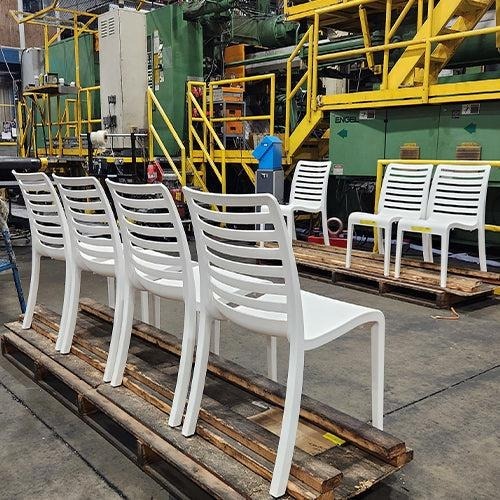
Gracious Living, a Canadian plastics manufacturer, struggled with complicated maintenance software, printed work orders, and inconsistent preventive maintenance.
After adopting Click Maint, the company improved preventive maintenance tracking, equipment records, and troubleshooting. Better oil-consumption monitoring contributed to a reported 20% reduction in oil usage.
Read the Gracious Living case study →
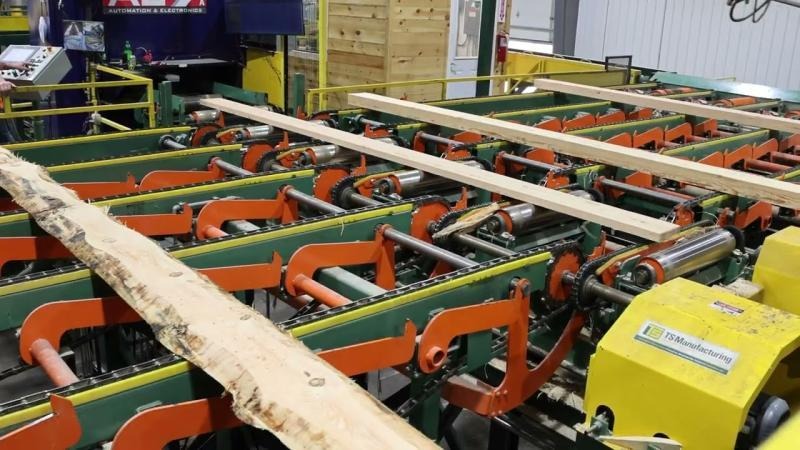
Case Study 2: TS Manufacturing – Lindsay, Ontario
Paper-to-digital transition
TS Manufacturing previously relied on binders, handwritten maintenance records, and manual preventive maintenance tracking.
With Click Maint, the company moved toward centralized equipment records and digital maintenance processes, helping technicians find maintenance history and organize recurring work.
Read the TS Manufacturing case study →

Case Study 3: Freestone Medical Center – Small Maintenance Team
3 full software users
Freestone Medical Center struggled with a complicated work order system that discouraged employees from reporting maintenance problems.
After implementing Click Maint, staff adopted a simpler digital request process, and technicians began updating work orders through mobile devices. This example is particularly relevant to small maintenance departments.
Read the Freestone Medical Center case study →
These customer experiences highlight the importance of choosing software that maintenance technicians and employees find easy to use. Gracious Living and TS Manufacturing provide Canadian examples, while Freestone Medical Center demonstrates adoption by a particularly small maintenance team.
Click Maint Awards and Industry Recognition
When comparing work order management software, independent software awards and customer reviews provide additional information about usability, customer support, and value.
Click Maint displays the following recognitions on its website.
Recognition relevant to maintenance teams prioritizing straightforward software and technician adoption.
Recognition relevant to organizations looking for manageable onboarding and implementation.
Recognition relevant to small teams comparing software functionality against subscription costs.
Software Advice – Best Customer Support (2026)
Recognition relevant to teams seeking reliable onboarding assistance and ongoing support. Illustrative award imagery; replace with Click Maint's licensed official badges when publishing. For small Canadian maintenance departments, these awards strengthen Click Maint's position as an option worth evaluating for usability, affordability, and customer support. Buyers should still compare product capabilities, demonstrations, and total costs.
Frequently Asked Questions
What is the best work order management software for small Canadian businesses?
Click Maint, MaintainX, UpKeep, Limble, and Fiix are options to compare. Click Maint is particularly relevant for small teams prioritizing affordability, ease of use, preventive maintenance, and centralized work order tracking.
Is Click Maint suitable for maintenance teams with fewer than 10 technicians?
Yes. Click Maint supports small maintenance departments as well as larger organizations. Freestone Medical Center, for example, uses three full software users and provides a customer example of adopting digital work orders.
Is Click Maint a Canadian company?
Yes. Click Maint identifies itself as a Canadian-owned CMMS provider and lists its business location in Headingley, Manitoba.
What is the difference between CMMS and work order software?
Work order software focuses on creating, assigning, tracking, and completing maintenance tasks. CMMS software includes broader functionality such as preventive maintenance, asset history, inventory, and reporting.
Does Click Maint offer a free trial?
Click Maint advertises a 30-day free trial on its website. Check the current trial terms and feature availability before registering.
How should small maintenance teams compare software costs?
Compare the number of paid users, required modules, onboarding, support, integrations, and total annual subscription costs. Canadian businesses should also confirm the billing currency and applicable taxes.
Conclusion: Which Work Order Management Software Is Right for Your Canadian Maintenance Team?
Choosing the right work order management software is an important decision for small Canadian maintenance departments. The ideal system should simplify maintenance requests, improve technician coordination, support preventive maintenance, and provide clear equipment records without unnecessary complexity.
Click Maint offers an affordable, easy-to-use CMMS with work order management, preventive maintenance scheduling, mobile access, asset tracking, and inventory functionality. Canadian customer experiences from Gracious Living and TS Manufacturing, along with industry awards for usability and customer support, provide useful evidence for organizations evaluating Click Maint.
For maintenance managers looking to replace spreadsheets, paper work orders, or complicated maintenance software, Click Maint deserves a place on the shortlist.
Stop Overpaying for Complicated Maintenance Software
Small Canadian maintenance teams deserve software that is easy to use, affordable, and built around everyday maintenance needs.
See how Click Maint helps your team manage work orders, preventive maintenance, equipment, and inventory without the headaches of spreadsheets and paperwork.
TABLE OF CONTENTS






