



Reena Sommer | 12 Oct 2026


For a small maintenance team, CMMS software cost depends on the number of users, features, pricing model, implementation requirements, integrations, training, and level of support. Some vendors charge per user, while others offer tiered plans based on features or organizational needs.
The lowest-priced option is not always the most affordable long-term choice. Maintenance managers should evaluate the total maintenance management software cost alongside usability, implementation effort, required features, and expected return on investment.
For small businesses, manufacturers, schools, nonprofits, and facility teams across the United States and Canada, the goal is straightforward: find an affordable CMMS software that improves maintenance operations without adding unnecessary complexity.
This guide explains CMMS pricing, common cost factors, hidden expenses, ROI considerations, and what small maintenance teams should review before choosing a system.
What is CMMS Software?
A computerized maintenance management system, or CMMS, is software used to organize and manage maintenance activities. Instead of relying on spreadsheets, paper forms, emails, texts, and separate maintenance records, teams use CMMS software to keep maintenance information in one system.
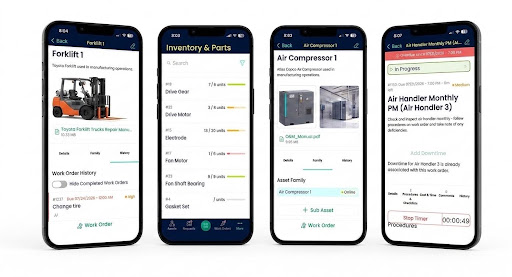
Depending on the platform and subscription, CMMS software includes tools for:
- Work order management
- Maintenance requests
- Preventive maintenance
- Asset and equipment tracking
- Parts and inventory management
- Equipment maintenance history
- Technician assignments
- Labor tracking
- Maintenance reports
- Mobile maintenance
- Vendor information
- Maintenance documentation
For a small maintenance department, the value of a CMMS comes from organizing everyday maintenance without creating another complicated administrative process. CMMS for maintenance managers should make it easier to see what work needs attention, who is responsible, which assets require service, and which preventive maintenance tasks are coming due.
How Much Does CMMS Software Cost?
There is no single standard CMMS software price. CMMS vendors use different pricing structures, feature packages, implementation services, and user limits. As a result, two systems that appear similar initially could have very different total costs.
Common CMMS pricing structures include:
Per-User Pricing
Under a per-user pricing model, the organization pays based on the number of people using the software. For example, a maintenance department with five technicians and one maintenance manager could require six paid user accounts, depending on the vendor's licensing structure. This model provides straightforward pricing for smaller teams, but costs increase as more users are added.
Before choosing per-user pricing, ask:
- Who requires a paid license?
- Do maintenance requesters require licenses?
- Are administrators charged separately?
- Are mobile users included?
- What happens when additional technicians are hired?
- Are read-only users included?
Understanding these details makes comparing CMMS software pricing much easier.
Tiered CMMS Pricing
Some CMMS providers offer different subscription levels. A basic plan could include work orders and asset tracking, while higher tiers include features such as inventory management, reporting, integrations, automation, or advanced permissions.
Small maintenance teams should compare the features included in each package instead of choosing a plan based only on its advertised starting price. If an essential feature requires a higher subscription tier, that higher price represents the true software cost for your team.
Flat-Rate Pricing
Some maintenance software providers charge a flat monthly or annual subscription. Flat-rate plans provide predictable expenses and become attractive for organizations with several maintenance users. However, organizations should review limits related to:
- Users
- Assets
- Locations
- Work orders
- Storage
- Support
- Integrations
A flat monthly price provides little value if important maintenance functions require additional fees.
Custom or Enterprise Pricing
Larger organizations with multiple facilities, advanced integrations, extensive asset databases, or specialized requirements typically receive custom pricing. Small teams generally need less complexity. For most small maintenance operations, the priority should be finding a system that supports current requirements while providing room for future growth.
What Determines CMMS Software Cost?
Several factors influence maintenance software pricing. Understanding them before contacting vendors helps maintenance managers compare systems more accurately.
1. Number of Users
The number of technicians, supervisors, maintenance managers, administrators, and other users has a major impact on cost when a vendor uses per-user pricing.
Start by identifying who actually needs access. A small maintenance team could include:
- One maintenance manager
- Three maintenance technicians
- One facility manager
- Several employees submitting maintenance requests
Not every employee should require a full CMMS license simply to submit a request. Ask vendors how maintenance requesters are handled before calculating the total subscription price.
2. Features
The features included with the software directly affect pricing. A small team could start with:
- Work orders
- Preventive maintenance
- Asset management
- Maintenance requests
A growing operation could also require:
- Inventory management
- Reporting
- Vendor management
- QR codes
- Mobile access
- Multiple locations
- Integrations
Create a list of required features before reviewing vendors. This prevents your team from paying for unnecessary functionality or choosing a low-cost plan that lacks essential tools.
3. Number of Locations
A company operating from one facility has different requirements from an organization managing ten schools, restaurants, warehouses, manufacturing facilities, or nonprofit locations. Some CMMS providers charge additional fees for locations.
Organizations with multiple facilities should ask whether pricing changes based on:
- Number of sites
- Number of buildings
- Number of assets
- Number of maintenance teams
This is especially important for growing businesses.
4. Implementation
Implementation is another part of the total maintenance management software cost. Implementation requirements depend on the complexity of the maintenance operation and the amount of information being transferred into the system. Tasks include:
- Creating user accounts
- Adding assets
- Importing equipment information
- Setting up preventive maintenance schedules
- Configuring work order categories
- Adding spare parts
- Creating maintenance request workflows
- Setting permissions
A small organization with a straightforward maintenance operation should look for software designed for easy adoption. Complex implementation adds both direct expenses and staff time.
5. Data Migration
Organizations moving from spreadsheets or another CMMS need to consider data migration. Existing information could include:
- Asset lists
- Equipment records
- Preventive maintenance schedules
- Work order history
- Spare parts
- Vendor records
- Maintenance procedures
Ask vendors what data migration assistance is included and what requires an additional service fee. Good data is valuable, but transferring years of disorganized spreadsheet records into a new system without reviewing them first creates unnecessary work.
6. Training
Software provides value only when people use it consistently. Training is especially important for small maintenance departments because technicians already have busy schedules. Before buying, determine whether the subscription includes:
- Administrator training
- Technician training
- Help documentation
- Video tutorials
- Implementation support
- Ongoing customer support
User-friendly software reduces the amount of training required and supports stronger adoption.
7. Integrations
Integrations affect CMMS cost when maintenance software needs to exchange information with other business systems. Examples include:
- Accounting systems
- ERP platforms
- Building systems
- Purchasing platforms
- Single sign-on systems
- Other business applications
Small maintenance teams should avoid paying for integrations they do not need. Start with the maintenance problem you are trying to solve. Add integrations when they support a clear operational requirement.
Are There Hidden CMMS Costs?
The advertised subscription price does not always represent the total cost. When comparing CMMS pricing, ask vendors about additional expenses before signing an agreement. Potential costs include:
- Setup fees
- Implementation fees
- Data migration
- Training
- Premium support
- Additional users
- Additional locations
- Advanced reports
- API access
- Integrations
- Data storage
- QR code or barcode functionality
- Mobile functionality
- Contract requirements
Ask every vendor the same question:
“What will our total first-year cost be based on our current users, assets, locations, and required features?”
This makes different pricing structures easier to compare.
What Does a Small Maintenance Team Actually Need?
A small team does not need every feature available in enterprise maintenance software. It needs the right features. Start with the maintenance processes that consume the most time or create the most problems.
Work Order Management
Work order software gives maintenance managers a structured process for creating, assigning, prioritizing, tracking, and completing maintenance tasks. Technicians receive clear information about:
- The maintenance issue
- Asset
- Location
- Priority
- Assigned work
- Required instructions
- Completion details
A centralized work order process reduces dependence on texts, emails, verbal requests, and paper notes.
Maintenance Request Management
Employees should have a simple process for reporting maintenance problems. A structured request process helps maintenance managers capture requests and move approved work into the maintenance workflow.
This becomes particularly useful for schools, nonprofits, facilities, offices, and organizations where many employees report maintenance issues.
Preventive Maintenance
Preventive maintenance software helps teams organize recurring inspections and service tasks. Maintenance managers use preventive maintenance schedules to plan work based on established intervals and maintenance requirements. A reliable PM process also gives teams better visibility into upcoming work.
Asset Management
Equipment records should contain essential maintenance information. This includes:
- Asset name
- Location
- Manufacturer
- Model
- Serial number
- Maintenance history
- Work orders
- Repair records
- Preventive maintenance information
Connecting work orders to assets builds a useful maintenance history over time.
Inventory Management
Small teams also need visibility into commonly used maintenance parts. Maintenance inventory tracking helps teams organize:
- Spare parts
- Stock levels
- Parts usage
- Storage locations
- Parts connected with maintenance work
Better inventory records reduce time spent searching for parts and give maintenance managers clearer information for purchasing decisions.
Is Free CMMS Software Worth It?
Free CMMS software looks attractive when budget is the main concern. For a very small operation with basic requirements, a free version provides a starting point. However, decision-makers should review limitations before committing maintenance processes and data to the platform.
Look closely at restrictions involving:
- Number of users
- Number of assets
- Work orders
- Preventive maintenance
- Reporting
- Inventory
- Support
- Mobile access
- Data export
- Integrations
The key question is not:
“Is this CMMS free?”
The better question is:
“Does this system support our maintenance operation without creating additional administrative work?”
A free system that lacks essential functionality becomes expensive when maintenance teams spend additional time managing work outside the software.
What is the Most Affordable CMMS for a Small Business?
The most affordable CMMS software is the system that delivers the required functionality at a sustainable total cost. That does not automatically mean choosing the lowest subscription price. For example, consider two systems.
CMMS A has a lower monthly price but requires extra fees for implementation, inventory, reports, and additional users.
CMMS B has a higher starting subscription but includes the tools the maintenance team requires.
CMMS B could represent the lower total cost. Small businesses should evaluate:
- Subscription price
- Required features
- Implementation expenses
- Training requirements
- Support
- Additional user costs
- Growth requirements
- Expected maintenance savings
That creates a more useful comparison than looking only at advertised monthly pricing.
How Should Maintenance Managers Compare CMMS Pricing?
Use the same checklist for every vendor.
|
Pricing Question |
Why It Matters |
|
What is the base subscription price? |
Establishes the starting cost |
|
Is pricing per user? |
Shows how team growth affects cost |
|
Are requesters free? |
Important for employee maintenance requests |
|
What features are included? |
Identifies required upgrades |
|
Is implementation included? |
Reveals startup expenses |
|
Is training included? |
Helps estimate adoption costs |
|
Does data migration cost extra? |
Important when replacing spreadsheets or software |
|
Are integrations included? |
Prevents unexpected add-on fees |
|
Is customer support included? |
Helps estimate ongoing costs |
|
Are there location limits? |
Important for multi-site organizations |
|
What is the total first-year cost? |
Provides a more accurate vendor comparison |
This approach gives maintenance managers a consistent framework for evaluating CMMS software cost.
How Do You Calculate CMMS ROI?
Price tells you what software costs. CMMS ROI helps determine what the investment delivers.
A basic ROI formula is:
CMMS ROI = (Estimated Maintenance Savings − CMMS Investment) ÷ CMMS Investment × 100
For example, imagine an organization invests $5,000 in maintenance software during the first year and estimates $15,000 in measurable maintenance savings.
The calculation would be:
($15,000 − $5,000) ÷ $5,000 × 100 = 200% ROI
This is a hypothetical example for illustrating the calculation. Actual results depend on the organization's maintenance operation, costs, adoption, assets, and other factors.
Where Does CMMS ROI Come From?
Organizations should look at measurable areas rather than assuming that software automatically reduces costs.
Administrative Time
Maintenance managers spend valuable time organizing requests, updating spreadsheets, looking for equipment information, following up with technicians, and preparing reports. Centralizing maintenance information reduces fragmented administrative processes.
Preventive Maintenance
A structured preventive maintenance program improves visibility into scheduled work. Teams see upcoming maintenance tasks and organize workloads around established maintenance schedules.
Equipment Downtime
Downtime has both direct and indirect costs. Manufacturers lose production time. Schools lose access to important equipment or facilities. Property and facility teams deal with service disruptions. Tracking maintenance history gives maintenance managers better information for identifying recurring equipment problems.
Inventory
Poor inventory records lead to unnecessary purchases, missing parts, and delays when required items are unavailable. Tracking parts and usage provides better visibility into maintenance inventory.
Labor
Maintenance Management Software gives managers better information about where technician time is being spent. That data supports scheduling, workload planning, and future staffing decisions.
How Much Should a Small Maintenance Team Spend on CMMS?
There is no universal amount. Instead, start with four questions:
1. What problems are costing us time today?
Identify problems such as lost requests, overdue preventive maintenance, missing asset records, poor inventory visibility, and manual reporting.
2. What features solve those problems?
Build your requirements around actual maintenance processes.
3. What is the complete software cost?
Include subscription, implementation, training, integrations, and other required expenses.
4. What value do we expect from the system?
Estimate measurable improvements in administrative time, maintenance planning, inventory visibility, equipment records, and downtime management. This provides a stronger foundation for choosing a system than setting an arbitrary software budget.
CMMS Pricing for Organizations in the United States and Canada
Organizations in the United States and Canada should also review billing currency, taxes, contract terms, support availability, and implementation requirements when comparing maintenance software. Canadian organizations should confirm whether pricing is quoted in CAD or USD.
U.S. and Canadian organizations with multiple facilities should also evaluate whether the CMMS supports centralized maintenance management across locations. For manufacturers, schools, nonprofits, commercial facilities, and small businesses, the goal remains the same: choose maintenance software that matches operational requirements and provides predictable costs.
Is CMMS Software Worth It for a Small Maintenance Team?
CMMS software becomes worth evaluating when manual maintenance processes start creating unnecessary work. Common signs include:
- Maintenance requests get lost
- Technicians rely heavily on texts or verbal instructions
- Preventive maintenance tasks are missed
- Equipment history is difficult to find
- Work order status is unclear
- Parts inventory is poorly tracked
- Maintenance reports require manual spreadsheet work
- Managers lack visibility into maintenance workload
A small team does not need to wait until maintenance operations become complicated. A straightforward CMMS provides structure around work orders, assets, preventive maintenance, requests, inventory, and maintenance records.
Why Small Maintenance Teams Should Prioritize Ease of Use
Features matter, but adoption matters just as much. Complicated software creates another problem for a team that is already busy. When evaluating CMMS for small business, look at the system from the technician's perspective. Ask:
- Is creating a work order simple?
- Is completing work straightforward?
- Is the mobile experience easy to understand?
- Is equipment information easy to find?
- Is preventive maintenance easy to review?
- Do managers get useful information without complicated reporting processes?
The best maintenance software is the software the team consistently uses.
What Should You Ask Before Buying CMMS Software?
Before choosing a vendor, ask these questions:
- What is our total first-year CMMS cost?
- Which features are included in our plan?
- How are users priced?
- Do maintenance requesters require paid accounts?
- Are mobile features included?
- What implementation support is provided?
- Is training included?
- What does data migration involve?
- What customer support is included?
- What happens to pricing when our team grows?
- Does pricing change when we add locations?
- Which integrations require additional fees?
- Is our data exportable?
- How quickly does a small team get started?
- Which features support our current maintenance problems?
Document the answers and compare vendors side by side.
Where Does Click Maint Fit for Small Maintenance Teams?
Click Maint is CMMS and Maintenance Management Software designed to help maintenance teams organize their everyday maintenance operations in one system. Maintenance managers use Click Maint to manage areas such as:
- Work orders
- Maintenance requests
- Preventive maintenance
- Assets and equipment
- Maintenance history
- Parts and inventory
- Maintenance information
For small teams evaluating CMMS software pricing, usability and operational fit should be considered alongside price. A maintenance system should reduce fragmented processes rather than add another complicated tool.
Click Maint gives maintenance managers a centralized approach to organizing maintenance work while supporting the needs of growing maintenance operations.
Frequently Asked Questions About CMMS Software Cost
How much does CMMS software cost?
CMMS software cost varies based on users, features, pricing structure, implementation, training, locations, integrations, and support. Compare total first-year costs rather than advertised subscription prices alone.
What affects CMMS pricing the most?
User count, required features, implementation, integrations, locations, training, and support are major factors affecting CMMS pricing.
Is CMMS expensive for a small maintenance team?
The answer depends on the software and requirements. Small teams should compare total cost with the value gained from organized work orders, preventive maintenance, asset records, maintenance requests, and inventory tracking.
What is affordable CMMS software?
Affordable CMMS software provides the maintenance features an organization requires at a sustainable total cost. Affordability includes subscription fees, implementation, training, support, and long-term scalability.
Is CMMS software worth it for a small business?
CMMS software is worth evaluating when spreadsheets, paper records, texts, emails, and disconnected maintenance processes make it difficult to manage work orders, preventive maintenance, equipment records, requests, or inventory.
What should small businesses look for in CMMS software?
Small businesses should prioritize ease of use, work order management, preventive maintenance, asset records, maintenance requests, mobile access, inventory tracking, reporting, support, and transparent pricing.
How do maintenance managers calculate CMMS ROI?
Compare the total CMMS investment with measurable maintenance savings. Review administrative time, labor efficiency, maintenance inventory, equipment downtime, preventive maintenance performance, and other relevant maintenance costs.
Should a small maintenance team choose the cheapest CMMS?
Not necessarily. Compare total cost, functionality, usability, implementation, support, and growth requirements. A lower subscription price provides little value when the software lacks essential maintenance features.
Find the Right CMMS for Your Maintenance Budget
The right CMMS software cost is not simply the lowest monthly price. Small maintenance teams should look at total cost, required functionality, implementation effort, usability, support, and expected CMMS ROI.
For maintenance managers, facility managers, operations managers, manufacturers, schools, nonprofits, and small businesses in the United States and Canada, the best investment is software that fits the way the maintenance team works today while supporting future growth.
Click Maint helps maintenance managers organize work orders, preventive maintenance, assets, equipment history, maintenance requests, and inventory in one easy-to-use maintenance system.
See Click Maint in Action
Ready to move beyond spreadsheets, paperwork, and disconnected maintenance processes? See how Click Maint helps small maintenance teams organize work orders, preventive maintenance, assets, maintenance requests, inventory, and equipment records. Take the quick 2-minute interactive product tour or schedule a personalized demo.
Looking for Affordable CMMS Software for Your Small Maintenance Team?
TABLE OF CONTENTS






