



Reena Sommer | 14 Oct 2026


Maintenance teams face growing pressure to reduce equipment downtime, control operating costs, improve productivity, and keep critical assets running. From manufacturing plants and healthcare facilities to schools, hotels, and commercial buildings, efficient maintenance operations play an essential role in business performance.
However, many organizations still depend on spreadsheets, paper work orders, emails, and disconnected communication tools to manage maintenance activities. These outdated processes create delays, reduce visibility, and make it difficult for maintenance managers to track repairs, schedule preventive maintenance, and measure equipment performance.
Modern Maintenance Management Software addresses these challenges by bringing maintenance activities, equipment information, work orders, and reporting into one centralized system.
Click Maint is helping organizations modernize their maintenance operations with an affordable, user-friendly computerized maintenance management system (CMMS). Designed for maintenance professionals, the platform simplifies everyday maintenance tasks without introducing unnecessary complexity.
With industry recognition, a growing customer base, and documented customer success stories, Click Maint demonstrates how practical technology supports more organized, proactive, and efficient maintenance operations.
How Does Affordable, Easy-to-Use CMMS Software Improve Maintenance Operations?
Maintenance departments manage a wide range of responsibilities, including equipment repairs, preventive maintenance, inspections, spare parts, contractor coordination, and facility maintenance requests.
Without a centralized system, even routine activities become difficult to manage.
Common challenges include:
- Lost or incomplete maintenance requests
- Delayed work order assignments and repairs
- Unplanned equipment downtime
- Limited visibility into maintenance history
- Poor communication between departments
- Difficulty tracking spare parts and inventory
- Inconsistent preventive maintenance schedules
- Limited reporting on maintenance costs and performance
These problems affect organizations of every size.
For manufacturing companies, equipment failures interrupt production schedules and increase operating costs. In healthcare facilities, maintenance delays affect equipment availability and facility operations. Schools and commercial buildings face similar challenges when maintenance requests remain unresolved or important inspections are missed.
A modern CMMS provides a structured approach to managing these responsibilities, giving maintenance managers better visibility into daily operations.
Introducing Click Maint: A Simpler Approach to CMMS
Click Maint is a cloud-based CMMS designed to help organizations organize, track, and manage maintenance activities from a centralized platform.
The software combines essential maintenance capabilities with an intuitive interface accessible through desktop and mobile devices.
Unlike complicated CMMS systems that require extensive training and lengthy implementation projects, Click Maint emphasizes simplicity, affordability, and fast adoption.
According to its official website, Click Maint offers pricing approximately 20–60% lower than many leading CMMS platforms, depending on the solution being compared.
Its core capabilities include work order management, preventive maintenance scheduling, asset tracking, maintenance requests, inventory management, mobile access, and maintenance reporting.
This approach makes the platform relevant to small maintenance departments, growing manufacturing companies, and organizations managing multiple facilities.
Centralized Work Order Management
Work orders form the foundation of daily maintenance operations.
Click Maint helps maintenance teams create, assign, prioritize, track, and complete work orders through a centralized system. Maintenance managers gain visibility into outstanding requests, technician assignments, repair status, and completed maintenance activities.
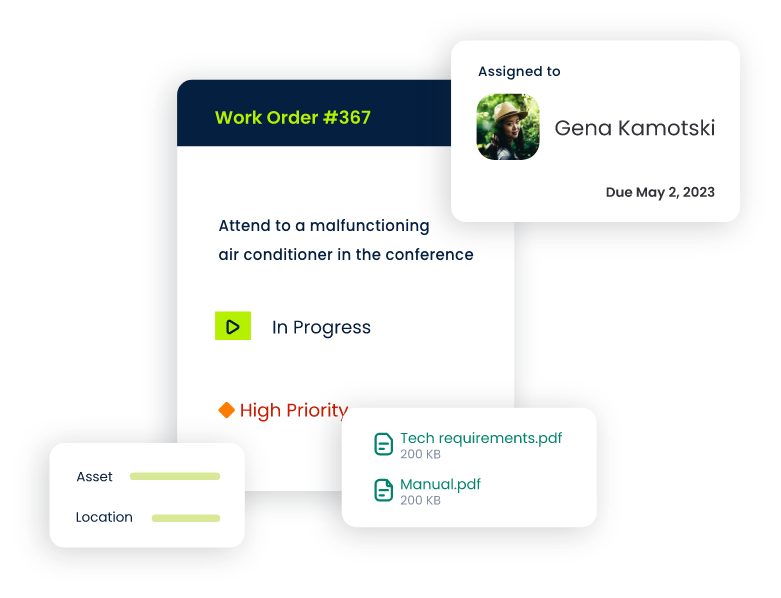
Technicians access work order details directly from their mobile devices, reducing reliance on paper instructions and manual updates. A structured work order process also improves accountability by documenting maintenance activities and keeping relevant information accessible to the team.
Preventive Maintenance Scheduling
Reactive maintenance creates uncertainty and increases the risk of unexpected equipment failures. Click Maint supports preventive maintenance programs by helping teams schedule recurring inspections, servicing, and maintenance activities.
Maintenance managers organize preventive tasks based on equipment requirements and established service intervals. This structured approach supports consistent maintenance execution, improved equipment reliability, and fewer overlooked maintenance activities.
Equipment and Asset Management
Understanding equipment history is essential for effective maintenance planning.Click Maint centralizes asset information, maintenance records, equipment details, and repair history.
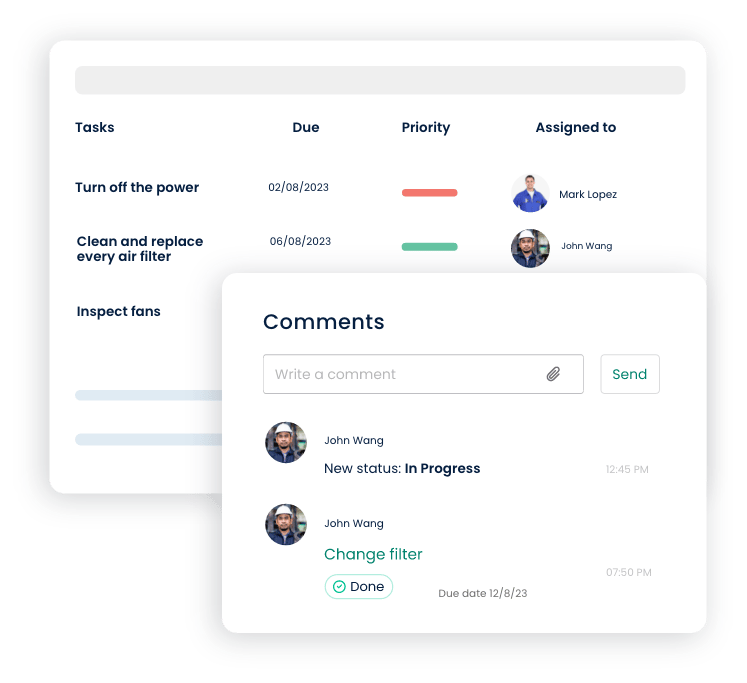
Maintenance teams gain a clearer understanding of recurring equipment issues, completed repairs, and upcoming maintenance requirements. Access to reliable asset information supports better troubleshooting, maintenance planning, and equipment-related decisions.
Mobile Maintenance Management
Maintenance technicians spend much of their working day away from their desks.Click Maint provides mobile access to work orders, maintenance requests, equipment records, and task updates.
Technicians also use QR codes to access relevant asset information and maintenance records. Mobile functionality improves communication between maintenance managers, technicians, and employees submitting requests.
Spare Parts and Inventory Tracking
Missing replacement parts extend repair times and create unnecessary delays.
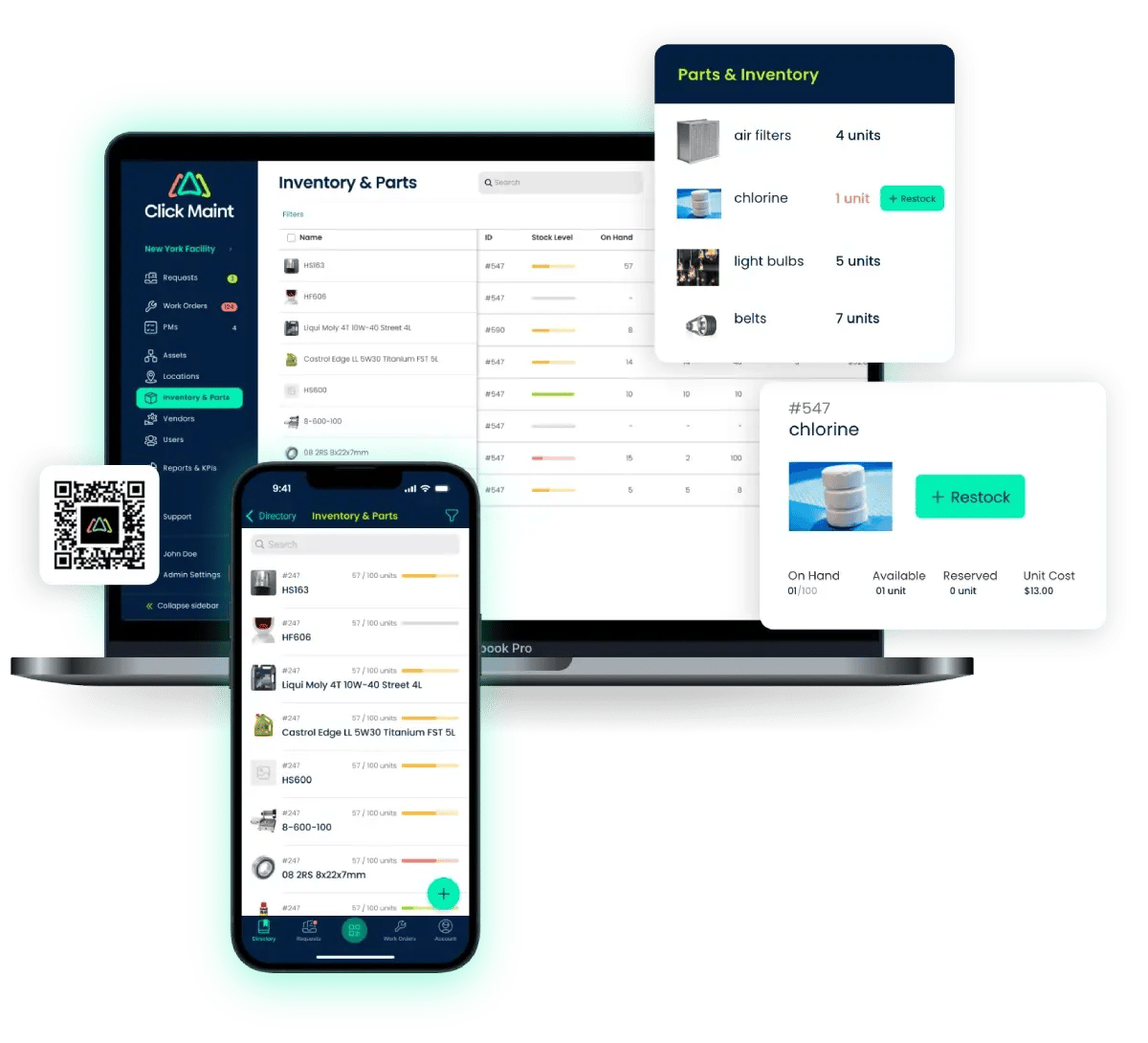
Click Maint helps maintenance departments organize spare parts information, track inventory quantities, and connect parts information with maintenance activities. Better inventory visibility supports maintenance planning and reduces the administrative effort involved in locating essential replacement components.
Real Customer Success: How Southern Carton Improved Maintenance Operations With Click Maint
Real-world results provide valuable insight into the impact of maintenance technology.
Southern Carton Company, a corrugated packaging manufacturer located in Lewisburg, Tennessee, provides an example of how a manufacturing organization improved maintenance coordination through Click Maint.
Established in 1977, Southern Carton employs approximately 50 people and produces custom corrugated packaging for different industries. The company began using Click Maint in August 2024, with approximately five software users.
The Challenge: Manual Maintenance Tracking and Communication Gaps
Before adopting Click Maint, Southern Carton relied on manual processes to track equipment maintenance and repairs.
The maintenance department experienced several operational challenges.
Recurring machinery problems were difficult to document and investigate. Communication gaps created confusion about reported equipment issues, assigned responsibilities, and completed repairs.
Tracking replacement parts for individual machines was another major challenge.
Without reliable maintenance records, the team struggled to identify previous repairs, recognize recurring failures, and maintain consistent follow-up on outstanding work.
These problems contributed to operational inefficiencies, repair delays, and disruptions to production schedules.
Why Southern Carton Selected Click Maint
Southern Carton prioritized two important factors when evaluating maintenance software: affordability and ease of implementation.
The company needed a system that would improve maintenance tracking without creating a complicated transition for employees.
Click Maint provided a straightforward solution with mobile work order functionality, accessible maintenance records, and onboarding assistance.
One particularly valuable feature was the ability for employees to submit maintenance requests directly from their phones.
Users also attached photographs of equipment problems or specific replacement parts, improving communication and troubleshooting.
During implementation, the Click Maint customer support team provided hands-on assistance and weekly meetings throughout the initial months.
This support helped Southern Carton transition from manual processes to a more organized digital maintenance workflow.
The Results: Better Organization, Communication, and Maintenance Visibility
Following implementation, Southern Carton reported improvements in maintenance organization and operational efficiency.
Work orders became easier to track, helping the maintenance team follow requests through completion.
Employees adopted the platform quickly, supported by its mobile-friendly interface and straightforward request submission process.
The ability to attach images improved communication between employees and maintenance personnel.
The company also reported better accountability, fewer communication problems, and more organized maintenance activities.
These improvements supported a more proactive approach to equipment maintenance.
John McClenney of Southern Carton described Click Maint as an important missing link for the maintenance department, particularly for tracking activities and providing insight before equipment breakdowns.
The Southern Carton experience highlights an important lesson: successful maintenance digitalization depends not only on software capabilities but also on usability, employee adoption, and implementation support.
Read the full Southern Carton case study: https://www.clickmaint.com/case-study/southern-carton
Award-Winning CMMS Software: Industry Recognition for Click Maint
Software awards and customer review recognition provide additional information for organizations evaluating maintenance platforms.
Click Maint features several industry awards and distinctions on its official website.
These include:
- G2 Easiest Setup 2025: Recognition associated with straightforward software implementation.
- G2 Easiest to Use 2025: Recognition highlighting the platform's usability.
- G2 Highest User Adoption 2026: Recognition associated with customer adoption.
- Capterra Best Value 2026: Recognition related to customer perceptions of software value.
- Software Advice Best Customer Support 2026: Recognition highlighting customer support.
- GetApp Category Leaders 2025: Recognition among software products in its category.
These distinctions reflect important factors in CMMS selection, including usability, onboarding, support, value, and employee adoption.
For maintenance departments replacing spreadsheets or outdated software, these factors deserve attention alongside technical features.
Awards provide useful third-party evaluation signals, while practical demonstrations and customer references help organizations determine whether a platform fits their specific requirements.
Explore Click Maint and its featured awards: https://www.clickmaint.com/
How Click Maint Supports Different Industries
Maintenance requirements differ across industries, but the need for reliable work order tracking, preventive maintenance, and equipment visibility remains consistent.
Manufacturing and Industrial Facilities
Manufacturing maintenance managers must maintain equipment reliability while supporting production targets.
Click Maint helps manufacturing teams organize machinery maintenance, track repairs, document equipment history, and schedule preventive maintenance.
Centralized records support faster access to repair information and improved coordination between production and maintenance departments.
Healthcare Facilities
Hospitals, clinics, and medical facilities depend on reliable equipment and well-maintained buildings.
Click Maint helps facility maintenance teams organize service requests, inspections, preventive maintenance, and equipment records.
Digital maintenance documentation also supports internal oversight and preparation for relevant facility inspections.
Schools and Educational Institutions
Educational facilities manage classrooms, HVAC systems, plumbing, electrical equipment, and other building assets.
Click Maint helps school maintenance teams collect staff requests, assign work orders, monitor repair progress, and schedule recurring maintenance.
A centralized system reduces dependence on informal emails and paper-based reporting.
Commercial Buildings and Property Management
Property and facility managers coordinate repairs across buildings, departments, and locations.
Click Maint provides a centralized platform for managing requests, maintenance activities, assets, and service records.
This improves visibility into outstanding maintenance work and supports consistent facility maintenance processes.
Hospitality and Multi-Location Operations
Hotels, restaurants, and other multi-location organizations require coordinated maintenance to support daily operations.
Click Maint helps teams manage equipment maintenance, track work orders, and organize preventive tasks across different locations.
Why Ease of Use Matters in Maintenance Software Selection
Organizations sometimes focus heavily on advanced software capabilities while overlooking the importance of employee adoption.
A CMMS delivers limited value when technicians avoid using it or employees continue submitting requests through disconnected channels.
User-friendly software encourages consistent participation. Maintenance technicians need straightforward work order instructions, easy access to equipment information, and simple methods for recording completed tasks. Maintenance managers need clear dashboards, accurate records, and reliable reporting.
Employees submitting maintenance requests need a simple process that does not require extensive training. Click Maint focuses on these practical requirements.
Its interface, mobile capabilities, and guided onboarding process help organizations introduce digital maintenance workflows without unnecessary complexity.
The Southern Carton case study illustrates this principle: employees quickly adopted the platform because submitting and tracking work orders became more convenient.
Moving From Reactive Maintenance to Proactive Maintenance
One of the most important goals of maintenance modernization is reducing dependence on emergency repairs. Reactive maintenance focuses on responding after equipment fails. Proactive maintenance emphasizes scheduled servicing, early issue identification, and better equipment information.
A CMMS supports this transition by helping organizations:
- Establish accurate equipment and asset records.
- Create preventive maintenance schedules.
- Document repairs and recurring problems.
- Assign and prioritize maintenance work.
- Track maintenance completion and overdue tasks.
- Review maintenance history and performance trends.
- Improve maintenance planning using recorded operational information.
These practices support more consistent maintenance operations and better-informed decisions.
Organizations should also measure performance using maintenance KPIs such as work order completion rates, preventive maintenance compliance, mean time to repair, and equipment downtime. Reliable maintenance data provides a stronger foundation for continuous improvement.
What Should Maintenance Managers Look for Before Choosing a CMMS?
Selecting the right CMMS requires more than comparing feature lists. Maintenance leaders should evaluate whether a solution matches their daily workflows, staffing resources, equipment requirements, and budget.
Important evaluation criteria include usability, mobile access, preventive maintenance capabilities, asset tracking, inventory management, reporting, implementation support, and total cost of ownership. Organizations should also consider how quickly technicians and employees will adopt the platform.A complicated system creates additional administrative work and delays the benefits of digital maintenance management.
Click Maint positions itself as a practical option for organizations seeking essential CMMS capabilities, accessible pricing, and straightforward implementation.
Its official website states that smaller teams have the potential to begin using the system quickly, while more complex implementations depend on factors such as data migration, multiple locations, and configuration requirements. A product demonstration or trial helps decision-makers assess how the software performs against their actual maintenance workflows.
The Future of Maintenance is Connected, Mobile, and Data-Driven
Maintenance operations continue to evolve as organizations prioritize equipment reliability, cost control, and operational visibility.
Mobile technology, digital work orders, centralized asset records, and performance reporting are becoming increasingly important components of effective maintenance programs. At the same time, organizations need practical software that maintenance employees will use consistently.
Successful maintenance modernization does not require unnecessary complexity. It requires accurate information, structured workflows, reliable communication, and tools that support everyday maintenance activities.
Click Maint brings these capabilities together in a centralized platform designed for maintenance teams. Its customer success stories and industry recognition highlight the value of combining essential maintenance functionality with affordability, usability, and responsive support.
Conclusion: Simplifying Maintenance Management with Click Maint
Modern maintenance departments need efficient processes, reliable equipment information, and better communication to meet operational demands.
Replacing disconnected spreadsheets, paper records, and informal maintenance requests with a centralized CMMS creates a stronger foundation for maintenance planning and execution.
Click Maint offers an affordable, easy-to-use solution for organizations seeking to improve work order management, preventive maintenance, equipment tracking, and operational visibility.
The Southern Carton customer story demonstrates how straightforward implementation, mobile work orders, and improved communication helped a manufacturing company organize its maintenance operations.
Combined with industry awards recognizing usability, customer support, adoption, and value, Click Maint presents a compelling option for organizations evaluating Maintenance Management Software.
Discover a Simpler Way to Manage Maintenance With Click Maint
See how Click Maint helps maintenance managers organize work orders, preventive maintenance, assets, and inventory in one easy-to-use platform.
Take the quick 2-minute interactive product tour or schedule a personalized demo to explore how Click Maint fits your maintenance operations.
Simpler Way to Manage Maintenance With Click Maint.
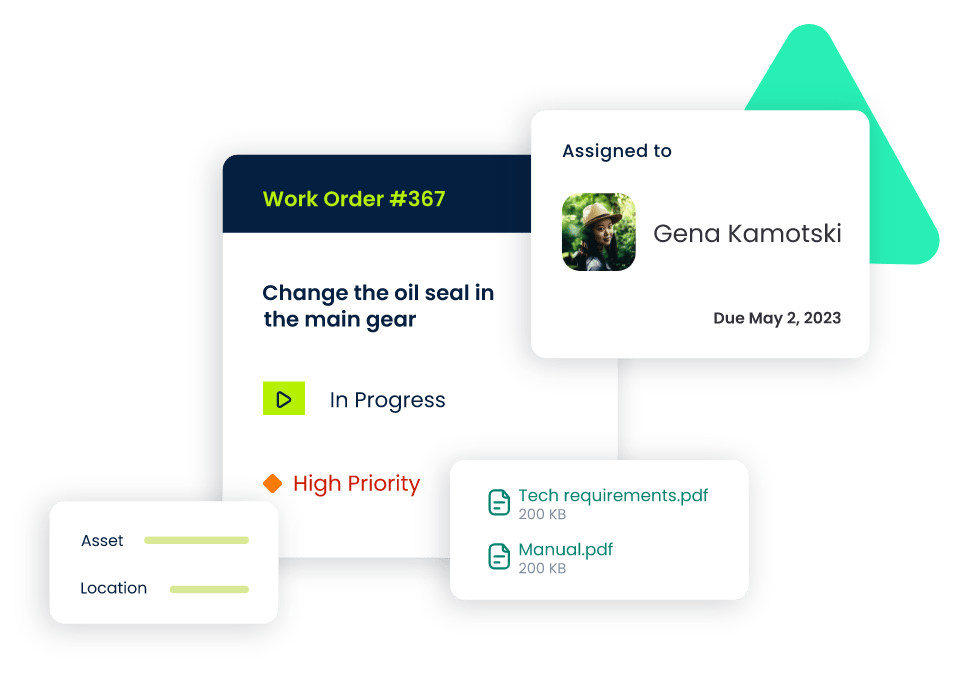
TABLE OF CONTENTS






