



Reena Sommer | 19 Oct 2026


Selecting the right work order management software for educational facilities involves carefully weighing key factors such as user-friendliness, maintenance request tracking, preventive maintenance scheduling, mobile accessibility, reporting capabilities, overall affordability, and multi-building management features.
The best work order management software for schools helps maintenance teams organize repair requests, assign technicians, track equipment, and complete maintenance tasks without relying on spreadsheets, emails, paper forms, or text messages.
For schools, colleges, universities, and other educational institutions, maintenance management involves more than repairing broken equipment. Facility managers must maintain safe classrooms, functional HVAC systems, restrooms, lighting, playgrounds, athletic facilities, and other campus infrastructure.
Click Maint provides affordable, easy-to-use work order management software designed to help education facility managers centralize maintenance requests, organize preventive maintenance, and improve maintenance team efficiency.
This guide explains how education facility managers should compare work order management software, which features matter most, and what questions to ask before selecting a system.
Still Managing School Maintenance Requests Through Emails and Spreadsheets?
Bring classroom repairs, maintenance requests, technician assignments, and preventive maintenance into one easy-to-use system with Click Maint Work Order Management Software.
Why Do Education Facility Managers Need Work Order Management Software?
Educational facilities require ongoing maintenance to provide safe, comfortable, and functional learning environments. School maintenance teams manage a wide range of tasks, including:
- HVAC system repairs and inspections.
- Classroom lighting and electrical maintenance.
- Plumbing repairs and restroom maintenance.
- Playground and athletic equipment inspections.
- Fire safety and emergency equipment checks.
- Preventive maintenance for school buildings.
- Cleaning and building maintenance requests.
- Equipment repairs across multiple campuses.
Without centralized work order management software, maintenance requests become difficult to organize.
Teachers submit requests through emails, school administrators contact maintenance supervisors by phone, and custodial teams report problems through text messages.This creates disconnected communication and increases the risk of maintenance requests being overlooked.
For example, a teacher reports a broken classroom air conditioner through email. The maintenance supervisor forwards the request to a technician, but the repair is delayed because the team has no centralized tracking system. School work order software solves this problem by providing a single system for submitting, assigning, tracking, and completing maintenance requests.
Stop Losing Track of School Maintenance Requests
Give teachers and school staff a simple way to report maintenance issues while your maintenance team tracks every request from submission to completion.
See how Click Maint helps schools replace scattered emails, paper forms, and spreadsheets with centralized work order tracking.
What Should Education Facility Managers Compare in Work Order Management Software?
Facility managers should evaluate software based on the daily needs of teachers, maintenance technicians, administrators, and school operations teams.
The following features are particularly important.
1. Ease of Use for Teachers and School Staff
Ease of use should be a top priority when comparing work order software for schools.
Teachers, office administrators, custodians, and other school employees need a simple way to submit maintenance requests.
A complicated request process leads to low software adoption and continued reliance on emails and text messages.
Look for software that provides:
- A simple maintenance request portal.
- Easy request submission without technical knowledge.
- Clear request categories and priorities.
- The ability to attach photos.
- Automatic notifications and request updates.
- A straightforward interface for school employees.
Click Maint provides a maintenance request portal that helps staff submit repair requests through a centralized system.
For education facilities replacing manual maintenance processes, this is an important advantage.
2. Centralized Work Order Tracking
School facility managers need visibility into every maintenance request.
A good work order management system should provide a centralized dashboard displaying open, assigned, overdue, and completed work orders.
For example, a school district managing 12 buildings needs to know which locations have outstanding HVAC repairs, plumbing problems, or urgent maintenance requests.
With centralized work order software, maintenance managers track these activities without searching through separate spreadsheets or email conversations.
When comparing software vendors, ask:
- Does the software display all maintenance requests in one dashboard?
- Are work orders organized by school, building, and location?
- Does the system track work order status?
- Are maintenance supervisors notified about overdue tasks?
- Does the software maintain complete repair histories?
3. Preventive Maintenance Scheduling
Preventive maintenance is essential for maintaining school buildings and equipment.
Educational facilities rely on HVAC systems, boilers, ventilation equipment, electrical systems, emergency lighting, and other assets that require scheduled inspections.
Preventive maintenance software helps facility managers organize recurring maintenance activities.
Examples include:
|
School equipment |
Preventive maintenance activity |
Example schedule |
|
HVAC systems |
Filter inspections and replacement |
Based on equipment requirements |
|
Boilers |
Safety and operational inspections |
Manufacturer and regulatory schedule |
|
Emergency lighting |
Functional testing |
Applicable safety requirements |
|
Playground equipment |
Condition and safety inspections |
School inspection program |
|
Plumbing systems |
Leak and fixture inspections |
Facility maintenance schedule |
|
Gym equipment |
Equipment safety inspections |
Usage and manufacturer guidance |
Schedules should follow manufacturer instructions, applicable regulations, and facility risk assessments. Click Maint combines work order management with preventive maintenance scheduling, helping education maintenance teams manage routine inspections and repairs in one system.
4. Mobile Work Order Management
School maintenance technicians work throughout classrooms, hallways, cafeterias, gymnasiums, libraries, and outdoor facilities. Mobile work order software helps technicians manage maintenance tasks while moving between locations.
Important mobile features include:
- Viewing assigned work orders.
- Updating maintenance task status.
- Adding repair notes and photographs.
- Accessing equipment information.
- Recording completed maintenance.
- Scanning QR codes to locate asset records.
Click Maint provides mobile maintenance workflows and QR code scanning, helping technicians access relevant equipment and work order information.
5. Multi-Building and Multi-Campus Management
School districts and universities frequently manage maintenance across multiple buildings.
A district with 15 schools needs a system that tracks work orders by campus, building, room, equipment, and maintenance team. Education facility management software should provide centralized visibility while allowing location-specific work order management.
Facility managers should compare:
- School and campus organization.
- Building and room identification.
- Maintenance team assignments.
- Location-specific reporting.
- Work order filtering.
- Centralized maintenance dashboards.
This is especially important for school districts, colleges, universities, and educational organizations operating multiple facilities.
6. Maintenance Asset Management
Schools maintain a wide range of assets, including HVAC equipment, boilers, generators, pumps, kitchen appliances, athletic equipment, and building systems. Asset management features help facility managers maintain accurate equipment records.
Look for CMMS Software for Educational Facilities that tracks equipment locations, maintenance history, inspection schedules, warranties, and repair costs. For example, a school facility manager reviewing repeated HVAC failures should be able to access previous repairs, replacement parts, and maintenance costs before deciding whether to repair or replace the equipment.
7. Maintenance Reporting and Budget Tracking
Education facility managers must demonstrate how maintenance resources are being used.
Work order reporting helps administrators understand maintenance workload, repair costs, equipment performance, and outstanding tasks.
Important maintenance KPIs include:
- Work order completion rate.
- Average work order completion time.
- Preventive maintenance compliance.
- Emergency versus planned maintenance.
- Maintenance backlog.
- Repair costs by building.
- Technician workload.
Reporting also helps school administrators justify maintenance budgets and identify buildings that require additional investment.
8. Affordable Pricing and Total Cost of Ownership
School districts and educational institutions operate under budget constraints. Facility managers should compare the total cost of ownership rather than the monthly subscription price alone.
Consider software licensing, implementation, training, technical support, integrations, and additional modules. Also ask whether the vendor charges for maintenance requesters, administrators, technicians, or individual campuses.
Work Order Management Software Comparison Checklist for Education Facilities
Use this interactive checklist when evaluating software vendors. School CMMS evaluation checklist
- Simple maintenance request portal for teachers and staff
- Centralized work order dashboard
- Automated preventive maintenance scheduling
- Mobile access and QR code scanning
- Multi-building and campus management
- Asset maintenance history
- Maintenance reporting and budget tracking
- Clear subscription and implementation pricing
- Training, support, and data security controls
- Easy onboarding and strong technician adoption
- Reset Copy checklist
How Does Click Maint Compare With Other School Work Order Software?
Education facility managers should shortlist software based on their maintenance complexity, staffing, budget, and existing technology. The following platforms represent different approaches to school maintenance management.
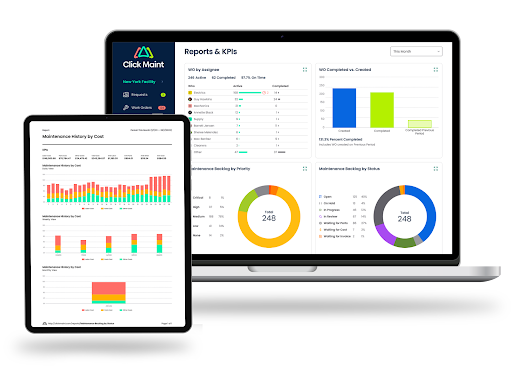
Click Maint — Affordable, easy-to-use CMMS
A strong option for school maintenance teams seeking centralized work orders, preventive maintenance, asset tracking, inventory management, and mobile access without unnecessary complexity.
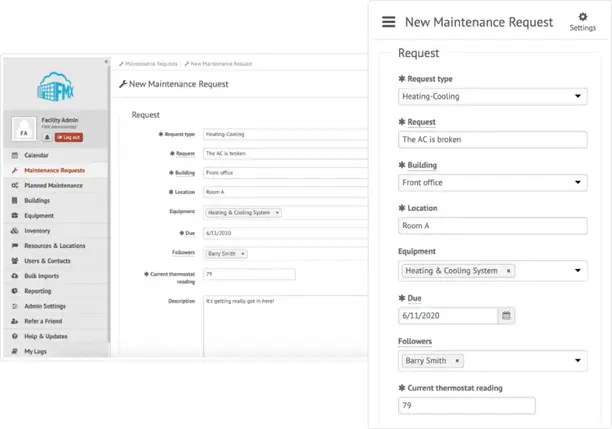
FMX — Education facilities and scheduling
Worth evaluating for school districts seeking maintenance management alongside facility scheduling and related operational workflows.
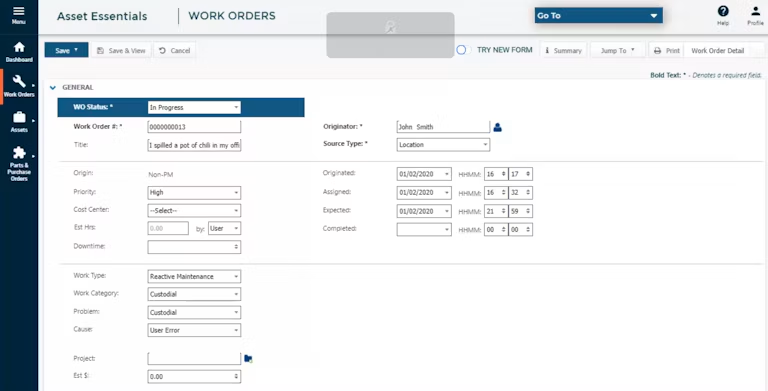
Brightly Asset Essentials (Now called Siemens) — Asset-intensive operations
An option for institutions that need broader asset lifecycle and maintenance planning capabilities.
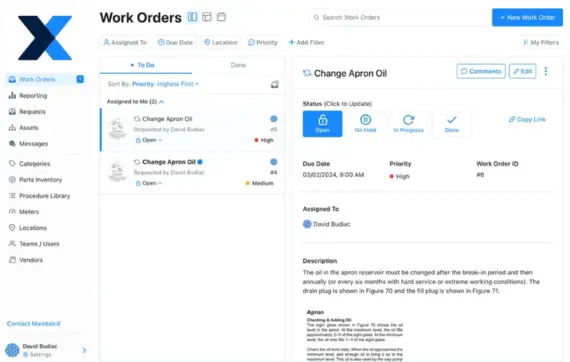
MaintainX — Mobile maintenance workflows
Worth comparing for maintenance teams emphasizing technician collaboration, mobile work orders, and standardized procedures.
These are evaluation categories, not verified rankings. Compare current vendor features, education pricing, integrations, and implementation requirements through product demonstrations.
Click Maint deserves consideration when affordability, ease of use, and essential CMMS functionality are the primary purchasing criteria. More complex educational institutions should also evaluate whether they require advanced capital planning, space management, or specialized integrations.
How Much Does Work Order Management Software Cost for Schools?
Pricing depends on the vendor, number of users, selected modules, and implementation requirements. Some platforms charge per technician, while others offer institution-specific pricing. When requesting a quote, education facility managers should ask whether teachers and other maintenance requesters require paid licenses.
Other important questions include whether pricing covers multiple buildings, mobile access, preventive maintenance, asset tracking, training, and technical support. The lowest subscription price is not necessarily the lowest total cost. Software that requires extensive training, complex setup, or additional modules could increase long-term expenses.
For small and mid-sized school maintenance teams, affordable software with essential features and straightforward onboarding is an important purchasing consideration.
How Should Education Facility Managers Test Work Order Software Before Buying?
A software demonstration should reflect actual school maintenance operations.Rather than reviewing features individually, facility managers should ask vendors to demonstrate complete maintenance workflows.
Example 1: Classroom Maintenance Request
A teacher discovers a leaking sink in a classroom.
The software should support the following process:
- The teacher submits a request through the maintenance portal.
- The maintenance supervisor reviews and prioritizes the request.
- A technician receives the assigned work order.
- The technician records the repair and any parts used.
- The work order is marked complete.
- The requester receives a status update.
This scenario helps determine whether the software is simple enough for school staff and effective for maintenance technicians.
Example 2: Preventive Maintenance for School HVAC
A facility manager schedules routine HVAC maintenance across several schools. The software should create recurring work orders, assign technicians, display equipment records, and track maintenance completion.
Example 3: Multi-School Maintenance Reporting
A school district operations director wants to review outstanding maintenance work across 10 schools. The software should provide reports organized by location, work order status, priority, and maintenance costs. These practical tests help facility managers understand how well a platform supports everyday maintenance activities.
What Mistakes Should Schools Avoid When Choosing Work Order Management Software?
Education facility managers should avoid selecting software based only on a long feature list. Common purchasing mistakes include choosing a complicated platform that staff struggle to use, overlooking the maintenance request experience, failing to involve technicians in demonstrations, and ignoring implementation costs.
Another mistake is selecting software that tracks repairs but does not support preventive maintenance. Schools also need to evaluate vendor security practices, access controls, data ownership, and integration requirements before purchasing.A successful implementation depends on both the software and the school's maintenance processes.
Why Is Click Maint a Strong Choice for School Maintenance Teams?
Click Maint focuses on practical maintenance management functionality for organizations that need a centralized system without extensive administrative complexity. Its relevant capabilities include:
- Work order creation, assignment, and tracking.
- Maintenance request management.
- Automated preventive maintenance scheduling.
- Equipment and asset management.
- Mobile maintenance workflows with QR code scanning.
- Parts and inventory tracking.
- Maintenance reports and dashboards.
For educational institutions replacing spreadsheets, paper forms, emails, or disconnected maintenance systems, Click Maint offers a practical starting point.
School facility managers should confirm their specific campus structure, integration requirements, and purchasing needs during a product demonstration.
Explore Click Maint Work Order Software to learn more about centralized maintenance tracking.
Frequently Asked Questions About Work Order Management Software for Schools
What is the best work order management software for education facilities?
The best work order management software for education facilities provides simple maintenance request submission, centralized work order tracking, preventive maintenance scheduling, mobile access, asset management, and reporting. Click Maint is a strong option for schools prioritizing affordability and ease of use.
How should school facility managers compare work order software?
School facility managers should compare software based on usability, maintenance request tracking, preventive maintenance features, multi-building management, technician mobility, reporting, pricing, security, and support.
What features should school maintenance software include?
Essential features include a maintenance request portal, work order assignment, preventive maintenance scheduling, asset tracking, mobile access, maintenance history, and reporting.
How does work order software help teachers and school staff?
Work order software provides a centralized system for reporting classroom repairs and facility problems. Staff receive a more consistent request process, while maintenance managers track and assign tasks.
Is CMMS software suitable for small schools?
Yes. Small schools benefit from CMMS software when maintenance requests, equipment records, and preventive maintenance tasks become difficult to manage manually. The right platform should match the school's budget and staffing requirements.
What is the difference between school work order software and CMMS software?
Work order software focuses on managing maintenance requests and repair tasks. CMMS software provides broader maintenance management capabilities, including preventive maintenance, equipment history, inventory tracking, and reporting.
How does preventive maintenance software help school facilities?
Preventive maintenance software helps schools schedule recurring inspections and servicing for HVAC systems, boilers, electrical equipment, and other building assets. This supports more consistent maintenance and better equipment records.
Conclusion: How Should Education Facility Managers Choose the Right Work Order Software?
Education facility managers should prioritize software that makes maintenance requests easy to submit, work orders simple to manage, and preventive maintenance easier to organize.
The right system should support teachers, technicians, maintenance supervisors, and school administrators without creating unnecessary administrative work.
For schools, colleges, and educational organizations seeking affordable, easy-to-use maintenance management software, Click Maint is a strong solution to evaluate.
By bringing maintenance requests, work orders, preventive maintenance, assets, and reporting into one system, Click Maint helps education maintenance teams stay organized and improve visibility into everyday maintenance operations.
Make School Maintenance Easier With Click Maint
See how Click Maint helps education facility managers organize maintenance requests, assign work orders, schedule preventive maintenance, and track school equipment across multiple buildings.

TABLE OF CONTENTS






