



Reena Sommer | 14 Oct 2026


Facility managers need reliable software to organize maintenance requests, reduce equipment downtime, track assets, and control maintenance costs. The best CMMS for facilities combines work order management, preventive maintenance, asset tracking, inventory management, and reporting in one easy-to-use system.
Click Maint is an affordable, user-friendly CMMS software option for organizations looking to replace spreadsheets, paper work orders, and disconnected maintenance tools.
This guide explains what facility maintenance CMMS software does, which features matter most, how to evaluate costs, and what facility managers should look for before purchasing.
What Is CMMS for Facilities?
A Computerized Maintenance Management System (CMMS) for facilities is software that helps facility managers organize, schedule, track, and manage maintenance activities across buildings, equipment, and physical assets.
Facility maintenance teams use CMMS software to manage:
- Maintenance requests and work orders
- Preventive maintenance schedules
- Building equipment and assets
- Maintenance technicians and assignments
- Spare parts and maintenance inventory
- Equipment inspections and repair history
- Maintenance costs and performance reports
- Multiple buildings and facility locations
Instead of managing maintenance through spreadsheets, emails, phone calls, and paper forms, organizations use centralized Maintenance Management Software to keep maintenance information organized.
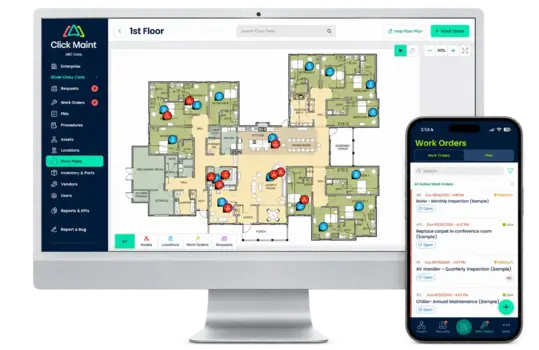
For example, a facility manager responsible for several commercial buildings needs visibility into equipment repairs, overdue maintenance tasks, and technician workloads. A CMMS provides a central location for tracking these activities.
Why Do Facility Managers Need CMMS Software?
Facility managers are responsible for maintaining safe, reliable, and efficient buildings. Their responsibilities include building systems, equipment maintenance, contractor coordination, inspections, and maintenance budgets.
Without a centralized system, maintenance operations become difficult to manage.
1. Lost and Untracked Maintenance Requests
Facility maintenance requests arrive through emails, phone calls, text messages, and verbal conversations.
When requests are not recorded in one system, maintenance teams struggle to identify which tasks are pending, assigned, or completed.
Solution: CMMS software creates a structured process for submitting, assigning, tracking, and completing maintenance requests.
2. High Equipment Downtime
Unexpected failures involving HVAC systems, plumbing, electrical equipment, and other building assets disrupt facility operations.
A reactive maintenance approach increases emergency repairs and makes maintenance planning difficult.
Solution: Preventive Maintenance Software helps facility managers schedule recurring inspections, servicing, and equipment maintenance based on established intervals.
3. Limited Maintenance Cost Visibility
Facility managers need accurate information about labor, replacement parts, equipment repairs, and maintenance spending.
Spreadsheets and disconnected records make it difficult to understand where maintenance budgets are being spent.
Solution: CMMS software organizes maintenance records and associated costs to support budget planning and financial decisions.
4. Difficulty Managing Multiple Facilities
Organizations with multiple buildings need consistent maintenance processes across locations. Without centralized software, managers struggle to compare maintenance performance, monitor overdue work orders, and coordinate maintenance resources.
Solution: A CMMS designed for multi-location operations provides visibility into maintenance activities across supported facilities.
What Are the Most Important CMMS Features for Facilities?
Choosing the best CMMS for Facilities starts with understanding the features required for daily maintenance operations.
1. Work Order Management
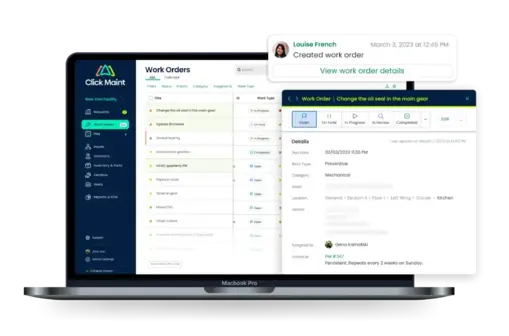
Work Order Software helps facility managers create, assign, prioritize, and track maintenance tasks.
Important capabilities include:
- Digital work order creation
- Technician assignments
- Work order priorities and statuses
- Maintenance instructions
- Labor and parts tracking
- Repair history
- Work order completion records
For example, when a building occupant reports a broken air conditioning unit, the maintenance request enters the system. The facility manager reviews the issue, assigns a technician, and tracks the repair through completion. This process creates accountability and reduces the risk of forgotten maintenance tasks.
2. Preventive Maintenance Scheduling
Preventive maintenance is essential for extending equipment life and reducing unexpected breakdowns.
Facility managers use Preventive Maintenance Software to organize recurring maintenance for:
- HVAC systems
- Electrical equipment
- Plumbing systems
- Emergency lighting
- Building pumps
- Generators
- Doors and access systems
- Fire safety equipment
A preventive maintenance program includes scheduled inspections, servicing, lubrication, cleaning, and equipment testing.
CMMS software helps teams maintain consistent schedules and document completed work.
3. Asset and Equipment Management
Facility managers are responsible for maintaining equipment throughout its operational life. Asset Management Software organizes information such as equipment location, identification numbers, installation dates, maintenance history, and associated work orders.
For example, a facility manager evaluating an aging HVAC unit needs to understand its repair history and maintenance costs. Centralized asset records support informed decisions about equipment repairs, replacement, and maintenance investments.
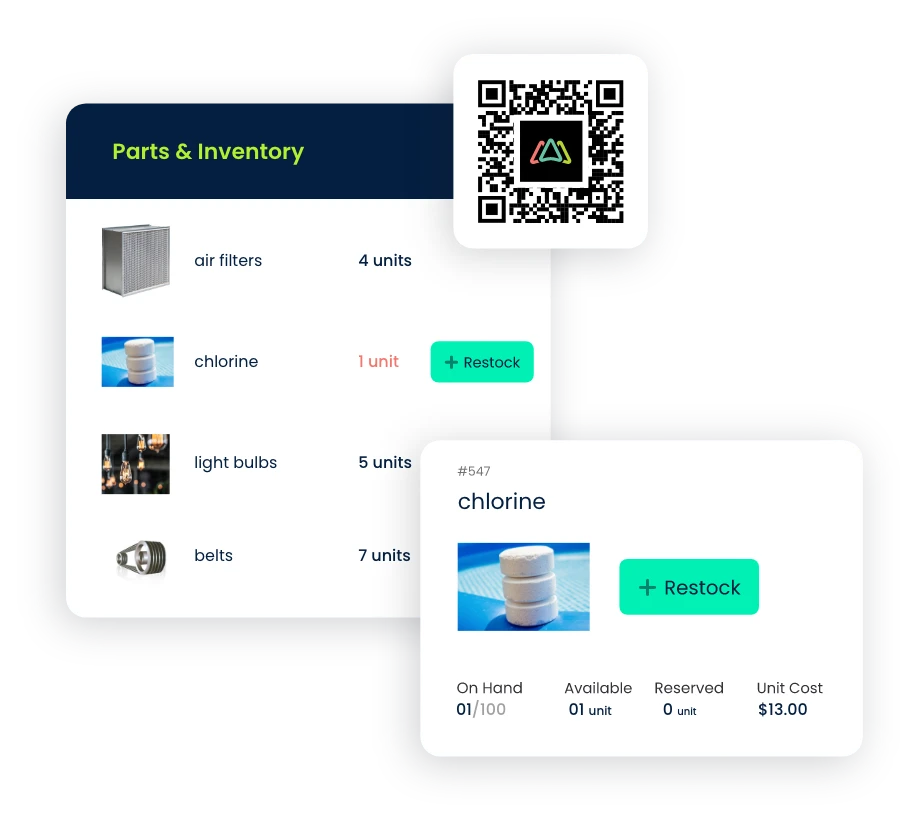
4. Maintenance Inventory Management
Facility maintenance teams rely on spare parts and supplies to complete repairs. Missing inventory creates delays, while excessive stock increases storage costs.
Maintenance Inventory Software helps teams organize:
- Spare parts and supplies
- Inventory quantities
- Storage locations
- Parts used on work orders
- Reorder information
- Inventory costs
Effective inventory tracking improves parts availability and supports maintenance budget management.
5. Mobile CMMS Access
Maintenance technicians spend much of their workday away from desks.
Mobile-friendly CMMS software gives technicians access to maintenance information while working throughout a facility.
Technicians access assigned work orders, review equipment details, update task statuses, and record completed maintenance activities.
Mobile access reduces paperwork and supports faster communication between maintenance teams.
6. Maintenance Reporting and KPIs
Facility managers need accurate performance data to improve maintenance operations.
Important maintenance KPIs include:
|
KPI |
What it measures |
|
Work Order Completion Rate |
Percentage of completed work orders |
|
Preventive Maintenance Compliance |
Percentage of scheduled PM tasks completed on time |
|
Mean Time to Repair (MTTR) |
Average time required to repair equipment |
|
Mean Time Between Failures (MTBF) |
Average operating time between equipment failures |
|
Maintenance Cost per Asset |
Total maintenance spending for individual assets |
|
Work Order Backlog |
Outstanding maintenance work |
|
Planned vs. Reactive Maintenance |
Distribution of scheduled and emergency maintenance |
Tracking these metrics helps facility managers identify recurring problems, evaluate team performance, and prioritize maintenance improvements.
How Does CMMS Software Improve Facility Maintenance Operations?
The main benefit of Facility Maintenance CMMS Software is improved control over maintenance activities.
Better Maintenance Organization
Maintenance requests, work orders, asset information, and preventive maintenance schedules are organized in one system.
Facility managers spend less time searching for information across spreadsheets, emails, and paper records.
Reduced Equipment Downtime
Scheduled preventive maintenance supports early identification of equipment problems.
Consistent inspections and maintenance records help teams address developing issues before they result in major failures.
Improved Maintenance Team Productivity
Clear work order assignments help technicians understand their priorities and responsibilities.
Digital maintenance records reduce administrative work and improve coordination between maintenance managers and technicians.
Stronger Maintenance Budget Control
Maintenance cost tracking gives managers greater visibility into labor, parts, and equipment spending.
Historical data supports repair-versus-replacement decisions and future maintenance budgets.
Improved Documentation and Accountability
Digital work orders and maintenance histories provide records of completed inspections, repairs, and maintenance activities.
These records support internal reviews, audits, and compliance processes when configured and maintained according to organizational requirements.
How Much Does CMMS for Facilities Cost in 2026?
The cost of facility maintenance CMMS software depends on the vendor, pricing model, number of users, included features, implementation requirements, and support services.
Common pricing structures include:
|
Pricing model |
Description |
Best suited for |
|
Per-user subscription |
Monthly or annual charges based on users |
Smaller maintenance teams |
|
Tiered subscription |
Different prices for feature packages |
Growing facilities |
|
Facility-based pricing |
Charges based on sites or locations |
Multi-location organizations |
|
Enterprise pricing |
Custom quotes based on requirements |
Large organizations |
When comparing CMMS pricing, facility managers should evaluate the total cost of ownership rather than subscription fees alone. Important questions include whether the quoted price covers setup, data migration, training, mobile access, support, integrations, and additional locations.
Click Maint is positioned as an affordable CMMS solution for organizations seeking straightforward maintenance management without unnecessary complexity. Buyers should request current pricing and confirm which capabilities are included in their selected plan.
What Is the Best CMMS for Small Facility Maintenance Teams?
Small facility maintenance teams need software that is easy to implement, affordable, and practical for daily operations. A maintenance department with three to ten technicians generally has different requirements from a large enterprise managing hundreds of assets across dozens of facilities.
The best CMMS for a small facility team should prioritize:
- Simple maintenance request submission
- Fast work order creation and assignment
- Automated preventive maintenance scheduling
- Centralized equipment records
- Mobile-friendly access
- Straightforward maintenance reports
- Affordable pricing
- Accessible customer support
Complex systems with lengthy implementation requirements introduce unnecessary administrative work for smaller teams. Click Maint is worth evaluating for small and growing facility maintenance teams seeking a simpler approach to managing work orders, preventive maintenance, assets, and inventory.
Looking for Affordable CMMS Software for Your Facility?
See how Click Maint helps facility managers organize work orders, maintenance requests, preventive maintenance, and equipment records.
Take the quick 2-minute interactive product tour or schedule a personalized demo.
How to Choose the Best CMMS for Facilities: Buying Checklist
Before purchasing CMMS software, facility managers should compare solutions based on functionality, ease of use, implementation, support, and overall value.
Facility CMMS Evaluation Checklist
0 of 10
Easy-to-use interface for facility managers and technicians
Digital maintenance request and work order management
Automated preventive maintenance scheduling
Equipment and asset maintenance history
Mobile access for maintenance technicians
Maintenance inventory and spare parts tracking
Support for multiple facilities and locations
Maintenance cost tracking and KPI reports
Transparent subscription and implementation costs
Training, onboarding, and customer support
Copy Checklist
A software demonstration should include real facility maintenance workflows, not just a list of product features. Ask vendors to demonstrate how a maintenance request becomes a completed work order, how recurring inspections are scheduled, and how managers track maintenance performance.
How Does CMMS Manage Maintenance Across Multiple Facilities?
Organizations managing multiple locations face additional maintenance challenges.
A facility manager responsible for several buildings needs consistent maintenance procedures, accurate equipment records, and visibility into outstanding work. A multi-facility CMMS helps organizations establish standardized processes for maintenance requests, work order assignments, preventive maintenance, and reporting.
Important requirements include centralized maintenance records, facility-specific asset information, location-based work orders, and user permissions.
For example, a senior living organization operating eight facilities needs a reliable way to coordinate maintenance requests and track repairs across different buildings. Centralized CMMS for Multiple Facilities supports more consistent maintenance operations while helping leadership evaluate performance across locations.
Which Industries Benefit From CMMS for Facilities?
Facility maintenance requirements vary by industry, but most organizations share the need to maintain equipment, respond to repair requests, and manage maintenance costs.
|
Industry |
Common maintenance requirements |
|
Commercial buildings |
HVAC, lighting, plumbing, elevators, and general repairs |
|
Schools and universities |
Classrooms, campuses, equipment inspections, and maintenance requests |
|
Healthcare facilities |
Equipment reliability, inspections, maintenance documentation, and building systems |
|
Manufacturing facilities |
Production equipment, preventive maintenance, and spare parts |
|
Hotels and resorts |
Guest room repairs, HVAC, plumbing, and property maintenance |
|
Churches and nonprofits |
Building upkeep, volunteer coordination, maintenance budgets, and equipment tracking |
|
Senior living facilities |
Resident maintenance requests, building systems, and preventive maintenance |
|
Government facilities |
Public building maintenance, work order accountability, and asset records |
Click Maint offers industry-focused maintenance management solutions for these types of organizations.
Why Choose Click Maint for Facility Maintenance Management?
Click Maint is a cloud-based Maintenance Management Software platform designed to simplify daily maintenance operations. The platform brings together work orders, maintenance requests, preventive maintenance, assets, inventory, and reporting in one centralized system.
1. Easy-to-Use Maintenance Management Software
Click Maint emphasizes straightforward navigation and simple maintenance workflows.
Facility managers and technicians need software that supports daily tasks without extensive administrative complexity.
2. Affordable CMMS for Facilities
Click Maint lists its Professional Plan at $35 USD per user per month on its facility management software page. Buyers should verify current pricing, billing terms, and included features before purchasing.
Click Maint
3. Centralized Facility Maintenance Operations
Click Maint helps teams organize work orders, maintenance requests, preventive maintenance schedules, asset information, and inventory records.
Facility managers gain a more structured approach to coordinating everyday maintenance activities.
4. Mobile-Friendly Maintenance Management
Maintenance teams access work orders and equipment information from mobile devices.
This supports technicians working across buildings, departments, and facility locations.
5. Maintenance Reporting and Visibility
Click Maint provides maintenance reporting capabilities to help managers evaluate work order progress, asset performance, maintenance costs, and operational trends.
Real Customer Case Study: Bethania Group Increased Completed Work Orders by 50%
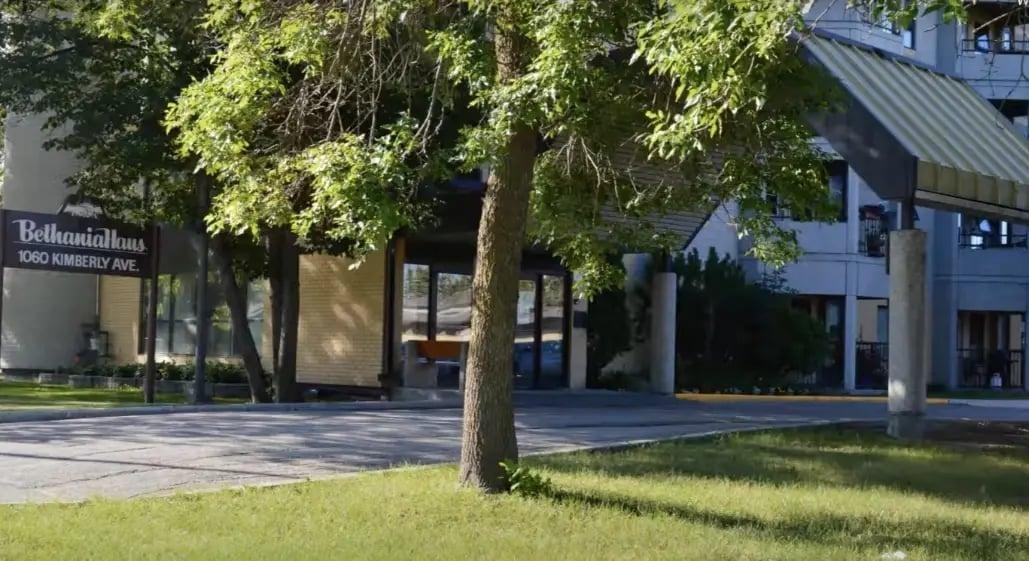
Bethania Group
Senior living and personal care facilities — Winnipeg, Manitoba, Canada
50%
Increase in completed work orders. Bethania Group manages assisted living and personal care facilities in Winnipeg. Its maintenance team needed a more efficient way to handle maintenance requests, improve communication, and coordinate work across its properties.
Before adopting Click Maint, the organization experienced challenges with maintenance request management, task prioritization, and coordination. After implementing Click Maint, Bethania Group reported:
- A 50% increase in completed reactive and preventive maintenance work orders.
- Faster work order response and completion.
- Improved maintenance communication.
- Better organization of maintenance supplies.
- Easier maintenance request submission through QR codes.
- Improved visibility into maintenance activities.
The case study demonstrates how a user-friendly CMMS supports maintenance coordination across multiple facilities. These results reflect Bethania Group's reported experience and are not guaranteed outcomes for every organization.
Read the Bethania Group CMMS case study.
Click Maint Awards and Customer Recognition
When comparing CMMS software, facility managers should evaluate independent recognition alongside product features, pricing, customer support, and usability.
Click Maint highlights several industry distinctions:
G2 — Easiest to Use and Easiest Setup (Spring 2025)
Recognition associated with software usability and implementation.
Capterra — Best Ease of Use (2026)
Recognition displayed on Click Maint's facility maintenance software page.
Software Advice — Best Customer Support (2026)
Recognition relating to the customer support experience. These award claims are displayed on Click Maint's published website. Badge images are illustrative; confirm the official award artwork before publication.
Frequently Asked Questions About CMMS for Facilities
1. What is the best CMMS for facilities?
The best CMMS for facilities provides work order management, preventive maintenance scheduling, asset tracking, inventory management, mobile access, and reporting. Click Maint is an option for facility managers prioritizing affordability, ease of use, and centralized maintenance operations.
2. What is the difference between CMMS and facility management software?
CMMS focuses on equipment maintenance, work orders, preventive maintenance, and maintenance history. Facility management software covers a broader range of building operations, including space management, property services, and workplace coordination.
3. Is CMMS worth it for small facilities?
CMMS is worth evaluating for small facilities experiencing missed maintenance requests, inconsistent preventive maintenance, or limited equipment records. The value depends on maintenance workload, software cost, team adoption, and measurable improvements.
4. How does CMMS reduce facility maintenance costs?
CMMS supports maintenance cost control through preventive maintenance scheduling, better work order coordination, asset repair history, inventory visibility, and maintenance performance reporting. Actual savings depend on implementation and operational practices.
5. What equipment should facility managers track in CMMS?
Facility managers should track critical assets such as HVAC equipment, electrical systems, pumps, generators, plumbing equipment, safety systems, and other building infrastructure requiring inspections or recurring maintenance.
6. Does CMMS support multiple facilities?
Yes. Multi-facility CMMS solutions organize maintenance activities across buildings and locations. Buyers should verify site-level reporting, user permissions, asset organization, and any additional location charges.
7. How do facility managers choose affordable CMMS software?
Facility managers should compare subscription costs, included features, user limits, implementation expenses, training, support, and scalability. An affordable CMMS should deliver the required maintenance capabilities without unnecessary complexity.
8. What should facility managers look for before buying CMMS?
Facility managers should prioritize usability, work order management, preventive maintenance, asset tracking, mobile access, reporting, customer support, and total cost of ownership. Testing actual maintenance workflows during a product demonstration is essential.
Conclusion: Find the Right CMMS for Your Facilities
Choosing the best CMMS for facilities requires more than comparing software features.
Facility managers need a system that simplifies maintenance requests, organizes work orders, improves preventive maintenance, tracks equipment, and supports maintenance cost control. The right software should match the organization's maintenance requirements, team size, budget, and operational complexity.
For facilities replacing spreadsheets, paper work orders, or difficult-to-use maintenance systems, Click Maint offers an affordable and straightforward maintenance management solution.
Simplify Facility Maintenance With Click Maint
Manage work orders, preventive maintenance, equipment, inventory, and maintenance requests in one easy-to-use CMMS.
Explore Click Maint's facility maintenance features and see how the software fits your team.

TABLE OF CONTENTS






