


Reena Sommer | 22 Oct 2026


Growing manufacturers face a familiar bind. Equipment keeps the line running, but keeping that equipment maintained is getting harder. Maintenance teams are stretched thin, spare parts are out of stock, and unplanned breakdowns eat into production targets and increase downtime.
A 2025 Fluke Corporation survey found that 55% of U.S. manufacturers experienced unplanned downtime in the past year, with costs reaching hundreds of thousands of dollars per hour.
Many of these manufacturers turn to a Computerized Maintenance Management System (CMMS) to regain control. However, most CMMS platforms were built for general facilities work, not for the specific demands of a factory floor.
That distinction matters when you are scheduling preventive maintenance around production cycles, tracking assets across multiple lines, and managing spare parts inventory in real time.
This comparison looks at how manufacturing maintenance software built with factory teams in mind differs from generic CMMS options. It evaluates Click Maint, MaintainX, and Limble across the features that matter most to maintenance managers and operations leaders at growing manufacturers.
Why Click Maint is the Best Manufacturing Maintenance Software
Key Takeaways: Click Maint vs MaintainX vs Limble
- Click Maint delivers software that’s easy to use, fast implementation, affordable pricing, making it a strong fit for growing manufacturers on a budget.
- Generic CMMS platforms often lack manufacturing-specific workflows like production-aware scheduling and factory-floor mobile access.
- MaintainX offers a mobile-first experience, though inventory management setup can require additional configuration time and additional features come at a higher cost.
- Limble provides highly configurable dashboards and PM scheduling, but like MaintainX advanced features are only accessible at higher price tiers.
- Click Maint centralizes work orders, preventive maintenance, assets, and inventory in a single cloud-based platform designed for quick adoption.
Click Maint vs MaintainX vs Limble: Overview
What is Click Maint CMMS?
Click Maint is a cloud-based CMMS built for maintenance and facilities teams at small to mid-sized organizations. It centralizes work order management, preventive maintenance scheduling, asset tracking, and inventory management in one platform.
Click Maint is designed for fast setup and high user adoption, with pricing that runs 20 to 60% lower than many comparable CMMS platforms.
Click Maint Key Features
- Work order management: Create, assign, and track work orders with checklists, labor time tracking, and real-time notifications for technicians.
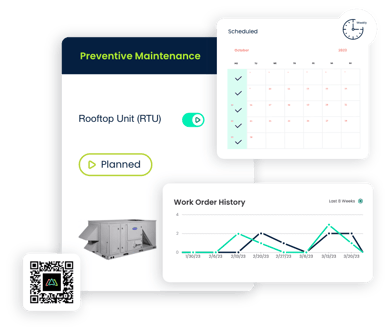
- Preventive maintenance scheduling: Set flexible recurring schedules (hourly, daily, weekly, monthly) with automated work order generation and progression tracking.
- Inventory and parts management: Monitor stock levels, set min/max quantities, associate parts to assets and work orders, and receive low-stock alerts.
- Asset tracking with QR codes: Manage equipment records, maintenance history, and downtime tracking with scannable QR codes for quick field access.
- Interactive floor plans and maps: View and manage all requests, work orders and assets from interactive floor and site plans.
- Mobile app for iOS and Android: Manage work requests, work orders, PMs, assets, and parts from a mobile device with real-time push notifications.
Click Maint Pros and Cons
Pros:
- Click Maint offers fast onboarding with minimal disruption to daily operations, helping teams realize return on investment (ROI) sooner.
- All core CMMS features are included in a single plan with transparent, per-user pricing and no hidden fees.
- Click Maint offers interactive floor plans and highly configurable location hierarchies making it easier to set up facilities.
- The interface is built for quick adoption by requesters, technicians, and managers without extensive training requirements.
Cons:
- Click Maint focuses on core maintenance management functions, so teams needing advanced enterprise asset management (EAM) features may need to evaluate scope.
- Reporting covers standard maintenance KPIs; organizations with complex custom analytics requirements may need to export data for deeper analysis.
- Click Maint currently lacks predictive maintenance (PdM) and condition monitoring.
What is MaintainX?
MaintainX is a mobile-first CMMS and frontline work execution platform. It focuses on digitizing procedures, managing work orders, and supporting cross-team communication for manufacturing and industrial teams. The platform includes AI-powered features for procedure generation and anomaly detection.
MaintainX Key Features
- Mobile work execution: Technicians create, update, and close work orders from Android and iOS apps with photo documentation.
- Procedure digitization: Convert paper-based standard operating procedures into digital checklists attached to work orders.
- Cross-team communication: A built-in messaging feature allows non-maintenance staff to request and track work.
- KPI dashboards: Track performance across teams and sites with configurable dashboards and custom filters.
- AI-powered tools: AI Procedure Generator creates step-by-step procedures from documents and text inputs.
MaintainX Pros and Cons
Pros:
- MaintainX includes a mobile app with feature parity to the desktop version, allowing field work to be completed entirely from a phone.
- The platform offers a built-in chat feature that helps coordinate work between maintenance and operations teams.
- MaintainX provides AI-assisted procedure creation, which can reduce the time needed to digitize existing paper processes.
Cons:
- Some users report that the parts inventory management module requires additional setup time compared to other areas of the platform.
- Certain custom workflow configurations require vendor support to complete, according to published user reviews.
- Location hierarchy configuration is limited to 2 levels and does not support interactive floor plans
- MaintainX has added a lot of advanced features like condition monitoring, SSO, custom fields, but these are only available at higher price plans which can be too expensive for small to mid-sized companies.
What is Limble?
Limble is a cloud-based CMMS that serves maintenance teams across manufacturing, facilities, and property management. It offers work order management, preventive maintenance scheduling, and customizable dashboards. The platform emphasizes ease of setup and user-friendly daily workflows.
Limble Key Features
- PM scheduling with calendar view: Set recurring preventive maintenance schedules and view upcoming work on a visual calendar.
- Custom dashboards and reporting: Build configurable dashboards to track work order status, asset performance, and team productivity.
- Work order templates: Standardize workflows with reusable templates that include checklists, procedures, and parts lists.
- Asset hierarchy management: Organize equipment using parent-child relationships for structured tracking across locations.
- Meter and threshold-based scheduling: Trigger maintenance work based on runtime or condition readings, not just calendar intervals.
Limble Pros and Cons
Pros:
- Limble offers configurable roles, permissions, and dashboard templates that teams can tailor to their specific plant workflows.
- The platform includes a responsive support team with live chat and training resources for onboarding.
- Limble offers predictive maintenance (PdM), IoT sensor integration and condition monitoring for asset management.
- High security standards including 21 CFR which is required for pharmaceutical and many food processing companies.
Cons:
- Offline mobile access is only available on Premium+ and Enterprise plans, which limits field use in areas with poor connectivity on the Standard plan.
- Some users report that session timeouts and reload issues can interrupt work order completion on the mobile app.
- Built-in reporting dashboards have limited flexibility for custom KPI views, according to multiple published reviews from plant managers.
- Limble can be overly complex and too costly for smaller manufacturing operations
Click Maint vs MaintainX vs Limble: In-Depth Comparison
Preventive Maintenance for Factory Floors
Click Maint provides flexible preventive maintenance scheduling with hourly, daily, weekly, and monthly intervals, plus floating PM triggers and a progression view that shows which PMs are approaching their due dates. This helps manufacturing teams stay ahead of equipment failures without disrupting production schedules.
MaintainX auto-generates preventive maintenance work orders and attaches standardized checklists. Limble offers calendar-based PM scheduling with meter and threshold triggers on its higher-tier plans. Both are functional, though Limble restricts meter-based scheduling to Premium+ and above.
Work Order Management
Click Maint gives maintenance managers full control over work order creation, assignment, and tracking with configurable forms, priority settings, and a calendar view for drag-and-drop rescheduling. Technicians receive real-time notifications and can log labor time and parts usage directly on the work order.
MaintainX and Limble both offer work order management with mobile access. MaintainX adds AI-suggested procedures to work orders. Limble includes reusable work order templates. For growing manufacturers focused on quick adoption, Click Maint keeps the work order process straightforward without requiring extensive configuration.
Asset Tracking and Equipment History
Click Maint includes asset management with parent-child hierarchy, downtime tracking, maintenance history, and QR code scanning for quick access to equipment records on the factory floor. Each asset record connects to related work orders, parts, and cost data. Click Maint’s interactive floor plans allow users to view and manage assets from digital floor plans in the CMMS.
MaintainX tracks asset details and repair history linked to work orders. Limble organizes equipment using parent-child structures. All three platforms provide asset tracking, but Click Maint pairs that tracking with QR code generation and scanning at no extra cost.
On a manufacturing floor, that kind of quick access to equipment records saves time and reduces errors during repairs.
Inventory and Spare Parts Control
Click Maint connects inventory management directly to work orders and assets, with stock level indicators, min/max quantities, low-stock alerts, and QR code scanning for parts. Transaction history ties every part consumed back to the specific work order that used it.
MaintainX includes parts tracking with some users noting that initial inventory setup takes longer. Limble provides inventory management with automated reordering on higher-tier plans. Both MaintainX and Limble support purchase order management with configurable approval workflows. For manufacturers where spare parts availability directly impacts production uptime, Click Maint offers practical inventory controls within the core platform.
Mobile Access on the Shop Floor
Click Maint runs on iOS and Android with full access to work orders, PMs, assets, requests, and parts. Technicians scan QR codes, upload photos, and receive push notifications from the factory floor.
MaintainX was built mobile-first and offers strong field functionality. Limble provides a mobile app on all plans, but offline mode is only available on Premium+ and Enterprise tiers. For manufacturers with areas of limited connectivity, this distinction is worth evaluating during a trial period.
Implementation Speed and Total Cost of Ownership
Click Maint is designed for fast implementation with hands-on onboarding and training. The total cost of ownership (TCO) stays lower because all core features are included in a single plan. There are no separate tiers to unlock work orders, preventive maintenance, or inventory management.
Click Maint offers turn-key asset audit implementation where a representative comes to the customer’s facility and takes a full inventory of assets with images, manuals, QR code labels and sets up the CMMS from start to finish with little to no work required by the customer.
MaintainX and Limble both offer onboarding support. However, total cost can climb as teams grow and need features that sit on higher-priced tiers. Limble recently acquired FM360 to extend its professional services offering to support more complex implementations.
Many organizations overlook expenses such as onboarding, data migration, system integration, and ongoing support, which can inflate the overall cost significantly. Click Maint keeps that cost picture transparent from the start.
Comparison Table: Manufacturing Maintenance Software
|
Feature |
Click Maint |
MaintainX |
Limble |
|
Interactive floor plans |
✓ |
✗ |
✗ |
|
QR code scanning |
✓ |
✓ |
✓ |
|
Inventory with low-stock alerts |
✓ |
✓ |
Premium+ only |
|
Floating PM triggers |
✓ |
✓ |
Premium+ only |
|
Multi-site Management |
✓ |
Enterprise only |
Premium+ only |
Why Click Maint is the Best Manufacturing Maintenance Software
For maintenance managers and operations leaders at growing manufacturers, the right CMMS needs to do more than track work orders. It needs to help you build a proactive maintenance program that reduces unplanned downtime, extends equipment life, and keeps spare parts available when your team needs them.
Click Maint delivers that combination in a single platform with transparent pricing. It centralizes preventive maintenance scheduling, work order management, asset tracking, and inventory control without forcing you into multiple tiers.
With fast onboarding and an intuitive interface, Click Maint helps growing manufacturers realize a return on investment in months, not years.
If your current maintenance approach relies on spreadsheets, disconnected tools, or a generic CMMS that does not fit how a factory actually operates, explore what Click Maint offers for manufacturing teams.
FAQs: Manufacturing Maintenance Software vs Generic CMMS
What is manufacturing maintenance software?
Manufacturing maintenance software is a CMMS designed to handle the specific needs of factory and plant environments. Click Maint, for example, centralizes work orders, preventive maintenance, asset tracking, and inventory management in one cloud-based platform built for quick adoption by maintenance teams.
How does manufacturing CMMS differ from generic CMMS?
A manufacturing-focused CMMS prioritizes features like production-aware scheduling, asset hierarchy management, spare parts tracking linked to work orders, and mobile access on the shop floor. Generic CMMS platforms may cover these areas at a basic level but often lack the depth needed for factory operations.
What features should growing manufacturers look for in a CMMS?
Start with preventive maintenance scheduling, work order management, asset tracking with equipment history, inventory control with low-stock alerts, and a mobile app your technicians can use on the factory floor. Click Maint includes all of these capabilities in a single plan.
Can Click Maint help reduce unplanned downtime in manufacturing?
Yes. Click Maint automates preventive maintenance scheduling, tracks asset conditions, and provides maintenance history and KPI reporting. These tools help maintenance managers identify patterns and address equipment issues before they lead to unplanned production stops.
Is Click Maint suitable for small manufacturing teams?
Click Maint is designed for small to mid-sized maintenance teams. Its per-user pricing model, fast implementation process, and intuitive interface make it practical for manufacturers with limited IT resources who need to get up and running quickly.
What is the total cost of ownership for a CMMS?
Total cost of ownership (TCO) includes the subscription price plus implementation, onboarding, training, data migration, integrations, and ongoing support. Click Maint keeps TCO transparent with all core features in one plan, so you can evaluate the full cost picture from the start.

TABLE OF CONTENTS






