



Reena Sommer | 29 Oct 2026


Managing maintenance across schools, colleges, universities, and district facilities requires clear communication, organized work orders, and reliable equipment maintenance schedules.
From classroom repairs and HVAC problems to plumbing emergencies and playground inspections, education facility managers handle maintenance requests that affect students, teachers, and daily school operations.
Without centralized education facility management software, maintenance teams struggle with missed requests, delayed repairs, incomplete records, and limited visibility into maintenance activities.
Click Maint provides easy-to-use, affordable CMMS software designed to help education facility managers organize campus maintenance, automate preventive maintenance, and track work orders across multiple buildings.
This guide explains how school work order software improves maintenance response times, simplifies daily operations, and helps school districts manage facilities more efficiently.
What is School Work Order Software?
School work order software is a digital maintenance management system that helps schools and educational institutions submit, assign, track, and complete facility maintenance requests. Instead of using emails, phone calls, paper forms, or spreadsheets, school staff submit maintenance requests through a centralized system.
Education facility managers review incoming requests, assign technicians, monitor progress, and maintain records of completed repairs.
A computerized maintenance management system (CMMS) also supports preventive maintenance scheduling, equipment tracking, spare parts inventory, and maintenance reporting. For school districts managing several campuses, education facility management software provides a central location for maintenance activities across buildings.

Why Do Schools Need Education Facility Management Software?
School buildings contain essential equipment and infrastructure that require regular maintenance. Common responsibilities include:
- Heating, ventilation, and air conditioning systems
- Plumbing and restroom maintenance
- Classroom lighting and electrical systems
- Gymnasiums and athletic facilities
- Cafeteria and kitchen equipment
- Fire safety and emergency equipment
- Doors, locks, and access systems
- Playground equipment and outdoor areas
- Roofs, flooring, and building infrastructure
.png?width=494&height=401&name=work%20orders%20list_2%20(1).png)
When maintenance requests arrive through different communication channels, important repairs get overlooked. Education facility management software helps school districts establish consistent maintenance procedures and improve accountability.
Common Campus Maintenance Challenges
|
Challenge |
Impact on school operations |
CMMS solution |
|
Lost maintenance requests |
Delayed classroom repairs |
Centralized request portal |
|
Missed HVAC maintenance |
Equipment breakdowns |
Preventive maintenance scheduling |
|
Limited work order visibility |
Unclear repair status |
Real-time work order tracking |
|
Multiple school buildings |
Difficult maintenance coordination |
Centralized facility records |
|
Incomplete equipment history |
Repeated repairs |
Asset maintenance tracking |
|
Missing spare parts |
Longer repair times |
Inventory management |
How Does Click Maint Help Education Facility Managers?
Click Maint provides maintenance management software that helps educational institutions manage daily facility operations without complicated processes.
Its core features support maintenance request management, preventive maintenance, work order tracking, equipment management, and maintenance reporting.
1. Simplify Maintenance Requests Across School Campuses
Teachers, administrative staff, custodians, and facility employees regularly identify maintenance issues. Examples include broken classroom lights, leaking faucets, damaged doors, heating problems, and malfunctioning cafeteria equipment.
Without a structured request process, maintenance teams spend time reviewing emails and following up on incomplete information. Click Maint includes a maintenance request portal that helps staff submit repair requests.
Education facility managers review requests, set priorities, and convert approved requests into work orders.
Example: A teacher reports a broken classroom heater. The maintenance manager receives the request, assigns a technician, and tracks the repair until completion.
This creates a clear record of the maintenance issue and its resolution.
2. Improve Work Order Management and Technician Accountability
Work order management is essential for coordinating maintenance across multiple school buildings.
Click Maint helps maintenance managers:
- Create and assign maintenance work orders
- Set repair priorities
- Track maintenance progress
- Record technician activities
- Document completed repairs
- Review maintenance history
- Manage work orders through a mobile app
For school district facilities, centralized work order management improves visibility into outstanding repairs. Maintenance supervisors identify overdue tasks and coordinate technician workloads across different campuses.
3. Automate Preventive Maintenance Scheduling
Schools depend on HVAC systems, electrical equipment, plumbing infrastructure, and safety systems to maintain safe learning environments. Missed preventive maintenance increases the risk of unexpected equipment failures.
Click Maint's preventive maintenance software helps education facility managers schedule recurring inspections and servicing activities.
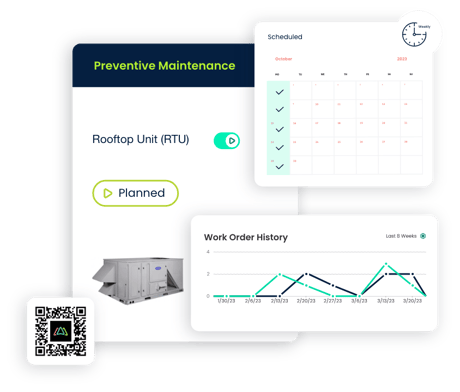
Examples include:
|
School equipment |
Preventive maintenance task |
Example frequency |
|
HVAC systems |
Inspect filters, belts, and components |
Monthly |
|
Plumbing systems |
Inspect leaks and fixtures |
Quarterly |
|
Emergency lighting |
Perform required inspections |
According to applicable standards |
|
Cafeteria equipment |
Inspect and service equipment |
Monthly |
|
Playground equipment |
Inspect wear and safety hazards |
According to site policy |
|
Building doors |
Inspect locks and hinges |
Quarterly |
These are illustrative schedules. Actual inspection intervals must follow manufacturer recommendations, local regulations, and school district policies. Automated maintenance scheduling helps teams plan work around school hours, holidays, and summer breaks.
4. Track Equipment Maintenance History
School districts manage equipment across classrooms, libraries, cafeterias, gymnasiums, and mechanical rooms. Without organized maintenance records, identifying recurring equipment problems becomes difficult. Click Maint's equipment maintenance tracking features help education facility managers maintain asset records, including maintenance history and completed work orders.
For example, if an HVAC unit experiences repeated breakdowns, the maintenance manager reviews its repair history before deciding whether further repairs or replacement are appropriate. This supports more informed maintenance budgeting and capital planning.
5. Manage Campus Maintenance From Mobile Devices
Maintenance technicians spend most of their time moving between classrooms, mechanical rooms, athletic facilities, and school buildings.
Click Maint's mobile application helps technicians access assigned work orders and update maintenance activities while working in the field.
QR code scanning simplifies equipment identification and access to maintenance information.
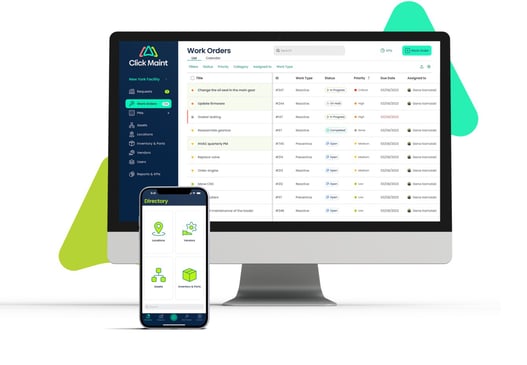
For school district facilities, mobile access reduces unnecessary administrative work and improves communication between maintenance teams.
6. Locate Equipment With Interactive Floor Plans
Large educational facilities contain equipment spread across multiple buildings and floors.
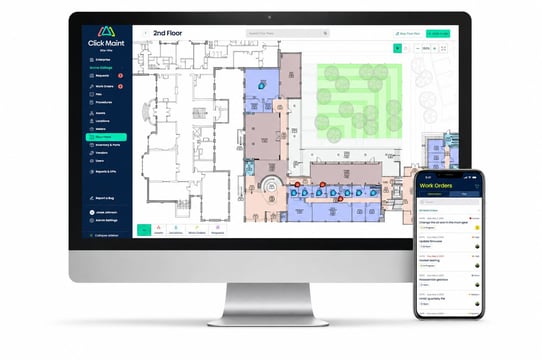
Click Maint's interactive floor plans help maintenance teams identify equipment locations.
This is especially useful for maintenance employees working across several school campuses.
For example, a technician assigned to inspect a rooftop HVAC unit reviews the equipment location and related maintenance information before beginning the task.
7. Track Spare Parts and Maintenance Inventory
School maintenance teams rely on replacement parts such as filters, light fixtures, plumbing components, belts, motors, and electrical supplies.
Click Maint includes inventory management capabilities that help teams organize spare parts and monitor stock levels.
This supports maintenance planning and reduces delays caused by missing replacement components.
See How Click Maint Simplifies School Maintenance
Explore maintenance requests, preventive maintenance schedules, work orders, and equipment tracking in one platform.
How Does Education Facility Management Software Improve Multi-Campus Maintenance?
School districts manage several buildings with different maintenance requirements.One district might oversee elementary schools, middle schools, high schools, administrative offices, and athletic facilities.
Without centralized maintenance software, tracking repair requests across locations becomes difficult.
Click Maint helps school maintenance leaders organize maintenance activities by facility, building, and equipment.
Benefits for School District Facilities
Centralized maintenance visibility: District maintenance leaders review work orders and maintenance activities across school facilities.
Improved technician coordination: Maintenance supervisors assign repairs based on priorities and available resources. Consistent preventive maintenance: Equipment servicing follows planned schedules across facilities.
Better maintenance documentation: Teams maintain records of completed repairs, inspections, and equipment servicing. Stronger budget planning: Maintenance histories provide useful information for identifying frequently repaired equipment and recurring maintenance costs.
For school districts with limited maintenance staff, centralized work order management helps teams prioritize urgent repairs while maintaining routine preventive maintenance.
How Does School Work Order Software Help Reduce Maintenance Costs?
Education facility managers must maintain school buildings while working within approved budgets. Reactive maintenance creates unexpected repair expenses and disrupts school operations.
Preventive maintenance software helps maintenance teams identify equipment problems before they develop into major failures. For example, replacing an HVAC filter during scheduled servicing is generally less disruptive than responding to an unexpected system breakdown during school hours. Maintenance management software also helps reduce administrative work associated with manual request tracking.
Example: School District Maintenance Savings
Consider a hypothetical school district managing eight facilities.
|
Maintenance metric |
Illustrative annual cost |
|
Reactive equipment repairs |
$45,000 |
|
Emergency maintenance labor |
$20,000 |
|
Administrative coordination |
$15,000 |
|
Total |
$80,000 |
|
Assumed cost reduction |
15% |
|
Potential annual savings |
$12,000 |
These figures are hypothetical and do not represent verified Click Maint customer results. Actual savings depend on facility conditions, maintenance practices, and software adoption.
What Should Education Facility Managers Look for in School Maintenance Software?
Before choosing education facility management software, school districts should evaluate the following requirements.
|
Evaluation criteria |
Why it matters |
|
Easy-to-use interface |
Reduces technician training time |
|
Maintenance request portal |
Simplifies repair submissions |
|
Preventive maintenance software |
Helps prevent missed equipment servicing |
|
Work order management |
Improves task visibility and accountability |
|
Multi-building asset tracking |
Organizes maintenance across campuses |
|
Mobile access |
Supports technicians working in the field |
|
QR code scanning |
Simplifies equipment identification |
|
Maintenance reporting |
Supports budget and performance reviews |
|
Affordable pricing |
Fits school district maintenance budgets |
|
Implementation support |
Helps teams transition from existing processes |
Education facility managers should also review user permissions, accessibility, data security, and procurement requirements before selecting a platform.
How Easy is it to Implement Click Maint in a School District?
Implementing school maintenance software should follow a clear process that supports maintenance teams and school staff.
- Identify Maintenance Requirements
Review existing work order processes, maintenance challenges, school locations, and equipment records. - Schedule a Click Maint Demonstration
Explore work order management, preventive maintenance scheduling, mobile access, and asset tracking. - Organize School Facilities and Assets
Prepare building lists, equipment information, maintenance schedules, and technician responsibilities. - Configure Maintenance Workflows
Establish maintenance request categories, work order priorities, recurring inspections, and user permissions. - Train Maintenance Staff
Introduce technicians, maintenance supervisors, and requesters to the new system. - Launch and Monitor Performance
Begin tracking maintenance requests, completed work orders, overdue tasks, and preventive maintenance completion.
A phased implementation helps school districts test workflows before expanding maintenance management software across additional facilities.
How Should Schools Measure Maintenance Performance?
Education facility managers should track maintenance KPIs to evaluate repair efficiency and preventive maintenance effectiveness.
Key performance indicators include:
- Average work order response time: Measures how quickly maintenance teams respond to reported issues.
- Work order completion rate: Tracks the percentage of maintenance tasks completed.
- Preventive maintenance completion rate: Measures completion of scheduled inspections and servicing.
- Overdue work orders: Identifies repairs requiring follow-up.
- Maintenance cost per facility: Helps school district leaders understand spending across campuses.
- Recurring equipment failures: Identifies assets requiring additional maintenance or replacement.
Tracking these indicators provides clearer visibility into campus maintenance performance.
Why Choose Click Maint CMMS for Schools and School Work Order Management?
Click Maint offers affordable, easy-to-use CMMS for schools, colleges, universities, and school districts looking to simplify maintenance operations, reduce equipment downtime, and improve facility management.
With Click Maint's school work order management software, education facility managers and maintenance teams gain access to essential features, including:
- Work Order Management: Create, assign, prioritize, and track school maintenance requests in one centralized system.
- Preventive Maintenance: Schedule routine inspections and maintenance for HVAC systems, plumbing, electrical equipment, and other school assets.
- Asset Management: Track school equipment, maintenance history, and repair activities.
- Mobile Access and QR Codes: Help maintenance technicians access work orders and equipment information directly from their mobile devices.
- Maintenance Request Portal: Simplify maintenance requests from teachers, administrative staff, and other school employees.
- Interactive Floor Plans: Locate equipment and manage maintenance activities across classrooms, buildings, and campuses.
Click Maint School Maintenance Case Study: Palestine CUSD #3
Palestine Community Unit School District #3 is featured in Click Maint's education customer case studies, highlighting the use of maintenance management software in a school district environment.
The case study provides a real-world example for education facility managers exploring CMMS for schools to improve work order organization, maintenance coordination, and visibility into school facility operations.
School districts evaluating digital maintenance solutions will find this customer story relevant when considering a transition from spreadsheets and paper-based maintenance tracking.
Read the Customer Story: Palestine CUSD #3 Case Study
Click Maint Recognition
Click Maint has received recognition across software review platforms, including Capterra and Software Advice, and has been featured by CIOReview.
These resources provide additional information for education facility managers evaluating software providers.
Read Click Maint's CIOReview Feature
Frequently Asked Questions
What is the best education facility management software for schools?
The right education facility management software depends on district size, maintenance requirements, budget, and implementation resources. Click Maint is worth evaluating for schools seeking easy-to-use work order management, preventive maintenance, and equipment tracking.
How does school work order software improve campus maintenance?
School work order software centralizes maintenance requests, assigns repairs to technicians, tracks work order status, and maintains equipment service records. This improves visibility and coordination across campus maintenance teams.
Does Click Maint support preventive maintenance for schools?
Yes. Click Maint provides preventive maintenance scheduling tools that help school maintenance teams organize recurring equipment inspections, HVAC servicing, and other planned maintenance activities.
How do school districts manage maintenance across multiple buildings?
School districts use centralized maintenance management software to organize work orders, equipment records, maintenance schedules, and repair activities across multiple facilities.
What is the difference between school work order software and CMMS?
School work order software focuses on maintenance requests and repair tracking. CMMS includes work order management along with preventive maintenance scheduling, equipment maintenance records, inventory management, and reporting.
Is Click Maint suitable for small school maintenance teams?
Click Maint is designed for maintenance teams seeking straightforward, affordable maintenance management software. Its work order, asset tracking, and preventive maintenance features make it relevant for smaller school districts and education facilities.
Conclusion: Improve Campus Maintenance With Click Maint
Managing maintenance across schools and educational facilities requires organized workflows, clear communication, and consistent preventive maintenance.
Education facility management software helps maintenance leaders reduce missed requests, improve work order visibility, and maintain equipment records.
For schools and districts seeking an affordable, easy-to-use solution, Click Maint offers essential maintenance management capabilities in one platform.
By centralizing maintenance requests, preventive maintenance schedules, and equipment tracking, school districts improve daily maintenance coordination and support reliable learning environments.
Ready to Simplify School and Campus Maintenance?
Make School Maintenance Easier With Click Maint. Give your maintenance team a centralized system for managing campus requests, preventive maintenance, and equipment repairs.

TABLE OF CONTENTS






