


Reena Sommer | 23 Oct 2026


Manufacturing maintenance teams need reliable software to manage equipment breakdowns, schedule preventive maintenance, track spare parts, and reduce production downtime. Choosing the right computerized maintenance management system (CMMS) is an important decision for plant managers, maintenance supervisors, and operations directors.
Two solutions worth comparing are Click Maint and MaintainX. Both offer manufacturing maintenance management software, but their pricing structures, advanced capabilities, and target customers differ.
Click Maint focuses on affordable, easy-to-use CMMS software for small and growing maintenance teams. MaintainX offers maintenance and operations management tools with additional capabilities for complex industrial environments.
This comparison examines features, pricing, usability, manufacturing applications, and a real customer case study to help manufacturers in the USA and Canada select the right CMMS.

Click Maint vs MaintainX: Quick Comparison
|
Comparison |
Click Maint |
MaintainX |
|
Best suited for |
Small and growing manufacturers |
Mid to enterprise manufacturers |
|
Starting paid price |
$35/user/month |
$65+/user/month, annually billed |
|
Work order management |
Yes |
Yes |
|
Request Portal |
Yes |
Yes |
|
Preventive maintenance |
Yes |
Yes |
|
Asset management |
Yes |
Yes |
|
Spare parts inventory |
Included in professional plan |
Yes |
|
Mobile app |
iOS and Android |
iOS and Android |
|
Interactive floor plans |
Yes |
No |
|
QR code workflows |
Yes |
Yes |
|
Maintenance checklists |
Yes |
Yes |
|
Maintenance reporting |
Yes |
Yes |
|
Meter-based maintenance |
Yes |
Yes |
|
IoT sensor integrations |
No |
Enterprise plan |
|
Purchase Orders |
Coming Soon |
Yes |
|
SSO |
Yes |
Enterprise plan |
|
API |
Yes |
Yes |
|
Free trial |
Yes |
Yes |
|
Primary advantage |
Affordability and simplicity |
Advanced industrial workflows |
Pricing and feature availability reflect published vendor information reviewed in October 2026. Confirm subscription terms and product capabilities before purchasing.
1. What Is the Difference Between Click Maint and MaintainX?
The primary difference between Click Maint and MaintainX is how each platform approaches maintenance management.
Click Maint: Affordable CMMS Software for Manufacturing Teams
Click Maint is maintenance management software designed to simplify daily maintenance operations.
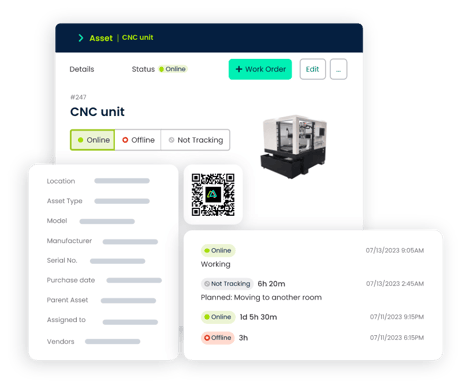
Manufacturing maintenance managers use Click Maint to organize work orders, schedule preventive maintenance, track equipment history, monitor inventory, and manage maintenance costs.
Key capabilities include:
- Digital work order creation and assignment
- Automated preventive maintenance scheduling
- Equipment and asset maintenance history
- Spare parts and inventory management
- Mobile access and QR code scanning
- Maintenance requests and approval workflows
- Labor, parts, and maintenance cost tracking
- Reporting and maintenance dashboards
Click Maint is especially relevant for manufacturers transitioning from paper records, spreadsheets, or a complicated maintenance management system.
MaintainX: Maintenance and Operations Management Software
MaintainX provides maintenance and operational workflows for industrial businesses.
Its capabilities include work orders, preventive maintenance, asset management, equipment inspections, digital procedures, parts inventory, and team communication.
Higher-tier subscriptions introduce features such as meter-based maintenance, advanced analytics, purchasing, enterprise reporting, and IoT sensor integrations.
MaintainX is worth evaluating for manufacturers with extensive industrial maintenance requirements and larger operational budgets.
2. Click Maint vs MaintainX: Work Order Management
Work order management is essential for manufacturing facilities. Equipment failures, inspections, repairs, and maintenance requests need clear assignments and accurate records.
Click Maint Work Order Software
Click Maint helps maintenance teams create, assign, prioritize, and complete digital work orders. Maintenance managers track:
- Equipment requiring repairs
- Assigned maintenance technicians
- Work order priority and status
- Labor hours and maintenance expenses
- Spare parts used during repairs
- Completed tasks and equipment history
Technicians access work orders through mobile devices, update progress, attach photos, and document completed repairs. Click Maint’s interactive floor plan feature allows users to view and manage work orders from digital floor plans.
For small manufacturing teams, this provides a straightforward way to replace paper work orders and improve accountability.
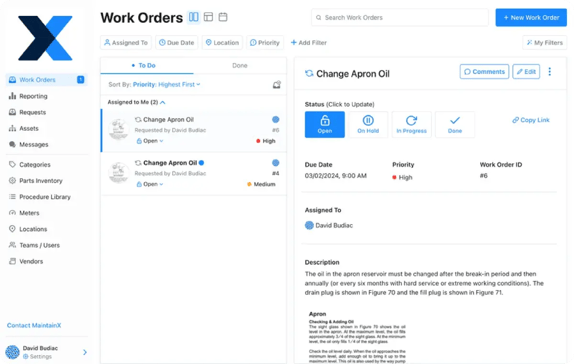
MaintainX Work Order Software
MaintainX provides digital work order management with mobile communication, standardized procedures, and task tracking.
Its work order functionality supports structured maintenance processes across manufacturing departments.
Verdict: Both solutions handle manufacturing work orders. Click Maint is a strong choice for teams prioritizing straightforward workflows and affordable pricing. MaintainX deserves consideration when standardized procedures and advanced operational coordination are central requirements.
3. Preventive Maintenance: Which CMMS is Better?
Preventive maintenance software helps manufacturing facilities schedule equipment inspections, lubrication, cleaning, servicing, and planned repairs.
A structured preventive maintenance program supports equipment reliability and reduces dependence on emergency maintenance.
Click Maint Preventive Maintenance
Click Maint helps maintenance managers automate recurring maintenance schedules.
Teams schedule maintenance activities by hourly, daily, weekly, monthly, and annual intervals. For example, a manufacturing facility could schedule:
- Daily conveyor inspections
- Weekly machine lubrication
- Monthly air compressor maintenance
- Quarterly production equipment servicing
- Annual electrical safety inspections
- Meter based PMs are also available
Click Maint brings upcoming maintenance tasks, completed work orders, and equipment records together in one system.
MaintainX Preventive Maintenance
MaintainX supports recurring preventive maintenance and advanced maintenance scheduling. Its Premium subscription includes meter-based maintenance, which is useful for equipment serviced according to operating hours or usage measurements.
Verdict: Both Click Maint and MaintainX offer robust preventive maintenance functionality with configurable procedure checklists. MaintainX goes beyond with it’s AI capabilities allowing users to easily populate procedures for PMs by uploading manuals. Click Maint is actively working on a similar feature and is planned to be released early 2027.
4. Equipment and Asset Management
Manufacturing facilities depend on machinery, production lines, conveyors, motors, compressors, and other critical equipment. Without accurate maintenance records, technicians spend additional time identifying previous repairs and recurring equipment problems.
Click Maint Asset Management
Click Maint centralizes equipment records, including:
- Asset information and locations
- Previous maintenance activities
- Repair history
- Preventive maintenance schedules
- Work orders associated with equipment
- Maintenance costs and downtime information
- View and manage assets from interactive floor plans
Its mobile and QR code functionality helps technicians retrieve equipment information while working on the plant floor.
MaintainX Asset Management
MaintainX also provides asset management and maintenance history tracking.
Its higher-tier offerings include additional asset reliability, reporting, and enterprise capabilities.
Verdict: Click Maint offers the essential equipment management functionality needed by many small and medium-sized manufacturers. MaintainX offers additional options for complex asset management requirements.
5. Spare Parts and Inventory Management
A manufacturing maintenance team needs the right replacement parts available when equipment requires servicing.
Poor inventory visibility creates unnecessary purchasing delays, extended equipment downtime, and inaccurate maintenance expenses.
Click Maint provides inventory management functionality within its Professional plan. Maintenance managers track spare parts, inventory quantities, and maintenance-related materials.
MaintainX provides parts inventory management through its Premium and Enterprise plans. They also offer purchase order capabilities allowing users to submit purchase orders and create workflows for approvals.
Verdict: Click Maint offers an attractive value proposition for manufacturers requiring work orders, preventive maintenance, and spare parts inventory within one subscription.
6. Click Maint vs MaintainX Pricing for Manufacturing Maintenance
Software pricing is an important consideration for manufacturers with limited maintenance budgets.
Click Maint Pricing
Click Maint lists its Professional plan at $35 USD per user per month, with annual and monthly subscription options.
The plan includes core maintenance functionality such as work orders, preventive maintenance, asset management, inventory tracking, mobile access, and reporting.
Click Maint also offers a 30-day free trial.
MaintainX Pricing
MaintainX publishes the following pricing:
|
Plan |
Price per user/month |
Billing |
|
Basic |
Free |
Free plan |
|
Essential |
$20 |
Annual |
|
Premium |
$65 |
Annual |
|
Enterprise |
Custom |
Quote required |
The Essential plan covers basic recurring maintenance workflows. Premium adds features such as parts inventory, purchasing, meter-based maintenance, and advanced analytics.
Estimated Annual CMMS Cost
|
Number of users |
Click Maint at $35 |
MaintainX Premium at $65 |
|
5 |
$2,100 |
$3,900 |
|
10 |
$4,200 |
$7,800 |
|
15 |
$6,300 |
$11,700 |
|
20 |
$8,400 |
$15,600 |
At these published rates, a 10-user manufacturing maintenance team would spend approximately $3,600 less per year with Click Maint than with MaintainX Premium.
These estimates compare subscription fees, not identical feature packages. Taxes, implementation services, additional requirements, and applicable discounts are excluded.
Stop Paying More Than Your Maintenance Team Needs
Compare your current CMMS expenses with Click Maint's affordable maintenance management software. Explore the features, estimate your costs, and see whether switching makes financial sense for your manufacturing facility.

7. Real Manufacturing Case Study: How TS Manufacturing Improved Maintenance With Click Maint
A real manufacturing example helps demonstrate the importance of selecting CMMS software that employees find practical and easy to use.
About TS Manufacturing
TS Manufacturing is a Canadian manufacturer located in Lindsay, Ontario.
The company specializes in automated material handling equipment and custom-engineered industrial systems.
Its manufacturing operations support industries including lumber processing, mining, aggregate handling, and biomass.
Company profile:
- Industry: Manufacturing
- Location: Lindsay, Ontario, Canada
- Company size: Approximately 200 employees
- Click Maint customer since: October 2024
The Challenge: Paper-Based Maintenance Management
Before implementing Click Maint, TS Manufacturing managed preventive maintenance schedules, equipment history, and technician notes using paper binders and handwritten records.
This created several challenges:
- Finding historical equipment maintenance records was time-consuming.
- Technicians depended on paper documentation and coworkers' knowledge.
- Preventive maintenance tracking required manual effort.
- Sharing maintenance information between employees was difficult.
- Identifying previous repairs and recurring problems required additional investigation.
The company needed a centralized system to improve maintenance visibility and preserve equipment knowledge.
The Solution: Implementing Click Maint
TS Manufacturing selected Click Maint to replace its paper-based maintenance process with a digital maintenance management system. The platform brought equipment history, maintenance records, work orders, preventive maintenance schedules, and technician notes into one location.
Instead of searching through multiple binders, technicians gained direct access to previous repairs and maintenance information. The Click Maint team also supported the implementation and onboarding process.
The Results: Better Maintenance Organization
Following implementation, TS Manufacturing reported several improvements:
Faster access to maintenance history: Technicians retrieve previous equipment repairs and service information more efficiently.
Improved preventive maintenance tracking: Maintenance managers monitor upcoming tasks and completed work within one system.
Less administrative work: Digital maintenance records replace much of the manual effort previously spent managing paperwork.
Better maintenance knowledge sharing: Equipment information remains accessible when responsibilities move between technicians.
Improved inventory visibility: Maintenance-related materials and resources are easier to organize and track.
Customer Testimonial
"Click Maint has transformed the way we manage maintenance, saving us both time and money."
— Desmon Dunn, Millwright Supervisor, TS Manufacturing
The TS Manufacturing experience demonstrates how an easy-to-use CMMS helps manufacturers modernize maintenance processes without introducing unnecessary complexity.
Read the Full TS Manufacturing Case Study →
8. Which CMMS is Easier to Implement?
Implementation is an important consideration when selecting manufacturing maintenance software. A CMMS needs to fit the daily routines of technicians, supervisors, and plant managers.
Manufacturers should evaluate:
- How quickly technicians learn to create and complete work orders
- Whether existing equipment records are easy to import
- How preventive maintenance schedules are configured
- Whether technicians use the mobile application effectively
- How much onboarding and administrator training is required
Click Maint emphasizes ease of use, straightforward configuration, and accessible customer support. MaintainX provides implementation and support options, with services and account management varying by subscription.
For manufacturers replacing spreadsheets or paper records, Click Maint offers a practical starting point. For more complex industrial deployments, both vendors should be evaluated against the required implementation scope.
9. Which Software Should Small Manufacturers Choose?
Small manufacturing companies usually prioritize affordability, fast adoption, and essential maintenance functionality. Click Maint is particularly relevant when the maintenance department needs:
- A centralized work order system
- Preventive maintenance scheduling
- Equipment maintenance records
- Spare parts inventory
- Mobile access for technicians
- Maintenance cost tracking
- Straightforward reporting
For these requirements, Click Maint offers a strong combination of functionality and value.
MaintainX is another option for smaller teams, particularly those seeking a free entry-level plan or mobile-first operational workflows. The right decision depends on the actual features needed rather than the number of features advertised.
10. When Should Manufacturers Choose MaintainX Instead?
MaintainX deserves consideration when a manufacturing organization requires advanced maintenance and operations capabilities. Examples include:
- Extensive standardized procedures
- Advanced maintenance analytics
- IoT sensor integrations
- Enterprise-wide maintenance coordination
- Complex multi-site reporting
- Advanced security and administrative controls
- Company has the budget to support the higher cost
Manufacturers should confirm which MaintainX subscription includes each required capability.
For facilities that need core CMMS functionality without advanced enterprise features, Click Maint offers a more economical alternative to MaintainX Premium at the published prices.
11. How Should Manufacturing Maintenance Managers Compare Both Systems?
Before selecting maintenance management software, manufacturing teams should complete a practical evaluation.
Step 1: Identify maintenance problems. Review equipment downtime, overdue preventive maintenance, work order delays, missing parts, and maintenance costs.
Step 2: Define essential requirements. Determine whether the plant needs work orders, preventive maintenance, asset management, inventory tracking, mobile access, and reporting.
Step 3: Compare subscription costs. Calculate the total cost for maintenance managers, supervisors, and technicians.
Step 4: Test real maintenance workflows. Create an emergency work order, schedule recurring maintenance, review equipment history, and record spare parts consumption.
Step 5: Evaluate implementation and support. Compare onboarding assistance, data migration requirements, employee training, and customer support.
Step 6: Calculate potential ROI. Estimate administrative time savings, reduced maintenance delays, improved preventive maintenance completion, and better parts inventory control.
Explore the Click Maint Manufacturing CMMS Solution →
Frequently Asked Questions
Is Click Maint better than MaintainX for manufacturing?
Click Maint is a strong option for small and growing manufacturers prioritizing affordable pricing, easy implementation, preventive maintenance, work orders, and spare parts tracking. MaintainX is worth considering for manufacturers requiring advanced procedures, meter-based maintenance, and enterprise capabilities.
Is Click Maint a more affordable alternative to MaintainX?
Click Maint's published $35 USD per-user monthly rate is lower than MaintainX Premium's $65 rate under annual billing. However, MaintainX also offers a free Basic plan and a $20 Essential plan. Compare the subscription tier that includes your required features.
Which CMMS is best for small manufacturing maintenance teams?
Small manufacturing teams should prioritize software that supports their essential maintenance workflows without unnecessary complexity. Click Maint is a competitive option for teams seeking work orders, preventive maintenance, inventory tracking, and asset management in one system.
Does Click Maint support preventive maintenance for manufacturing equipment?
Yes. Click Maint supports recurring preventive maintenance schedules, equipment maintenance history, work order tracking, checklists, and maintenance notifications.
Does MaintainX offer advanced manufacturing maintenance features?
Yes. MaintainX offers capabilities such as condition based maintenance, IoT sensor integration, purchasing, robust AI capabilities, and enterprise integrations through qualifying subscription plans.
Can Canadian manufacturers use Click Maint?
Yes. Click Maint supports Canadian manufacturing organizations. TS Manufacturing in Lindsay, Ontario, is an example of a Canadian manufacturer that adopted Click Maint to digitize maintenance records and improve preventive maintenance management.
How much does CMMS software cost for 10 manufacturing users?
At the published rates used in this comparison, Click Maint costs approximately $4,200 USD annually for 10 users, while MaintainX Premium costs approximately $7,800 USD annually. Final costs depend on billing terms, services, and contract requirements.
Final Verdict: Click Maint vs MaintainX for Manufacturing Maintenance
Both Click Maint and MaintainX provide useful manufacturing maintenance management functionality.
Choose Click Maint when your priorities are affordable CMMS software, easy adoption, preventive maintenance, equipment history, inventory tracking, and everyday maintenance organization. Click Maint is also offers interactive floor plans which is an added benefit for manufacturing plants with larger sites.
Choose MaintainX when your operation requires advanced industrial maintenance workflows, specialized integrations, or enterprise capabilities that justify a higher subscription cost.
For small and growing manufacturers in the USA and Canada, Click Maint offers a practical alternative to MaintainX Premium, especially when the goal is to improve maintenance performance without increasing software complexity or expenses.
Ready to Simplify Manufacturing Maintenance and Reduce CMMS Costs?
Stop managing maintenance through scattered spreadsheets, paper records, and disconnected systems.
See how Click Maint brings work orders, preventive maintenance, equipment history, spare parts, and maintenance reporting together in one easy-to-use platform.
TABLE OF CONTENTS






