



Reena Sommer | 22 Sep 2026


General managers are responsible for keeping operations productive, controlling costs, supporting employees, and making sure equipment and facilities are ready when needed. Maintenance plays an important role in all of these areas.
When maintenance relies on spreadsheets, paper forms, emails, and verbal requests, general managers lack real-time visibility into work order status, equipment readiness, and maintenance backlogs. Work orders get delayed, preventive maintenance tasks are missed, equipment failures are more frequent and disrupt operations, and maintenance costs spiral out of control. A Computerized Maintenance Management System (CMMS) bring these activities into one place.
But how do you identify the Best CMMS for your organization?
This General Manager CMMS Checklist explains what to look for when comparing top CMMS solutions and how Click Maint can help organizations manage work orders, preventive maintenance, assets, equipment, inventory, and maintenance requests.
What is a General Manager CMMS Checklist?
A General Manager CMMS Checklist is a practical framework for evaluating whether maintenance software provides the visibility, control, and functionality an organization needs.
GMs don’t need to manage every maintenance task themselves. Instead, they need visibility into questions like:
- What equipment problems are affecting operations?
- Are urgent work orders being completed?
- Is preventive maintenance happening on schedule?
- Which assets require frequent repairs?
- Where is the maintenance budget being spent?
- Are technicians waiting for spare parts?
- Is the maintenance backlog increasing?
- Which equipment is creating the most downtime?
The Best CMMS should make it easier to answer these questions without forcing managers to search through multiple spreadsheets, emails, or paper records.
General Manager Checklist for Choosing the Best CMMS
Use the following checklist when comparing CMMS software for your organization.
1. Is the CMMS Easy to Use?
☐ Simple interface
☐ Easy work order creation
☐ Fast technician onboarding
☐ Clear navigation
☐ Mobile-friendly workflows
☐ Minimal administrative complexity
Ease of use should be one of the first considerations when comparing top CMMS platforms.
Many CMMS software solutions have hundreds of features, but those features provide limited value if employees find the system difficult to use. They also come at extra cost, and if not needed or unused is a waste of financial resources.
General managers should consider how easily maintenance technicians, supervisors, maintenance managers, and other employees can complete common tasks.
Click Maint is designed to simplify everyday maintenance management and help teams organize their maintenance work without unnecessary complexity.
2. Can It Centralize Work Orders?
☐ Create work orders
☐ Assign work to technicians
☐ Set priorities
☐ Track work order status
☐ Add technician notes
☐ Review completed work
☐ Maintain work order history
Work order management is one of the core functions to consider when looking for the Best CMMS.
Without a centralized process, maintenance work can arrive through phone calls, emails, text messages, paper forms, and verbal requests.
That creates opportunities for important work to be forgotten or delayed.
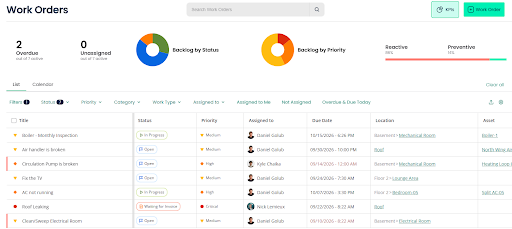
Click Maint Work Order Software helps maintenance teams organize work orders in one system so managers can see what needs attention, what is being worked on, and what has been completed.
3. Does It Support Preventive Maintenance?
☐ Schedule recurring maintenance
☐ Track upcoming PM tasks
☐ Identify overdue maintenance
☐ Assign preventive maintenance
☐ Document completed work
☐ Maintain PM history
A general manager should not have to wait for equipment to break before maintenance begins.
Preventive maintenance helps teams inspect and service equipment before problems become larger failures.
Click Maint Preventive Maintenance Software helps organizations organize recurring maintenance activities and create a more proactive maintenance program.
Moving from reactive repairs toward planned maintenance can help organizations improve equipment reliability and reduce avoidable operational disruptions.
4. Can It Manage Assets and Equipment?
☐ Create asset records
☐ Maintain equipment information
☐ Review maintenance history
☐ Connect work orders to assets
☐ Track recurring equipment problems
☐ Store useful maintenance information
General managers need to know which assets support operations and which ones are becoming maintenance problems.
A top CMMS should make equipment information easier to access.
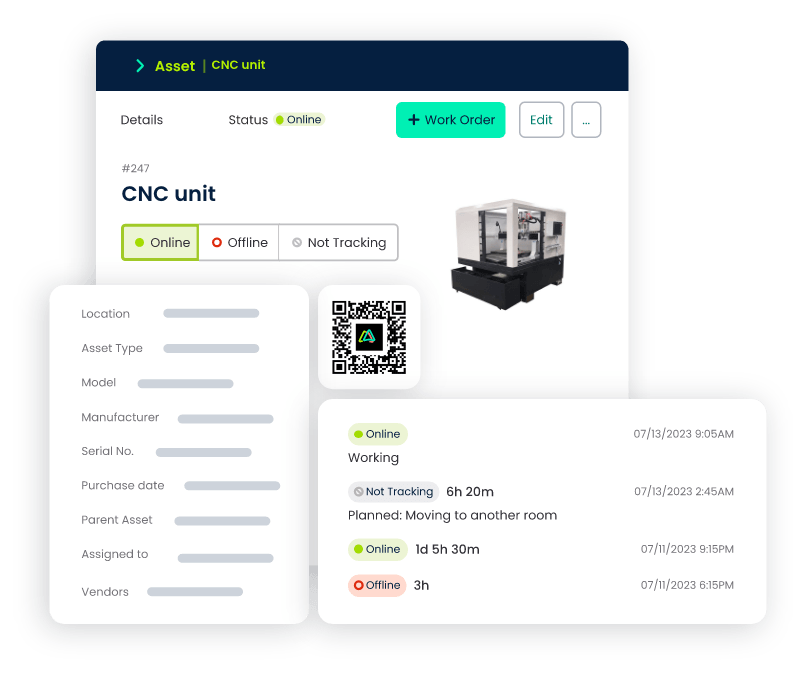
With Click Maint, maintenance teams can organize asset and equipment information alongside maintenance activity.
This gives teams better context when diagnosing equipment problems and helps management identify assets that require repeated attention.
5. Does it Help Reduce Equipment Downtime?
☐ Identify critical equipment issues
☐ Prioritize urgent repairs
☐ Schedule preventive maintenance
☐ Review recurring failures
☐ Improve repair coordination
☐ Maintain equipment history
Unexpected equipment downtime can interrupt production, delay services, reduce productivity, and create additional costs.
The Best CMMS should support a more organized approach to preventing and responding to equipment problems.
Click Maint helps teams centralize work orders, preventive maintenance, and equipment records so maintenance problems can be identified and addressed more efficiently.
6. Can Employees Submit Maintenance Requests Easily?
☐ Centralized maintenance requests
☐ Clear problem descriptions
☐ Location information
☐ Request prioritization
☐ Work order follow-up
Employees are often the first people to notice maintenance problems.
A leaking pipe, damaged door, unusual equipment noise, broken light, or safety concern may be reported long before a maintenance technician discovers it.
A CMMS can provide a structured process for capturing these requests.
With Click Maint, organizations can organize maintenance requests and turn reported issues into actionable maintenance work.
7. Does the CMMS Support Parts and Inventory Management?
☐ Track maintenance parts
☐ Review available inventory
☐ Identify low-stock items
☐ Prepare parts for planned maintenance
☐ Reduce unnecessary inventory
☐ Improve spare-parts visibility
A maintenance technician may be ready to repair an asset but unable to complete the work because a critical part is unavailable.
On the other hand, keeping excessive spare parts in storage ties up money.
The Best CMMS should help maintenance teams improve visibility into parts and inventory.
Click Maint Inventory Management Software can help teams organize maintenance inventory and support better planning for upcoming repairs and preventive maintenance.
General Manager Daily CMMS Checklist
Once a CMMS has been implemented, general managers can use a short daily checklist to maintain visibility without becoming involved in every maintenance task.
Daily Checks
☐ Review critical equipment problems
☐ Check urgent work orders
☐ Identify major overdue work
☐ Review operational issues caused by maintenance
☐ Check high-priority maintenance requests
☐ Confirm critical repairs are progressing
☐ Review significant downtime events
The purpose is not to micromanage the maintenance team.
Instead, general managers should focus on maintenance issues that can affect operations, customers, employees, safety, costs, or business performance.
Weekly General Manager CMMS Checklist
Weekly reviews provide an opportunity to identify trends before they become larger problems.
☐ Review work order backlog
☐ Check preventive maintenance completion
☐ Identify recurring equipment failures
☐ Review critical asset problems
☐ Check delayed repairs
☐ Identify work waiting for spare parts
☐ Review major maintenance requests
☐ Discuss operational risks with maintenance leaders
A growing maintenance backlog or repeated failure of the same asset may indicate that additional action is needed.
A CMMS gives general managers and maintenance leaders a shared source of maintenance information for these discussions.
Monthly General Manager CMMS Checklist
Monthly reviews should focus more on performance, cost, and long-term improvement.
☐ Review preventive versus reactive maintenance
☐ Identify high-maintenance assets
☐ Review recurring equipment failures
☐ Evaluate work order trends
☐ Review maintenance costs
☐ Identify major downtime causes
☐ Review spare-parts requirements
☐ Identify opportunities for preventive maintenance
☐ Review equipment repair versus replacement needs
☐ Set maintenance improvement priorities
The goal is to use maintenance information to support better operational decisions.
Best CMMS Features for General Managers
When comparing the Best CMMS platforms, general managers should focus on features that solve real operational problems.
|
CMMS Feature |
Why It Matters to General Managers |
|
Work Order Management |
Provides visibility into maintenance work |
|
Preventive Maintenance |
Helps reduce reliance on reactive repairs |
|
Asset Management |
Organizes equipment information and history |
|
Equipment Maintenance |
Supports equipment reliability |
|
Maintenance Requests |
Centralizes reported maintenance problems |
|
Inventory Management |
Improves spare-parts visibility |
|
Mobile Access |
Helps technicians manage work in the field |
|
Maintenance History |
Provides context for repair decisions |
|
Reporting |
Helps managers identify maintenance trends |
|
Multi-Location Management |
Supports organizations with multiple facilities |
The right feature set depends on the organization's size, industry, assets, maintenance team, and operational requirements.
Best CMMS vs. Top CMMS: What Should General Managers Actually Compare?
Searching for the Best CMMS or top CMMS can produce dozens of software options.
Rather than choosing software based only on rankings or the number of features advertised, general managers should compare solutions against their organization's actual requirements.
Ask these questions:
Is it easy to use?
Technicians and managers need to be comfortable using the system consistently.
Does it solve our biggest maintenance problems?
Identify whether work orders, downtime, preventive maintenance, inventory, asset records, or another issue is the primary challenge.
Can we implement it without unnecessary complexity?
A lengthy implementation can delay results and make adoption harder.
Can our maintenance team use it in their normal workflow?
CMMS software should support maintenance work rather than create additional administrative work.
Can it provide useful maintenance visibility?
General managers should be able to understand important maintenance trends without reviewing every individual task.
Does it fit our budget?
The most expensive CMMS is not automatically the best CMMS for every organization.
The goal is to find the best fit between functionality, usability, implementation, and cost.
How Can the Best CMMS Help Reduce Maintenance Costs?
Maintenance costs are influenced by many factors, including equipment condition, asset age, labor, spare parts, contractors, and unexpected failures.
CMMS software can support better cost control by helping organizations:
- Reduce unnecessary reactive maintenance
- Improve preventive maintenance
- Identify recurring equipment problems
- Organize technician work
- Improve spare-parts visibility
- Maintain better equipment histories
- Prioritize maintenance based on operational impact
- Identify assets that require excessive maintenance
CMMS software does not automatically reduce costs simply because it has been installed. The value comes from using better maintenance information and workflows to improve maintenance decisions.
How Can CMMS Help General Managers Reduce Downtime?
Downtime is more than a maintenance problem.
When critical equipment fails, the effects can spread across operations.
Employees may be unable to complete their work. Production can stop. Customers may experience delays. Emergency repairs may be required.
A CMMS helps teams address downtime by improving maintenance organization.
With Click Maint, organizations can use work orders, preventive maintenance, asset records, maintenance history, and other maintenance information to support a more proactive approach.
General managers can also use maintenance data to identify equipment that repeatedly disrupts operations.
General Manager CMMS Implementation Checklist
Choosing software is only the beginning.
Use this checklist when implementing a new CMMS:
☐ Identify maintenance goals
☐ Determine which problems the CMMS should solve
☐ Identify critical assets
☐ Organize asset information
☐ Set up preventive maintenance schedules
☐ Establish work order priorities
☐ Define maintenance request processes
☐ Add important parts and inventory information
☐ Train maintenance employees
☐ Establish consistent work order procedures
☐ Define the maintenance metrics management will review
☐ Review adoption after implementation
☐ Improve workflows based on team feedback
Starting with clear priorities can make CMMS implementation easier and help prevent teams from trying to change every maintenance process at once.
Why Consider Click Maint When Comparing Top CMMS Solutions?
Click Maint is designed to help organizations simplify maintenance management and bring important maintenance activities into a centralized system.
Click Maint can support teams with:
- Work order management
- Preventive maintenance
- Asset management
- Equipment maintenance
- Maintenance requests
- Parts and inventory
- Maintenance records
- Maintenance reporting
For general managers, the benefit is greater visibility.
Instead of relying on separate spreadsheets, paper records, emails, and verbal updates, managers can support a more structured maintenance process.
Organizations evaluating the Best CMMS should consider whether Click Maint's functionality, usability, implementation approach, and pricing align with their maintenance requirements.
General Manager CMMS Checklist Before Buying
Before making a final CMMS decision, ask:
☐ Does it solve our main maintenance problems?
☐ Is it easy for our technicians to use?
☐ Does it provide strong work order management?
☐ Can it automate recurring preventive maintenance?
☐ Can we organize our assets and equipment?
☐ Can employees submit maintenance requests?
☐ Can we manage maintenance inventory?
☐ Can we review equipment maintenance history?
☐ Does it give management useful maintenance visibility?
☐ Can it support our locations and maintenance team?
☐ Is implementation manageable?
☐ Does it fit our budget?
☐ Can the software grow with our organization?
If a CMMS meets these requirements, it deserves further evaluation based on your organization's specific needs.
Frequently Asked Questions About the Best CMMS for General Managers
What is the best CMMS for general managers?
There is no single Best CMMS for every general manager. The right solution depends on the organization's maintenance needs, assets, team size, industry, locations, budget, and required functionality. General managers should compare solutions based on usability, work orders, preventive maintenance, asset management, inventory, reporting, and implementation requirements.
What should a general manager look for in CMMS software?
General managers should look for easy-to-use software that provides work order management, preventive maintenance, asset and equipment management, maintenance requests, inventory management, maintenance history, and useful operational visibility.
What are the most important features of a top CMMS?
Important features of a top CMMS typically include work orders, preventive maintenance scheduling, asset management, maintenance history, inventory management, mobile accessibility, maintenance requests, and reporting.
How does CMMS software help general managers?
CMMS software gives general managers greater visibility into maintenance operations. It can help them understand urgent maintenance problems, equipment reliability, preventive maintenance, downtime, work order backlogs, and recurring asset issues.
Can a CMMS help reduce equipment downtime?
A CMMS can support downtime reduction by improving preventive maintenance, work order prioritization, equipment history, maintenance planning, and identification of recurring equipment problems.
Can CMMS software help control maintenance costs?
CMMS software can help teams identify recurring problems, improve preventive maintenance, organize labor and work orders, improve spare-parts visibility, and make more informed equipment maintenance decisions.
Is Click Maint suitable for general managers?
Click Maint is designed to centralize core maintenance activities such as work orders, preventive maintenance, assets, equipment maintenance, maintenance requests, and inventory. General managers can evaluate these capabilities against their organization's specific requirements.
Find the Right CMMS for Your Organization With Click Maint
Choosing the Best CMMS is not about finding the platform with the longest feature list.
It is about finding software that your maintenance team can use consistently to manage work orders, stay ahead of preventive maintenance, improve equipment reliability, organize maintenance information, and give management better operational visibility.
The General Manager CMMS Checklist provides a practical framework for comparing top CMMS solutions based on the needs of your organization.
Click Maint brings work orders, preventive maintenance, assets, equipment, maintenance requests, inventory, and maintenance records into a centralized maintenance system.
Take the quick 2-minute interactive product tour
TABLE OF CONTENTS






