



Reena Sommer | 21 Sep 2026


Handling a single property presents its own set of challenges, but juggling several buildings, tenants, equipment, service providers, and repair requests is even more challenging for property managers.
Property leaders must maintain facility safety, ensure operational reliability, preserve tenant satisfaction, and keep upkeep expenses in check. Relying on ad-hoc tools like spreadsheets, emails, phone conversations, and paper files often results in essential maintenance items falling through the cracks or suffering delays.
That is where CMMS for property management helps.
A computerized maintenance management system (CMMS) gives property managers and maintenance teams one place to manage work orders, preventive maintenance, assets, parts, maintenance requests, and maintenance records.
Click Maint CMMS software helps property management teams organize maintenance operations and get better visibility into the work happening across their facilities.

What is CMMS for Property Management?
CMMS for property management is software designed to help property managers organize, schedule, track, and document building maintenance activities.
Instead of relying on separate spreadsheets, emails, paper forms, and text messages, property managers can manage maintenance information from one centralized system.
A property management CMMS can help teams manage:
- Maintenance requests
- Work orders
- Preventive maintenance
- Building assets and equipment
- Maintenance schedules
- Spare parts and inventory
- Vendors and contractors
- Labor and maintenance costs
- Maintenance history
- Reports and performance data
For property managers responsible for several buildings or locations, a CMMS can also provide greater visibility into maintenance activities across the property portfolio. Here are seven signs that your property management team may need CMMS software.
1. Maintenance Requests Are Getting Lost or Delayed
One of the clearest signs that you need a CMMS is when maintenance requests are difficult to track.
Tenants, employees, or building occupants may report problems through phone calls, emails, text messages, or conversations with staff.
For example, a tenant might report a leaking faucet by email while another reports a broken light by phone. If these requests are not recorded in one system, maintenance teams can easily overlook them.
Delayed maintenance can lead to unhappy tenants and larger repair problems.
With Click Maint, maintenance requests can be organized and converted into trackable work orders. Maintenance teams can see what needs attention, who is responsible, and the status of each task.
This creates a clearer process from the initial request through completion.
2. Your Team Relies Heavily on Spreadsheets and Paper
Spreadsheets can work when a property portfolio is small and maintenance activity is limited.
But as the number of properties, assets, technicians, and work orders grows, spreadsheets can become difficult to maintain.
Different team members may have different versions of the same spreadsheet. Information can become outdated, and finding historical maintenance records may take valuable time.
Paper-based processes make these challenges even worse.
CMMS software for property management creates a centralized source for maintenance information.
Instead of searching through spreadsheets or filing cabinets, property managers can access work orders, asset records, preventive maintenance schedules, and other maintenance information from a single system.
This makes daily maintenance management more organized and efficient.
3. Emergency Repairs Are Becoming Too Common
Does your maintenance team spend most of its time responding to equipment failures?
If so, your maintenance strategy may be too reactive.
Reactive maintenance means repairing an asset after something has already gone wrong. While some unexpected repairs are unavoidable, relying too heavily on reactive maintenance can increase downtime, disrupt building operations, and create unexpected expenses.
Preventive maintenance helps teams address equipment needs before failures occur.
A CMMS for property management can help schedule recurring preventive maintenance tasks based on dates or maintenance intervals.
For example, property teams may schedule regular maintenance for:
- HVAC systems
- Boilers
- Elevators
- Fire safety equipment
- Emergency lighting
- Pumps
- Generators
- Plumbing systems
- Doors and access systems
- Building equipment
With Click Maint preventive maintenance software, maintenance teams can create recurring maintenance schedules and generate work orders for planned tasks with clearly defined procedure checklists.
Moving from reactive repairs toward planned preventive maintenance can help property managers improve equipment reliability and reduce avoidable disruptions.
4. You Don't Have a Clear Maintenance History for Your Assets
Property managers are responsible for many assets. But can your team quickly answer questions such as:
When was this HVAC unit last serviced?
How many times has this pump been repaired?
What maintenance was completed on this boiler?
How much maintenance has this asset required?
When maintenance records are scattered across spreadsheets, invoices, emails, and paper documents, answering these questions becomes difficult.
CMMS software creates a maintenance history for assets and equipment.
With Click Maint, property management teams can associate work orders and maintenance activities with specific assets. This gives managers better access to past maintenance information when planning future work.
Maintenance history can also help teams identify assets that require frequent repairs and support more informed repair-or-replace discussions.
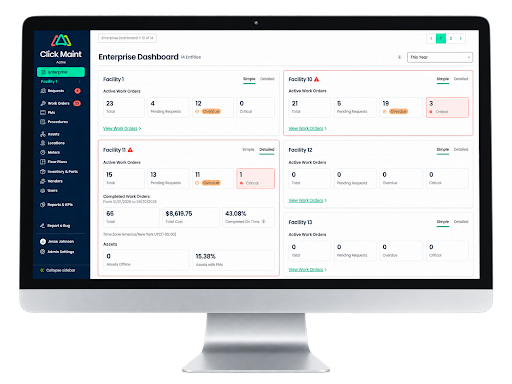
5. Managing Maintenance Across Multiple Properties is Difficult
Managing maintenance for one building can be complicated. Managing several locations makes coordination even harder. Property managers may need to know:
Which locations have open work orders?
Which buildings have overdue preventive maintenance?
Where are technicians spending their time?
Which assets require immediate attention?
Without centralized property maintenance management software, getting this information may require contacting multiple employees or checking several spreadsheets.
A CMMS provides a more structured way to organize maintenance activities across properties.
Property managers can use Click Maint to manage work orders, assets, maintenance requests, and preventive maintenance activities within a centralized maintenance system.
This can be especially useful for teams responsible for:
- Apartment and residential properties
- Commercial buildings
- Office properties
- Retail locations
- Mixed-use properties
- Condominium facilities
- Senior living properties
- Educational facilities
- Other multi-location operations
Centralized maintenance information gives managers greater visibility into what is happening across their properties.
6. Maintenance Costs Are Difficult to Track
Property maintenance involves many expenses, including labor, replacement parts, contractors, and emergency repairs.
If maintenance information is stored in different systems, property managers may struggle to understand where maintenance resources are being used.
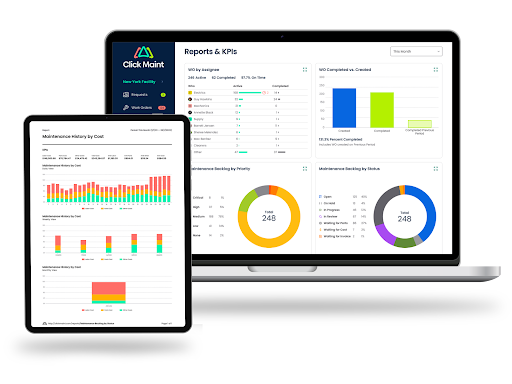
CMMS software can help organize maintenance-related information by work order, asset, and location. This gives managers better data for answering questions such as:
Which assets require frequent maintenance?
Which types of work orders happen most often?
Where are maintenance resources being used?
Are preventive maintenance tasks being completed?
Which maintenance activities are taking the most time?
Having accurate maintenance records can help property managers make more informed decisions about budgets, staffing, preventive maintenance, and equipment replacement.
7. Your Property Portfolio is Growing Faster Than Your Maintenance Process
Growth is another strong sign that your property management team may need a CMMS.
A process that works for two buildings may not work for 10, 20, or more locations.
As a portfolio grows, the number of maintenance requests, assets, technicians, vendors, and preventive maintenance tasks can increase significantly.
Trying to manage this growth with disconnected tools can create administrative work and reduce visibility.
A CMMS for property management provides a structured system that can support expanding maintenance operations.
Instead of creating another spreadsheet whenever a property is added, teams can maintain a consistent process for tracking maintenance work.
What Features Should Property Managers Look for in CMMS Software?
Not every CMMS is the same. Property managers should focus on features that make everyday maintenance easier rather than choosing software based only on the number of available features. Important capabilities can include:
Work order management: Create, assign, prioritize, update, and track maintenance work orders.
Maintenance requests: Provide a structured process for submitting and managing repair requests.
Preventive maintenance: Schedule recurring inspections and planned maintenance activities.
Asset management: Keep maintenance records connected to building equipment and assets.
Interactive floor plans: View and manage work orders, requests, assets and locations from interactive floor plans.
Inventory management: Track maintenance parts and supplies used for repairs and preventive maintenance.
Mobile access: Give technicians access to maintenance information while working around a property.
Reporting: Review work order activity, maintenance performance, asset history, and other operational information.
The right solution should also be easy enough for property managers and technicians to use consistently.
Benefits of CMMS for Property Management
Implementing CMMS software can help property management teams move from scattered maintenance processes toward a more organized system.
Potential benefits include:
- Faster work order management
- Better visibility into maintenance requests
- More consistent preventive maintenance
- Centralized asset maintenance records
- Improved communication between managers and technicians
- Better organization across multiple properties
- Easier access to maintenance history
- More useful maintenance reporting
- Better tracking of maintenance activities and costs
Most importantly, a CMMS gives property managers greater visibility into maintenance operations so they can identify issues and make informed decisions.
Why Consider Click Maint for Property Management?
Click Maint CMMS software is designed to make maintenance management simple and accessible.
Property managers can use Click Maint to organize maintenance requests, create and track work orders, schedule preventive maintenance, maintain asset information, and improve visibility into day-to-day maintenance activities.
Instead of managing maintenance through disconnected emails, spreadsheets, phone calls, and paper records, teams can keep important maintenance information in one place.
For growing property management teams, this creates a more structured approach to managing buildings, equipment, and maintenance responsibilities.
Frequently Asked Questions About CMMS for Property Management
What is the best CMMS for property management?
The best CMMS for a property management team depends on the number of properties, maintenance workload, assets, users, and required features. Property managers should look for easy-to-use software that supports work orders, maintenance requests, preventive maintenance, asset tracking, mobile access, and reporting. Click Maint provides these core maintenance management capabilities in a centralized system.
Can property managers use CMMS software?
Yes. CMMS software can be used by property managers to organize work orders, preventive maintenance, maintenance requests, building assets, and maintenance records. It can be especially useful for managers responsible for multiple properties.
What is the difference between CMMS and property management software?
Property management software generally focuses on broader property operations, such as leases, tenants, rent, accounting, and property administration. A CMMS focuses specifically on maintenance operations, including work orders, preventive maintenance, assets, equipment, parts, and maintenance history.
While property management software often has maintenance management capabilities for requests and work orders, they typically lack asset management and preventive maintenance features. The two types of software can serve different operational needs.
Can CMMS software manage multiple properties?
Yes. CMMS software can help teams organize maintenance information across multiple buildings or locations. This gives property managers greater visibility into work orders, assets, preventive maintenance, and maintenance activities across their portfolio.
Does a CMMS help with preventive maintenance?
Yes. Preventive maintenance is a core CMMS function. Teams can create recurring maintenance schedules and track whether planned maintenance activities have been completed.
Is It Time for Your Property Management Team to Use a CMMS?
If maintenance requests are being missed, spreadsheets are becoming difficult to manage, emergency repairs are increasing, or your property portfolio is growing, your current maintenance process may no longer be enough.
CMMS for property management gives managers and maintenance teams a centralized way to organize work orders, preventive maintenance, assets, maintenance requests, and maintenance records.
With Click Maint, property management teams can simplify maintenance operations and gain better visibility into the work required to keep their properties running.
Ready to simplify property maintenance? Explore Click Maint CMMS software and see how easy it can be to manage maintenance requests, work orders, assets, and preventive maintenance from one place.
Ready to simplify property maintenance?
TABLE OF CONTENTS






