



Reena Sommer | 28 Sep 2026


When a classroom door will not close, an HVAC unit stops working, or a sink begins leaking, teachers and staff need a quick and reliable way to report the problem. Many schools already have a formal process for maintenance requests. However, when that system is difficult or inconvenient to use, teachers and staff may turn to faster alternatives such as text messages, emails, phone calls, or conversations with maintenance employees.
This can create two separate maintenance processes: an official work order system that is underused and an informal process that is difficult for facility managers to track. The result can be unaddressed requests, duplicate reports, delayed repairs, limited accountability, and old work orders that remain open longer than expected.
Work order software for schools can improve maintenance request tracking by giving teachers and staff a simple way to report problems while providing the maintenance team with one centralized place to prioritize, assign, monitor, and complete work orders.
For schools evaluating new maintenance software, the goal should not simply be to add another system. The goal should be to establish a maintenance request process that staff will actually use.
Why is Maintenance Request Tracking Difficult for Schools?
Maintenance requests can come from almost anywhere in a school. A teacher may notice a broken light. A custodian may discover a plumbing problem. An administrator may report an HVAC issue. A coach may notice damaged equipment in the gym. Problems begin when these requests are submitted through different channels.
For example, one employee may use the official work order system while another sends a text. Someone else emails the facility manager, while another employee mentions the problem directly to a technician. The maintenance team then has to manage requests across several places. This makes it difficult to answer basic questions such as:
- Which maintenance requests are still open?
- Which problems are most urgent?
- Who is responsible for each work order?
- How long has a request been waiting?
- Has the repair been completed?
- Are certain assets experiencing repeated problems?
A centralized school work order system can provide one source of information for maintenance requests and work orders.

Why Do Teachers and Staff Avoid Using Maintenance Work Order Systems?
Teachers and staff may bypass a maintenance system when submitting a request feels more difficult than sending a text or email. An existing system might require users to remember passwords, navigate several screens, complete unnecessary fields, or understand maintenance terminology they rarely use. Teachers and school employees already have demanding responsibilities. Reporting a broken faucet or damaged classroom door should not require learning a complicated maintenance application.
This is why ease of use should be an important consideration when evaluating work order software for schools. If staff can quickly report a problem, provide its location, add useful details, and submit the request, the school has a better opportunity to establish a consistent maintenance process.
7 Signs Your School Needs Better Maintenance Request Tracking
1. Teachers Regularly Text Maintenance Employees
Texting is convenient, but requests stored on individual phones are difficult for the entire maintenance department to see and manage.
2. Staff Rarely Use the Existing Work Order System
Having software does not solve the problem if employees routinely bypass it. Low adoption can indicate that the request process is too complicated or inconvenient.
3. Old Work Orders Remain Unaddressed
Finding forgotten or unresolved work orders can indicate that the school lacks a reliable process for monitoring outstanding maintenance. Facility managers should be able to quickly identify open and overdue work.
4. Maintenance Receives Duplicate Requests
Several employees may report the same broken door or HVAC problem through different channels. Without centralized tracking, technicians may not realize that the requests relate to the same issue.
5. Staff Frequently Ask for Updates
Questions such as “Did you receive my request?” and “Has anyone looked at this yet?” can indicate limited visibility into request status.
6. Managers Cannot See the Complete Maintenance Workload
When requests are spread across software, email, texts, spreadsheets, and conversations, management may not have an accurate picture of outstanding work.
7. Maintenance Reporting Requires Manual Work
If facility managers have to collect information from multiple sources to determine how many requests were received or completed, the process may be unnecessarily complicated.
How Does Work Order Software Improve Maintenance Request Tracking?
CMMS for schools improves maintenance request tracking by creating a structured workflow from the initial request through assignment, repair, and completion. Instead of leaving maintenance information inside texts, emails, or individual conversations, requests can become trackable records.
A typical workflow could be:
Problem identified → Request submitted → Request reviewed → Priority assigned → Technician assigned → Work completed → Work order closed → Maintenance history retained
This gives facility managers better visibility into what needs attention and what has already been completed.
What Should a School Maintenance Request Process Look Like?
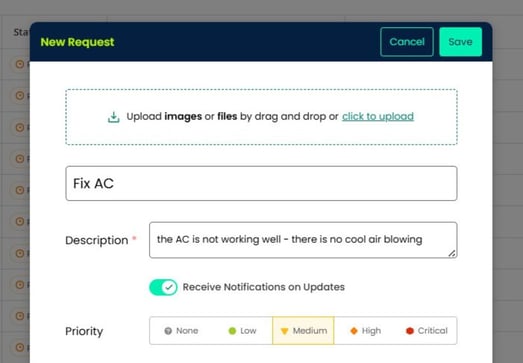
The process should be easy for the requester and structured enough for the maintenance department. Suppose a teacher notices water leaking under a classroom sink. Instead of finding a technician and verbally reporting the problem, the teacher submits a maintenance request through the school's approved system.
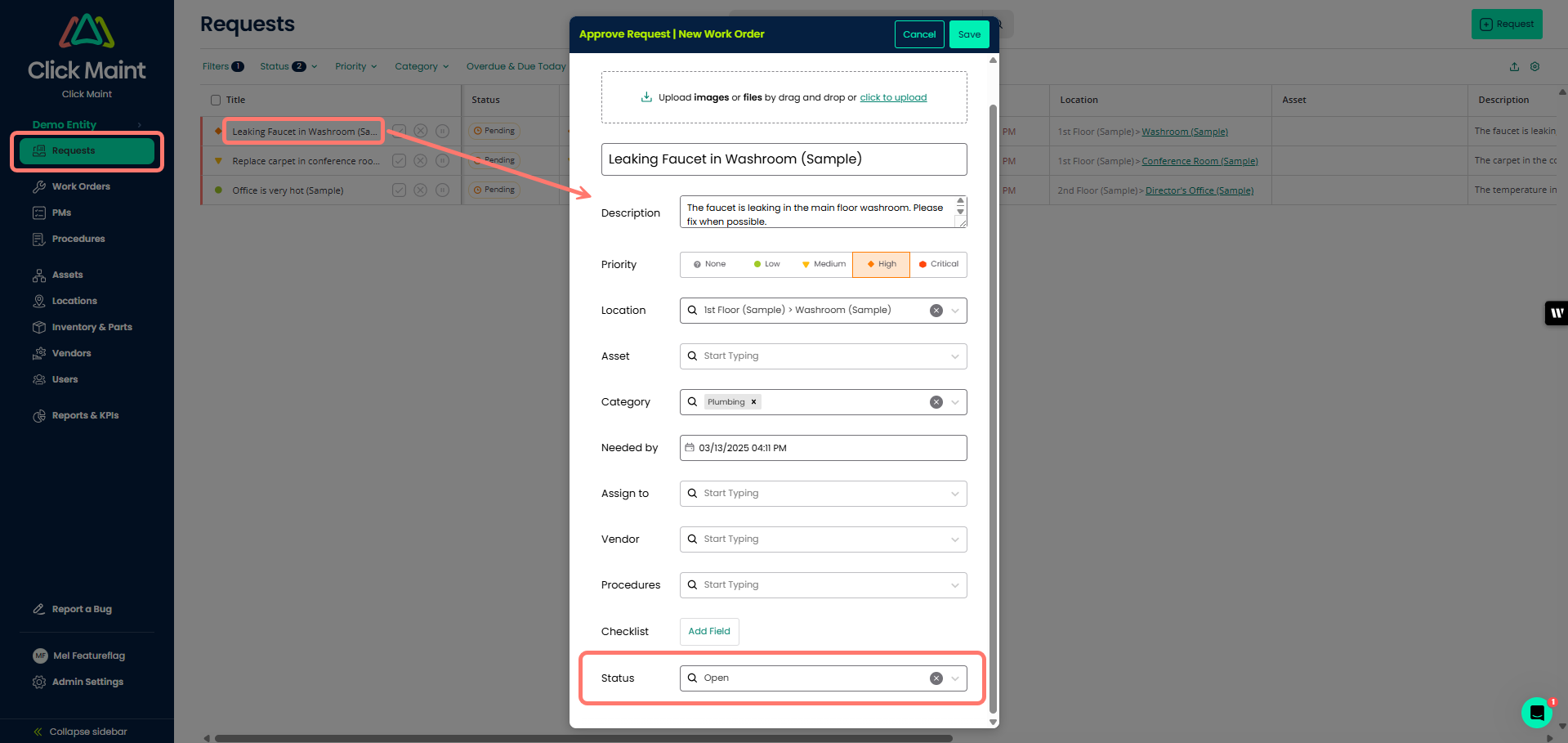
The request can include the building or room, a short description, and a photo when useful. The maintenance team can then review the request, determine its priority, assign the appropriate employee, and track the work through completion. The important difference is that the maintenance issue now exists as a trackable record.
Text Messages vs. Work Order Software for Schools
|
Maintenance Process |
Texts & Informal Requests |
Work Order Software |
|
Request tracking |
Difficult |
Centralized |
|
Work assignment |
Informal |
Structured |
|
Priority management |
Limited |
Organized |
|
Open request visibility |
Limited |
Centralized |
|
Status tracking |
Manual follow-up |
Trackable workflow |
|
Maintenance history |
Difficult to maintain |
Recorded |
|
Duplicate requests |
Harder to identify |
Easier to manage |
|
Reporting |
Limited |
Centralized data |
|
Multi-building visibility |
Difficult |
Easier to organize |
|
Accountability |
Conversation dependent |
Documented workflow |
Text messaging can still be useful for communication.
The challenge arises when texts, emails, and conversations become the primary system for managing maintenance work.
What Features Should Schools Look for in Work Order Software?
When comparing work order software for schools, facility managers should evaluate how easily the software can be used by both maintenance employees and occasional users such as teachers.
Easy Maintenance Request Submission
Submitting a maintenance request should be straightforward. Schools should consider how many steps are required and whether occasional users can understand the process without extensive training.
Mobile-Friendly Access
Maintenance issues are often discovered away from a desktop computer. Mobile-friendly access can make it easier for staff to report problems and for technicians to update assigned work.
Work Order Prioritization
Schools need a way to distinguish routine repairs from urgent problems. Priority levels help maintenance teams determine which work should receive attention first.
Assignment and Status Tracking
Facility managers should be able to see who is responsible for each work order and whether the work is new, assigned, in progress, overdue, or completed.
Photos and Attachments
Photos can give maintenance employees useful context before they arrive at the location.
Asset and Equipment History
Connecting maintenance work to assets helps schools build service histories and identify equipment that requires repeated repairs.
Preventive Maintenance Scheduling
Schools can also use preventive maintenance software to schedule recurring inspections and maintenance for HVAC systems, boilers, generators, doors, plumbing systems, vehicles, and other equipment.
Reporting
Centralized maintenance information can make it easier to review work order activity, outstanding requests, completion trends, and other maintenance metrics.
Multi-Building Management
School districts and education organizations managing several facilities should consider whether maintenance activity can be organized and viewed across locations.
Why User Adoption Matters When Choosing School Maintenance Software
Software features have limited value if teachers and staff do not use the system. This is especially important in schools because many people submitting maintenance requests are occasional users rather than maintenance professionals. A facility manager might use the system every day. A teacher may only need it a few times each year. Schools should therefore evaluate the request process from the teacher's perspective.
Ask:
Can someone who rarely uses this software successfully submit a maintenance request without extensive training?
If the answer is no, employees may return to familiar alternatives such as texts and emails.
How Can Schools Improve Staff Adoption of Work Order Software?
Start by reducing friction. Keep request forms simple and avoid requiring information that teachers are unlikely to know. Explain why the school is introducing a standardized process. Employees should understand that using the work order system helps ensure their request is recorded, prioritized, assigned, and tracked.
Training should also match the employee's role.Teachers may only need to know how to submit and check a request. Maintenance technicians need more detailed training on assignments, work order updates, asset records, and completion procedures.
Finally, schools should establish one clear primary method for submitting maintenance requests. If the organization continues accepting requests through multiple informal channels, the maintenance team may continue operating several parallel processes.
.png?width=494&height=401&name=work%20orders%20list_2%20(1).png)
When Should a School Replace Its Existing Work Order System?
A school should consider evaluating new work order software when the existing system is routinely bypassed, maintenance requests are difficult to track, old work orders remain unresolved, or facility managers cannot confidently determine what work is outstanding.
The existence of software does not necessarily mean the maintenance process is working. A system that employees rarely use can leave the maintenance department relying on the same texts, emails, calls, spreadsheets, and conversations it was supposed to replace.
School Work Order Software Evaluation Checklist
Before choosing a new system, ask:
- Can teachers submit maintenance requests easily?
- How many steps are required?
- Can requests be submitted from mobile devices?
- Can employees include photos?
- Can facility managers prioritize requests?
- Can technicians easily see their assignments?
- Can managers identify overdue work orders?
- Can request status be tracked?
- Can work orders be connected to assets?
- Is maintenance history retained?
- Can preventive maintenance be scheduled?
- Can multiple schools or buildings be managed?
- Can maintenance inventory be tracked?
- Are useful maintenance reports available?
- How much training will occasional users require?
- How difficult is implementation?
Whenever possible, allow actual users to test the request process during software evaluation. A teacher or staff member should be able to submit a basic maintenance request without needing detailed instructions.
How Click Maint Helps Schools Improve Maintenance Request Tracking
Click Maint CMMS software helps schools and education facility teams centralize maintenance requests and work orders instead of relying on disconnected texts, emails, calls, spreadsheets, and conversations. Schools can use Click Maint to manage maintenance requests, work orders, preventive maintenance, assets, equipment information, and maintenance records within a centralized maintenance environment.
For a school replacing an underused maintenance system, the objective is simple:
Make it easier for staff to report maintenance problems and easier for the facilities team to track those problems through completion.
Make School Maintenance Requests Easier to Track
Are teachers and staff still submitting maintenance requests through texts, emails, calls, and an underused work order system? See how Click Maint can help centralize school maintenance requests and work orders. Take the quick 2-minute interactive product tour.
Make School Maintenance Requests Easier to Track
Frequently Asked Questions
What Is Work Order Software for Schools?
Work order software for schools helps education facility teams receive, assign, prioritize, track, and complete maintenance requests. It provides a centralized record of maintenance work instead of relying on separate texts, emails, paper forms, spreadsheets, and conversations.
How Can Schools Track Maintenance Requests?
Schools can use a centralized work order system to record requests and track them by status, priority, location, and assignment. This gives facility managers greater visibility into open, overdue, in-progress, and completed maintenance work.
What Is the Best Way for Teachers to Submit Maintenance Requests?
Schools should provide teachers with a simple, standardized request process that requires minimal training. Requests should enter a centralized maintenance workflow where facility staff can review, prioritize, assign, track, and close them.
Why Do Staff Avoid Using Maintenance Software?
Employees may bypass maintenance software when it requires too many steps, is difficult to navigate, works poorly on mobile devices, or requires more effort than sending a text or email. Ease of use should therefore be evaluated before selecting a new system.
Can CMMS Software Help Schools Manage Work Orders?
Yes. CMMS software can help schools manage maintenance requests, work orders, preventive maintenance, assets, maintenance histories, and related maintenance information from a centralized system.
Can Work Order Software Replace Maintenance Requests Sent by Text?
Work order software provides a structured alternative to requests submitted through texts, calls, emails, and informal conversations. Instead of leaving the request in an individual communication channel, it creates a record that can be prioritized and tracked through completion.
Is CMMS Software Useful for Small Schools?
It can be. A small maintenance team may still manage many assets, work requests, inspections, and preventive maintenance tasks. The value of a CMMS depends more on maintenance complexity and workflow needs than the number of maintenance employees.
Improve School Maintenance From Request to Completion
Better maintenance request tracking starts with making it easy for people to report problems.
If teachers and staff avoid the official system, maintenance information can become scattered across text messages, emails, calls, and conversations. That makes it harder for facility managers to know which problems are outstanding and whether work has been completed.
Work order software for schools can create a more consistent process—from the moment a maintenance issue is reported through assignment, repair, and completion. For schools evaluating new software, usability deserves serious consideration. The system should not only provide the features the facilities department needs.
It should provide a maintenance request process that teachers and staff will actually use.
Ready to Improve Maintenance Request Tracking?
See how Click Maint can help your school manage maintenance requests, work orders, preventive maintenance, assets, and maintenance records in one centralized system.
TABLE OF CONTENTS






