



Reena Sommer | 22 Sep 2026


Maintenance managers in manufacturing handle a demanding set of responsibilities: maintaining equipment performance, completing scheduled preventive tasks, addressing sudden breakdowns, managing spare parts inventories, and minimizing unscheduled downtime.
Handling these duties becomes significantly more challenging when maintenance data is fragmented across paper files, emails, spreadsheets, and isolated software tools. Implementing manufacturing CMMS software offers a solution.
A computerized maintenance management system (CMMS) centralizes work orders, preventive maintenance, equipment records, parts inventory, maintenance history, and other maintenance activities. But not every CMMS is the right fit for every manufacturing plant. Before buying CMMS software for manufacturing, maintenance managers should evaluate how well each system supports their actual workflows. Use this manufacturing CMMS software checklist to identify the capabilities your team needs.
Quick Manufacturing CMMS Software Checklist
Before selecting a CMMS, check whether the software provides:
- Work order management
- Preventive maintenance scheduling
- Equipment and asset management
- Maintenance request management
- Mobile access
- QR codes or asset labels
- Spare parts and inventory management
- Equipment maintenance history
- Inspection and maintenance checklists
- Maintenance reporting and analytics
- Multi-site management (if there are multiple facilities in your company)
- User roles and permissions (more important for larger teams >10 users)
- Vendor management
- Easy implementation
- Simple technician training
- Customer support
- Scalable pricing
The goal is not to buy the CMMS with the most robust feature list. Instead, the priority should be on finding software that fits your maintenance operation and is easy enough for your team to use consistently.
1. Work Order Management
Work order management should be one of the first capabilities maintenance managers evaluate. Manufacturing teams may handle corrective repairs, inspections, preventive maintenance, safety-related tasks, and equipment servicing every day.
.png?width=563&height=457&name=work%20orders%20list_2%20(1).png)
A manufacturing CMMS should make it easy to:
- Create work orders
- Assign technicians
- Set priorities
- Add due dates
- Track work status
- Record labor
- Record parts used
- Add instructions
- Upload photos and documents
- Close and review completed work
- Work on mobile and desktop
- Include templates and procedure checklists
- Generate work orders for assets by scanning a QR code or barcode
Maintenance managers should also be able to quickly identify open, overdue, completed, and high-priority work orders.
Before buying, ask:
How many steps does it take for a technician to receive, update, and complete a work order? A complicated workflow can make adoption more difficult.
2. Preventive Maintenance Scheduling
Preventive maintenance is a major reason manufacturers invest in CMMS software. A good preventive maintenance software system should allow maintenance teams to create recurring maintenance schedules for production equipment and facility assets. This could include:
- CNC machines
- Conveyors
- Motors
- Pumps
- Compressors
- Forklifts
- Packaging equipment
- HVAC systems
- Generators
- Production lines
Maintenance managers should be able to define maintenance schedules and automatically generate work based on those schedules. Ask vendors whether preventive maintenance can be scheduled based on the criteria your facility uses and how upcoming PM tasks are displayed to technicians.
Ensure that notifications are sent to assigned technicians via email and push notifications on mobile. PMs should not only auto generate, but can be manually triggered in advance as well if needed. Preventive maintenance schedules should be flexible, having time-based as well as meter-based and give options for hourly, daily, weekly, monthly, annually and seasonally.
3. Equipment and Asset Management
Manufacturing plants can have hundreds or thousands of maintainable assets. Your manufacturing maintenance software should provide one place to organize important equipment information. An asset record may include:
- Asset name
- Asset ID
- Location
- Manufacturer
- Model
- Serial number
- Installation date
- Warranty information
- Manuals
- Photos
- Maintenance procedures
- Preventive maintenance schedules
- Work order history
- QR codes or barcodes
Technicians should be able to find this information without searching through filing cabinets or multiple spreadsheets.
4. Complete Equipment Maintenance History
Before selecting CMMS software, ask:
Can I quickly see the complete maintenance history for a machine?
Maintenance history gives managers useful information about how equipment has performed over time. For example, if a production machine repeatedly requires repairs, managers can review:
- Previous work orders
- Types of failures
- Maintenance frequency
- Parts used
- Technician notes
- Preventive maintenance records
This information can support repair-versus-replacement discussions and future maintenance planning.
5. Mobile CMMS Access for Technicians
Maintenance technicians work on the plant floor, not behind a desk. Mobile access should therefore be an important part of your manufacturing CMMS software checklist. Technicians should be able to use a phone or tablet to:
- View assigned work
- Update work order status
- Access equipment information
- Add notes
- Upload photos
- Record labor
- Record parts
- Complete maintenance checklists
- Scan QR codes or barcodes for assets, locations, and parts
Mobile access helps technicians update maintenance information while they are performing the work.
6. QR Codes and Equipment Labels
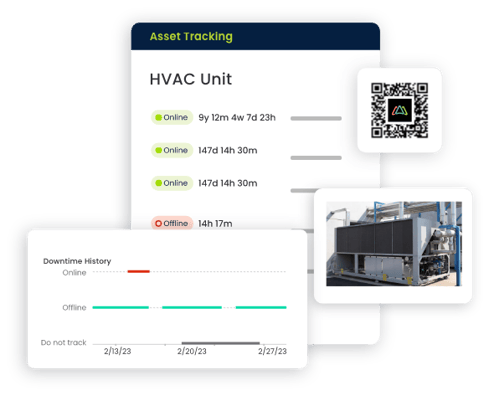
How quickly can technicians find information about the machine in front of them? QR codes can simplify this process. A technician can scan a QR code attached to an asset and access available information such as its maintenance history, work orders, preventive maintenance tasks, or equipment details. For manufacturers with many assets, QR codes can reduce the time spent searching for equipment records.
7. Spare Parts and Inventory Management
A maintenance team may know exactly how to repair a machine but still experience delays if the required spare part is unavailable. That makes inventory management an important CMMS capability. Look for features that help your team:
- Track spare parts
- Monitor stock quantities
- Identify storage locations
- Record parts used on work orders
- Associate parts with equipment
- Review inventory usage
- Maintain reorder information
- Reconcile quantity amounts
- Track stocked parts and non-stocked parts
- Record manufacturer part numbers as well as supplier part numbers
- Have customizable units of measure
- Track partial consumption, not only whole items
Connecting spare parts with work orders can also give managers better visibility into maintenance material usage.
8. Maintenance Requests
Production operators, supervisors, and other employees may identify equipment problems before the maintenance team does. Your CMMS should provide a simple maintenance request process. For example, an operator who notices unusual equipment behavior could submit a request containing relevant information. The maintenance team can review it, determine the priority, and create a work order when appropriate. This creates a more structured process than relying entirely on calls, emails, messages, or verbal requests.
9. Inspection and Maintenance Checklists
Standardized procedures can help manufacturing maintenance teams perform recurring tasks consistently.
Look for a CMMS that supports digital maintenance checklists.
These can be used for:
- Equipment inspections
- Preventive maintenance
- Startup checks
- Shutdown procedures
- Forklift inspections
- Facility inspections
- Seasonal maintenance
- Lock out tag out (LOTO) procedures
Technicians can follow the required steps and document completed work within the maintenance system.
10. Maintenance Reporting and Analytics
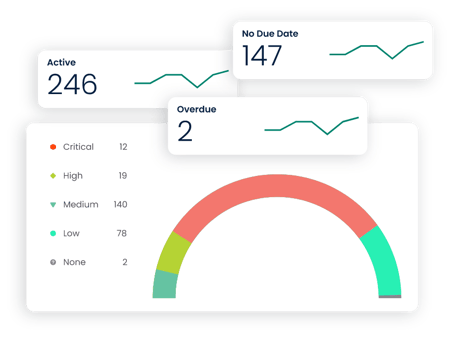
A CMMS should do more than store maintenance records. Maintenance managers should be able to turn their data into useful information. Look for reports covering metrics such as:
- Open work orders
- Overdue work orders
- Work order completion
- Preventive maintenance completion
- Reactive versus preventive maintenance
- Equipment maintenance history
- Maintenance costs
- Technician workload
- Spare parts usage
Choose reports based on the KPIs your plant actually uses rather than the total number of reports advertised by a vendor.
11. Multi-Site Manufacturing Maintenance
Manufacturers operating multiple plants need to determine whether the CMMS can scale across locations. Ideally, maintenance information should be organized in a structure that makes sense for your organization, such as:
Company → Plant → Area → Production Line → Equipment
Managers may need a company-wide view while plant-level teams need information relevant to their own facilities. Ask vendors how users, assets, work orders, and reports can be separated or consolidated across locations.
12. Ease of Use
A feature-rich CMMS provides limited value when technicians find it too difficult to use. During your CMMS evaluation, ask maintenance technicians to participate in product demonstrations. Have them test common activities such as:
- Finding a work order
- Updating its status
- Finding an asset
- Adding a photo
- Recording a part
- Completing a PM
- Reviewing equipment history
If these everyday tasks require excessive training or too many steps, adoption may become more difficult.
13. Implementation and Training
Ask each CMMS vendor what implementation involves. Important questions include:
- How long does implementation typically take?
- How are assets imported?
- Can existing maintenance records be imported?
- What configuration is required?
- What training is provided?
- How are technicians onboarded?
- What customer support is available after launch?
Manufacturers should consider implementation effort alongside software features and price.
14. CMMS Pricing and Scalability
Manufacturing maintenance managers should understand the total cost of the system before making a purchase. Ask about:
- Subscription price
- User limits
- Feature restrictions
- Implementation fees
- Training fees
- Support costs
- Contract requirements
- Additional locations
- Costs for adding users
- Future price increases
Also think about future requirements. Your maintenance team may be small today, but additional technicians, equipment, production lines, or facilities could be added later

Questions to Ask During a Manufacturing CMMS Demo
Bring this checklist to every CMMS product demonstration:
- How easy is it to create and complete a work order?
- Can technicians access work orders from mobile devices?
- Can we schedule recurring preventive maintenance?
- Can we track equipment by plant, area, and production line?
- Can we view complete equipment maintenance history?
- Can technicians scan QR codes to access asset records?
- Can we track spare parts and inventory?
- Can operators submit maintenance requests?
- Can we create equipment inspection checklists?
- What maintenance reports and KPIs can we track?
- Can the software support multiple manufacturing plants?
- How are existing asset records imported?
- How long does implementation typically take?
- What training is available?
- What customer support is included?
- How does pricing change as we add users or locations?
How Click Maint Supports Manufacturing Maintenance Teams
Click Maint is a CMMS platform designed to help maintenance teams organize core maintenance activities in one place. Manufacturing teams can use Click Maint CMMS software to support workflows involving work orders, maintenance requests, preventive maintenance, assets, and maintenance records.
When evaluating Click Maint or another manufacturing CMMS, compare the software against your plant's actual requirements. Consider the number of technicians and assets you manage, your preventive maintenance processes, reporting needs, ease of use, implementation requirements, and budget.
Explore Click Maint CMMS for Manufacturing
Looking for a simpler way to organize manufacturing maintenance? See how Click Maint CMMS software for manufacturing can help your team manage work orders, maintenance requests, preventive maintenance, and equipment from a centralized platform.
Take the quick 2-minute interactive Click Maint product tour to see how it works.
Frequently Asked Questions About Manufacturing CMMS Software
What is manufacturing CMMS software?
Manufacturing CMMS software is a computerized maintenance management system used to organize maintenance activities for manufacturing equipment and facilities. It can centralize work orders, preventive maintenance schedules, asset records, parts information, and maintenance history.
What should maintenance managers look for in CMMS software?
Maintenance managers should evaluate work order management, preventive maintenance, equipment tracking, mobile access, spare parts management, maintenance history, reporting, ease of use, implementation, support, scalability, and pricing.
How does CMMS software help reduce equipment downtime?
A CMMS can help maintenance teams organize preventive maintenance, respond to work requests, track equipment problems, and access maintenance history. These capabilities can help teams identify and address maintenance needs before some issues develop into larger disruptions.
Can CMMS software manage preventive maintenance in manufacturing?
Yes. Preventive maintenance is a core capability of many CMMS platforms. Maintenance teams can schedule recurring tasks and track their completion for production equipment and facility assets.
Is CMMS software useful for small manufacturers?
It can be. Small manufacturers that have moved beyond spreadsheets or paper-based maintenance processes may use CMMS software to centralize work orders, PM schedules, equipment records, and maintenance history.
What is the best CMMS software for manufacturing?
The right CMMS depends on the manufacturer's maintenance requirements, number of users, equipment, facilities, workflows, integrations, budget, and implementation needs. Maintenance managers should compare platforms using a requirements checklist and test everyday workflows during product demonstrations.
Final Manufacturing CMMS Software Checklist
Before buying, confirm whether the CMMS meets your requirements:
☐ Work order management
☐ Preventive maintenance scheduling
☐ Equipment and asset management
☐ Equipment maintenance history
☐ Mobile technician access
☐ QR codes and asset labels
☐ Spare parts and inventory management
☐ Maintenance requests
☐ Inspection and maintenance checklists
☐ Reporting and analytics
☐ Multi-site management
☐ User roles and permissions
☐ Easy-to-use interface
☐ Implementation support
☐ Technician training
☐ Customer support
☐ Pricing that fits your operation
☐ Ability to scale as your operation grows
Choosing manufacturing CMMS software should start with how your maintenance team actually works. Define your must-have capabilities, involve technicians in demonstrations, compare implementation requirements, and evaluate total cost. This approach can help you identify software that fits both your current maintenance operation and future requirements. For manufacturers evaluating a modern CMMS, Click Maint is one option to include in that assessment.

TABLE OF CONTENTS






