


Reena Sommer | 28 Sep 2026


Many facility maintenance teams start with simple tools to track and manage work orders, preventive maintenance and equipment. Spreadsheets and whiteboards are used to track preventive maintenance. Email handles repair requests. Paper forms document inspections. A shared calendar reminds technicians about upcoming tasks. Text messages help coordinate urgent repairs.
These tools can work when maintenance operations are small. But as the number of assets, technicians, locations, and work orders grows, information becomes scattered. A facility manager may need to check several places just to answer a simple question: Has this repair been completed?
This is where facility maintenance software and CMMS software can help. Instead of managing maintenance through disconnected systems, facilities can centralize work orders, assets, preventive maintenance, parts, requests, and maintenance records in one system.
What are Disparate Maintenance Tracking Tools?
Disparate maintenance tools are separate applications, documents, spreadsheets, and communication channels used to manage different parts of maintenance operations. For example, a facility may use:
- Excel or Google Sheets for asset records
- Email for maintenance requests
- Paper forms for inspections
- Calendars for preventive maintenance
- Text messages for technician communication
- Separate inventory spreadsheets for spare parts
- Accounting software for maintenance costs
- Shared folders for equipment manuals and documents
Each tool may perform its individual job well. The problem occurs when information needs to move between them. Facility managers can end up manually copying information, searching through emails, updating multiple spreadsheets, and asking technicians for status updates.
A CMMS (Computerized Maintenance Management System) provides a centralized alternative.

Why Do Facilities End Up Using Multiple Maintenance Systems?
Most facilities do not deliberately design a fragmented maintenance process. It usually develops gradually.
A small maintenance team might begin with a spreadsheet because it is inexpensive and familiar. As maintenance requirements increase, the team adds a shared calendar. Later, an online form might be introduced for maintenance requests.
Eventually, the organization may have several tools performing different maintenance functions. The process can become difficult to manage when the facility adds more equipment, buildings, employees, contractors, or locations. At that point, maintenance teams may spend increasing amounts of time managing information instead of managing maintenance.
7 Signs Your Facility Has Outgrown Its Current Maintenance Tools
How can you tell when spreadsheets and separate maintenance applications are no longer enough? Here are seven common warning signs.
1. Maintenance Requests Are Getting Lost
Maintenance requests may arrive through email, phone calls, text messages, conversations, or paper forms. When requests enter through multiple channels, it can be difficult to determine what has been assigned, completed, or is still waiting.
Facility work order software provides a central location where requests can be submitted, reviewed, prioritized, assigned, and tracked.
2. Technicians Spend Too Much Time Looking for Information
Technicians need access to information such as:
- Asset details
- Previous repairs
- Maintenance procedures
- Equipment manuals
- Parts information
- Preventive maintenance schedules
- Work order instructions
If this information exists across spreadsheets, folders, email, and paper records, technicians may spend unnecessary time searching for it. A CMMS can associate maintenance information with individual assets and work orders.
3. Preventive Maintenance Tasks Are Being Missed
Calendars and spreadsheets can help schedule preventive maintenance, but they become harder to maintain as the number of assets increases. A missed PM can contribute to equipment problems, emergency repairs, and operational disruptions.
Preventive maintenance software can automatically generate recurring maintenance tasks based on defined schedules.
4. You Don't Have Complete Asset Maintenance Histories
Suppose an HVAC unit fails repeatedly.
Before deciding whether to repair or replace it, the facility manager may want to know:
- How often has it failed?
- What repairs have been performed?
- How much maintenance has it required?
- Which parts were replaced?
- How much downtime has occurred?
When maintenance records are scattered across several systems, answering these questions can be difficult. CMMS software creates centralized maintenance histories for equipment and assets.
5. Inventory Records Don't Match Actual Stock
Maintenance teams need the right parts available when equipment requires repairs. Separate inventory spreadsheets can make it difficult to determine what is actually available.
Maintenance inventory management within a CMMS helps teams track parts, quantities, usage, and associated work orders.
6. Managers Have Limited Maintenance Reporting
Disconnected systems make reporting difficult because information must first be collected from several sources. Facility managers may struggle to track metrics such as:
- Open work orders
- Completed work orders
- Overdue maintenance
- Preventive versus reactive maintenance
- Maintenance costs
- Equipment downtime
- Technician workload
Centralized maintenance management software makes operational reporting easier because maintenance data is collected within the same system.
7. Managing Multiple Locations Is Becoming Difficult
The limitations of disparate tools become more noticeable when an organization operates multiple buildings or locations. Each location may develop its own spreadsheets and processes. A centralized CMMS can provide standardized maintenance processes while allowing managers to see activity across different sites.
What Are the Hidden Costs of Disconnected Maintenance Systems?
The price of individual tools does not represent the full cost of a fragmented maintenance process. The larger cost can come from inefficiency. Employees spend time:
- Entering the same information more than once
- Searching for maintenance records
- Following up on work order status
- Updating spreadsheets
- Finding equipment documentation
- Reconciling inventory records
- Preparing reports manually
There is also the possibility of important information being missed.
For example, an email requesting an equipment repair may remain unread. A spreadsheet may not be updated after a technician completes a task. A PM reminder may be overlooked. Centralizing maintenance information reduces the number of places teams need to check.
How Does CMMS Software Centralize Facility Maintenance?
CMMS software centralizes maintenance operations by providing one system for managing work orders, assets, preventive maintenance, maintenance requests, inventory, documentation, and reporting.
Instead of moving between several tools, facility teams can manage core maintenance activities from a shared platform.
Work Order Management
Work order software allows teams to create, assign, prioritize, update, and complete maintenance work orders. Facility managers can see what work is:
- New
- Assigned
- In progress
- Overdue
- Completed
Technicians can receive clearer information about what needs to be done and update work order status as maintenance progresses.
.png?width=417&height=338&name=work%20orders%20list_2%20(1).png)
Maintenance Requests
Employees and other authorized users can submit maintenance requests through a standardized process. This reduces reliance on informal requests sent through email, text, or verbal conversations. Once approved, requests can be converted into work orders.
Preventive Maintenance
Preventive maintenance software allows teams to schedule recurring maintenance activities. Examples include:
- HVAC inspections
- Filter changes
- Fire safety inspections
- Generator maintenance
- Equipment lubrication
- Vehicle inspections
- Building system checks
Recurring work orders can then be generated according to the established maintenance schedule.
Asset and Equipment Management
A CMMS creates centralized records for maintainable assets. An asset record may contain equipment information, maintenance history, associated work orders, documents, and other relevant information. This provides technicians and managers with a more complete view of each asset.
Spare Parts and Inventory
Maintenance teams can track spare parts and materials used for maintenance. Connecting inventory usage with work orders can also provide better visibility into where maintenance resources are being consumed.
Documents and Maintenance Records
Instead of storing equipment documentation across different folders and locations, relevant files can be connected to maintenance records. Technicians can access information when completing work.
Maintenance Reporting
Because work order and asset information is stored centrally, managers can more easily analyze maintenance activity and identify trends.
Spreadsheets and Disparate Tools vs. CMMS Software
|
Maintenance Function |
Disparate Tools |
CMMS Software |
|
Work orders |
Email, paper or spreadsheets |
Centralized work order system |
|
Maintenance requests |
Calls, texts and email |
Standardized request process |
|
Preventive maintenance |
Calendars and spreadsheets |
Recurring PM scheduling |
|
Asset history |
Multiple files |
Central asset records |
|
Technician updates |
Calls, texts and email |
Work order updates |
|
Inventory |
Separate spreadsheets |
Integrated parts tracking |
|
Documentation |
Shared folders/paper |
Linked maintenance records |
|
Reporting |
Manual data collection |
Centralized reporting |
|
Multi-site visibility |
Separate systems |
Shared maintenance platform |
|
Scalability |
Increasing manual work |
Designed for growing operations |
The goal is not simply to replace Excel.
The larger objective is to establish one reliable source of maintenance information.
When Should a Facility Replace Maintenance Spreadsheets With CMMS Software?
A facility should consider moving beyond spreadsheets when maintaining the spreadsheets starts becoming part of the maintenance problem. Common indicators include increasing work order volume, missed preventive maintenance, inconsistent asset records, difficulty tracking repair requests, multiple maintenance locations, limited reporting, and excessive manual data entry.
The right time depends on operational complexity rather than simply the size of the organization. Even a relatively small maintenance team can benefit from a CMMS if it manages many critical assets or receives a high volume of maintenance requests.
Is CMMS Software Worth It for a Small Facility Maintenance Team?
CMMS software can be useful for small maintenance teams when it eliminates enough administrative work and provides better control over maintenance operations. A team does not necessarily need hundreds of technicians to benefit from maintenance software. A smaller facility may use a CMMS to manage:
- Work requests
- Work orders
- Preventive maintenance
- Equipment records
- Spare parts
- Maintenance schedules
The decision should be based on the complexity of the maintenance operation and the limitations of the team's current process.
How to Move From Spreadsheets to CMMS Software
Moving to a CMMS does not require transferring every piece of historical information immediately. A practical implementation can be completed in stages.
Step 1: Identify Your Current Maintenance Tools
Document where maintenance information currently exists. Include spreadsheets, paper forms, calendars, email inboxes, shared drives, and other applications.
Step 2: Identify Your Biggest Problems
Determine which processes create the most difficulty. For example:
- Work orders are being lost
- PMs are overdue
- Asset records are incomplete
- Parts cannot be located
- Reporting takes too long
These problems can help determine which CMMS capabilities should be implemented first.
Step 3: Organize Asset Information
Identify the equipment and assets that need to be managed. Start with critical equipment if entering every asset immediately would make implementation unnecessarily complicated.
Step 4: Establish a Standard Work Order Process
Define how requests enter the system and how work orders move from creation to completion. For example:
Request → Review → Prioritize → Assign → Complete → Close.
Step 5: Set Up Preventive Maintenance
Move recurring maintenance schedules from calendars and spreadsheets into the CMMS.
Step 6: Train the Maintenance Team
A system only creates value when people actually use it. Technicians should understand how to receive assignments, access information, update work orders, and document completed maintenance.
Step 7: Review Maintenance Data
Once the system contains reliable data, managers can begin using reports to identify bottlenecks and opportunities for improvement.
CMMS Implementation Checklist for Facility Managers
Before moving away from disparate maintenance tools, facility managers should answer these questions:
- What maintenance information needs to be centralized?
- Which assets should be imported?
- Who can submit maintenance requests?
- Who approves and assigns work?
- Which preventive maintenance schedules need to be transferred?
- What spare parts need to be tracked?
- Which technicians need mobile access?
- What maintenance KPIs should management monitor?
- Do multiple facilities need access?
- What existing maintenance data should be retained?
Answering these questions before implementation can make the transition easier.
What Should Facility Managers Look for in CMMS Software?
Not every organization needs the same maintenance software. However, facility managers should consider several core capabilities.
Easy Work Order Management
Creating and updating work orders should be straightforward for both managers and technicians.
Preventive Maintenance Scheduling
The system should support recurring maintenance schedules so teams can move away from manually managing PM calendars.
Asset Management
Facility teams should be able to maintain centralized equipment information and maintenance history.
Mobile Access
Technicians frequently work away from a desk. Mobile-friendly access can allow them to view assignments and update work from the field.
Maintenance Request Management
Employees should have a simple method for submitting maintenance issues without relying entirely on emails and phone calls.
Inventory Management
If spare parts are important to maintenance operations, consider software that provides inventory visibility.
Reporting
Managers should be able to review maintenance performance without manually combining information from multiple systems.
Multi-Site Capabilities
Organizations managing several facilities should consider whether the software provides appropriate visibility across locations.
Ease of Use
Feature quantity should not be the only consideration. Software that is difficult for technicians to adopt can simply create another maintenance management problem.
How Click Maint Helps Centralize Facility
Click Maint is a CMMS and facility maintenance software platform designed to help maintenance teams move away from fragmented processes. Instead of managing work across spreadsheets, paper forms, emails, calendars, and disconnected applications, teams can use Click Maint to bring important maintenance activities into a centralized system. Facility teams can manage areas such as:
Work orders: Create, assign, prioritize, track, and complete maintenance work.
Maintenance requests: Establish a consistent process for receiving maintenance issues.
Preventive maintenance: Schedule recurring maintenance and inspections.
Assets and equipment: Maintain centralized equipment information and maintenance history.
Inventory: Improve visibility into maintenance parts and supplies.
Maintenance records: Keep important information connected to maintenance activity.
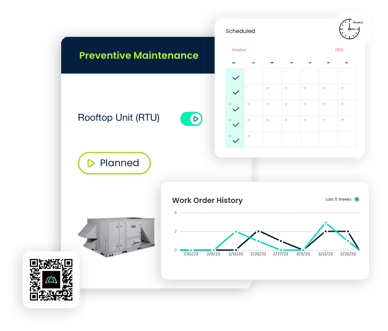
Centralization can be especially valuable for organizations that have reached the point where maintaining their collection of spreadsheets and separate applications requires too much administrative effort.
Frequently Asked Questions
What is facility maintenance software?
Facility maintenance software helps organizations manage maintenance activities such as work orders, preventive maintenance, assets, equipment, maintenance requests, inventory, schedules, and maintenance records from a digital system.
Can CMMS software replace maintenance spreadsheets?
Yes. A CMMS can replace many spreadsheets used for work orders, preventive maintenance schedules, asset records, and maintenance tracking. It can also connect these processes so information does not have to be manually transferred between separate files.
What is the difference between spreadsheets and CMMS software?
Spreadsheets primarily store information in rows and columns. CMMS software is designed specifically to manage maintenance workflows, including work orders, recurring maintenance, equipment histories, maintenance requests, parts, and reporting.
Can a CMMS manage both work orders and preventive maintenance?
Yes. Work order management and preventive maintenance scheduling are core functions of many CMMS platforms. Preventive maintenance schedules can generate planned work while the same system manages reactive repair work.
Why should facilities centralize maintenance data?
Centralized maintenance data gives technicians and managers a shared source of information. It can reduce duplicate data entry, improve maintenance visibility, preserve asset history, and make reporting easier.
How do you know when you've outgrown maintenance spreadsheets?
Common signs include increasing work order volume, missed maintenance tasks, inconsistent asset information, difficulty producing reports, lost maintenance requests, multiple facilities using different processes, and significant time spent manually updating records.
Does a small maintenance team need CMMS software?
A small team may benefit from CMMS software when it manages enough assets, preventive maintenance tasks, work requests, or operational complexity that spreadsheets and manual processes become difficult to maintain.
Build One Centralized Maintenance Process
Spreadsheets, email, paper forms, and calendars can serve a maintenance team for years. But they were not designed to operate together as a complete maintenance management system. As a facility grows, fragmented processes can make it increasingly difficult to know what needs attention, who is responsible, what work has been completed, and how individual assets are performing.
Moving to Best facility maintenance software gives teams an opportunity to create a more consistent process for managing maintenance information. Rather than checking five different places, the maintenance team can work from one centralized system.
Ready to Move Beyond Spreadsheets and Disconnected Maintenance Tools?
Still managing maintenance across spreadsheets, email, paper forms, calendars, and separate tools?
See how Click Maint facility maintenance software can help bring your work orders, preventive maintenance, assets, maintenance requests, and maintenance information into one centralized system.
TABLE OF CONTENTS






