



Reena Sommer | 29 Sep 2026


Managing maintenance across a single school or school district becomes complicated as the volume of work orders, PMs, and maintenance requests increase. Facility managers need to coordinate HVAC maintenance, plumbing repairs, electrical work, inspections, custodial requests, playground equipment, building assets, and hundreds of preventive maintenance tasks.
School CMMS software helps facility managers organize work orders, preventive maintenance, assets, equipment, parts, and maintenance records in one centralized system. Before purchasing a CMMS, schools should evaluate ease of use, work order management, preventive maintenance, mobile access, asset tracking, reporting, scalability, implementation, and total cost.
This checklist explains what school facility managers should look for when comparing CMMS software for schools. But first, let's understand what CMMS software is in the context of educational facilities.
What is School CMMS Software?
School CMMS software is a Computerized Maintenance Management System designed to help educational facilities organize and track maintenance operations. Instead of managing maintenance through spreadsheets, paper forms, emails, phone calls, and separate calendars, facility teams can use a CMMS to centralize maintenance information.
A school maintenance team can use CMMS software to manage activities such as:
- Maintenance requests
- Work orders
- Preventive maintenance
- Building and equipment records
- Inspections
- Parts and inventory
- Technician assignments
- Maintenance history
- Maintenance costs
- Reports and KPIs
Schools, colleges, universities, and school districts may all use CMMS software, although their maintenance requirements can differ considerably.

Why Do Schools Need CMMS Software?
Schools contain many assets and building systems that require ongoing maintenance. HVAC systems need servicing. Boilers and mechanical equipment require inspections. Plumbing and electrical problems need attention. Classrooms, gyms, cafeterias, playgrounds, and common areas generate maintenance requests.
When these activities are managed manually, facility managers can have difficulty answering basic questions:
Which work orders are still open?
What preventive maintenance is due this week?
Which equipment repeatedly breaks down?
Who is working on each maintenance request?
What repairs have previously been completed on this asset?
Are the required parts available?
CMMS software gives facility managers a centralized view of this information and helps create a more organized maintenance process.
School CMMS Software Checklist
Before choosing a CMMS for schools, facility managers should evaluate how well the software supports everyday maintenance operations. Use the following checklist during software research, product demonstrations, and trials.
1. Is the CMMS Easy for Your Maintenance Team to Use?
Ease of use should be one of the first things facility managers evaluate.
Feature-rich, robust software provides little value when technicians find it overly complicated and don’t use it consistently. School maintenance teams often include employees with different levels of technical experience. A good system should make common tasks straightforward.
During a CMMS demonstration, evaluate whether employees can easily:
- View assigned work
- Create work orders
- Update work order status
- Add notes
- Upload photos
- Find asset information
- Complete preventive maintenance tasks
- Search maintenance history
Ask vendors how much training is normally required and what support is available during implementation.
Checklist:
☐ Simple interface
☐ Easy work order updates
☐ Minimal training requirements
☐ Clear navigation
☐ Easy access to maintenance information
2. Does the CMMS Software Simplify Maintenance Requests?
Schools receive maintenance requests from many people, including teachers, administrators, custodians, office staff, and other employees. Without a standard process, requests may arrive through emails, phone calls, text messages, conversations, or handwritten notes. That makes requests easier to overlook.
A school maintenance management system should provide a simple process for submitting maintenance requests and turning approved requests into actionable work. Facility managers should be able to review requests, establish priorities, and assign appropriate employees.
Checklist:
☐ Simple maintenance request process
☐ Centralized request tracking
☐ Priority levels
☐ Request status visibility
☐ Easy conversion from requests to work orders
3. Does the CMMS Provide Strong Work Order Management?
Work order management is one of the most important CMMS features for school facility teams. A good system should allow facility managers to create, assign, prioritize, track, and close maintenance work orders. When evaluating the software ensure that work orders have the necessary information and at the same time is easy to update and manage. Each work order should provide technicians with the information required to complete the task.
That might include:
- Building or location
- Asset
- Problem description
- Priority
- Assigned technician
- Due date
- Instructions
- Photos
- Documents
- Parts
- Completion notes
Centralizing this information can help reduce confusion and make it easier to monitor maintenance backlogs.
Checklist:
☐ Create work orders quickly
☐ Assign technicians
☐ Set priorities
☐ Add due dates
☐ Attach photos and documents
☐ Track work order status
☐ Record completion details
☐ Review work order history
4. Does the Software Manage Preventive Maintenance?
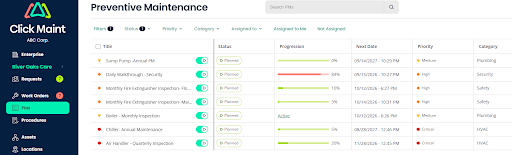
Preventive maintenance is particularly important in educational facilities because many building systems must operate reliably throughout the school year. A preventive maintenance software function should help teams organize recurring maintenance activities rather than depending on memory or separate calendars.
Examples can include:
- HVAC servicing
- Boiler maintenance
- Filter replacement
- Plumbing inspections
- Electrical inspections
- Generator maintenance
- Kitchen equipment maintenance
- Door and hardware inspections
- Grounds equipment servicing
- Building system inspections
Facility managers should be able to create recurring schedules and identify upcoming or overdue maintenance.
Checklist:
☐ Recurring PM schedules
☐ Upcoming maintenance visibility
☐ Overdue PM tracking
☐ Maintenance instructions
☐ PM completion history
☐ Asset-linked preventive maintenance
5. Can You Track School Assets and Equipment?
Schools can contain hundreds or thousands of maintainable assets. Without organized records, technicians may struggle to understand an asset's maintenance history. A CMMS should help schools create centralized records for important assets such as:
- HVAC equipment
- Boilers
- Pumps
- Generators
- Electrical systems
- Kitchen equipment
- Gym equipment
- Grounds equipment
- Vehicles
- Building equipment
An asset record should make relevant maintenance information easier to access.
Checklist:
☐ Centralized asset database
☐ Asset maintenance history
☐ Associated work orders
☐ Preventive maintenance records
☐ Asset documents and notes
☐ Location information
6. Does the CMMS Support Managing Work on Mobile Devices?
School maintenance employees rarely spend their entire day at a desk. They move between classrooms, mechanical rooms, cafeterias, gyms, outdoor areas, and sometimes multiple buildings. Mobile CMMS access can allow technicians to review and update maintenance information while they are in the field. Look for the ability to:
- View assigned work orders
- Update work status
- Add notes
- Upload photos
- Access equipment information
- Complete maintenance tasks
This can reduce the need to return to an office simply to update maintenance records.
Checklist:
☐ Mobile-friendly access
☐ Work order updates
☐ Photo uploads
☐ Asset information access
☐ Easy technician workflow
7. Can the Software Manage Multiple School Buildings?
This becomes especially important for school districts and educational organizations operating multiple facilities. A district maintenance manager may need visibility across elementary schools, middle schools, high schools, administrative buildings, athletic facilities, and other properties. Look for a CMMS that can organize maintenance information by location while still providing broader visibility across the organization. Facility managers should be able to answer questions such as:
- Which school has the largest maintenance backlog?
- Where are overdue PM tasks located?
- Which buildings have recurring equipment problems?
- How is maintenance work distributed across locations?
Checklist:
☐ Multiple location support
☐ Building-level asset organization
☐ Location-specific work orders
☐ Cross-location visibility
☐ Scalable structure
8. Does the CMMS Help Track Maintenance Parts and Inventory?
A technician cannot complete some repairs if the required replacement part is unavailable. Schools may maintain spare filters, belts, electrical components, plumbing supplies, hardware, and equipment parts. Inventory functionality can help maintenance teams understand what they have available and connect parts usage with maintenance activities.
Checklist:
☐ Parts inventory records
☐ Stock visibility
☐ Parts linked to maintenance work
☐ Inventory usage tracking
☐ Easy inventory updates
9. Does the CMMS Provide Useful Maintenance Reporting?
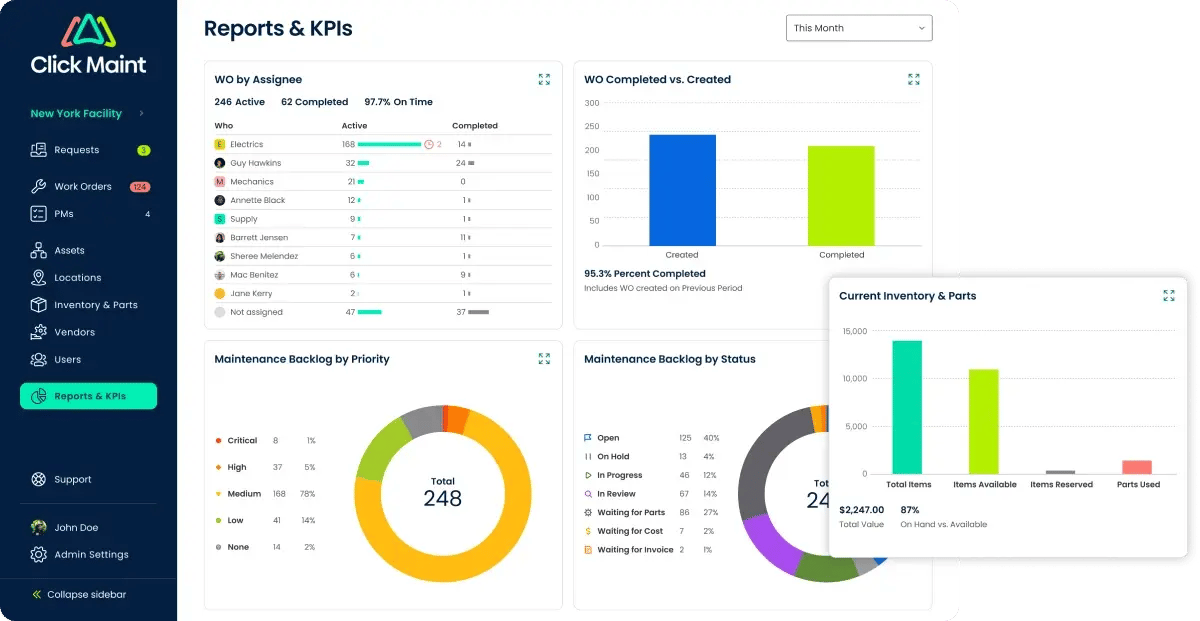
Facility managers need more than a list of completed work orders. Reporting can help identify maintenance trends and support planning. Useful school maintenance metrics may include:
- Open work orders
- Completed work orders
- Maintenance backlog
- Preventive maintenance completion
- Equipment downtime
- Maintenance costs
- Work by building
- Work by asset
- Work by technician
The goal is not to collect every possible metric. Schools should focus on data that helps facility managers make better maintenance decisions.
Checklist:
☐ Work order reporting
☐ PM reporting
☐ Asset history
☐ Maintenance cost visibility
☐ Building/location reporting
☐ Useful dashboards and KPIs
.png?width=2095&height=1700&name=work%20orders%20list_2%20(1).png)
10. Can the CMMS Support Maintenance Documentation?
Facility teams often need maintenance records for inspections, internal reviews, budgeting, and operational planning. A CMMS can help maintain a digital record of work completed on buildings and equipment. Before purchasing software, determine whether the system allows your team to retain the documentation relevant to your organization's maintenance and inspection requirements.
Checklist:
☐ Maintenance history
☐ Inspection records
☐ Completed work documentation
☐ Asset service records
☐ Searchable historical information
Schools should separately confirm their specific legal, safety, accessibility, inspection, privacy, and record-retention requirements with the appropriate authorities.
11. How Secure is the CMMS?
Maintenance systems may contain information about school buildings, assets, users, vendors, and maintenance activities. Security therefore deserves attention during vendor evaluation. Ask prospective CMMS providers about:
- User permissions
- Account security
- Data protection
- Backup practices
- Security controls
- Vendor security policies
- Audit trail
Schools should involve their IT or security teams when assessing whether a platform meets organizational requirements.
Checklist:
☐ User permissions
☐ Appropriate access controls
☐ Data security information available
☐ IT/security review completed
12. How Difficult is the Implementation Process?
Even good software can fail if implementation becomes too complicated for the maintenance team. Before signing a contract, ask:
How long does setup typically take?
How will assets be imported?
How are users added?
How are PM schedules configured?
What training is included?
What support is available after launch?
Schools should have a clear implementation plan before moving away from their existing process.
Checklist:
☐ Clear implementation process
☐ Asset-data import options
☐ User setup
☐ PM setup assistance
☐ Training resources
☐ Customer support
13. Can the CMMS Grow With Your School or District?
A school may initially need basic work order and preventive maintenance functionality. Requirements can change over time. The organization may add buildings, technicians, assets, maintenance programs, or additional reporting requirements. Choosing scalable CMMS software for schools can reduce the need to replace the system as maintenance operations become more complex.
Checklist:
☐ Additional users can be supported
☐ Additional assets can be added
☐ Multiple facilities can be organized
☐ Maintenance processes can expand
☐ Reporting can support future requirements
14. What is the Total Cost of the CMMS?
Facility managers should look beyond the advertised subscription price. Ask about the total cost associated with:
- Software subscriptions
- Users
- Implementation
- Training
- Support
- Additional modules
- Integrations
- Future expansion
Then compare that cost with the problems the software is intended to solve. A lower-priced CMMS is not automatically the better choice if it lacks important functionality. Likewise, a complex enterprise platform may provide features a smaller school maintenance department never uses. The objective is to find a system that matches the school's actual maintenance requirements.
School CMMS Software Evaluation Checklist
Use this condensed checklist when comparing vendors:
|
Requirement |
Check |
|
Easy for technicians to use |
☐ |
|
Maintenance request management |
☐ |
|
Work order management |
☐ |
|
Preventive maintenance scheduling |
☐ |
|
Asset and equipment tracking |
☐ |
|
Mobile access |
☐ |
|
Multiple building/location support |
☐ |
|
Parts and inventory tracking |
☐ |
|
Maintenance reports and KPIs |
☐ |
|
Maintenance documentation |
☐ |
|
Appropriate security controls |
☐ |
|
Easy implementation |
☐ |
|
Training and support |
☐ |
|
Scalability |
☐ |
|
Reasonable total cost |
☐ |
A product demonstration should test these requirements using your school's actual maintenance workflows rather than generic examples.
What Questions Should Facility Managers Ask CMMS Vendors?
Before buying school CMMS software, ask each vendor the same core questions:
- How quickly can our maintenance team learn the system?
- How are maintenance requests submitted?
- Can technicians manage work orders from mobile devices?
- How are preventive maintenance schedules created?
- Can we organize assets by school, building, and location?
- Can we view the complete maintenance history of an asset?
- Can the system support multiple schools?
- How does inventory management work?
- What maintenance reports are available?
- What security and user-permission options are available?
- What does implementation involve?
- What training and customer support are included?
- What costs should we expect beyond the subscription?
- Can we test the software before making a decision?
Using consistent questions makes CMMS vendors easier to compare.
CMMS vs. Spreadsheets for School Maintenance
Spreadsheets may work when maintenance operations are small and simple. As assets, buildings, work orders, and PM schedules increase, manual tracking can become more difficult.
|
Area |
Spreadsheets |
CMMS Software |
|
Work orders |
Manual tracking |
Centralized management |
|
Maintenance requests |
Often separate |
Centralized workflow |
|
Preventive maintenance |
Manual scheduling |
Recurring schedules |
|
Asset history |
Multiple files/rows |
Centralized records |
|
Technician updates |
Manual |
Updated within system |
|
Multi-school management |
Can become complex |
Location-based organization |
|
Reporting |
Manual analysis |
Built-in reporting capabilities |
|
Maintenance records |
Distributed |
Centralized history |
The right time to move from spreadsheets to a CMMS depends on the complexity of the school's maintenance operation—not simply the size of the maintenance team.
How Can Click Maint Help School Maintenance Teams?
Click Maint is CMMS software that helps maintenance teams centralize and organize everyday maintenance activities. For educational facilities, a CMMS can provide a more structured way to manage work instead of relying on disconnected spreadsheets, emails, paper forms, and manual tracking. Depending on your organization's requirements and configuration, Click Maint can support maintenance processes involving:
- Work orders
- Maintenance requests
- Preventive maintenance
- Assets and equipment
- Parts and inventory
- Maintenance records
- Reporting
When evaluating Click Maint or another CMMS, facility managers should test the software against real scenarios from their schools.
For example, create a maintenance request for a classroom HVAC problem, assign the resulting work to a technician, update it from a mobile device, review the equipment's maintenance history, and close the work order. This gives the team a much clearer idea of whether the software fits its everyday workflow.
Frequently Asked Questions About School CMMS Software
What is the best CMMS software for schools?
The best fit depends on the school's maintenance requirements. Facility managers should compare ease of use, work orders, preventive maintenance, asset tracking, mobile access, multi-location capabilities, reporting, implementation, support, security, and total cost.
What does CMMS stand for in school maintenance?
CMMS stands for Computerized Maintenance Management System. Schools can use CMMS software to organize maintenance work, preventive maintenance, assets, equipment records, maintenance requests, parts, and related data.
Can schools use CMMS software for preventive maintenance?
Yes. CMMS software can help school maintenance teams organize recurring preventive maintenance for HVAC equipment, boilers, generators, building systems, and other maintainable assets.
Can a CMMS manage multiple schools?
Many CMMS platforms can support multiple locations. School districts should specifically evaluate how each system organizes buildings, assets, work orders, users, and reports across locations.
Can teachers submit maintenance requests through a CMMS?
Depending on the CMMS and its configuration, maintenance-request functionality can provide employees with a standardized way to report maintenance issues. Schools should check how requesters interact with each system during evaluation.
Is CMMS software better than spreadsheets for school maintenance?
A CMMS may become more practical when spreadsheets make it difficult to manage work orders, preventive maintenance schedules, assets, multiple buildings, and maintenance history. Very simple operations may still be manageable with spreadsheets.
What should schools look for in maintenance software?
Prioritize ease of use, work order management, maintenance requests, preventive maintenance, asset management, mobile accessibility, multi-location capabilities, reporting, security, implementation, support, scalability, and total cost.
Should schools take a CMMS product tour before buying?
Yes. A product tour, trial, or demonstration can help facility managers understand how the system handles everyday workflows before committing to it.
Choose School CMMS Software Based on Your Maintenance Needs
Buying CMMS software should not be about finding the platform with the longest feature list. Facility managers should identify the maintenance problems they need to solve first. For one school, the priority may be preventive maintenance. Another may struggle with work order backlogs. A school district may need better visibility across multiple buildings.
Create your requirements, use a consistent checklist, and then evaluate each CMMS against real maintenance workflows. The right system should make everyday maintenance easier to organize, not add unnecessary complexity.
Explore Click Maint CMMS for School Maintenance
See how easy it is to manage work orders, maintenance requests, preventive maintenance, assets, equipment, and maintenance information with Click Maint CMMS.
Make School Maintenance Easier With Click Maint

TABLE OF CONTENTS






