



Reena Sommer | 1 Oct 2026


A broken door handle gets reported by email. An employee texts a technician about a leaking faucet. Someone tells the maintenance manager that a room is too cold. Another employee leaves a note about damaged equipment. By the end of the day, the maintenance team has requests coming from five different places. Which request is most urgent? Has someone already been assigned? Was the repair completed? Did anyone record what was done?
This scenario highlights why having a consistent way to track maintenance requests from employees is important for Maintenance Managers. A structured maintenance request process gives employees an easy way to report problems while giving maintenance teams one place to review, prioritize, assign, track, and complete work.
Maintenance Management Software brings maintenance requests, work orders, assets, preventive maintenance, and maintenance history into a centralized system.CMMS for Maintenance Managers gives managers greater visibility into incoming requests, technician assignments, work order status, and completed maintenance.
This guide explains how to build an employee maintenance request process step by step and how Click Maint replaces scattered emails, texts, paperwork, and spreadsheets with an organized maintenance management system.
What is a Maintenance Request?
A maintenance request is a formal notification that alerts the maintenance team about an issue requiring inspection, service, or repair. Employees submit maintenance requests for issues such as:
- Leaking faucets
- Broken lights
- HVAC problems
- Equipment failures
- Damaged doors
- Electrical problems
- Plumbing issues
- Safety concerns
- Building damage
- Furniture repairs
- Cleaning or facility problems
A maintenance request starts the maintenance workflow. After reviewing the request, the maintenance team creates or manages a work order to assign, track, and document the required work.
For Maintenance Managers, organizing these requests in Maintenance Management Software establishes a consistent process from initial submission through completion.
What Is the Best Way to Track Maintenance Requests From Employees?
The best approach gives employees one clear way to submit maintenance requests and gives the maintenance team a centralized system for managing them.
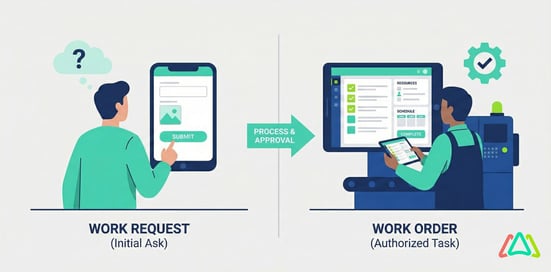
A simple process looks like this:
Employee submits request → Maintenance reviews request → Priority is determined → Work is assigned → Technician completes work → Request/work order is closed → Maintenance history is recorded
The goal is to eliminate uncertainty. Employees know where to report a problem. Maintenance Managers know what requires attention. Technicians know what work has been assigned. Managers see what remains open and what has been completed.
CMMS for Maintenance Managers centralizes this workflow and provides one source for tracking maintenance requests, work orders, technicians, assets, and maintenance history.
Why Emails, Texts, and Verbal Requests Fail
Informal communication is convenient, which explains why employees use it. If someone notices a broken sink, sending a quick text to a maintenance technician feels easier than completing a form. Problems arise as request volume increases and maintenance teams lose visibility into outstanding work.
Text Messages
Texts quickly alert technicians, but they do not provide an effective maintenance tracking system. Requests disappear beneath newer messages, other team members lack visibility, and completed work lacks a centralized maintenance record.
Email provides a written record, but maintenance requests become mixed with unrelated messages. Employees also send requests to different people, creating separate maintenance queues.
Phone Calls
Phone calls work for urgent communication, but the request still requires documentation afterward. Without documentation, the maintenance team lacks a reliable record of who called, what was reported, and what action was taken.
Verbal Requests
A technician walking through a facility hears: “When you get a chance, please look at the door in Room 205.” Then an emergency occurs. By the end of the day, the original request gets forgotten.
Spreadsheets
Some maintenance departments enter every request manually into Excel. This creates a central list, but someone still transfers information from emails, texts, calls, and conversations into the spreadsheet.
As request volume grows, the process becomes increasingly administrative. Maintenance Management Software removes much of this fragmentation by keeping requests and related maintenance work in one system.
Why Maintenance Request Tracking Matters
Maintenance request tracking goes beyond creating records. It gives Maintenance Managers greater visibility into the work employees request.
An organized system answers important questions:
- What maintenance requests are currently open?
- Which requests are urgent?
- Who submitted each request?
- Where is the problem located?
- Which technician is responsible?
- How long has the request been open?
- What work was completed?
- Are employees repeatedly reporting the same problem?
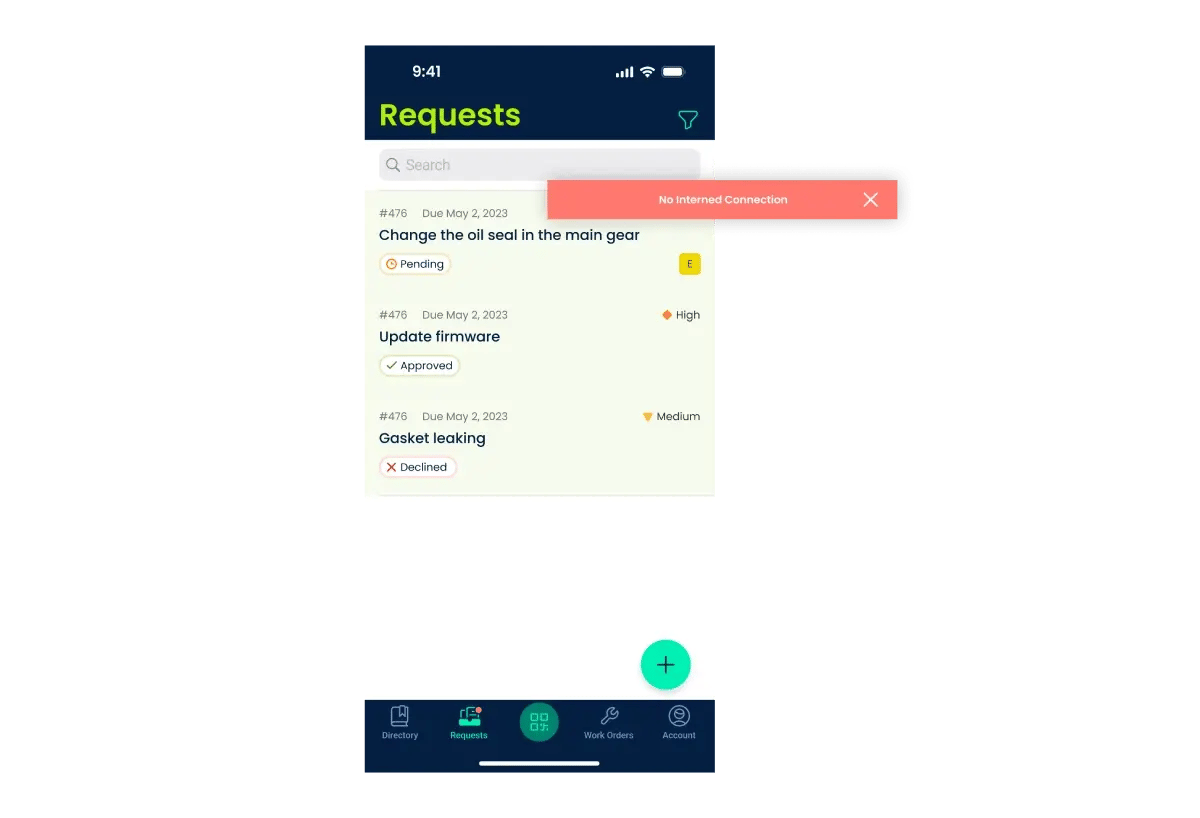
Without a centralized system, answering these questions requires searching emails, spreadsheets, texts, and paper records. CMMS for Maintenance Managers provides a centralized view of requests, work orders, technician assignments, priorities, assets, and completed maintenance.
How to Track Maintenance Requests From Employees: Step by Step
An effective maintenance request process needs to remain simple for employees while giving Maintenance Managers enough information to prioritize and manage work.
Step 1: Create One Standard Way to Submit Requests
Start by reducing the number of channels employees use to report maintenance problems.
Instead of:
Text + email + paper + phone + verbal requests
Move toward: One maintenance request system
Employees need to know exactly where to report a maintenance issue. A simple process encourages consistent use. Avoid forms that require technical maintenance knowledge. Request essential information such as:
- What is the issue?
- Where is the problem?
- Which asset is affected, if known?
- How urgent does it appear?
- Who is reporting it?
- Is there a useful photo?
Keep the process simple.
Step 2: Capture the Right Information
A request stating “Machine broken” does not give Maintenance Managers enough information to evaluate and assign the work.
A stronger request includes:
Location: Production Area B
Asset: Conveyor 04
Problem: Conveyor stops approximately every five minutes.
Impact: Production is delayed.
Photo: Attached
Clear information helps Maintenance Managers understand the problem before assigning work. Keep forms concise while collecting enough information for the maintenance team to take action.
Step 3: Identify the Location or Asset
Connect every request to a location, asset, or both whenever the information is available.
Instead of:
“The air conditioner isn't working.”
Use:
Building A – Office 204 – HVAC-12
Accurate identification helps technicians locate problems faster. Asset labels and QR codes also strengthen this process. An employee scans a QR code attached to an asset or facility location and follows the configured request workflow. Linking the QR code to the appropriate asset or location associates the maintenance request with the correct record.
Step 4: Review the Request
Not every maintenance request deserves the same priority. A maintenance manager or designated employee reviews incoming requests before assigning work.
Review questions include:
- Is this a maintenance issue?
- Is there a safety concern?
- Is critical equipment affected?
- Is the problem interrupting operations?
- Does the issue require immediate attention?
- Has someone already reported the problem?
This review prevents duplicate, incomplete, or low-priority requests from immediately becoming technician assignments. Maintenance Management Software gives Maintenance Managers one location for reviewing and organizing incoming requests.
Step 5: Prioritize the Work
After reviewing the request, assign an appropriate priority.
A simple priority structure includes:
Emergency: Immediate safety or operational risk.
High: Significant operational impact requiring prompt attention.
Medium: Important repair that does not immediately stop operations.
Low: Minor issue scheduled around higher-priority work.
Match priority definitions to your organization's operations and apply them consistently. When every request receives an urgent designation, priority loses its purpose.
Step 6: Convert the Request Into Trackable Work
Once the maintenance team determines that work is required, move the issue into a trackable work process.
The work record includes:
- Request description
- Asset
- Location
- Priority
- Assigned technician
- Due date
- Instructions
- Photos
- Parts required
- Completion notes
This process creates accountability.
Instead of asking “Has the repair been completed?”, Maintenance Managers check the work order status directly in their Maintenance Management Software.
Step 7: Assign the Right Technician
Assign work based on:
- Technician availability
- Required skills
- Location
- Workload
- Priority
- Equipment knowledge
Technicians need enough information to understand the assignment without searching through messages or contacting several people for context. CMMS for Maintenance Managers keeps the work request, asset information, priority, instructions, and technician assignment together.
Step 8: Track Work Order Status
Use clear statuses so everyone understands where work stands.
For example:
New → Approved → Assigned → In Progress → On Hold → Completed
Status tracking gives Maintenance Managers a clear view of the team's workload and identifies bottlenecks. When numerous work orders remain “On Hold,” managers investigate whether parts, approvals, contractors, staffing, or other resources are causing delays.
Step 9: Document the Completed Work
When technicians complete repairs, they record what they did.
For example:
Problem: Water leaking underneath sink.
Cause: Failed supply line.
Action: Replaced supply line and inspected connections.
Result: Leak stopped and area tested.
Useful completion information includes:
- Work performed
- Technician
- Completion date
- Parts used
- Labor time
- Photos
- Additional recommendations
These records create maintenance history and give Maintenance Managers valuable information when the same problem returns.
Step 10: Close the Request
A maintenance request should not remain open after the associated work is complete.
Closing requests consistently keeps the maintenance queue accurate and improves reporting. Maintenance Management Software gives managers a clear distinction between:
- New requests
- Work in progress
- Waiting work
- Completed maintenance
A clean queue provides an accurate picture of the team's real workload.
How QR Codes Simplify Employee Maintenance Requests
One challenge with maintenance request systems is getting employees to follow the established submission process.
A complicated process involving passwords, asset numbers, long forms, and multiple screens pushes employees back toward texting or verbally contacting technicians.
QR codes provide a simpler entry point.
Place QR codes:
- On equipment
- In classrooms
- In hotel rooms
- In common areas
- Near facility assets
- In maintenance-sensitive locations
An employee discovers a problem, scans the code, and follows the maintenance request process. When the QR code is associated with an asset or location, Maintenance Managers receive more accurate information about where the problem occurred.
Maintenance Request vs. Work Order: What's the Difference?
Maintenance requests and work orders represent different stages of the maintenance process.
Maintenance Request
A maintenance request reports a problem.
Example:
“The freezer in Kitchen 2 is not maintaining temperature.”
Work Order
A work order organizes the actual maintenance work and includes information such as:
- Technician assignment
- Priority
- Asset
- Instructions
- Parts
- Labor
- Completion information
A simple workflow follows:
Request → Review → Work Order → Completion
Keeping these stages organized prevents every employee request from immediately becoming an unreviewed maintenance task. CMMS for Maintenance Managers brings both stages into a centralized maintenance workflow.
Spreadsheet vs. Maintenance Management Software
Spreadsheets provide a basic way to record maintenance requests, but the process requires significant manual administration as request volume increases.
Maintenance Management Software provides a structured workflow for submitting requests, assigning technicians, tracking priorities, connecting work with assets, documenting maintenance history, and reporting on maintenance activity.
A spreadsheet primarily records information. Maintenance Management Software manages the workflow surrounding that information.

What to Look for in Maintenance Management Software
Organizations moving away from texts, emails, paper, and spreadsheets need software that simplifies maintenance rather than adding unnecessary complexity.
For Maintenance Managers, important capabilities include:
Easy Request Submission. Employees need a fast, straightforward way to submit maintenance requests.
Submission options include:
- Request web portals
- Login-based request forms
- Dedicated request email addresses
- QR code request portals
Work Order Management
Maintenance Managers need one system for reviewing requests, assigning technicians, prioritizing work, and tracking completion.
Asset Management
Connect maintenance requests and work orders with relevant assets so completed repairs contribute to equipment maintenance history.
QR Code Support
QR codes provide employees and technicians with a direct route to the appropriate asset, location, or maintenance request workflow.
Mobile-Friendly Workflows
Maintenance work happens throughout facilities. Technicians need access to assignments, asset information, instructions, and work order updates while away from their desks.
Preventive Maintenance
Employee requests address problems already noticed. Preventive maintenance schedules recurring work before failures disrupt operations.
CMMS for Maintenance Managers brings reactive and preventive maintenance into one organized workflow.
Reporting
Maintenance Managers need visibility into request volume, open work orders, completed work, technician workloads, maintenance costs, and recurring equipment problems.
Common Maintenance Request Tracking Mistakes
Even strong Maintenance Management Software requires a well-designed maintenance process.
Avoid these common mistakes.
Too Many Submission Channels
When employees submit requests through numerous channels, the maintenance team still monitors multiple places.
Create one standardized request process.
Complicated Request Forms
Do not ask employees to diagnose equipment problems. Ask them to describe what they see, where it happened, and which asset is affected.
Everything Is Urgent
Create clear priority definitions. Without them, employees naturally view their own requests as urgent.
Work Is Completed but Never Closed
When technicians fail to update completed work, the maintenance backlog becomes inaccurate.
No Maintenance History
Document completed work so future technicians and Maintenance Managers understand previous repairs, recurring failures, and asset maintenance history.
No Employee Training
Tell employees exactly how to submit maintenance requests. A straightforward process communicated clearly produces better consistency than a complicated process employees struggle to understand.
How Maintenance Request Tracking Identifies Recurring Problems
A centralized maintenance request system provides something scattered texts and conversations do not: organized maintenance data. Suppose employees submit 15 maintenance requests about the same HVAC unit over six months. Viewed individually, each request looks like an isolated issue. Viewed together, the requests reveal a pattern.
Maintenance Managers review the history and determine whether the equipment requires:
- A different preventive maintenance schedule
- A detailed inspection
- A major repair
- Component replacement
- Complete asset replacement
Maintenance Management Software turns completed maintenance records into useful information for asset management and maintenance planning decisions.
How Different Industries Track Employee Maintenance Requests
The same structured process applies across numerous industries.
Schools
Teachers and staff report problems involving classrooms, washrooms, HVAC systems, lighting, doors, and school equipment.
Manufacturing
Employees report equipment problems while maintenance teams connect requests with production assets and work orders.
Hotels
Hotel staff report guest room and facility maintenance problems through a standardized process.
Healthcare Facilities
Employees submit facility maintenance requests while maintenance teams manage work through established maintenance workflows.
Restaurants
Employees report problems involving refrigeration, cooking equipment, HVAC systems, plumbing, and other facility assets.
Churches and Nonprofits
Staff and volunteers submit facility issues through one established process instead of searching for the appropriate maintenance team member.
Frequently Asked Questions
What is the best way to track maintenance requests from employees?
Use one standardized maintenance request process instead of relying on texts, emails, phone calls, paper forms, and verbal conversations. Maintenance Management Software centralizes submission, prioritization, technician assignment, work order status, completion records, and maintenance history.
How do Maintenance Managers organize maintenance requests?
Maintenance Managers capture requests in a centralized system, identify the location or asset, review the issue, establish priority, assign the work, track its status, document the repair, and close the request after completion.
What is CMMS for Maintenance Managers?
CMMS for Maintenance Managers is software that centralizes maintenance requests, work orders, preventive maintenance, assets, technician assignments, inventory, and maintenance history. It gives maintenance leaders greater visibility into daily maintenance operations and completed work.
Does Excel track employee maintenance requests?
Yes. Excel maintains a basic request list. However, submission, technician assignment, status updates, notifications, maintenance history, and reporting require additional manual work as request volume increases.
What information should employees include in a maintenance request?
Employees should provide a clear description of the problem, location, affected asset when known, and relevant photos or details. Keep the request form straightforward so employees consistently follow the established process.
Do QR codes work for maintenance requests?
Yes. QR codes provide employees with a direct route to a maintenance request form and associate requests with specific assets or locations when configured accordingly.
What's the difference between maintenance request software and work order software?
Maintenance request software captures reported problems. Work order software organizes and tracks the work required to resolve them. Maintenance Management Software brings maintenance requests, work orders, assets, preventive maintenance, technician assignments, and maintenance history into one centralized system.
Track Employee Maintenance Requests With Click Maint
Employees should not have to wonder whom to contact when something breaks. Maintenance Managers should not have to search through texts, emails, spreadsheets, and handwritten notes to understand what requires attention.
Click Maint Maintenance Management Software brings maintenance requests, work orders, assets, preventive maintenance, technician assignments, and maintenance history into a centralized system. Employees receive a clear process for reporting problems, while Maintenance Managers gain greater visibility into requested, assigned, in-progress, and completed work.
For teams looking for CMMS for Maintenance Managers, Click Maint provides a straightforward way to organize maintenance activities and keep work moving from request through completion.
Stop Losing Maintenance Requests
Replace scattered texts, emails, spreadsheets, and paperwork with Click Maint Maintenance Management Software. Give Maintenance Managers a centralized way to submit, prioritize, assign, track, and complete maintenance work. Take the quick 2-minute interactive product tour.
Improve the way you manage Maintenance Requests

TABLE OF CONTENTS






