



Reena Sommer | 5 Oct 2026


Small businesses start managing equipment maintenance with whatever tools are already available. Typically, these tools include Excel spreadsheets, paper checklists, whiteboards, calendars, emails, or text messages between employees. That approach works for maintenance teams with few assets and maintenance tasks.
But as your business grows, so does the maintenance workload. More equipment means more inspections, repairs, preventive maintenance tasks, work orders, spare parts, and maintenance records to track. Eventually, spreadsheets and paper processes make it difficult to answer basic questions:
- Which equipment needs maintenance this week?
- Are any preventive maintenance tasks overdue?
- Who is responsible for each repair?
- When was an asset last serviced?
- Which equipment keeps breaking down?
- How much are we spending on maintenance?
- Where is the maintenance history for this machine?
Asset maintenance software for small businesses helps organize this information in one place. Instead of building a complicated maintenance process around spreadsheets, small businesses use Maintenance Management Software such as Click Maint to manage assets, work orders, preventive maintenance, equipment history, and maintenance inventory.
This guide explains what small businesses and maintenance managers should look for when choosing asset maintenance software and which features matter most.
What Is Asset Maintenance Software?
Asset maintenance software is a digital system used to organize equipment information and manage maintenance activities throughout an asset's operating life. Depending on the software, businesses use it to manage:
- Equipment and asset records
- Work orders
- Maintenance requests
- Preventive maintenance
- Inspections
- Repair history
- Technician assignments
- Spare parts
- Maintenance costs
- Equipment documents
- Maintenance reports
Many organizations manage these processes using CMMS software, or a computerized maintenance management system. A CMMS connects assets with the maintenance work performed on them. Instead of keeping equipment information in one spreadsheet and repair records in another, a business maintains a digital asset record containing relevant maintenance information.
For growing maintenance departments, CMMS for maintenance managers provides a centralized system for organizing daily maintenance operations.

What Should Small Businesses Look for in Asset Maintenance Software?
The best software is not necessarily the product with the longest feature list. Small businesses should look for Maintenance Management Software that solves actual maintenance problems without creating unnecessary complexity. Maintenance managers should focus on features that improve work order visibility, preventive maintenance, equipment history, technician productivity, and maintenance reporting. Here are some of the most important capabilities to consider.
1. Easy Asset Management
Asset management is the foundation of the system. Your team should have a simple way to create a digital record for each important piece of equipment. An asset record should include information such as:
- Asset name
- Asset ID
- Category
- Manufacturer
- Model
- Serial number
- Location
- Purchase date
- Installation date
- Warranty information
- Current status
- Maintenance history
Standardized records help employees find information quickly and reduce dependence on individual employees' knowledge.
Ask Before Buying:
How quickly does the system let our team create, find, and update an equipment record? If everyday asset management feels complicated during the software evaluation, adoption becomes more difficult after implementation.
2. Simple Work Order Management
Small maintenance teams need an easy way to manage work from request through completion. Look for software that supports a straightforward workflow: Maintenance request → Work order → Technician assignment → Repair → Completion
A work order should make it easy to record:
- Equipment
- Problem
- Priority
- Assigned technician
- Due date
- Work performed
- Labor
- Parts
- Completion notes
The objective is to give everyone better visibility into maintenance work. Managers see what needs attention, while technicians see their assigned responsibilities. For maintenance managers, centralized work order management also provides a clearer picture of backlogs, priorities, technician assignments, and completed maintenance.
3. Preventive Maintenance Scheduling
Preventive maintenance is one of the strongest reasons for a small business to move beyond spreadsheets.
When PM schedules are managed manually, someone needs to continually review dates and determine which tasks are coming due.
Look for preventive maintenance software that lets your team create recurring maintenance tasks, including:
- Weekly equipment inspections
- Monthly lubrication
- Quarterly HVAC maintenance
- Filter replacements
- Belt inspections
- Forklift maintenance
- Safety inspections
- Annual equipment servicing
A more organized PM process helps maintenance teams complete scheduled work on time and gives maintenance managers greater visibility into upcoming and overdue tasks.
4. Equipment Maintenance History
Knowing what happened to an asset previously makes future maintenance easier. Your software should provide a maintenance history associated with each asset. That history should contain:
- Previous work orders
- Preventive maintenance
- Repairs
- Technician notes
- Parts replacements
- Inspection information
- Maintenance costs
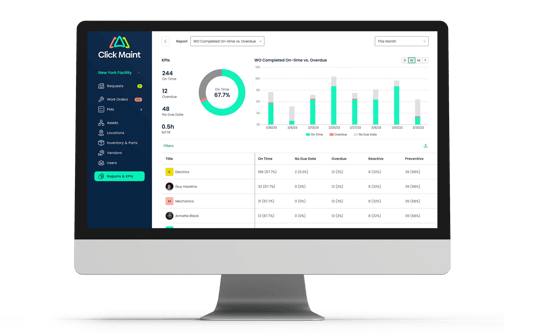
Consider a small manufacturer with a compressor that keeps shutting down. Without a maintenance history, each breakdown looks like a new problem. With centralized records, the maintenance team sees whether the same component has already been replaced several times. That information supports better troubleshooting, repair, and replacement decisions.
5. Mobile-Friendly Access
Maintenance work does not usually happen at a desk.
Technicians work:
- On a production floor
- In a mechanical room
- Around a facility
- In a warehouse
- At another building
- Outside
Small businesses should therefore consider how easily technicians access maintenance information while working. Technicians should quickly find assigned work, review asset information, enter notes, and update work status without unnecessary administrative steps. Mobile-friendly Maintenance Management Software also gives maintenance managers faster updates from technicians in the field.
6. Maintenance Request Management
How do employees currently report maintenance problems? For many small businesses, the answer is:
Text someone.
Or:
Send an email.
Or:
Tell the maintenance person when you see them.
The problem is not the communication itself. The problem is creating a reliable maintenance record afterward. Requests are easily forgotten when technicians are busy. A structured maintenance request process gives employees a clear way to report problems so the maintenance team reviews, prioritizes, assigns, and tracks each request.
7. Parts and Inventory Tracking
You do not want to discover that a critical replacement part is unavailable after equipment has already failed.
Look for maintenance software that tracks commonly used spare parts. Useful information includes:
- Part name
- Part number
- Quantity
- Storage location
- Minimum stock level
- Supplier
- Cost
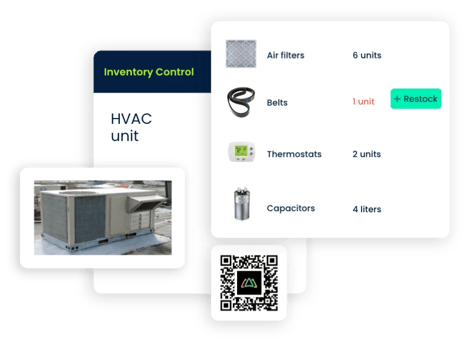
Connecting parts to maintenance activities also helps businesses understand which assets consume the most replacement components. This information gives maintenance managers greater control over maintenance inventory and helps teams prepare for upcoming repairs and preventive maintenance.
8. Maintenance Reporting
Small businesses do not necessarily need hundreds of reports. They need useful information. Maintenance software should make it easier to answer practical questions such as:
- How many work orders are open?
- Which maintenance tasks are overdue?
- Which assets require frequent repairs?
- How much maintenance work is being completed?
- Which equipment creates the most maintenance problems?
- What preventive maintenance work is coming up?
Good reporting makes maintenance data easier to understand instead of creating additional administrative work.
For maintenance managers, these reports support better decisions around work order priorities, equipment reliability, preventive maintenance, labor, and maintenance costs.
9. Ease of Use
Ease of use is one of the most important considerations for a small maintenance team.
Software provides little value when employees avoid using it. A complicated system pushes employees back toward:
- Text messages
- Paper
- Excel
- Personal notes
- Verbal requests
During a product evaluation, consider how many steps are required to complete common tasks.
For example:
How quickly does someone submit a maintenance request?
How easily does a manager assign a work order?
Does the system let a technician update a work order without extensive training?
How quickly does someone find an asset's maintenance history?
Usability has a major impact on adoption.
The best CMMS for maintenance managers should also remain straightforward for technicians and employees submitting maintenance requests.
10. Fast and Simple Implementation Process
Small businesses do not always have dedicated software implementation teams. Look for a solution designed for straightforward implementation without turning the project into a major IT initiative.
Before buying, ask:
- How long does setup typically take?
- Does the system support importing existing asset information?
- How much training is required?
- Does the system support starting with basic features?
- Is adding additional assets later straightforward?
For many small businesses, starting simple is better than configuring every available feature immediately.
Excel vs. Asset Maintenance Software for Small Businesses
Excel is a common first asset management tool for small businesses. There is nothing inherently wrong with that.
A spreadsheet works well for maintaining a simple equipment list. However, the differences become more important as maintenance activity increases.
|
Capability |
Excel |
Asset Maintenance/CMMS Software |
|
Equipment list |
Yes |
Yes |
|
Asset information |
Yes |
Yes |
|
Maintenance history |
Manual |
Centralized |
|
Work orders |
Manual |
Built for maintenance workflows |
|
PM scheduling |
Manual |
Recurring maintenance workflows |
|
Technician assignments |
Manual |
Centralized |
|
Maintenance requests |
Not purpose-built |
Structured request process |
|
Spare parts |
Separate spreadsheets |
Connected with maintenance |
|
Reporting |
Requires setup |
Maintenance-focused |
|
Multiple maintenance users |
Possible |
Designed for team workflows |
The main difference is that Excel stores information, while a CMMS organizes the maintenance processes connected to that information.
How Much Does Asset Maintenance Software Cost for a Small Business?
Pricing varies significantly between maintenance software providers. Some systems charge per user. Others use different subscription plans or feature packages. Small businesses should look beyond the monthly subscription price and consider the total value of the system.
Ask:
- How many users do we need?
- Are technician accounts included?
- Are important features locked behind higher plans?
- Is implementation an additional cost?
- Is customer support included?
- Will we need expensive integrations?
- Does pricing remain practical as the business grows?
The lowest-priced system is not always the least expensive option if employees struggle to use it. Likewise, a complex enterprise system sometimes includes capabilities that a small maintenance team will never use.
The objective is to find Maintenance Management Software that provides the maintenance capabilities your business actually needs at a sustainable cost.
How to Choose Asset Maintenance Software for Your Small Business
A simple buying process helps you avoid paying for unnecessary features.
Step 1: Identify Your Maintenance Problems
Write down the biggest problems with your current process.
For example:
- Missed PMs
- Lost maintenance requests
- Poor equipment history
- Too many spreadsheets
- Unclear work order priorities
These problems should guide your software evaluation.
Step 2: Identify Must-Have Features
Separate requirements into must-haves and nice-to-haves. For a small business, must-have features typically include:
- Asset tracking
- Work orders
- Preventive maintenance
- Maintenance requests
- Mobile access
This prevents the buying process from becoming focused on impressive features your team will never use.
Step 3: Take a Product Tour or Demo
Do not evaluate maintenance software only from a feature list. See how everyday tasks actually work. Ask the software provider to show you how to:
- Create an asset.
- Submit a maintenance request.
- Create a work order.
- Assign it to a technician.
- Schedule preventive maintenance.
- Complete a work order.
- View an asset's maintenance history.
This provides a better picture of what your employees will experience.
Step 4: Consider Your Technicians
Managers sometimes select the software, but technicians use it every day. A system that looks impressive to management but is difficult for technicians to use creates adoption problems.
Include the people who will actually use the software in the evaluation process. For maintenance managers, technician adoption should remain a major part of the CMMS selection process.
Step 5: Consider Future Growth
You do not need to purchase an enterprise-level system simply because your business expects to grow. However, the software should support reasonable growth in:
- Assets
- Users
- Work orders
- Locations
- Preventive maintenance
Changing maintenance systems requires time and effort, so it makes sense to think beyond today's requirements.
Is CMMS Software Worth It for a Small Business?
It depends on the maintenance operation. A business with very few assets and minimal maintenance could manage effectively with spreadsheets. A small business managing dozens or hundreds of important assets faces a very different situation.
CMMS software becomes more valuable when maintenance problems start affecting:
- Equipment availability
- Employee productivity
- Maintenance costs
- Preventive maintenance completion
- Work order visibility
- Asset reliability
Company size alone should not determine whether you need maintenance software.
Maintenance complexity is the better measure.
For growing teams, CMMS for maintenance managers provides a structured way to organize work orders, preventive maintenance, assets, equipment history, inventory, and maintenance requests in one system.
Why Small Businesses Consider Click Maint
Small maintenance teams do not need the complexity of a large enterprise maintenance platform. They need a practical way to organize everyday maintenance.
Click Maint is a CMMS designed to help maintenance teams manage important maintenance activities such as:
- Assets and equipment
- Work orders
- Maintenance requests
- Preventive maintenance
- Maintenance history
- Parts and inventory
For a small business moving away from spreadsheets, paper, or informal maintenance processes, the goal is straightforward: create a centralized system that employees actually use.
Click Maint provides Maintenance Management Software for maintenance managers and teams looking for a simpler way to organize everyday maintenance operations.
Frequently Asked Questions
What Is the Best Asset Maintenance Software for a Small Business?
The best option depends on the business's maintenance needs. Small businesses should prioritize ease of use, asset tracking, work order management, preventive maintenance, maintenance history, mobile accessibility, and pricing that fits their operation.
Does a Small Business Need CMMS Software?
Not every small business needs a CMMS. Businesses with few assets and limited maintenance could use spreadsheets effectively. CMMS software becomes more useful as the number of assets, preventive maintenance tasks, work orders, technicians, and maintenance records increases.
Is Excel Suitable for Tracking Equipment Maintenance?
Yes. Excel works for tracking basic asset and maintenance information. However, work orders, PM scheduling, maintenance history, requests, and multi-user workflows require more manual administration as operations grow. Maintenance Management Software provides a more structured approach for growing maintenance operations.
What Is the Difference Between Asset Management Software and CMMS Software?
Asset management software broadly focuses on managing assets throughout their lifecycle. CMMS software focuses specifically on maintaining physical assets and managing maintenance processes such as work orders, preventive maintenance, repairs, maintenance history, and parts.
What Should Small Businesses Look for in CMMS Software?
Prioritize features your team will actually use, including easy asset management, work orders, preventive maintenance scheduling, maintenance requests, maintenance history, mobile access, reporting, and inventory tracking.
Maintenance managers should also evaluate usability, implementation, technician adoption, reporting, and the system's ability to support future growth.
How Do Small Businesses Move From Excel to CMMS Software?
Start by cleaning your existing asset spreadsheet and identifying the equipment information worth transferring.
Next:
- Move essential equipment records into the CMMS.
- Set up preventive maintenance schedules.
- Establish a standard work order process.
- Configure maintenance request workflows.
- Train employees on basic workflows.
- Begin tracking completed maintenance digitally.
This approach gives teams a structured transition from spreadsheets to Maintenance Management Software.
Find the Right Asset Maintenance Software for Your Small Business
Asset maintenance does not have to become complicated just because your business is growing.
The right system should make maintenance easier to organize.
If your team spends too much time updating spreadsheets, searching for equipment records, tracking down maintenance requests, or trying to remember which preventive maintenance tasks are due, it is time to consider a CMMS.
Click Maint helps small businesses centralize assets, work orders, preventive maintenance, maintenance requests, equipment history, and inventory so maintenance managers and technicians have a clearer view of what needs to be done.
See How Click Maint Works
Looking for an easier way to manage equipment maintenance? See how Click Maint helps small businesses and maintenance managers organize assets, work orders, preventive maintenance, maintenance requests, inventory, and maintenance history. Take the quick 2-minute interactive product tour or schedule a personalized demo.
Simplify Asset Maintenance with Click Maint
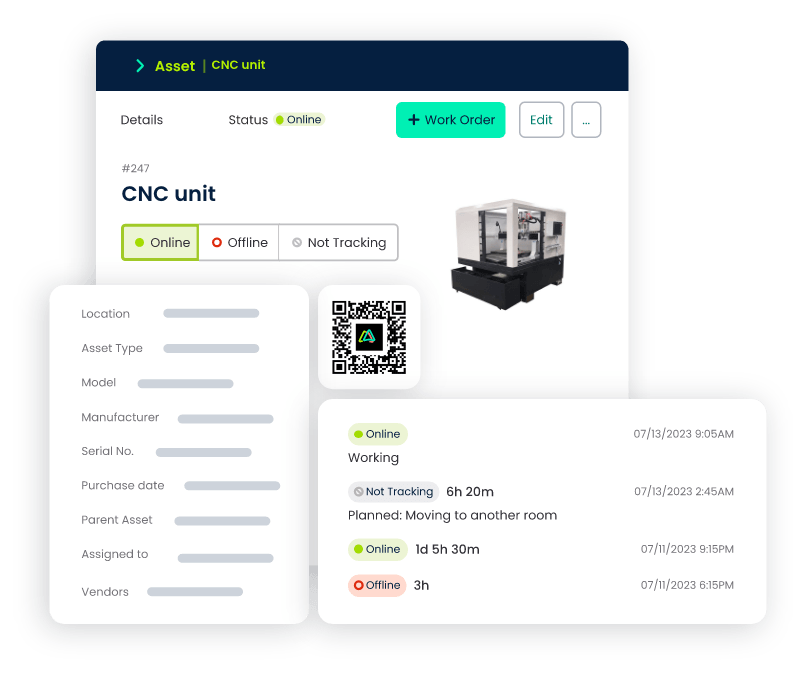
TABLE OF CONTENTS






