


Reena Sommer | 5 Oct 2026


Keeping accurate records of equipment maintenance is essential for any organization that relies on machinery, vehicles, tools, or facility assets. Without a clear maintenance history, teams struggle to understand what repairs were completed, when equipment was last serviced, how much maintenance costs, or why an asset keeps failing.
An organized equipment maintenance history gives maintenance teams a complete record of inspections, preventive maintenance, repairs, parts replacements, downtime, and costs associated with each asset.
While spreadsheets and paper records work for very small operations, they become difficult to maintain as the number of assets and work orders grows. CMMS software and Maintenance Management Software provide a more efficient way to create and maintain centralized maintenance records.
In this guide, we'll explain how to track equipment maintenance history, what information to record, and how Click Maint helps maintenance managers organize equipment records and maintenance operations.
What Is Equipment Maintenance History?
Equipment maintenance history is a chronological record of maintenance activities performed on a piece of equipment throughout its operating life.
The record includes:
- Preventive maintenance
- Inspections
- Equipment repairs
- Work orders
- Parts replacements
- Equipment failures
- Technician notes
- Labor hours
- Maintenance costs
- Downtime
- Meter readings
- Photos and documents
Instead of searching through paperwork, emails, spreadsheets, and technician notes, maintenance teams use one maintenance record to understand what has happened to an asset over time.
For example, if a production machine fails repeatedly, its maintenance history could show that the same component was replaced three times within six months. Maintenance managers use this information to investigate the underlying problem instead of continuing to perform the same repair.

Why Is Equipment Maintenance History Important?
Tracking maintenance history helps organizations make better decisions about equipment reliability, preventive maintenance, costs, and replacement.
A complete history helps maintenance teams answer questions such as:
When was this equipment last serviced?
What repairs have already been completed?
Which technician performed the work?
What parts were replaced?
How much has the equipment cost to maintain?
How frequently does the equipment fail?
Should we repair or replace the asset?
Without reliable records, these questions become difficult to answer.
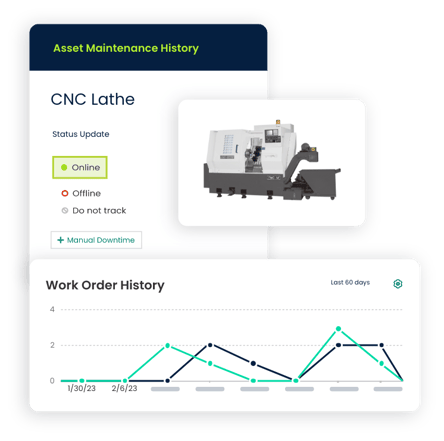
Historical maintenance information also gives managers data for improving maintenance planning instead of relying only on memory or assumptions.
What Information Should You Track?
Every organization has different maintenance requirements, but an equipment maintenance record should generally contain several core types of information.
1. Equipment Information
Start by creating a clear record for every maintainable asset. Record information such as:
- Asset name
- Asset ID or equipment number
- Serial number
- Manufacturer
- Model
- Location
- Department
- Installation date
- Purchase date
- Warranty information
- Equipment status
Standardized asset records make it easier to connect maintenance activities to the correct equipment.
2. Work Order History
Every completed work order should become part of the equipment's maintenance history. A work order record includes:
- Work order number
- Date requested
- Date completed
- Maintenance type
- Problem reported
- Work performed
- Technician assigned
- Labor time
- Parts used
- Completion notes
Digital work orders simplify this process because completed work remains associated with the asset.
3. Preventive Maintenance History
Preventive maintenance records show whether scheduled maintenance activities are being completed. Examples include:
- Lubrication
- Filter replacements
- Belt inspections
- Cleaning
- Calibration
- Safety inspections
- Fluid changes
- Component replacements
Tracking this information helps maintenance managers determine whether preventive maintenance schedules are being followed and whether those schedules are reducing equipment problems.
4. Equipment Repairs
Corrective maintenance should also be documented. When equipment breaks down, record information such as:
- Failure date
- Failure description
- Cause of failure
- Repair performed
- Technician
- Parts replaced
- Labor hours
- Equipment downtime
- Repair cost
Over time, these records reveal recurring failures. If the same asset repeatedly experiences similar problems, managers review whether preventive maintenance requires adjustment or whether equipment replacement represents the better option.
5. Parts and Inventory Usage
Maintenance history becomes more useful when parts usage is connected to individual assets and work orders. For example, teams track:
- Replacement parts
- Quantity used
- Part cost
- Supplier
- Date installed
This information helps maintenance managers understand which assets consume the most spare parts. It also improves maintenance inventory planning by showing which components are frequently required.
6. Labor Hours
Technician labor represents an important part of maintenance costs. Recording labor time against work orders allows managers to see how much technician time is spent maintaining individual assets.
For example, two similar machines could have similar purchase prices while one requires significantly more maintenance hours. Maintenance history makes those differences easier to identify.
7. Equipment Downtime
Downtime should be recorded whenever maintenance interrupts equipment availability. Track information such as:
- Date equipment stopped
- Duration of downtime
- Reason for downtime
- Repair start time
- Repair completion time
This data helps teams identify equipment responsible for frequent operational interruptions.
8. Maintenance Costs
Maintenance history should also include costs whenever possible. Common costs include:
- Technician labor
- Replacement parts
- Contractor services
- Materials
- Emergency repairs
Over time, maintenance managers calculate how much an asset costs to maintain. This information supports repair-versus-replace decisions.
How to Track Equipment Maintenance History Step by Step
Creating reliable equipment maintenance records requires more than simply recording repairs.
Organizations need a consistent process supported by clear procedures and reliable Maintenance Management Software.
Step 1: Create an Equipment Inventory
Start by identifying all assets that require maintenance. Depending on the organization, this includes:
- Manufacturing machinery
- HVAC systems
- Forklifts
- Vehicles
- Pumps
- Motors
- Compressors
- Electrical equipment
- Kitchen equipment
- Medical equipment
- Building systems
Assign each asset a unique identification number. This creates the foundation for accurate equipment tracking.
Step 2: Create a Digital Asset Record
Create a digital profile for every important asset. Include basic equipment information along with manuals, warranties, photos, specifications, and other useful documents. The asset profile should become the central location for information related to that piece of equipment.
Step 3: Connect Work Orders to Equipment
Every maintenance request or work order should be connected to the correct asset whenever possible. For example, instead of creating a work order called:
"Repair leaking pump."
Connect the work order directly to:
Pump P-104
When the technician completes the work, the repair information becomes part of Pump P-104's maintenance history. This creates a continuous record throughout the equipment's life.
Step 4: Record Maintenance Details
Technicians should document what happened during each maintenance activity. Useful notes include:
Problem: Motor overheating during normal operation.
Inspection: Cooling fan partially blocked by debris.
Action: Cleaned fan assembly and inspected motor.
Result: Motor temperature returned to normal range.
Detailed notes give future technicians valuable context when troubleshooting similar problems.
Step 5: Track Parts Used
Record replacement parts directly on the work order. This creates a history showing exactly which components were installed and when. If the same component fails repeatedly, managers identify the pattern more easily.
Step 6: Record Labor and Downtime
Technicians should record the time spent completing maintenance. Teams should also document equipment downtime when applicable. Together, these records help managers understand the operational impact of equipment maintenance.
Step 7: Close Work Orders Consistently
Completed work orders should include all required information before they are closed. A simple completion checklist verifies that:
- Work was completed
- Technician notes were entered
- Parts were recorded
- Labor was recorded
- Photos were attached when necessary
- Equipment status was updated
Consistent work order completion improves the quality of maintenance history.
Step 8: Review Equipment History Regularly
Maintenance history becomes most valuable when teams actually use it. Maintenance managers should periodically review asset records to identify:
- Repeated equipment failures
- Rising repair costs
- Excessive downtime
- Frequently replaced parts
- Preventive maintenance problems
- Assets requiring significant technician time
These insights help teams adjust maintenance strategies.
Spreadsheet vs. CMMS for Tracking Equipment Maintenance
Some organizations begin tracking maintenance using spreadsheets. A spreadsheet typically contains columns for:
|
Asset |
Maintenance Date |
Work Performed |
Technician |
Parts |
Cost |
|
Pump P-104 |
Sept. 10 |
Replaced seal |
Technician A |
Seal Kit |
$125 |
|
HVAC-12 |
Sept. 12 |
Replaced filter |
Technician B |
Filter |
$35 |
This approach works when an organization has only a few assets and maintenance activities. However, spreadsheets become difficult to manage as operations grow.
Common problems include:
- Multiple spreadsheet versions
- Missing maintenance records
- Inconsistent data entry
- Difficulty finding previous repairs
- Limited connections between work orders and assets
- Manual preventive maintenance scheduling
- Limited reporting
A computerized maintenance management system (CMMS) centralizes this information.
Instead of manually updating several files, technicians complete digital work orders that contribute directly to an asset's maintenance record. For growing maintenance operations, CMMS for maintenance managers provides a structured system for tracking equipment, work orders, preventive maintenance, parts, labor, and maintenance history.
How CMMS Software Helps Track Equipment Maintenance History
CMMS software provides a central system for managing assets, work orders, preventive maintenance, inventory, and maintenance records. With Maintenance Management Software such as Click Maint, maintenance teams organize important equipment information and maintenance activity in one place.
Centralized Asset Records
Each asset has its own digital record. Maintenance teams access relevant information without searching through filing cabinets, spreadsheets, emails, or separate systems.
Digital Work Order History
When maintenance work is completed through digital work orders, organizations build a searchable history of maintenance activities.
Managers and technicians review previous work before starting another repair.
Preventive Maintenance Tracking
Preventive maintenance tasks are scheduled according to established maintenance requirements. Completed preventive maintenance creates an ongoing record that helps teams see what work has been performed.
Maintenance Inventory Tracking
Connecting spare parts with maintenance work provides better visibility into which parts are being used on specific equipment.
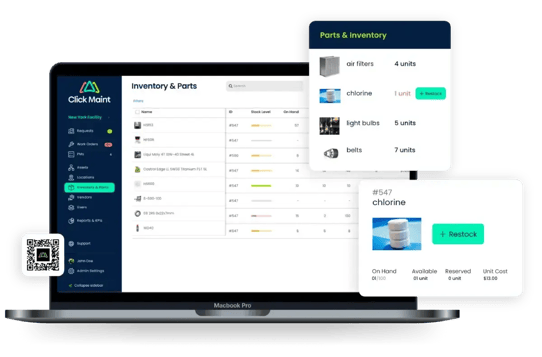
This improves inventory planning and helps teams identify equipment with unusually high parts consumption.
Better Maintenance Reporting
Centralized maintenance data makes it easier to evaluate metrics such as:
- Maintenance costs
- Work order completion
- Equipment downtime
- Repair frequency
- Preventive maintenance completion
- Labor usage
These insights help maintenance managers make more informed decisions.
How Equipment Maintenance History Helps Reduce Downtime
Maintenance history does more than document past work. It helps teams improve future maintenance. Consider a conveyor motor that fails every few months. Without maintenance history, each failure could appear to be an isolated incident.
With detailed records, a maintenance manager sees that the same motor experienced four overheating incidents during the year. The team then investigates potential causes such as:
- Improper lubrication
- Excessive load
- Electrical problems
- Poor ventilation
- Misalignment
- Aging components
Maintenance history turns individual work orders into information that supports better troubleshooting.
How Maintenance History Supports Repair-or-Replace Decisions
Eventually, organizations must decide whether aging equipment should continue to be repaired or replaced. Maintenance history provides useful information for that decision.
Managers review:
Repair frequency: How frequently does the equipment fail?
Maintenance costs: How much has been spent repairing it?
Downtime: How much operational disruption does it cause?
Parts availability: Are replacement components becoming difficult to obtain?
Equipment age: Is the asset approaching the end of its expected useful life?
Instead of relying only on the latest breakdown, managers evaluate the asset's broader maintenance record.
Best Practices for Equipment Maintenance Records
To keep maintenance history useful, organizations should establish consistent maintenance documentation practices. Keep asset names and identification numbers standardized. Require technicians to enter meaningful completion notes. Connect work orders to specific assets whenever possible. Record parts, labor, costs, and downtime consistently.
Organizations should also avoid creating separate maintenance records for the same asset across multiple systems. The goal is to create one reliable source of maintenance information that technicians and maintenance managers easily access.
Frequently Asked Questions
What Is Equipment Maintenance History?
Equipment maintenance history is a chronological record of inspections, preventive maintenance, repairs, work orders, parts replacements, labor, costs, and other maintenance activities associated with an asset.
What Should an Equipment Maintenance Record Include?
A maintenance record should include asset information, maintenance dates, work performed, technicians, parts used, labor hours, repair costs, downtime, preventive maintenance activities, and completion notes.
How Do You Keep Track of Equipment Maintenance?
Organizations use paper records, spreadsheets, or CMMS software. A CMMS provides a centralized way to connect equipment records with work orders, preventive maintenance, inventory, and maintenance history.
Maintenance Management Software provides growing maintenance teams with a structured system for managing these records.
Why Should Maintenance Teams Track Repair History?
Repair history helps teams identify recurring failures, understand maintenance costs, troubleshoot equipment problems, plan preventive maintenance, and make better repair-or-replace decisions.
How Does a CMMS Track Equipment Maintenance History?
CMMS software maintains digital asset records and connects maintenance activities, work orders, preventive maintenance tasks, technician notes, parts, and other information to individual assets.
For organizations evaluating CMMS for maintenance managers, equipment maintenance history is an important feature because it gives managers and technicians a centralized record of maintenance activity.
Build a Better Equipment Maintenance History With Click Maint
Accurate equipment maintenance history gives maintenance teams greater visibility into the condition, reliability, and cost of their assets.
Instead of relying on spreadsheets, paperwork, or technician memory, organizations use Click Maint CMMS software to organize asset information, work orders, preventive maintenance, maintenance inventory, and service records in one system.
Click Maint provides Maintenance Management Software that helps maintenance managers organize equipment records and gain greater visibility into daily maintenance operations.
Better records make it easier to understand what happened to an asset, identify recurring maintenance problems, and make informed decisions about future maintenance.
See Equipment Maintenance Tracking in Action
Ready to organize your equipment maintenance records? See how Click Maint helps maintenance managers track equipment maintenance history, work orders, preventive maintenance, assets, and parts in one system. Take the quick 2-minute interactive product tour or schedule a personalized demo.
See Equipment Maintenance Tracking in Action
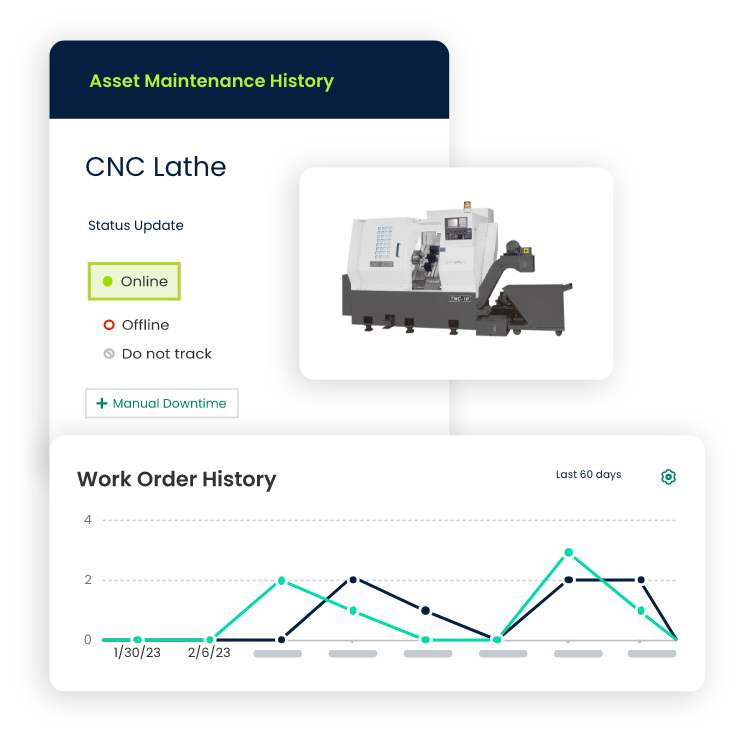
TABLE OF CONTENTS






