



Reena Sommer | 28 Sep 2026


Maintenance Directors should look for CMMS software that makes it easier to manage work orders, preventive maintenance, equipment, technicians, spare parts, maintenance costs, and performance reporting. The right system should provide clear visibility into maintenance operations while being simple enough for technicians and other employees to use consistently.
For Maintenance Directors, choosing a Computerized Maintenance Management System (CMMS) is more than a software decision. It can affect how quickly maintenance requests are handled, how preventive maintenance is scheduled, how equipment history is documented, and how leadership understands maintenance performance.
If your maintenance department still relies heavily on spreadsheets, paper forms, emails, phone calls, or text messages, important information can become scattered across multiple places. This Maintenance Director CMMS checklist explains what to evaluate before buying maintenance management software and which questions to ask prospective CMMS vendors.
What is CMMS Software in the Context of Maintenance Directors?
CMMS software gives Maintenance Directors a centralized system for managing maintenance work, assets, preventive maintenance schedules, inventory, technicians, and maintenance records. Instead of managing maintenance information through separate spreadsheets, emails, paper records, and conversations, teams can organize their activities within one system.
A Maintenance Director can use a CMMS to answer important operational questions:
- How many work orders are currently open?
- Which work orders are overdue?
- What equipment is experiencing recurring problems?
- Which preventive maintenance tasks are due?
- How much reactive maintenance is occurring?
- What parts are needed for upcoming work?
- What maintenance work was previously performed on an asset?
- How is the maintenance team performing?
- Which facilities or assets require the most maintenance attention?
The objective is not simply to digitize work orders. A CMMS should help Maintenance Directors gain better control and visibility over the entire maintenance operation.
Maintenance Director CMMS Checklist
Before purchasing a CMMS, evaluate these 20 areas.
1. Work Order Management
Why it matters: Work orders are at the center of most maintenance operations.
Maintenance Directors need a system that makes it easy to create, prioritize, assign, track, and close maintenance work. Look for capabilities that support:
- Work order creation
- Priority levels
- Technician assignments
- Due dates
- Status tracking
- Labor information
- Parts usage
- Notes and instructions
- Photos and attachments
- Work order history
The system should also give Maintenance Directors an easy way to identify open, overdue, high-priority, and completed work.
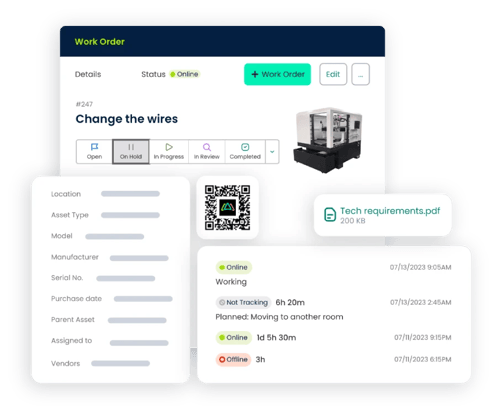
Ask the CMMS vendor: Can I see all open and overdue work orders across my maintenance operation from one place?
2. Maintenance Request Management
Maintenance Directors should also consider how work enters the maintenance department. Employees may currently report problems through phone calls, emails, text messages, paper forms, or conversations in the hallway. That makes requests difficult to prioritize and track. A centralized maintenance request process can provide a more consistent path from identifying a problem to completing the repair. Look for a system that makes it easy for authorized users to submit maintenance requests without creating unnecessary administrative work.
Ask the CMMS vendor: How quickly can an employee submit a maintenance request, and how does my team turn that request into a work order?
3. Preventive Maintenance Scheduling
Preventive maintenance should be a major consideration when evaluating CMMS software. A CMMS helps maintenance teams schedule recurring work instead of relying on spreadsheets, calendars, or employee memory.
Examples may include:
- HVAC inspections
- Equipment lubrication
- Filter replacements
- Safety inspections
- Generator maintenance
- Vehicle servicing
- Belt inspections
- Equipment cleaning
- Facility inspections
Maintenance Directors should be able to see upcoming and overdue preventive maintenance activities.
Ask the CMMS vendor: Can the CMMS automatically generate recurring preventive maintenance work orders?
4. Asset and Equipment Management
Maintenance Directors need more than a list of equipment. They need useful information about each asset. A CMMS should allow teams to maintain asset records containing information such as:
- Asset name
- Location
- Model
- Serial number
- Manufacturer
- Maintenance history
- Associated work orders
- Manuals and documents
- Repair notes
Centralized asset histories can make it easier to understand recurring maintenance problems and support repair-versus-replacement discussions.
Ask the CMMS vendor: Can I open an asset record and quickly see its maintenance and work order history?
5. Equipment Downtime Tracking
Unplanned downtime can disrupt production, facility operations, service delivery, and employee productivity. Maintenance Directors should understand whether a prospective CMMS provides the information they need to identify assets associated with recurring maintenance issues.
Useful maintenance records can help teams investigate questions such as:
- Which equipment frequently requires repairs?
- Which assets generate repeated emergency work orders?
- Where are recurring failures occurring?
- Are certain assets consuming excessive maintenance resources?
This information can support better maintenance planning.
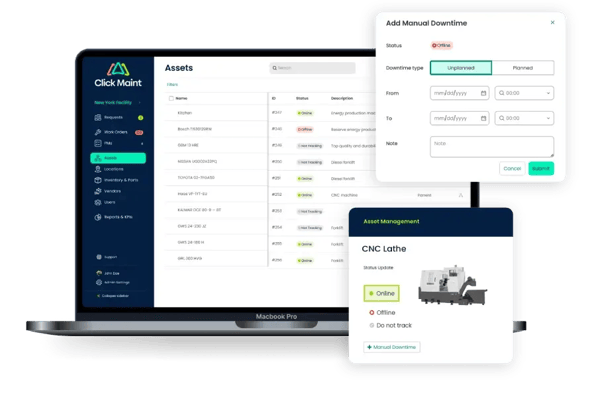
Ask the CMMS vendor: How does the CMMS help us identify equipment associated with recurring downtime or repair activity?
6. Maintenance Planning and Scheduling
Creating work orders is only one part of maintenance management. Maintenance Directors also need to coordinate:
- Priorities
- Available technicians
- Planned work
- Emergency repairs
- Preventive maintenance
- Parts availability
- Facility access
Look for a CMMS that gives managers clear visibility into upcoming maintenance work and technician assignments.
Ask the CMMS vendor: How can supervisors schedule and prioritize work across the maintenance team?
7. Technician Workload and Accountability
A Maintenance Director should be able to determine who is responsible for each maintenance task. A CMMS can provide a documented workflow showing:
What needs to be done → Who is responsible → When it is due → Current status → Completion
This is more reliable than depending on conversations or text messages. The goal is not to micromanage technicians. It is to provide clarity around responsibilities and priorities.
Ask the CMMS vendor: Can supervisors quickly see technician assignments and outstanding work?
8. Labor Tracking
Understanding labor requirements can help Maintenance Directors plan resources more effectively. Depending on organizational needs, teams may want to record:
- Technician time
- Work order labor
- Planned versus completed work
- Contractor involvement
Labor information can also provide useful context when evaluating expensive or maintenance-intensive assets.
Ask the CMMS vendor: What labor information can we capture through work orders?
9. Spare Parts and Inventory Management
A technician cannot complete a repair efficiently if the required part is unavailable. Maintenance Directors should look for inventory functionality that can help track:
- Spare parts
- Stock quantities
- Storage locations
- Parts associated with work orders
- Inventory usage
- Reorder information
Better inventory visibility can help teams prepare for planned maintenance while reducing unnecessary searches for parts.
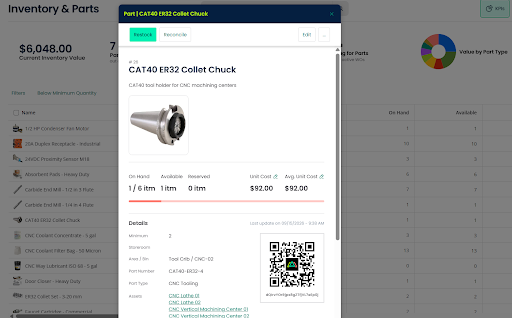
Ask the CMMS vendor: Can technicians see whether a required part is available before starting a work order?
10. Maintenance Cost Tracking
Maintenance Directors are often expected to explain where maintenance resources are being used. A CMMS helps organize information associated with maintenance activities, including labor and parts where supported by the platform.
This can help answer questions such as:
- Which assets require frequent repairs?
- Where are maintenance resources being spent?
- Which types of work occur most frequently?
- Are recurring equipment problems driving additional maintenance activity?
Maintenance data can give leadership better context for budgeting and asset planning.
Ask the CMMS vendor: What maintenance cost information can we track by work order, asset, or location?
11. Maintenance KPIs and Reporting
Maintenance Directors should look for reporting that turns maintenance records into actionable information. Depending on the organization, useful maintenance metrics may include:
- Open work orders
- Overdue work orders
- Work order completion
- Preventive maintenance completion
- Reactive versus planned work
- Maintenance costs
- Asset repair frequency
- Equipment downtime
The right metrics depend on your operational goals. Avoid choosing a system simply because it offers hundreds of reports. Focus on whether it provides the information your team and leadership actually need.
Ask the CMMS vendor: Can I create reports that help me communicate maintenance performance to senior leadership?
12. Mobile CMMS Capabilities
Technicians spend much of their time working around facilities and equipment rather than sitting at computers. Mobile access can allow technicians to manage work where maintenance happens. They may need to:
- View assignments
- Read work instructions
- Update work order status
- Add notes
- Review asset history
- Record parts
- Upload photos
- Complete work orders
Reducing unnecessary data entry can also encourage greater CMMS adoption.
Ask the CMMS vendor: What can technicians do from their phones or tablets?
13. Multi-Site Maintenance Management
Maintenance Directors responsible for several facilities need both local and organization-wide visibility. The CMMS should make it possible to organize information by:
- Facility
- Building
- Department
- Location
- Asset
At the same time, leadership should be able to understand maintenance activity across the broader organization. This can be particularly useful for manufacturers, schools, healthcare organizations, nonprofits, property portfolios, senior living organizations, municipalities, and other multi-location operations.
Ask the CMMS vendor: Can I manage several locations while maintaining a consolidated view of maintenance operations?
14. Maintenance History and Documentation
Historical maintenance information can become extremely valuable when equipment starts developing recurring problems. A CMMS should maintain accessible records of previous work. This may include:
- Completed work orders
- Technician notes
- Maintenance dates
- Parts used
- Inspection records
- Photos
- Asset documents
Instead of searching through paper files or old spreadsheets, authorized employees should be able to find relevant maintenance history quickly.
Ask the CMMS vendor: How easily can technicians retrieve previous maintenance records for an asset?
15. Ease of Use and Technician Adoption
One of the most important CMMS features is often overlooked: usability. An overly complex and sophisticated system provides limited value if employees don’t use it. During demonstrations, pay attention to how many steps are required to perform common tasks.
Ask a vendor to demonstrate how a technician would:
- Open an assigned work order.
- Review instructions.
- Check asset history.
- Add a note or photo.
- Record work performed.
- Close the work order.
Maintenance Directors should involve actual users in the evaluation process whenever practical.
Ask the CMMS vendor: How much training does a typical technician need before using the system independently?
16. Implementation and Onboarding
Buying CMMS software is only the beginning. Ask how the system will be implemented. Consider:
- Asset setup
- User creation
- Existing data
- Preventive maintenance schedules
- Inventory records
- Training
- Technical support
A system that takes excessive effort to implement may slow adoption.
Ask the CMMS vendor: What does implementation look like from purchase to daily use?
17. Integration Capabilities
Maintenance software rarely operates completely independently. Depending on your organization, integrations with other business systems may be important. Before purchasing, identify which connections are truly necessary rather than paying for integrations your team may never use. Document:
- Current business applications
- Required data flows
- Integration priorities
- Future requirements
Then verify those requirements directly with the CMMS vendor.
Ask the CMMS vendor: Which systems can the CMMS integrate with, and what is required to configure those integrations? Are the integrations out of the box or will the connections need to be built using the API?
18. Scalability
Your maintenance department may look very different in three years. You may add:
- More technicians
- More facilities
- Additional equipment
- More preventive maintenance programs
- New departments
- Higher work order volumes
Choose a CMMS that can accommodate expected growth without forcing the organization into unnecessary complexity today.
Ask the CMMS vendor: How does the system handle additional locations, users, assets, and maintenance activity?
19. Vendor Support
Even easy-to-use software may require support. Maintenance Directors should understand what happens when employees need assistance. Ask about:
- Onboarding
- Training resources
- Customer support
- Help documentation
- Support availability
- Ongoing product education
Also determine whether additional support carries additional costs.
Ask the CMMS vendor: What support is available after implementation?
20. Total Cost of Ownership
Do not compare CMMS products based solely on advertised subscription prices. Consider the broader cost, including:
- Subscription fees
- Number of users
- Implementation
- Training
- Integrations
- Additional modules
- Support
- Future expansion
- Annual price increases
Then compare those costs against the operational problems you are trying to solve. The objective is not necessarily to select the system with the most features. It is to find a system that meets your maintenance requirements at a cost your organization can support.
Maintenance Director CMMS Evaluation Scorecard
Use this simple checklist when comparing CMMS vendors:
|
CMMS Requirement |
Required? |
Vendor Meets Requirement? |
|
Work order management |
☐ |
☐ |
|
Maintenance requests |
☐ |
☐ |
|
Preventive maintenance |
☐ |
☐ |
|
Asset management |
☐ |
☐ |
|
Equipment maintenance history |
☐ |
☐ |
|
Downtime tracking |
☐ |
☐ |
|
Maintenance scheduling |
☐ |
☐ |
|
Technician assignments |
☐ |
☐ |
|
Labor tracking |
☐ |
☐ |
|
Parts and inventory |
☐ |
☐ |
|
Maintenance cost tracking |
☐ |
☐ |
|
KPI reporting |
☐ |
☐ |
|
Mobile access |
☐ |
☐ |
|
Multi-location management |
☐ |
☐ |
|
Integrations |
☐ |
☐ |
|
Easy technician adoption |
☐ |
☐ |
|
Implementation support |
☐ |
☐ |
|
Scalability |
☐ |
☐ |
|
Customer support |
☐ |
☐ |
|
Fits budget |
☐ |
☐ |
A structured scorecard helps keep the evaluation focused on operational requirements rather than impressive features your team may never use.
7 Signs Your Maintenance Department May Need a CMMS
1. Your Work Order Backlog Keeps Growing
If new requests are arriving faster than teams can organize and complete them, better work order visibility may be needed. A CMMS provides a central location for prioritizing, assigning, and tracking maintenance work.
2. Your Team Is Constantly Fighting Emergencies
Frequent emergency repairs can leave little time for planned maintenance.
A stronger preventive maintenance process can help teams shift more attention toward scheduled work.
3. Preventive Maintenance Tasks Are Being Missed
Spreadsheets and calendar reminders become harder to manage as the number of assets increases. CMMS software centralizes PM schedules and recurring maintenance activities.
4. Equipment History Is Difficult to Find
If employees have to search paper files, old spreadsheets, or emails to determine what happened to a machine six months ago, maintenance decisions become more difficult.
5. Technicians Receive Work Through Text Messages
Text messages may be convenient, but they are difficult to use as a complete maintenance record. Centralized work orders create a clearer history.
6. Spare Parts Are Difficult to Track
If technicians frequently discover that required parts are unavailable—or the organization repeatedly purchases parts already in storage—better inventory visibility may help.
7. Leadership Wants Better Maintenance Data
Maintenance Directors increasingly need to communicate operational performance to executives. A CMMS provides a centralized source of maintenance information for reporting and decision-making.
How Can CMMS Software Help Maintenance Directors Reduce Equipment Downtime?
CMMS software can help Maintenance Directors organize preventive maintenance, work orders, asset histories, and recurring repair information.
Rather than waiting for a breakdown and then searching for equipment records, technicians can access relevant maintenance information from a centralized system. Historical work orders can also help maintenance teams identify assets experiencing repeated problems.
A CMMS doesn’t eliminate every equipment failure. However, better maintenance planning and accessible asset information can help teams manage maintenance more systematically.
How Can a CMMS Help Reduce Work Order Backlogs?
A CMMS gives Maintenance Directors greater visibility into incoming and outstanding work. Managers can organize work by factors such as priority, status, due date, technician, asset, or location, depending on the system.
This helps answer three important questions:
What needs attention first?
Who is responsible for it?
What work is falling behind?
A centralized process can be especially useful when maintenance teams receive a large volume of requests from multiple departments or facilities.
How Can CMMS Software Improve Preventive Maintenance?
CMMS software can centralize preventive maintenance schedules and help teams generate recurring maintenance work. Instead of relying on employees to remember every inspection or service interval, the maintenance team can establish repeatable schedules. Maintenance Directors can then review upcoming, completed, and overdue preventive maintenance activities. This provides greater visibility into whether the preventive maintenance program is being executed as planned.
Questions Maintenance Directors Should Ask During a CMMS Demo
Do not allow the entire demonstration to focus on the vendor's most impressive features. Ask the salesperson to show your actual workflows. Questions should include:
- How does a maintenance request become a work order?
- How do I see overdue work orders?
- How do technicians receive assignments?
- How do I schedule recurring preventive maintenance?
- How can I review an asset's complete maintenance history?
- How are parts associated with work orders?
- How does a technician update a work order from a phone?
- How can I identify assets requiring frequent repairs?
- Which maintenance KPIs can I report?
- How does the system handle multiple facilities?
- How long does implementation typically take?
- What training and support are available?
A useful CMMS demonstration should show how the software handles your everyday maintenance scenarios, not simply provide a tour of every feature.
How Should Maintenance Directors Compare CMMS Software?
Start with problems, not products. Document your current maintenance challenges before contacting vendors. For example:
Problem: Work orders are getting lost.
Requirement: Centralized work order tracking.
Problem: PM tasks are being missed.
Requirement: Recurring preventive maintenance scheduling.
Problem: Repair histories are difficult to find.
Requirement: Centralized asset maintenance records.
Problem: Technicians cannot find parts.
Requirement: Maintenance inventory tracking.
Problem: Leadership lacks maintenance visibility.
Requirement: Dashboards and reporting.
This approach makes it easier to distinguish essential capabilities from features that may look impressive but do not solve your actual problems.
How Click Maint Helps Maintenance Directors Simplify Maintenance Management
Maintenance Directors need visibility without adding unnecessary administrative work for technicians.
Click Maint is CMMS software designed to help organizations centralize key maintenance activities, including work orders, maintenance requests, preventive maintenance, assets, inventory, and maintenance information. Instead of managing maintenance across disconnected spreadsheets, paper records, emails, and text messages, organizations can establish a more centralized maintenance workflow. For Maintenance Directors, this can provide a clearer view of maintenance activities while giving technicians a structured way to manage everyday work.
Managing a Growing Work Order Backlog?
If your team is struggling with disconnected maintenance requests, preventive maintenance schedules, or equipment records, explore how Click Maint CMMS software can help centralize maintenance operations.
Final Maintenance Director CMMS Buying Checklist
Before making a decision, ask:
- Is it easy for technicians to use?
- Can we centralize all work orders?
- Can employees submit maintenance requests easily?
- Can we schedule preventive maintenance?
- Can we maintain asset histories?
- Can we identify recurring equipment problems?
- Can managers plan and assign work?
- Can we track spare parts?
- Can we capture useful maintenance cost information?
- Can we report meaningful maintenance KPIs?
- Can technicians work from mobile devices?
- Can we manage multiple locations?
- Can the software scale with us?
- Is implementation manageable?
- Does the vendor provide adequate support?
- Does the total cost fit our requirements and budget?
If a CMMS performs well against these requirements and fits your team's actual workflows, it is more likely to provide long-term value than software selected simply because it has the longest feature list.
See Click Maint in Action
If spreadsheets, emails, paper forms, and text messages are making maintenance increasingly difficult to manage, it may be time to centralize your processes. See how Click Maint helps Maintenance Directors organize work orders, preventive maintenance, assets, inventory, and everyday maintenance operations in one system.
See How Click Maint Simplifies Maintenance Operations

Frequently Asked Questions
What should a Maintenance Director look for in CMMS software?
A Maintenance Director should prioritize work order management, preventive maintenance scheduling, asset history, inventory management, mobile access, maintenance reporting, ease of use, scalability, and implementation support. The system should solve the organization's actual maintenance problems without creating unnecessary complexity.
What is CMMS software for Maintenance Directors?
CMMS software is a centralized system Maintenance Directors can use to organize work orders, preventive maintenance, assets, equipment records, parts, technicians, and maintenance information. It provides greater visibility into maintenance operations than disconnected spreadsheets, emails, paper forms, and text messages.
How does a CMMS help Maintenance Directors?
A CMMS helps Maintenance Directors centralize maintenance information, prioritize work, assign technicians, schedule preventive maintenance, maintain equipment histories, manage spare parts, and report maintenance performance. This gives directors better operational visibility while technicians manage their everyday tasks.
Can CMMS software reduce equipment downtime?
CMMS software supports processes that can help organizations manage downtime, including preventive maintenance scheduling, centralized work orders, accessible asset histories, and tracking recurring equipment problems. Actual downtime results depend on factors such as equipment condition, maintenance strategy, staffing, parts availability, and execution.
How does CMMS software help with preventive maintenance?
A CMMS allows maintenance teams to create recurring preventive maintenance schedules and track upcoming, completed, and overdue maintenance activities. This reduces dependence on spreadsheets, paper calendars, and employee memory for managing recurring work.
What maintenance KPIs should a Maintenance Director track?
Relevant KPIs depend on organizational goals but may include open work orders, overdue work, preventive maintenance completion, reactive versus planned maintenance, downtime, repair frequency, maintenance costs, and other asset or work-order performance measures.
Is CMMS software useful for multi-site maintenance operations?
CMMS software can be particularly useful for multi-site organizations because it can centralize maintenance information while organizing work by facility, asset, technician, or location. Maintenance Directors should verify that a prospective system provides both location-level visibility and the consolidated reporting they require.
How should a Maintenance Director evaluate CMMS vendors?
Begin by identifying your biggest maintenance problems and translating each problem into a software requirement. Use the same requirements, workflows, and questions during every vendor demonstration. Compare usability, work order management, preventive maintenance, asset management, mobile functionality, reporting, implementation, support, scalability, and total cost.
TABLE OF CONTENTS






