



Reena Sommer | 28 Aug 2026


A Definitive Guide for Growing Manufacturers
For growing manufacturers, equipment downtime is rarely caused by a single breakdown. More often, it comes from a series of smaller failures that compound over time: missed inspections, unclear work orders, poor asset visibility, delayed approvals, incomplete maintenance history, and teams relying on spreadsheets that were never designed to run a modern maintenance operation.
That is exactly why more maintenance leaders are replacing basic tracking methods with maintenance management software. A modern cloud-based CMMS does more than digitize maintenance records. It gives maintenance and operations teams a central system for managing work orders, improving preventive maintenance, tracking asset history, and reducing delays that cause costly downtime.
The business case is strong. Deloitte notes that poor maintenance strategies can reduce an asset’s productive capacity by 5% to 20%, and that unplanned downtime costs industries an estimated $50 billion each year. For small to mid-sized manufacturing companies, that kind of lost capacity is not just a maintenance issue. It is a growth issue. Let’s explore in more detail how cloud CMMS helps reduce equipment downtime.
Why Downtime Becomes Harder to Control as Manufacturers Grow
In a smaller plant, maintenance often works through experience, speed, and close communication. A supervisor knows which line goes down most often. A veteran technician knows the signs that a motor is about to fail. Work requests are easy to track because everyone is working from the same physical space.
But growth changes the equation.
As production expands, more assets enter service, more technicians touch the same equipment, and more work needs to be scheduled across shifts. The old system of spreadsheets, whiteboards, paper logs, and inbox requests becomes harder to manage. Information gets buried. Asset history becomes fragmented. Preventive work slips. Repairs become more reactive.
This is the point where many manufacturers realize they do not have a maintenance effort problem. They have a “systems” problem.
What Is a Cloud-Based CMMS?
A cloud-based CMMS (Computerized Maintenance Management System) is maintenance software that is hosted online and accessed through a web browser or mobile device. It gives maintenance teams one central place to manage work orders, preventive maintenance, equipment history, parts, inspections, and maintenance records.
This is different from a traditional on-premise CMMS, where the software is installed on company-owned servers and typically managed by an internal IT team. On-premise systems can require more upfront setup, server maintenance, software updates, backups, and ongoing technical support.
With a cloud-based CMMS, the software provider manages the infrastructure, updates, and system availability. Maintenance teams can access the system from connected devices without being tied to a specific computer or company network.
For manufacturers, this can mean:
-
Faster implementation with less IT involvement
-
Access from the plant floor, office, or another facility
-
Automatic software updates without manual installations
-
Easier collaboration across shifts, departments, and locations
-
Real-time access to maintenance and equipment information
-
Easier integration with other systems through APIs
-
Less reliance on local servers and internal infrastructure
-
Better scalability as operations, users, or facilities grow
These benefits are especially important when the goal is to reduce equipment downtime.
Faster Response Starts With Better Visibility
Downtime is not always extended because a repair is complicated. Often, valuable time is lost before the repair even begins.
An operator may notice a problem but have no easy way to report it. A maintenance request may sit unnoticed. A technician may arrive at the equipment without knowing its service history, the nature of the problem, or which parts are required.
With an older on-premise system, access may also be limited to certain computers or locations. If technicians need to return to a workstation to review information or update a work order, every extra step can slow the response.
A cloud-based CMMS keeps the process connected. An operator can submit a request from the plant floor, the maintenance team can review and prioritize it, and a technician can receive the work order directly on a phone or tablet.
The work order can include the problem description, asset information, photos, procedures, previous maintenance history, required parts, and other details needed to complete the repair.
When equipment is down, reducing these small delays can make a significant difference. Faster communication and better access to information help technicians spend less time looking for answers and more time getting equipment back into operation.

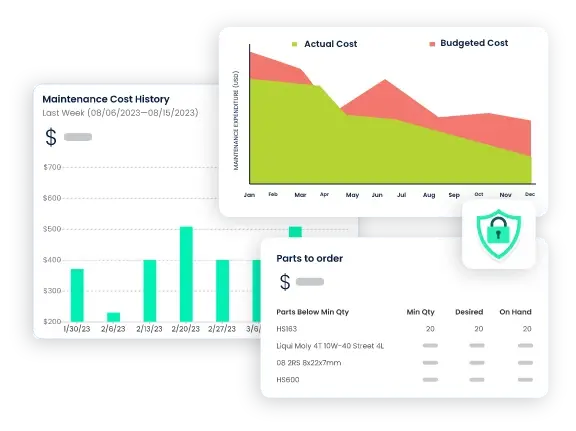
See Click Maint CMMS Software in Action
See how easy it is to streamline maintenance processes, reduce downtime, and improve productivity with Click Maint CMMS software. Take the quick 2-minute interactive product tour today.
Mobile Access Keeps Maintenance Moving
Maintenance work happens on the plant floor, not behind a desk.
Traditional on-premise CMMS software was often designed around desktop access and internal networks. That can work for administrative tasks, but it is less practical for technicians moving between production lines, equipment, buildings, and facilities.
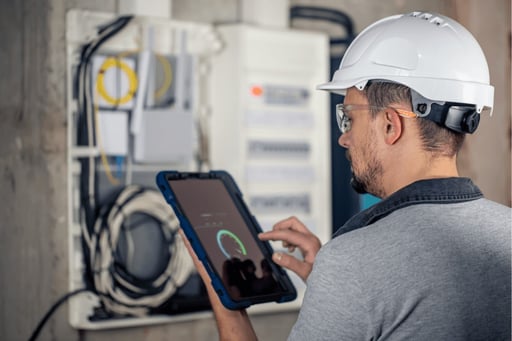
A cloud-based CMMS gives technicians access to maintenance information from smartphones, tablets, and other connected devices. They can receive assignments, review asset history, add notes and photos, record parts used, and close work orders directly where the work is being performed.
This reduces administrative bottlenecks and helps maintenance information stay current. Managers gain better visibility into what is happening across the plant, while technicians can focus more of their time on maintaining and repairing equipment.
Less IT Overhead and Easier Scalability
On-premise CMMS software can require companies to maintain servers, manage upgrades, perform backups, and troubleshoot technical issues internally. As a manufacturer adds users, equipment, production lines, or facilities, the supporting infrastructure may also need to grow.
Cloud-based CMMS software removes much of that burden. Updates and system maintenance are generally handled by the software provider, while manufacturers can add users or locations without installing new software at every site.
For growing manufacturers, this makes it easier to standardize maintenance processes across multiple facilities while maintaining a central view of work orders, equipment performance, preventive maintenance, and downtime.
The result is a maintenance system that is easier to access, easier to scale, and better suited to supporting faster maintenance decisions when equipment availability matters most.
Centralized Data Improves Decision-Making
A plant can only improve what it can see clearly. When maintenance records live in separate spreadsheets, paper notes, emails, and individual memory, leaders end up making decisions from partial information.
Cloud-based maintenance management software centralizes that information. Work orders, maintenance history, asset records, and task completion status all live in one environment. That makes it easier to spot repeat failures, compare asset performance, identify preventive maintenance gaps, and understand where downtime is actually coming from.
How Maintenance Management Software Strengthens Preventive Maintenance
Most manufacturers already understand the value of preventive maintenance. The challenge is not convincing anyone that PM matters. The challenge is executing it consistently enough to reduce failures without creating unnecessary work.
This is where a modern CMMS outperforms basic tracking tools. Here’s how and why.
Scheduling Preventive Maintenance With More Consistency
Preventive maintenance often breaks down because the system behind it is too manual. Schedules are spread across calendars and spreadsheets. Task details are inconsistent. Completion records are incomplete. Follow-up actions are hard to track.
With a cloud CMMS, preventive tasks can be standardized, scheduled, assigned, and documented in one place. Instead of relying on memory or manual reminders, the system helps ensure recurring work is visible and actionable.
That does not mean every preventive task becomes perfect overnight. It does mean the plant has a better operational framework for making PM repeatable.
Moving Beyond Time-Based Maintenance Alone
Time-based preventive maintenance is useful, but it has limits. In some cases, it leads to maintenance being performed earlier than necessary. In others, it misses asset issues that emerge between intervals.
Deloitte explains that predictive maintenance aims to reduce unnecessary preventive maintenance while helping assets avoid catastrophic failure. The same source notes that predictive programs can use data from sensors, PLCs, ERP systems, CMMS platforms, MES environments, GPS tracking, telematics systems, and onboard diagnostics. That broader data picture enables more timely, data-driven maintenance decisions.
For growing manufacturers, the practical takeaway is simple: a cloud CMMS creates the foundation for stronger preventive maintenance today and more condition-aware maintenance tomorrow.
Why Asset Tracking Plays a Bigger Role in Downtime Reduction
Many manufacturers view asset tracking primarily as a visibility tool for inventory, tools, or mobile equipment. In reality, it can also be a meaningful maintenance performance tool.
According to Link Labs, asset tracking systems can support maintenance through data analytics, maintenance planning reports, equipment maintenance history, and real-time asset location visibility. The article also notes that these reports can help users conduct maintenance on time, thereby avoiding machine downtime.
That connection matters more than many maintenance teams realize, and the following is why.
Asset Tracking Helps Teams Find What Matters Faster
When a shared asset, mobile unit, or tagged piece of equipment cannot be located quickly, maintenance work slows down. Search time becomes downtime-adjacent time. Even if the production asset itself is fixed in place, support equipment, tools, replacement units, or diagnostic devices may not be.
Real-time asset visibility reduces that friction. The less time teams spend locating equipment, the more time they spend actually maintaining it.
Asset History Becomes More Useful When It Is Tied to the Right Equipment
One of the biggest weaknesses of spreadsheet-based maintenance is that the records often exist but are not in a useful form. Data may be stored somewhere, yet still be difficult to connect to a specific asset, service event, or failure pattern.
Link Labs notes that asset-tracking reporting can include equipment maintenance history. That gives maintenance leaders a better way to connect work performed, asset condition, and future maintenance timing. Over time, this improves root-cause analysis and helps distinguish chronic offenders from one-off incidents.
Better Timing Reduces Avoidable Downtime
Link Labs also describes the difference between preventative maintenance on a fixed schedule and predictive maintenance based on historical data and current conditions. That blend is important. A growing manufacturer does not need to leap from spreadsheets directly into a fully mature predictive maintenance program. But it does need systems that support better timing.
When asset tracking and cloud CMMS work together, the maintenance team is better positioned to service the right asset at the right time, based on actual visibility and usable records rather than rough estimates.
Why Cloud CMMS Outperforms Basic Tracking Tools
The simplest way to understand the value of a cloud CMMS is this: basic tools can store maintenance data, but they do not manage maintenance execution very well.
A spreadsheet may show an asset list. It may even contain due dates and maintenance notes. But it typically does not support live workflows, mobile execution, automated notifications, real-time sensor inputs, or easy collaboration across teams and shifts.
By contrast, FTMaintenance highlights several capabilities that basic systems struggle to match:
Real-Time Maintenance Data
Maintenance teams can access current information rather than wait for delayed updates.
Better Collaboration
Notifications and centralized records help teams complete work faster and with fewer communication gaps.
Improved Information Sharing
API-based sharing reduces duplicate data entry and helps maintenance data flow between systems.
Real-Time Equipment Monitoring
Sensor data can feed into the CMMS and automatically generate maintenance requests or work orders, supporting action before failure escalates.
That difference is strategic. Downtime reduction is not just about having records. It is about turning maintenance information into action quickly enough to change outcomes.
Using Downtime Data to Improve Reliability
Reducing downtime requires more than a fast response. It also requires understanding patterns.
Accruent emphasizes using real-time data in downtime reports to understand downtime causes better and reduce them altogether. That point is critical for manufacturers trying to mature beyond reactive maintenance.
If leaders do not know which assets fail most often, which failures cause the most disruption, or which PM tasks do not prevent breakdowns, improvement remains theoretical. A cloud-based CMMS makes downtime analysis more practical because the data is already tied to work orders, assets, and maintenance activity.
Once that reporting foundation exists, manufacturers can start asking better questions:
- Which assets create the most repeat downtime?
- Which failures happen after missed or delayed preventive maintenance?
- Which lines are suffering from the same issue across shifts?
- Which repair points toward replace-vs-repair decisions?
These are the questions that move maintenance from firefighting into operational control.
A Practical Roadmap for Growing Manufacturers
Manufacturers do not need to implement the most advanced maintenance strategy on day one. They do need to move away from fragmented systems. The following is a stepwise plan to reduce equipment downtime with cloud CMMS.
Start With Critical Assets
Focus first on the equipment that creates the greatest operational risk or the most expensive downtime.
Standardize Preventive Maintenance
Define recurring tasks, service intervals, procedures, and completion requirements inside the CMMS.
Build Asset-Level History
Tie every work order to a specific asset so patterns become visible over time.
Improve Downtime Reporting
Use real-time data to understand what is truly driving equipment downtime, not just what is most visible in the moment.
Add Asset Tracking Where Visibility Is Weak
If teams regularly lose time locating assets, confirming maintenance status, or understanding equipment history, asset tracking can close an important operational gap.
Conclusion
For small to mid-sized manufacturers, downtime reduction is no longer just a matter of working harder or reacting faster. It requires better systems.
A modern maintenance management software platform provides maintenance leaders with the structure to improve preventive maintenance, strengthen asset tracking, centralize maintenance data, and respond more quickly when assets begin to fail. A cloud-based CMMS does not eliminate every breakdown, but it gives growing manufacturers something far more valuable than another spreadsheet: control.
When maintenance becomes more connected, visible, and actionable, downtime stops being just a recurring cost of doing business. It becomes a solvable operational problem.
TABLE OF CONTENTS






