



Reena Sommer | 1 Sep 2026


Educational facilities endure heavier wear and tear than most other buildings. Balancing tight operational budgets, aging infrastructure, and busy schedules alongside safety standards places constant demands on K-12 and higher education facility teams. Equipment failures, such as a leaking roof, an HVAC breakdown during peak summer heat, or an overdue fire alarm inspection, do more than cause inconvenience; they risk shutting down classrooms and creating compliance issues.
This is why more schools are moving away from spreadsheets, sticky notes, and email chains and adopting facilities management software for schools. The right platform doesn't just organize work orders; it protects student safety, extends the life of critical assets, and gives administrators the visibility they need to justify budgets and pass audits.
This guide breaks down what facilities management software does, why schools need it, what to look for when evaluating options, and how a solution like Click Maint can help school districts and campuses run smoother, safer facilities operations.
Why Schools Need Dedicated Facilities Management Software
Managing educational facilities is complex enough. Managing a district with multiple sites; elementary schools, middle schools, and high schools, each with different HVAC systems, plumbing infrastructure, playgrounds, and safety equipment, multiplies that complexity many times over.
Here's what makes school facilities management uniquely challenging:
- Aging buildings and equipment. Many schools operate in buildings that are decades old, with boilers, roofs, and electrical systems that require constant preventive attention to avoid costly failures.
- Tight, publicly scrutinized budgets. Facilities teams have to justify every dollar spent, which means tracking maintenance costs, asset lifecycles, and repair history with precision.
- Compliance and safety requirements. Fire extinguishers, emergency lighting, playground equipment, HVAC filtration, and water systems all require scheduled inspections that can't be missed.
- Limited staff, high volume of requests. A small maintenance crew is often responsible for hundreds of thousands of square feet, and teachers or staff need an easy way to report issues like a broken window or a jammed door.
- Summer maintenance windows. Much of the heaviest work like floor refinishing, HVAC overhauls, and roof repairs has to be squeezed into a short window between school years.
Spreadsheets, paper work orders, and legacy databases simply can't keep up with this level of complexity. That's where facility management software built for maintenance operations comes in.
What is Facilities Management Software?
Facilities management software is a digital platform that helps organizations plan, track, and manage the maintenance of their buildings, equipment, and assets. For schools, this typically includes:
- Work order management: submitting, assigning, tracking, and closing out maintenance requests
- Preventive maintenance scheduling: automatically generating recurring tasks like HVAC filter changes, fire extinguisher inspections, or boiler servicing
- Asset management: tracking equipment history, warranties, and lifecycle costs for everything from boilers, air handlers, circulating pumps, buses and more.
- Inventory and parts tracking: keeping tabs on spare parts so a maintenance tech isn't stuck waiting on a shipment mid-repair
- Reporting and analytics: giving administrators visibility into costs, response times, and recurring issues across every campus
In short, it serves as the essential foundation that keeps a school's physical environment safe, functional, and cost-efficient.
The Core Benefits of Facility Maintenance Software for Schools
1. Faster Response to Maintenance Requests
When a teacher notices a broken thermostat or a leaking pipe, they shouldn't have to track down the head custodian in the hallway. With facility maintenance software, staff can submit a request from a phone or computer in seconds, and the maintenance team is notified instantly. This drastically cuts down on the time between "something's wrong" and "it's fixed."
2. Fewer Emergency Repairs Through Preventive Maintenance
Reactive maintenance, waiting for something to break before fixing it, is the most expensive way to manage a facility. Facilities management software allows schools to build recurring, automated preventive maintenance schedules for HVAC systems, fire safety equipment, plumbing, and more. Catching small issues early prevents costly emergency repairs and extends the useful life of expensive assets.
3. Improved Safety and Regulatory Compliance
Schools are required to keep detailed records for inspections related to fire safety, water quality, playground equipment, and more. A digital system creates a timestamped, auditable history of every inspection and repair, making it far easier to demonstrate compliance to state inspectors, insurance auditors, or school boards.
4. Better Budget Planning and Spend Visibility
Facilities directors are constantly asked to justify their budgets. With centralized data on labor hours, parts costs, and asset repair history, it becomes much easier to build a data-backed case for capital improvement requests or additional maintenance staff, instead of relying on gut feeling.
5. Centralized Oversight Across Multiple Campuses
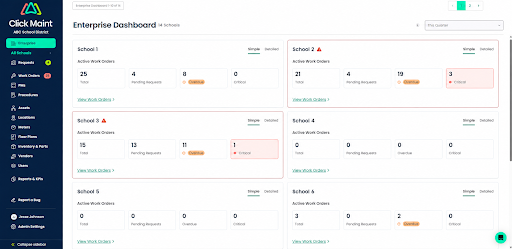
For districts managing multiple schools, a cloud-based platform gives facilities directors a single dashboard to see what's happening across every building, which requests are open, which preventive tasks are overdue, and where recurring problems are cropping up.
Click Maint Facilities Management Software for Schools
Take the quick 2-minute interactive product tour.
What to Look for in the Best Facility Management Software for Schools
Not all platforms are built the same, and schools have needs that differ from a typical corporate office or manufacturing plant. When evaluating the best facility management software for your district or campus, keep these criteria in mind:
- Ease of use for non-technical staff. Teachers, front-office staff, and custodians need to be able to submit or manage requests without training. Look for a clean, intuitive interface.
- Mobile accessibility. Maintenance techs are rarely at a desk. A strong mobile app lets them view, update, and close work orders from anywhere on campus.
- Preventive maintenance automation. The system should let you build recurring schedules tied to specific assets, locations, or compliance requirements.
- Asset and inventory tracking. You should be able to see the full history and cost of ownership for every major piece of equipment, plus track spare parts on hand.
- Scalability across multiple locations. If you're managing a district, the software needs to handle multiple buildings under one account without becoming a headache to administer.
- Reporting capabilities. Look for dashboards and exportable reports that make it easy to present data to a school board or superintendent.
- Affordable, transparent pricing. School budgets are tight, so avoid platforms with confusing tiers or expensive add-ons that aren't clearly explained upfront.
- Responsive customer support and quick implementation. Facilities staff don't have time for a months-long rollout. A good vendor should get your team up and running quickly.
How Click Maint Helps Schools Simplify Facilities Management
Click Maint is a CMMS (Computerized Maintenance Management System) built to help maintenance teams move away from manual processes and toward organized, proactive facilities management, and it's a strong fit for schools and districts of all sizes.
Here's how Click Maint supports school facilities teams specifically:
- Simple work order submission for staff. Teachers and administrative staff can submit maintenance requests in just a few clicks, so nothing gets lost in an email inbox or forgotten in a hallway conversation.
- Automated preventive maintenance. Click Maint lets facilities managers set up recurring maintenance schedules for HVAC systems, fire safety equipment, plumbing, and other critical assets, helping schools stay ahead of failures and stay compliant with inspection requirements.
- Asset tracking built for long-term planning. Every piece of equipment gets a full maintenance history, which helps facilities directors make smarter decisions about repair versus replacement.
- Multi-location support. Districts managing several schools can oversee all of them from one account, with the ability to drill down into individual campuses when needed.
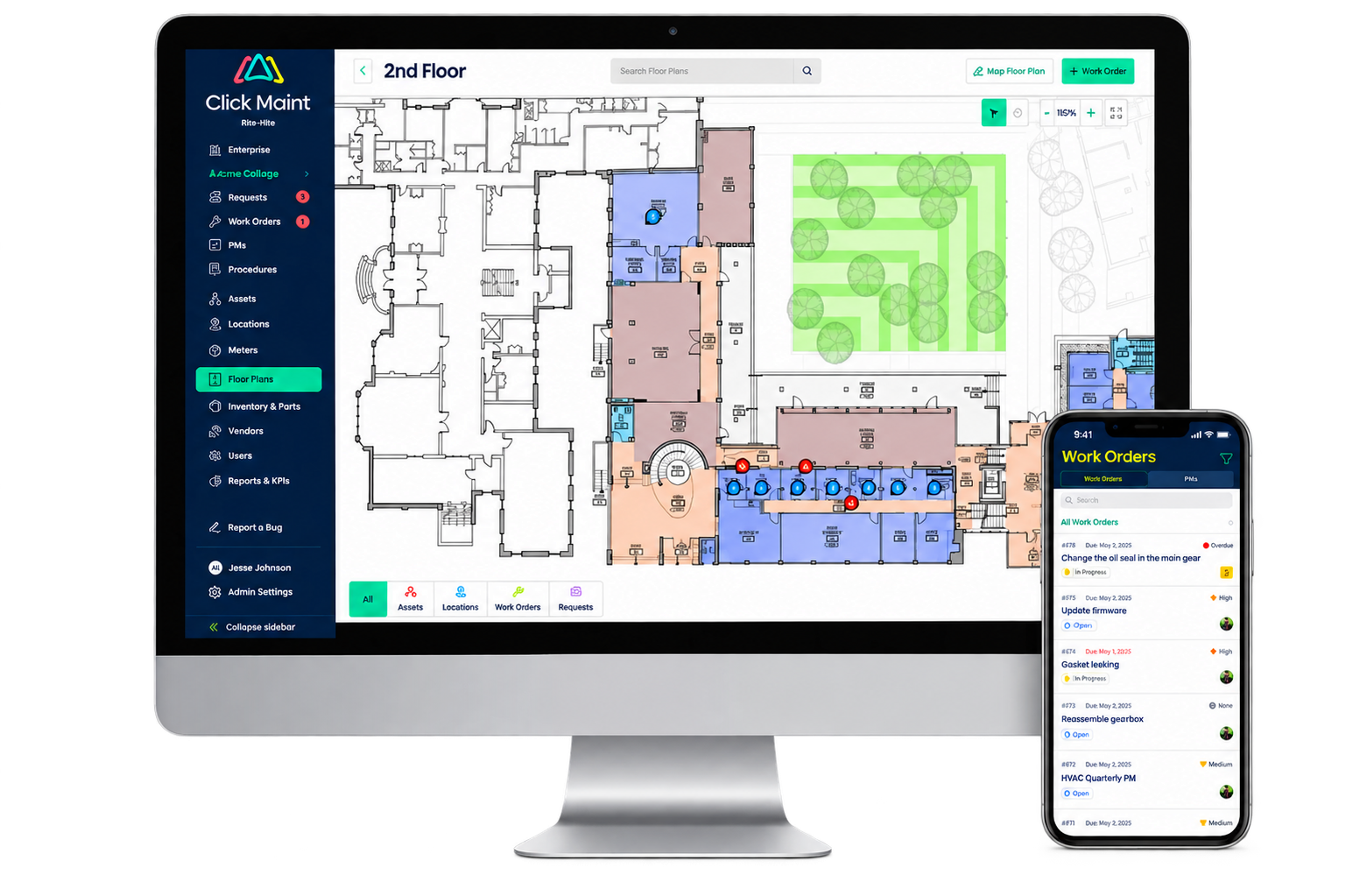
- Mobile-friendly design. Custodial and maintenance staff can manage their work orders directly from their phones while moving around campus.
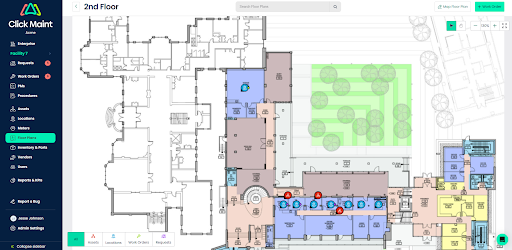
- Interactive floor plans. Click Maint includes the ability to manage maintenance requests, work orders, PMs, assets and locations from interactive floor plans, making locating maintenance work easier for technicians and other facilities staff.
- Clear, exportable reporting. Facilities directors can pull data on response times, costs, and recurring issues to support budget conversations with school boards.
- Straightforward pricing and fast onboarding. Click Maint is designed to be implemented quickly, without a long rollout; an important consideration for facilities teams that are already stretched thin.
For school districts looking for facilities management software for schools that's powerful enough to handle multiple campuses but simple enough for non-technical staff to use day to day, Click Maint offers a practical, budget-conscious solution.
Final Thoughts
Facilities management is one of the most demanding, high-stakes jobs for schools, yet it's often run with outdated tools that compromise performance. Moving to purpose-built facility management software gives schools faster response times, fewer emergency repairs, stronger compliance records, and clearer budget visibility.
If your school is still relying on spreadsheets, paper work orders, outdated software, or scattered emails to manage maintenance, it may be time to explore a dedicated CMMS. Platforms like Click Maint are built specifically to help facilities teams, including those in K-12 and higher education, spend less time chasing down problems and more time keeping schools safe, functional, and ready for students every day.
TABLE OF CONTENTS






