
Dayo | 16 Sep 2026


Every day, facility managers juggle numerous responsibilities. Work orders need attention, preventive maintenance must stay on schedule, equipment needs inspections, spare parts must be available, and urgent maintenance requests can appear at any time.
Managing all these responsibilities with spreadsheets, paper forms, emails, and disconnected systems makes facility maintenance harder than it needs to be.
A Facility Manager CMMS Checklist gives facility managers a structured way to organize daily, weekly, monthly, and preventive maintenance activities.
With Click Maint CMMS, facility managers can centralize work orders, preventive maintenance, assets, equipment records, maintenance requests, parts inventory, and other maintenance information in one system.
This checklist can help facility managers build a more proactive maintenance program, improve equipment reliability, and keep maintenance teams focused on the work that matters most.
What is a Facility Manager CMMS Checklist?
A Facility Manager CMMS Checklist is a structured list of maintenance activities that facility managers can organize and monitor through Computerized Maintenance Management System (CMMS) software.
Rather than relying on memory or separate spreadsheets, facility managers can use a CMMS to keep important maintenance activities organized.
A typical checklist covers:
- Work orders
- Maintenance requests
- Preventive maintenance
- Equipment inspections
- Asset management
- Parts and inventory
- Safety-related maintenance
- Technician assignments
- Maintenance records
- Facility condition assessments
- Recurring equipment breakdowns
- Maintenance performance
Click Maint CMMS helps facility managers bring these activities into a centralized maintenance workflow.
Daily Facility Manager CMMS Checklist
Daily maintenance management should focus on urgent work, equipment availability, technician priorities, and issues that could affect building operations.
Facility managers can start each day with the following checklist.
1. Review Open Work Orders
☐ Check new work orders
☐ Review high-priority work orders
☐ Identify overdue work orders
☐ Check work waiting for assignment
☐ Review work orders waiting for parts
☐ Confirm completed work orders
☐ Review technician notes when needed
Click Maint Work Order Software helps facility managers organize maintenance work so teams can understand what needs attention and what has already been completed.
.png?width=512&height=415&name=work%20orders%20list_2%20(1).png)
2. Review New Maintenance Requests
☐ Check new maintenance requests
☐ Determine the urgency of each request
☐ Identify affected assets or locations
☐ Prioritize requests based on operational impact
☐ Assign maintenance work
☐ Check for duplicate requests
A centralized maintenance request process can reduce the risk of requests being lost in emails, phone calls, paper forms, or verbal conversations.
3. Check Critical Equipment
☐ Review problems involving critical assets
☐ Check equipment currently out of service
☐ Review recurring equipment failures
☐ Confirm urgent repairs are progressing
☐ Identify equipment affecting facility operations
Critical equipment should receive additional attention because its failure may have a greater impact on facility operations.
Using Click Maint CMMS, facility teams can maintain asset and maintenance records that provide useful context when equipment problems occur.
4. Review Today's Preventive Maintenance
☐ Check preventive maintenance due today
☐ Confirm technician assignments
☐ Identify overdue PM tasks
☐ Review required maintenance procedures
☐ Confirm necessary parts and tools are available
☐ Follow up on incomplete PM work
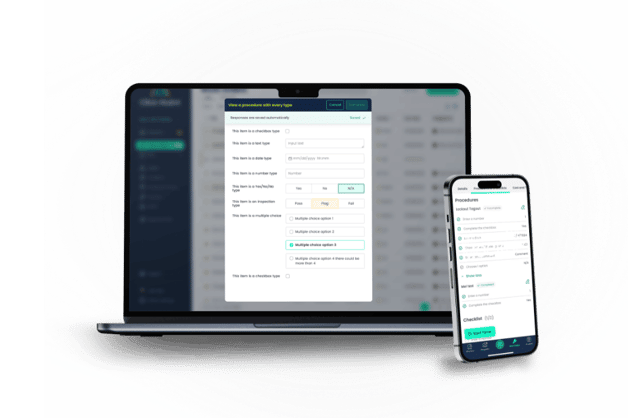
Click Maint Preventive Maintenance Software helps teams organize recurring maintenance tasks so important maintenance is less likely to be missed.
Weekly Facility Manager CMMS Checklist
Weekly reviews give facility managers an opportunity to look beyond today's emergencies and identify developing maintenance problems.
5. Review Preventive Maintenance Completion
☐ Review completed PM work
☐ Identify overdue preventive maintenance
☐ Investigate repeatedly missed tasks
☐ Review technician notes
☐ Check upcoming maintenance schedules
☐ Adjust maintenance priorities where required
Preventive maintenance should not simply be scheduled. Facility managers also need visibility into whether the work is actually being completed.
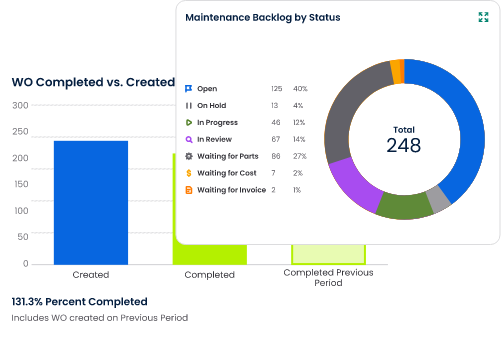
6. Review the Work Order Backlog
A growing backlog can indicate that the maintenance team has more work than it can effectively manage.
Each week, check:
☐ Number of open work orders
☐ High-priority outstanding work
☐ Old work orders
☐ Work waiting for parts
☐ Work waiting for contractors
☐ Work requiring additional information
☐ Jobs that can be closed
A CMMS for Facility Managers creates greater visibility into maintenance work and can make backlog reviews easier.
7. Check Spare Parts and Maintenance Inventory
Missing parts can turn a simple repair into extended downtime.
However, stocking excessive quantities of rarely used parts can also increase costs.
Facility managers should review:
☐ Critical spare-parts availability
☐ Frequently used maintenance parts
☐ Low-stock items
☐ Parts needed for upcoming preventive maintenance
☐ Parts associated with delayed repairs
☐ Unnecessary or obsolete inventory
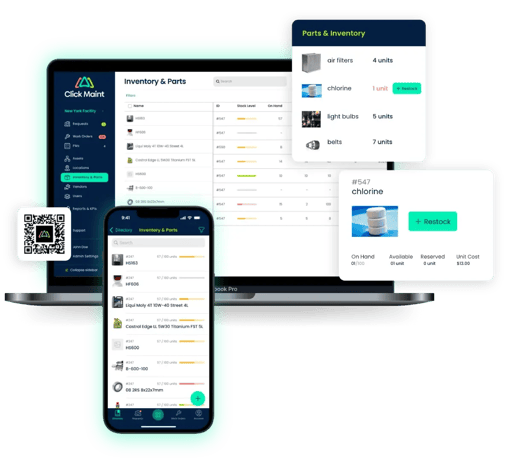
Click Maint Inventory Management Software can help maintenance teams organize maintenance parts and inventory information.
Better inventory visibility supports maintenance planning and helps teams prepare for upcoming work.
8. Review Recurring Equipment Problems
One equipment failure may be an isolated problem.
Five similar failures may indicate something more serious.
Review:
☐ Assets with repeated work orders
☐ Recurring breakdowns
☐ Repeated component replacements
☐ Assets generating frequent maintenance requests
☐ Equipment requiring increasing maintenance attention
☐ Problems reported by multiple technicians
Maintenance history can help facility managers determine whether teams are repeatedly fixing symptoms instead of addressing the underlying problem.
Monthly Facility Manager CMMS Checklist
Monthly maintenance reviews should focus on broader trends, costs, asset performance, and opportunities for improvement.
9. Review Asset Maintenance History
Facility managers should periodically review maintenance history for important assets.
Check:
☐ Frequency of repairs
☐ Previous failures
☐ Preventive maintenance history
☐ Replaced components
☐ Technician observations
☐ Recurring maintenance problems
☐ Assets requiring excessive attention
Click Maint Equipment Maintenance Software helps maintenance teams keep maintenance information associated with equipment and assets.
Historical records can provide valuable context when deciding whether equipment needs additional maintenance, major repairs, or replacement.
10. Review Maintenance Performance
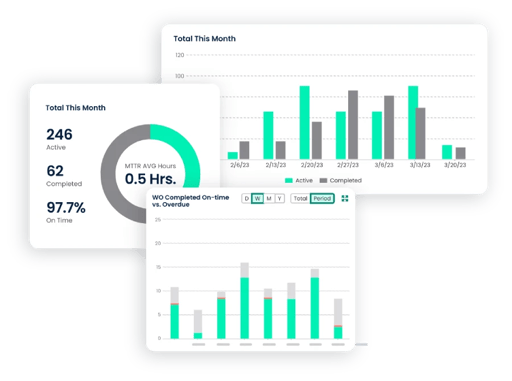
A CMMS can create maintenance data, but collecting data alone does not improve facilities.
Facility managers need to use that information to identify problems and opportunities.
Consider reviewing:
☐ Open versus completed work orders
☐ Preventive versus reactive maintenance
☐ Overdue preventive maintenance
☐ Work order backlog
☐ Recurring equipment failures
☐ Maintenance activity by asset
☐ Technician workload
☐ Maintenance trends
These indicators can help facility managers understand whether maintenance operations are becoming more proactive or remaining heavily reactive.
11. Review Maintenance Costs
Facility managers are often expected to maintain reliable facilities while controlling operating costs.
Monthly maintenance reviews should consider:
☐ Emergency repair activity
☐ Contractor expenses
☐ Spare-parts consumption
☐ Assets requiring frequent repairs
☐ Preventive maintenance requirements
☐ Repeated maintenance work
☐ Opportunities to reduce unnecessary costs
A maintenance management software system can provide more organized maintenance information for evaluating where resources are being used.
Preventive Maintenance Checklist for Facility Managers
Preventive maintenance is one of the most important responsibilities in facility management.
The exact checklist depends on the building, industry, equipment, and manufacturer recommendations, but common areas include:
HVAC Systems
☐ Inspect HVAC equipment
☐ Replace or inspect filters
☐ Check belts and components
☐ Inspect for unusual noises or vibration
☐ Check temperature performance
☐ Inspect for leaks
☐ Review maintenance history
Electrical Systems
☐ Inspect electrical equipment
☐ Check panels where appropriate
☐ Review reported electrical problems
☐ Inspect emergency lighting
☐ Test backup systems as required
☐ Document maintenance activity
Plumbing Systems
☐ Check for leaks
☐ Inspect pumps
☐ Review drainage issues
☐ Check water-related equipment
☐ Inspect recurring plumbing problems
☐ Schedule required preventive maintenance
Fire and Life-Safety Equipment
☐ Review required inspections
☐ Check scheduled testing
☐ Document completed maintenance
☐ Address identified deficiencies
☐ Maintain appropriate inspection records
Safety and regulatory requirements vary by equipment, industry, jurisdiction, and facility. Facility managers should always follow applicable codes, regulations, manufacturer requirements, and qualified professional guidance.
Building Exterior
☐ Inspect roofing
☐ Check doors and windows
☐ Inspect exterior lighting
☐ Review drainage conditions
☐ Inspect visible structural issues
☐ Review seasonal maintenance needs
Facility Interior
☐ Check lighting
☐ Inspect doors and hardware
☐ Review flooring conditions
☐ Check washrooms
☐ Inspect common areas
☐ Address reported safety hazards
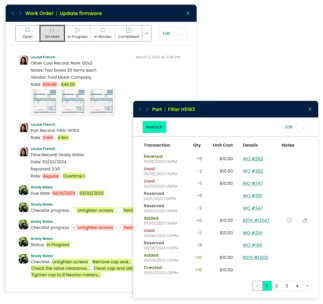
Click Maint Preventive Maintenance Software can help facility teams organize recurring maintenance schedules rather than depending entirely on calendars, paper checklists, or memory.
Seasonal Facility Maintenance Checklist
Canadian and northern U.S. facilities can experience major seasonal changes, making seasonal planning particularly important.
Spring
☐ Inspect roofing after winter
☐ Review drainage systems
☐ Inspect exterior areas
☐ Prepare cooling systems
☐ Check landscaping equipment
☐ Review spring preventive maintenance
Summer
☐ Monitor cooling equipment
☐ Check HVAC performance
☐ Review exterior maintenance
☐ Inspect high-use equipment
☐ Prepare upcoming fall maintenance
Fall
☐ Prepare heating systems
☐ Inspect roofs and drainage
☐ Check weather sealing
☐ Prepare snow-related equipment where applicable
☐ Review winter spare-parts needs
Winter
☐ Monitor heating systems
☐ Check entrances and exterior areas
☐ Review snow and ice maintenance requirements
☐ Monitor equipment exposed to cold conditions
☐ Prepare for weather-related maintenance requests
Seasonal maintenance tasks can be scheduled through a CMMS for Facility Managers so teams have more time to prepare before conditions change.
Multi-Facility CMMS Checklist
Facility management becomes more complex when one team is responsible for multiple buildings or locations.
Facility managers should check:
☐ Are work orders organized by location?
☐ Are assets associated with the correct facility?
☐ Are preventive maintenance schedules consistent?
☐ Can managers identify maintenance problems by location?
☐ Are maintenance requests being handled consistently?
☐ Are technicians following standard procedures?
☐ Are critical spare parts available where needed?
☐ Are recurring problems being identified across locations?
☐ Is maintenance history available to the appropriate team members?
Using Click Maint CMMS can help organizations build a more standardized approach to maintenance across multiple facilities.
Facility Manager CMMS Checklist for Choosing Software
The checklist is also useful when selecting a CMMS.
Before choosing facility maintenance software, ask:
☐ Is the CMMS easy for technicians to use?
☐ Does it provide work order management?
☐ Can we schedule recurring preventive maintenance?
☐ Can we manage assets and equipment?
☐ Can technicians access maintenance history?
☐ Can we organize maintenance requests?
☐ Can we manage spare parts and inventory?
☐ Does it support our facility structure?
☐ Can we maintain technician notes and maintenance records?
☐ Does it provide useful reporting?
☐ Is implementation straightforward?
☐ Can the system grow with our maintenance operation?
☐ Does the pricing fit our budget?
☐ Does the CMMS meet our organization's security and operational requirements?
A long list of advanced features is not necessarily what makes a CMMS effective.
The best facilities management software is one that gives maintenance teams the tools they need while remaining simple enough to use consistently.
How Click Maint Helps Facility Managers Complete Their Maintenance Checklist
Click Maint CMMS gives facility managers and maintenance teams a centralized platform for organizing everyday maintenance activities.
Facility teams can use Click Maint to support:
- Work order management
- Preventive maintenance
- Maintenance requests
- Asset management
- Equipment maintenance
- Parts and inventory
- Maintenance records
- Technician documentation
- Maintenance reporting
Instead of switching between spreadsheets, paperwork, emails, and disconnected maintenance records, facility managers can bring important maintenance information into one system.
This makes the Facility Manager CMMS Checklist more than a list of tasks. It becomes part of an organized maintenance process.
Frequently Asked Questions About Facility Manager CMMS Checklists
What is a Facility Manager CMMS Checklist?
A Facility Manager CMMS Checklist is a structured list of maintenance activities that facility managers can organize and track through CMMS software. It can include work orders, preventive maintenance, inspections, assets, equipment, inventory, maintenance requests, and maintenance performance reviews.
What should facility managers check every day?
Facility managers should typically review urgent work orders, new maintenance requests, critical equipment problems, overdue work, preventive maintenance due, technician priorities, and repairs that could affect facility operations.
What should facility managers check weekly?
Weekly checks can include preventive maintenance completion, work order backlog, recurring equipment failures, spare-parts availability, delayed repairs, and upcoming maintenance requirements.
What should facility managers review monthly?
Monthly reviews should look at broader maintenance trends, asset performance, recurring failures, preventive versus reactive maintenance, maintenance costs, work order performance, and opportunities to improve maintenance processes.
How does a CMMS help facility managers?
A CMMS centralizes maintenance information and helps facility managers organize work orders, preventive maintenance, assets, maintenance requests, equipment history, parts, and maintenance records.
Can Click Maint help with preventive maintenance checklists?
Click Maint Preventive Maintenance Software helps maintenance teams organize recurring maintenance tasks and schedules. Facility managers can use structured maintenance processes to improve visibility into planned work and reduce the chance that important maintenance activities are overlooked.
Can CMMS software help reduce facility maintenance costs?
CMMS software can support cost control by helping teams improve preventive maintenance, identify recurring equipment problems, organize work orders, improve spare-parts visibility, and reduce inefficient maintenance processes.
What is the best CMMS for facility managers?
The best CMMS depends on the organization's facilities, assets, maintenance processes, team size, budget, and operational requirements. Facility managers should prioritize usability and core capabilities such as work orders, preventive maintenance, asset management, maintenance history, inventory, and reporting.
Turn Your Facility Maintenance Checklist Into Action With Click Maint
A checklist is valuable only when maintenance tasks are assigned, completed, documented, and followed up.
Click Maint CMMS for Facility Managers helps turn daily, weekly, monthly, preventive, and seasonal maintenance activities into an organized maintenance process.
Facility managers can centralize work orders, schedule preventive maintenance, manage equipment and assets, track maintenance requests, improve inventory visibility, preserve maintenance history, and give maintenance teams clearer priorities.
Instead of managing your Facility Manager CMMS Checklist across spreadsheets, paper forms, emails, and separate systems, bring your maintenance activities together with Click Maint.
See how easy it is to manage work orders, maintenance requests, preventive maintenance, assets, and facility maintenance with Click Maint. Take the quick 2-minute interactive product tour.
TABLE OF CONTENTS