


.png)
Reena Sommer | 19 Aug 2026


When a machine breaks, the maintenance team needs the right part fast. If parts are missing, work comes to a stand still for hours or even days. This increases costs and delays service.
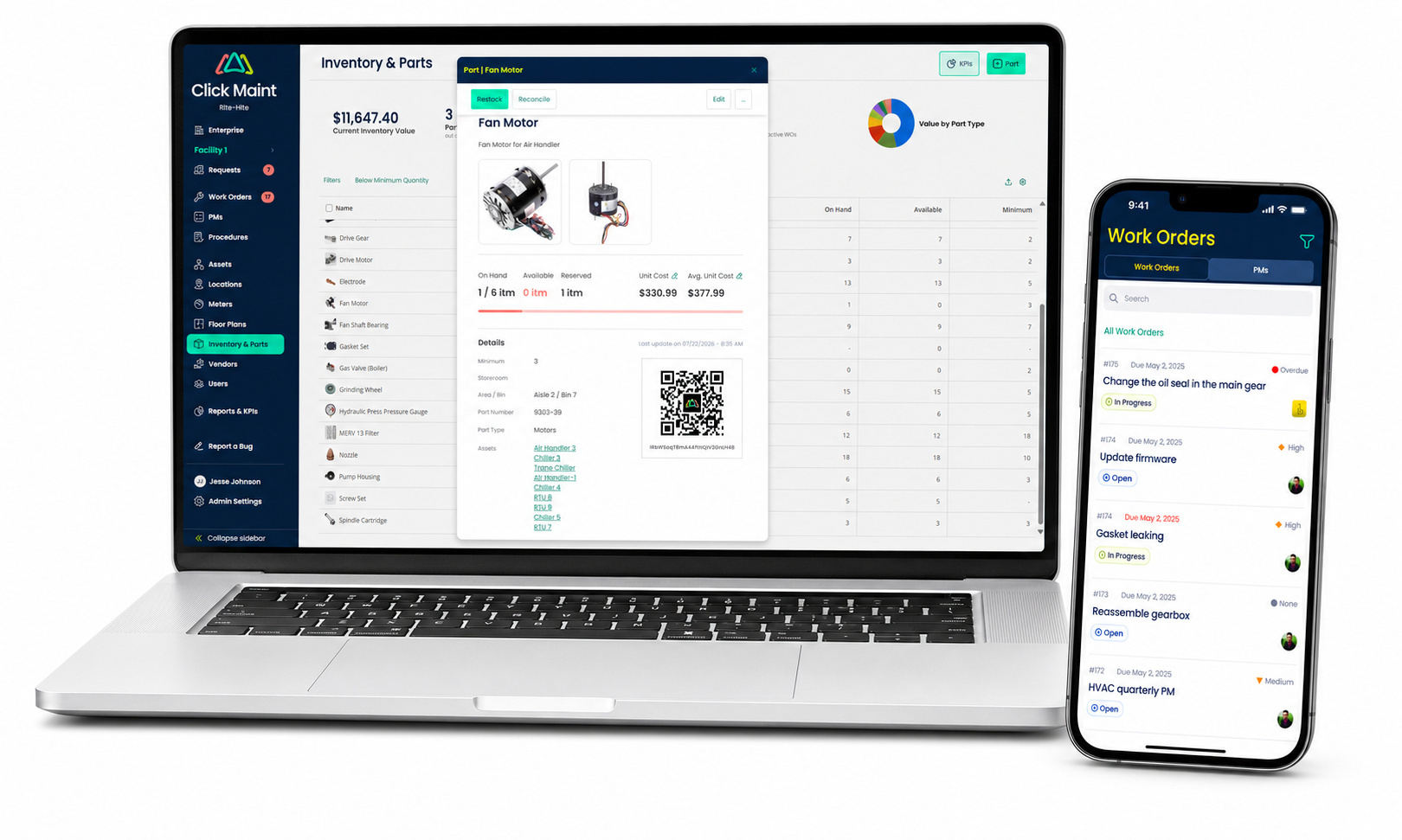
Maintenance inventory software helps prevent this problem. It tracks spare parts, tools, and materials used for corrective and preventive maintenance work orders. It shows what is available, where inventory items are stored, and when the team should order more.
Businesses across diverse industries, including manufacturing, healthcare, education, hospitality, government, and others, use inventory management tools integrated into their Maintenance Management Software. Click Maint brings maintenance work, equipment records, schedules, and parts information into one easy-to-use system. This guide explains how maintenance inventory works, why it matters, and what to look for in a solution.
What is Maintenance Inventory Software?
Maintenance inventory software is a digital tool that tracks the parts, tools, and supplies used to maintain equipment. It records part names, numbers, quantities, storage locations, costs, suppliers, and order history.
For example, a factory may keep motors, belts, filters, and safety gloves in its storeroom. The software can tell the maintenance team:
- How many items are in stock
- Where each item is stored
- Which inventory items are reserved for planned jobs
- When stock is running low
- Which supplier carries inventory restocking is necessary
- How much each part costs
This gives everyone one reliable place to find inventory information. It is easier to manage than paper lists or separate spreadsheets.
What is Maintenance Management Software?
Maintenance Management Software is a system that helps teams plan, track, and improve maintenance work. It is often called a computerized maintenance management system, or CMMS.
A CMMS manages and tracks work orders, equipment records, service schedules, labor, spare parts, costs, and reports. Inventory management is a core feature of CMMS software capabilities.
Click Maint is a powerful, easy-to-use, mobile-friendly Maintenance Management system designed to centralize and streamline all aspects of your maintenance operations. It provides tools for tracking inventory, managing assets, and scheduling both preventive and reactive maintenance. Maintenance and facilities teams can easily conduct inspections, track labor and repair costs, and gain valuable insights through detailed reporting and KPIs, ensuring that managers and technicians have everything they need to keep equipment running efficiently on any device.
How Does Maintenance Inventory Software Work?
The software manages the entire inventory management process from procurement to usage or consumption. The basic process is simple:
- Add the item. Record its name, part number, price, supplier, and location.
- Receive stock. Update the quantity when an order arrives.
- Store the item. Record the store room, shelf, or bin where it is kept.
- Use the item. Link the part to a repair or work order.
- Update the count. Remove the used amount from available stock.
- Order more. Send an alert when stock reaches a set low level. Order more inventory items from the supplier, and restock.
Many CMMS or inventory management systems use barcodes or QR codes. The ability to scan barcodes or QR codes makes receiving, counting, and using parts faster and keeps quantity counts more accurate.
See Inventory Management in Action
Why is Maintenance Inventory Management Important?
Good inventory management allows businesses to balance two primary risks:
- Insufficient Stock: A shortage of spare parts causes work delays, slows production, and extends equipment downtime, leading to higher costs.
- Excess Inventory: Carrying surplus stock increases holding costs and risks part depreciation, obsolescence, damage, theft, and unnecessary storage usage.
Maintenance inventory management software allows organizations to maintain optimal stock levels; preventing over-purchasing while providing better records for purchasing and planning.
Benefits of Maintenance Inventory Software
Fewer Repair Delays
Technicians can check whether a part is available before starting work. They can also find its storage location without wasting time searching. If inventory is low, maintenance personnel are notified and can order in advance to prevent stock outs, rush order expenses, and ensure parts are on hand when needed.
Better Stock Levels
Managers can set a reorder point for each item. When the quantity reaches that level, the system can warn the team that it is time to buy more.
Lower Costs
Clear records help teams find items that are rarely used or ordered too often. The business can reduce extra stock and focus its budget on parts that are regularly used. In addition, by having parts on hand when needed, businesses avoid additional costs for rush orders.
Faster Work Order Completion
Parts can be connected to work orders. Managers can check whether materials are ready before assigning a job. Technicians can record what they used while completing the work. Having the right parts on hand when needed allows work orders to be completed faster by avoiding delays.
How Inventory Management Supports Preventive Maintenance
Preventive Maintenance Software is designed to help teams service equipment proactively, addressing potential issues before they turn into expensive breakdowns. By setting up automatic schedules based on specific dates, running hours, meter readings, or usage, maintenance teams can consistently stay ahead of problems.
For example, if a large generator requires a new oil filter every 500 hours, preventive maintenance software automatically triggers the task when needed. When inventory is connected to this process, the system helps the team confirm that the right part is in stock, ensuring the technician has everything required as soon as the work order is assigned.
Connecting inventory with Preventive Maintenance Software helps maintenance teams:
- Order needed parts before planned work is scheduled to begin.
- Reserve inventory items so they are set aside for future maintenance tasks.
- Eliminate delays during scheduled service by ensuring all necessary parts are physically ready.
- Better predict the future demand for common supplies based on upcoming maintenance schedules.
- Reduce the need for last-minute emergency purchases that often carry higher shipping costs.
Preventive maintenance plans establish which repair and inspection tasks require completion. At the same time, inventory management systems ensure that all required spare parts and materials are fully stocked and available for those tasks. Integrating these two processes allows maintenance teams to work more efficiently, preventing service gaps and ensuring equipment remains fully operational.
Features to Look for
Real-Time Stock Tracking
The system should show current quantities. It should also separate parts that are available, reserved, or already on order.
Low-Stock Alerts
Users should be able to choose a reorder point for each item. Critical parts or items with long delivery times may need higher stock levels.
Associate Parts to Work Orders
Technicians should be able to add parts to a work order. The system should update the inventory count and job cost.
Supplier Records and Reports
Useful records include supplier names, parts costs, lead times, past orders, low-stock items, and inventory value. Companies with several sites should also be able to track and transfer inventory and parts between locations.
How Click Maint Helps Maintenance Teams
Click Maint is Maintenance Management Software designed to make daily maintenance work easier to organize. It helps managers and technicians keep work orders, equipment details, schedules, and related maintenance information in one place.
With a connected system like Click Maint, maintenance teams can:
- Track and process work orders and maintenance requests
- Keep asset and service information current and organized
- Plan preventive maintenance tasks
- Record materials and parts associated with maintenance work orders
- Give team members clear and current information about work orders, inventory and assets
Ultimately, the goal is to help your team finish work faster, prevent equipment breakdowns, and extend the lifespan of your assets. When selecting a system, ensure its features align with your specific inventory workflows, team size, locations, and reporting requirements.
How to Choose the Right Maintenance Inventory Management Software
1. Understand your process
Write down how you order, store, and track parts now. Note where you face delays or missing information.
2. Define your needs
List the tools you must have. Larger quantities of inventory should have a barcode or QR code scanning system, while smaller operations managing fewer stock items may not.
3. Try it first
Software providers often offer live demos over web-conference and free trials. Take advantage of these resources to properly evaluate the software. It’s recommended that you evaluate 3-5 different maintenance inventory management software options.
4. Check integrations
Make sure the software works with your current work orders, preventive maintenance plans, and accounting tools. Inquire about API and integration tools that the software vendor provides and run it by your IT team to make sure integrations are doable.
5. Compare total costs
Get price proposals from various software providers. Ensure that proposals include pricing for subscription (recurring fees) if SaaS (software as a service) or ongoing maintenance fees if on-premise. Find out what implementation and onboarding cost. In order for the software implementation to be successful, the software needs to be configured properly, data migrated and end-users trained.
Tips for Successful Maintenance Inventory Management Software Setup
Start by cleaning up your list. Delete any duplicate items, and make sure every part has a simple name and a unique ID number. Also, put QR code or barcode labels on all your storage shelves and bins so storage areas can be scanned with mobile devices and records like quantities can be updated accurately.
Perform a full count of all your parts before you start using the software. Pick your most important items and set up alerts for when you need to order more. Make sure to teach your team to log every single part they use or move.
Don't try to do everything at once. Start by setting up just one storage room or team to make sure it works well. Once you have it running smoothly, you can add more locations, and remember to check your inventory counts regularly.
Final Thoughts
By offering real-time visibility into spare parts, tools, and materials, maintenance inventory software enables maintenance teams to locate parts and inventory quickly, avoid stockouts, control costs, and prepare for upcoming projects.
The true value of inventory management is realized when it integrates with work order workflows and maintenance schedules. Comprehensive Maintenance Management Software unites these core functions, while built-in Preventive Maintenance capabilities enable organizations to secure necessary parts and plan resource requirements long before scheduled service dates.
Click Maint unifies maintenance operations and work order management into a streamlined, intuitive platform. By leveraging accurate data, automated workflows, robust asset management, and proper team training, organizations can reduce administrative searching and focus on completing work orders and inspections to maintain peak equipment uptime.
Frequently Asked Questions
What is maintenance inventory software?
It is software that tracks the parts, tools, and supplies your team uses to fix equipment. It helps you keep accurate records of what you have, where it is stored, and how much it costs.
What is the main benefit of using it?
It ensures you have the right parts on hand when needed, which prevents work delays. It also helps you save money by reducing unnecessary stock and preventing emergency orders.
Is maintenance inventory software the same as a CMMS?
Inventory software focuses specifically on parts, while a CMMS is a complete system that also manages work orders, assets, and maintenance schedules. Most CMMS platforms today include inventory management as a core feature.
How does this software help with preventive maintenance?
It confirms that the parts required for upcoming scheduled tasks are already in stock. This allows technicians to start repairs immediately without waiting for parts to arrive.
What is a reorder point?
It is the minimum stock level that triggers an alert when it is time to buy more parts. Setting this helps you avoid running out of essential items before you need them.
Can the software work on a mobile device?
Yes, most modern maintenance software is mobile-friendly. This allows technicians to check parts or log usage directly from the job site using their phone or tablet. Most mobile apps include QR code scanning as well so parts details can be accessed quickly and quantities updated.
Do I really need to track every part with QR codes or barcodes?
Barcodes or QR codes make tracking much faster and more accurate than paper lists. While you can start manually, scanning helps prevent counting errors as your inventory grows.
Can small businesses use this software?
Absolutely. Even small teams benefit from having an organized list of parts to save time, reduce confusion, and prevent costly mistakes.
TABLE OF CONTENTS






