Reena Sommer | 18 Nov 2026


Canadian manufacturing plants depend on reliable equipment, organized maintenance schedules, and technicians who respond quickly to equipment issues. When maintenance teams rely on paper checklists, spreadsheets, or manual work orders, keeping track of preventive maintenance becomes difficult.
For maintenance managers, missed inspections, delayed repairs, and incomplete equipment records create problems that affect production schedules and maintenance costs.
This is where preventive maintenance software becomes valuable.
Modern mobile preventive maintenance software helps technicians access assigned work orders, complete inspections, review equipment history, and record maintenance activities directly from smartphones or tablets.
For Canadian manufacturing plants looking for an easy-to-use solution, Click Maint provides preventive maintenance scheduling, mobile work order management, equipment asset tracking, QR code scanning, and maintenance reporting in one cloud-based system.
This guide explains what Canadian plant managers should look for in preventive maintenance software and how Click Maint supports mobile maintenance technicians.

Why Do Canadian Manufacturing Plants Need Mobile Preventive Maintenance Software?
Manufacturing facilities operate equipment that requires regular inspection, lubrication, calibration, cleaning, and servicing. Production machinery, conveyor systems, packaging equipment, compressors, pumps, and HVAC systems all need consistent maintenance to remain reliable.
However, maintenance technicians spend much of their working day on production floors rather than sitting at desks.
Traditional maintenance processes create several challenges:
- Paper work orders become lost or difficult to update.
- Maintenance technicians lack immediate access to equipment history.
- Preventive maintenance tasks get delayed or overlooked.
- Supervisors struggle to track completed inspections.
- Spare parts information remains disconnected from maintenance tasks.
- Equipment downtime becomes difficult to measure.
Mobile maintenance management software addresses these challenges by connecting technicians, maintenance managers, equipment records, and preventive maintenance schedules.
Instead of returning to an office to collect paperwork, technicians access maintenance information from their mobile devices.
For Canadian plants with multiple production lines, shifts, or facilities, this supports better maintenance coordination and accountability.
What Features Should Canadian Plants Look for in Preventive Maintenance Software?
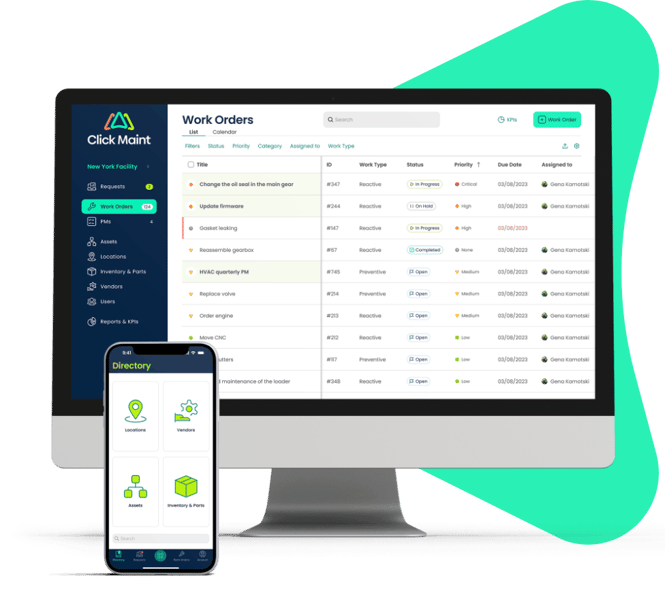
Mobile access helps technicians manage preventive maintenance tasks directly from the production floor.
Not every preventive maintenance system provides the same functionality. Canadian maintenance managers should evaluate software based on technician usability, scheduling flexibility, equipment tracking, and implementation requirements.
1. Mobile Work Order Management
Mobile work order management is one of the most important features for manufacturing maintenance teams.
Technicians need a straightforward way to view assigned tasks, update work order status, and document completed maintenance.
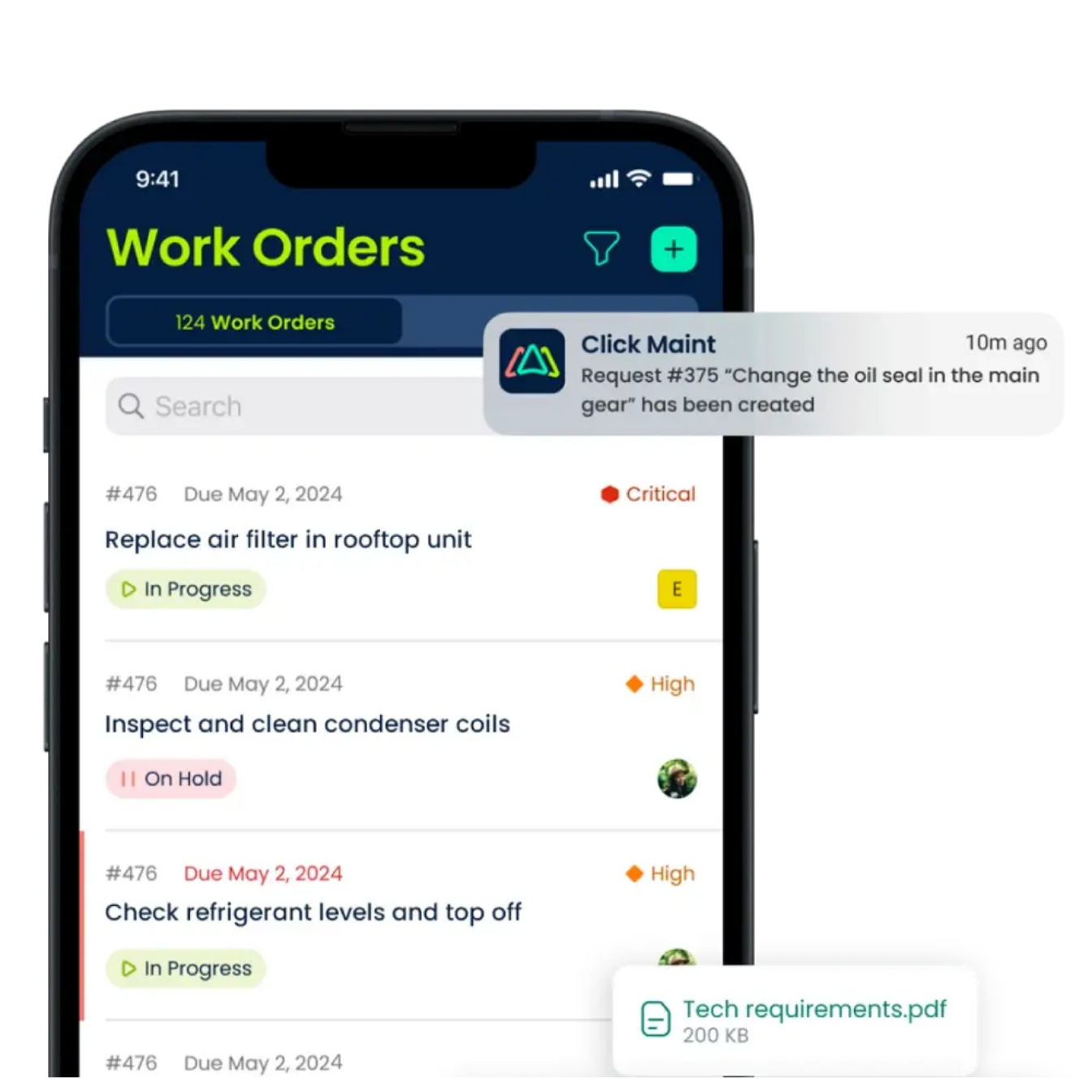
With Click Maint, technicians use the mobile app to:
- Access preventive and reactive work orders.
- Review assigned maintenance tasks.
- Update work order information.
- Attach equipment photos and maintenance notes.
- Complete work orders from mobile devices.
- Receive maintenance notifications.
Click Maint supports iOS and Android mobile devices, helping technicians manage work without relying on printed work orders.
2. Automated Preventive Maintenance Scheduling
Preventive maintenance scheduling software helps maintenance managers organize recurring equipment inspections and servicing.
Instead of manually tracking maintenance dates, teams establish schedules based on equipment requirements.
Click Maint supports flexible preventive maintenance scheduling, including recurring intervals and maintenance procedures.
For example, a Canadian manufacturing plant could establish the following maintenance schedule:
|
Equipment |
Preventive maintenance task |
Frequency |
|
Conveyor system |
Inspect belts and bearings |
Weekly |
|
Air compressor |
Check filters and lubrication |
Monthly |
|
Packaging machine |
Inspect moving components |
Weekly |
|
Industrial pump |
Check seals and vibration |
Monthly |
|
HVAC equipment |
Inspect filters and components |
Quarterly |
|
Production machinery |
Complete safety inspection |
Daily |
Actual maintenance intervals should follow manufacturer guidance, operating conditions, and applicable safety requirements.
With Click Maint, maintenance managers assign preventive maintenance tasks to technicians and track their completion through a centralized system. This helps plants reduce missed maintenance activities and maintain consistent servicing records.
3. QR Code Scanning for Equipment Maintenance
QR code scanning makes equipment information easier to access.Instead of searching through spreadsheets or equipment binders, technicians scan a QR code attached to a machine.

Click Maint supports QR codes for equipment assets, locations, and parts. When technicians scan an asset QR code using the Click Maint mobile app, they access the associated information and have options to create work orders or maintenance requests.
For example, a technician inspecting a packaging machine could:
- Scan the equipment QR code.
- Review the machine's asset information.
- Open or create a maintenance work order.
- Record inspection findings.
- Attach photos of damaged components.
- Update the maintenance record.
This reduces time spent searching for equipment information and supports accurate maintenance documentation.
4. Digital Preventive Maintenance Checklists
Manufacturing maintenance teams need consistent inspection procedures. Digital checklists help technicians follow established maintenance instructions and document completed activities.
Click Maint supports procedures and checklists within preventive maintenance work orders. Technicians access procedures through the mobile app and record their progress while working on equipment.
For example, a compressor preventive maintenance checklist could include:
- Inspect the air filter.
- Check oil levels.
- Examine hoses and connections.
- Inspect for leaks.
- Record operating conditions.
- Document unusual noises or vibration.
- Confirm maintenance completion.
Standardized checklists help reduce missed inspection steps and improve maintenance consistency across shifts.
5. Equipment Asset Tracking and Maintenance History
Manufacturing plants depend on accurate equipment records to support maintenance decisions.
When maintenance history is scattered across spreadsheets, notebooks, and paper files, technicians spend additional time searching for information.
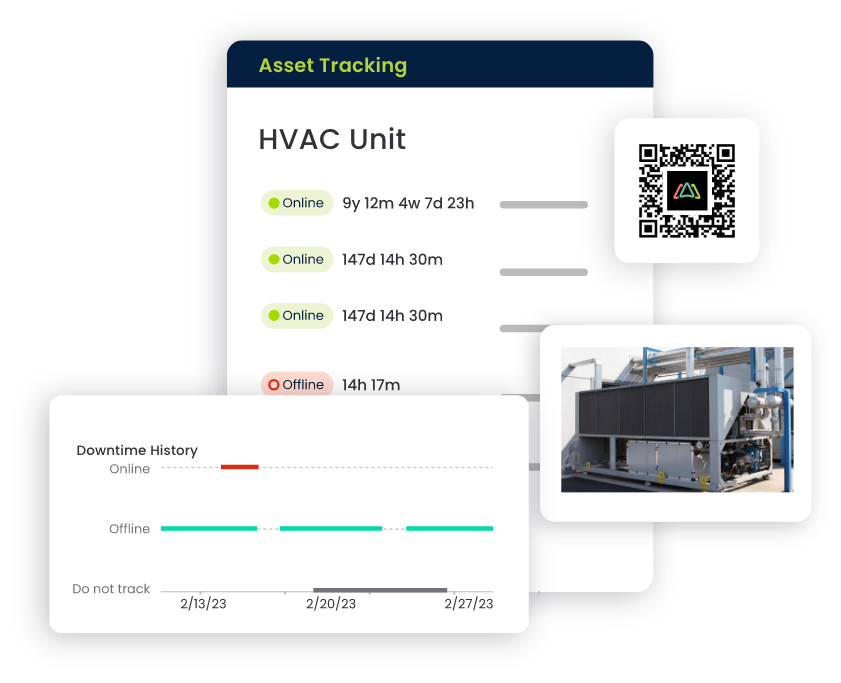
Click Maint brings equipment information into one system, including:
- Asset details and locations.
- Maintenance and repair history.
- Associated work orders.
- Equipment documentation.
- Maintenance costs.
- Downtime information.
Technicians review previous maintenance activities before starting repairs, helping them understand recurring equipment problems.
For plant managers, centralized equipment asset tracking also supports long-term maintenance planning and replacement decisions.
6. Spare Parts and Inventory Management
A preventive maintenance program becomes less effective when technicians lack the parts needed to complete scheduled tasks.
For example, a technician assigned to replace a conveyor bearing could experience delays if the required replacement part is unavailable.
Click Maint includes inventory management capabilities that connect parts with assets and work orders. Maintenance teams use the system to track spare parts, monitor inventory quantities, and document materials used during repairs. This supports better maintenance preparation and reduces unnecessary delays caused by missing inventory.
7. Equipment Downtime Tracking and Reporting
Reducing unplanned equipment downtime is a major goal for manufacturing maintenance teams.
However, plants need accurate maintenance records to identify equipment problems and recurring failures.
Preventive maintenance software helps managers review equipment history, maintenance activity, and downtime trends.
Click Maint includes reporting capabilities for maintenance costs, work orders, asset performance, and downtime.
Maintenance managers use these records to identify equipment requiring additional attention and evaluate preventive maintenance effectiveness.
How Does Click Maint Support Mobile Maintenance Technicians in Canadian Plants?
Click Maint combines mobile work orders, preventive maintenance, equipment records, QR code scanning, and parts management in a centralized maintenance platform.
The mobile app helps technicians access maintenance information while moving between equipment and production areas.
Click Maint is designed for maintenance teams that want to move away from paper-based processes and improve daily maintenance coordination.
For Canadian manufacturing plants, the software supports several important operational requirements.
Centralized maintenance management: Maintenance managers organize work orders, preventive maintenance, assets, and inventory within one system.
Mobile technician access: Technicians manage assigned work through smartphones and tablets instead of relying on printed documents.
Straightforward implementation: Smaller maintenance teams have a practical way to transition from spreadsheets to digital maintenance tracking.
Canadian business considerations: Click Maint's published Canadian software guidance states that it supports Canadian data residency and billing in Canadian currency. Organizations should confirm the relevant contractual terms and current billing options during evaluation.
These capabilities make Click Maint worth evaluating for Canadian manufacturers seeking a mobile-focused preventive maintenance system.
How Does Mobile Preventive Maintenance Software Help Reduce Equipment Downtime?
Mobile preventive maintenance software supports equipment reliability by making scheduled maintenance easier to organize and document. Consider a manufacturing plant operating multiple packaging machines.
Without a centralized maintenance system, technicians could miss inspections, overlook recurring equipment problems, or spend time searching for previous repair records. With a mobile CMMS, maintenance teams follow a more organized workflow.
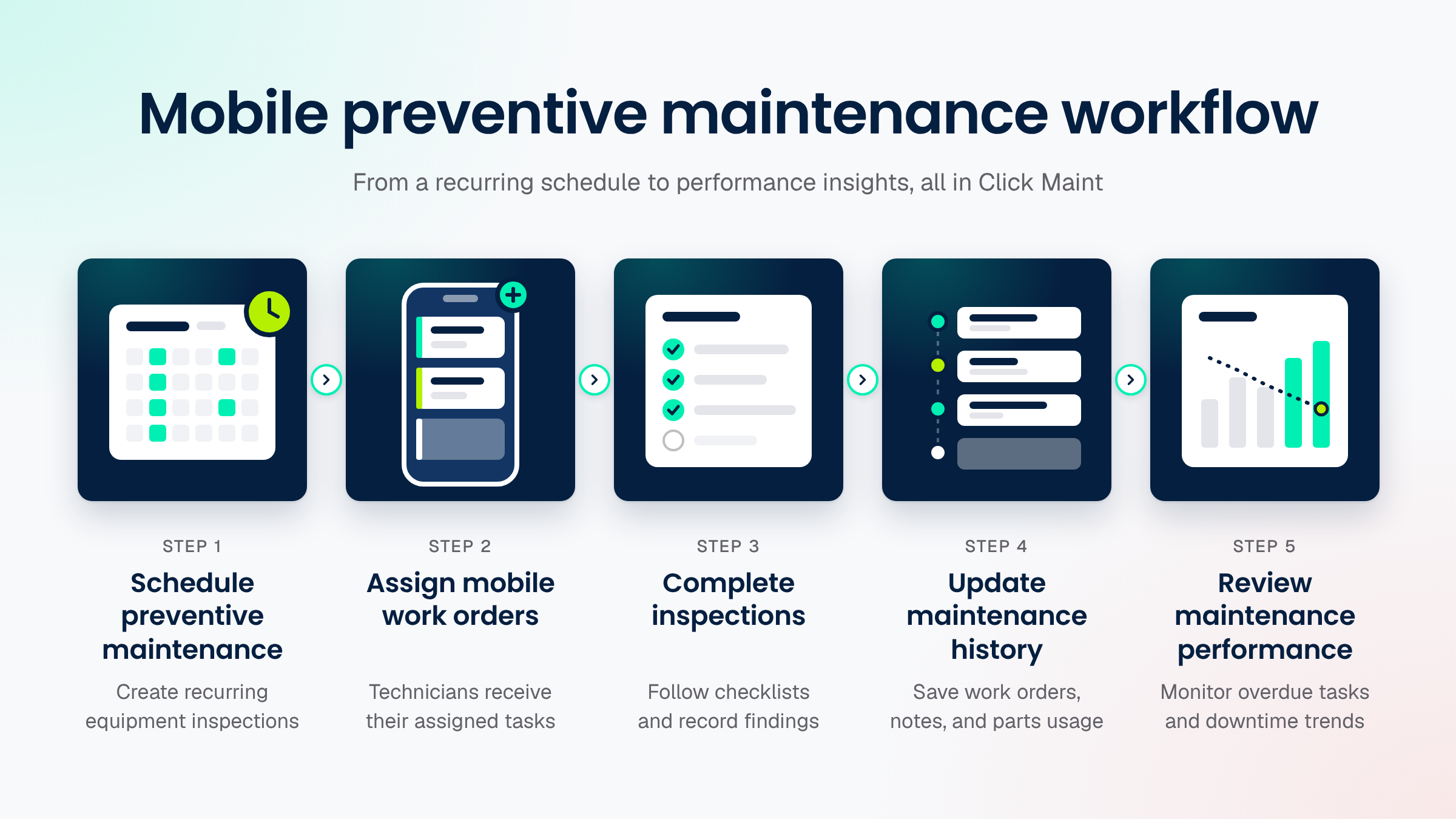
This process gives maintenance managers greater visibility into completed maintenance and outstanding equipment issues.
It also helps technicians maintain accurate records without duplicating paperwork.
Preventive maintenance does not eliminate every breakdown, but consistent scheduling and documentation support better equipment reliability.
Click Maint Manufacturing Case Study: TS Manufacturing
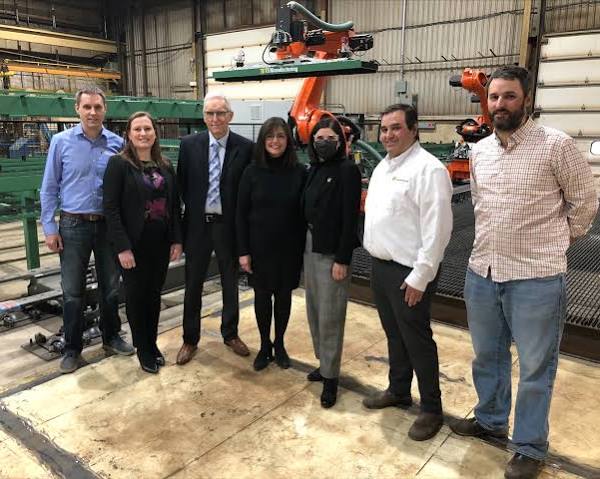
TS Manufacturing provides a relevant example of how a Canadian manufacturing business transitioned from paper-based maintenance processes to centralized preventive maintenance software.
The challenge
Before implementing Click Maint, TS Manufacturing relied on paper records, binders, and handwritten maintenance notes.
Technicians spent valuable time searching for previous repairs, equipment history, and preventive maintenance documentation.
The company needed a more organized system to manage maintenance schedules, preserve equipment knowledge, and improve access to maintenance records.
The solution
TS Manufacturing implemented Click Maint to centralize preventive maintenance schedules, equipment history, work orders, and technician notes.
Instead of searching through paper binders, technicians gained faster access to maintenance information within one platform.
The results
According to Click Maint's published customer story, TS Manufacturing experienced improved maintenance organization, easier access to historical records, and less administrative work.
The centralized system also helped preserve maintenance knowledge between technicians and improved visibility into upcoming preventive maintenance tasks.
Read the full customer story: TS Manufacturing Case Study
This example demonstrates the value of moving from paper-based maintenance records to digital maintenance management in a Canadian manufacturing environment.
How to Choose Preventive Maintenance Software for a Canadian Manufacturing Plant
Before selecting software, maintenance managers should evaluate how well the platform fits their daily maintenance operations.
The following checklist provides a practical starting point.
Preventive Maintenance Software Evaluation Checklist
Select the requirements your plant needs before evaluating vendors.
- Mobile app for iOS and Android technicians
- Recurring preventive maintenance scheduling
- Digital work orders and inspection checklists
- QR code scanning for equipment
- Centralized asset maintenance history
- Spare parts and inventory management
- Downtime and maintenance reporting
- Simple technician onboarding
- Canadian billing and data residency requirements
- Suitable implementation and ongoing support
- Reset Copy selected
Canadian plants should also test mobile usability in their actual operating environment. For example, maintenance teams working in areas with limited wireless connectivity should verify whether the software supports the required offline workflows before purchasing.
How to Implement Preventive Maintenance Software in a Canadian Plant
Implementing preventive maintenance software becomes easier when maintenance managers begin with a clear plan.
Step 1: Identify critical manufacturing equipment
Create an equipment list that includes production machinery, compressors, conveyors, pumps, packaging equipment, and other important assets.
Step 2: Review existing preventive maintenance tasks
Identify current inspection schedules, maintenance procedures, equipment manuals, and recurring servicing requirements.
Step 3: Configure preventive maintenance schedules
Create recurring maintenance tasks based on equipment requirements, manufacturer recommendations, and operating conditions.
Step 4: Assign maintenance technicians
Set up technician accounts and assign preventive maintenance responsibilities.
Step 5: Introduce mobile work orders
Train technicians to access tasks, update maintenance records, attach photos, and complete inspections using mobile devices.
Step 6: Add equipment QR codes
Place QR code labels on important equipment so technicians have a faster way to access asset information.
Step 7: Monitor maintenance performance
Review preventive maintenance completion, overdue tasks, equipment downtime, and recurring repairs.
Start with a pilot group of technicians or one production area before expanding the system across the plant.
Why Consider Click Maint for Preventive Maintenance Software in Canada?
Canadian manufacturing maintenance teams need software that supports their daily operations without creating unnecessary complexity. Click Maint brings together several core maintenance functions.
|
Click Maint capability |
Value for Canadian plants |
|
Preventive maintenance scheduling |
Organizes recurring equipment servicing |
|
Mobile CMMS app |
Gives technicians access to maintenance tasks |
|
Work order management |
Tracks repairs and assigned work |
|
QR code scanning |
Speeds up access to equipment information |
|
Asset management |
Centralizes equipment maintenance records |
|
Inventory management |
Tracks maintenance parts and supplies |
|
Downtime reporting |
Supports equipment reliability analysis |
|
Digital procedures |
Standardizes maintenance inspections |
Click Maint also offers a 30-day trial, allowing maintenance managers to test workflows with their teams before making a purchasing decision.
For small and mid-sized Canadian manufacturers, this provides an opportunity to evaluate technician adoption, maintenance scheduling, and equipment tracking using real maintenance tasks.
Frequently Asked Questions
What preventive maintenance software supports mobile technicians in Canadian plants?
Click Maint supports mobile technicians in Canadian manufacturing plants through preventive maintenance scheduling, mobile work orders, digital checklists, QR code scanning, equipment tracking, and inventory management. Its mobile CMMS app is available for iOS and Android devices.
What is mobile preventive maintenance software?
Mobile preventive maintenance software allows technicians to access scheduled maintenance tasks, inspect equipment, update work orders, and document completed maintenance using smartphones or tablets.
Does Click Maint support preventive maintenance scheduling?
Yes. Click Maint supports recurring preventive maintenance schedules, assigned technicians, digital procedures, and maintenance notifications. Maintenance managers use these features to organize equipment inspections and servicing.
Does Click Maint work on mobile phones?
Yes. Click Maint provides a mobile app for iOS and Android devices. Technicians access work orders, preventive maintenance tasks, assets, parts, and QR code features through the app.
How does preventive maintenance software reduce downtime?
Preventive maintenance software helps teams schedule inspections, document equipment problems, monitor recurring failures, and complete maintenance activities on time. These processes support improved equipment reliability and reduce the risk of avoidable breakdowns.
Is Click Maint suitable for small manufacturing plants in Canada?
Click Maint is designed for maintenance teams seeking straightforward work order management, preventive maintenance scheduling, and equipment tracking. Small Canadian manufacturing plants evaluating alternatives to spreadsheets and paper records should consider it.
What should Canadian plants check before choosing mobile CMMS software?
Canadian plants should evaluate mobile functionality, scheduling flexibility, technician usability, equipment tracking, reporting, connectivity requirements, implementation support, data residency, and total software costs.
Choosing Preventive Maintenance Software for Canadian Plants
Mobile preventive maintenance software plays an important role in keeping manufacturing maintenance teams organized.
For Canadian plants, the right system should help technicians complete inspections, access equipment records, manage work orders, and document maintenance activities without unnecessary administrative work.
Click Maint offers a practical solution for manufacturing teams seeking centralized preventive maintenance scheduling, mobile technician access, equipment asset tracking, and maintenance reporting.
By replacing paper-based processes with digital maintenance workflows, Canadian manufacturers gain better visibility into equipment maintenance and technician activity.
Keep Your Maintenance Team Connected With Click Maint
Discover how Click Maint preventive maintenance software helps Canadian manufacturing plants schedule maintenance, manage mobile work orders, track equipment, and improve technician productivity.
TABLE OF CONTENTS