



Reena Sommer | 16 Sep 2026


Plant managers face constant pressure to keep production moving while controlling operating costs. Unexpected equipment failures, emergency repairs, missing spare parts, overdue preventive maintenance, and inefficient work orders can quickly increase maintenance expenses and interrupt production.
This is where CMMS for Plant Managers can make a difference.
Click Maint CMMS gives plant managers and maintenance teams a centralized system to manage work orders, preventive maintenance, equipment, maintenance history, parts inventory, and maintenance activities.
By replacing spreadsheets, paper records, and disconnected maintenance processes with maintenance management software, plant managers can improve maintenance visibility, identify recurring problems, plan work more effectively, and build a more proactive approach to equipment maintenance.
What is CMMS for Plant Managers?
A Computerized Maintenance Management System (CMMS) is software used to organize, schedule, track, and document maintenance activities.
For plant managers, a CMMS provides visibility into the maintenance activities that can affect production.
Instead of asking multiple people for updates or searching through spreadsheets, plant managers can use Click Maint CMMS to help answer important questions such as:
- Which equipment requires maintenance?
- Which work orders are open?
- What preventive maintenance is due?
- Which assets experience repeated problems?
- What maintenance work has already been completed?
- Are critical spare parts available?
- Which maintenance tasks should be prioritized?
- Where is the maintenance team spending its time?
A CMMS for Plant Managers does more than organize maintenance tasks. It gives managers detailed reliable information for making maintenance and operational decisions.
How Can CMMS Software Reduce Maintenance Costs?
Maintenance costs are not limited to the price of replacement parts.
A breakdown can generate additional costs through technician overtime, emergency parts purchases, production delays, contractor expenses, wasted materials, and lost productivity.
Plant managers can use Click Maint CMMS to address several sources of unnecessary maintenance spending.
1. Shift From Reactive to Preventive Maintenance
Reactive maintenance means repairing equipment after it fails.
Some reactive maintenance will always be necessary, but relying too heavily on emergency repairs can make maintenance expensive and unpredictable.
Preventive maintenance software helps teams schedule maintenance before failures occur.
With Click Maint, plant maintenance teams can organize recurring activities such as:
- Equipment inspections
- Lubrication
- Filter replacement
- Belt inspections
- Cleaning
- Calibration
- Fluid checks
- Safety inspections
- Component replacement
- Routine servicing
Completing these tasks at planned intervals can help maintenance teams identify deterioration before it turns into a more serious problem.
For plant managers, that can mean fewer maintenance surprises and a more predictable maintenance workload.
2. Reduce Unplanned Equipment Downtime
Unexpected downtime can be one of the most disruptive problems in a manufacturing plant.
When a critical machine stops, the impact can extend beyond maintenance. Production may slow or stop, employees may have to wait, schedules may change, and customer orders can potentially be affected.
CMMS software for manufacturing helps plant managers build a more structured approach to maintaining production equipment.
Click Maint allows maintenance teams to maintain equipment records, organize preventive maintenance, manage work orders, and document repairs.
Historical maintenance information can also help teams identify equipment experiencing recurring problems.
Instead of repeatedly fixing the same failure without context, technicians and managers can review previous maintenance activity and determine whether additional action is needed.
3. Improve Work Order Management
Poorly managed work orders can increase both maintenance costs and downtime.
Requests may be forgotten, duplicated, incorrectly prioritized, or assigned without enough information.
Click Maint Work Order Software provides a centralized system for organizing maintenance work.
A structured work order process can help plant managers and maintenance teams understand:
- What needs to be repaired
- Which equipment is affected
- Where the asset is located
- How urgent the work is
- Who is responsible
- What work has been completed
- What information technicians recorded
Better work order visibility helps plant managers prioritize maintenance based on operational importance instead of relying solely on whoever reports a problem first.
.png?width=512&height=415&name=work%20orders%20list_2%20(1).png)
4. Identify Recurring Equipment Problems
Repeated repairs can quietly increase maintenance expenses.
Consider a machine that experiences the same failure several times during the year.
If maintenance records are scattered across paper forms, emails, and spreadsheets, the pattern may be difficult to recognize.
With Click Maint Equipment Maintenance Software, maintenance activities can be associated with equipment records.
Plant managers and maintenance teams can use maintenance history to look for recurring problems.
They can then ask better questions:
Why does this asset continue to fail?
Are we treating the symptom instead of the root problem?
Does the preventive maintenance schedule need to change?
Is a particular component repeatedly failing?
Is continued repair still cost-effective?
The answers can support better repair, maintenance, and replacement decisions.
How Can CMMS Software Reduce Equipment Downtime?
Reducing downtime requires more than responding quickly after equipment fails.
Plant managers need to reduce the likelihood of failures while helping technicians respond efficiently when failures do occur.
A manufacturing CMMS software solution supports both goals.
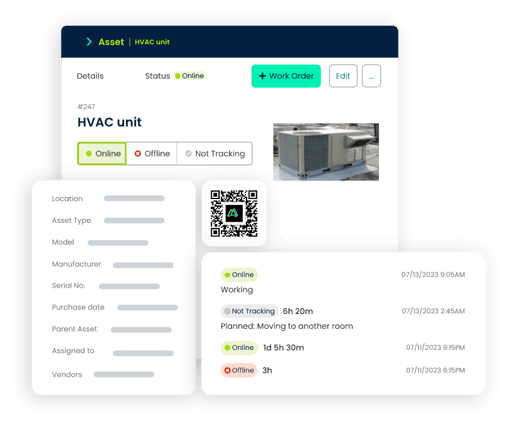
5. Give Maintenance Technicians Better Information
When equipment fails, technicians need accurate information.
They may need to know what happened, whether the equipment has failed before, what repairs were previously performed, and what parts were used.
Searching for this information manually wastes valuable repair time.
Click Maint CMMS helps centralize maintenance records so technicians can have more context when troubleshooting equipment.
Better information can help reduce time spent trying to understand the history of an asset before beginning the repair.
It also helps preserve maintenance knowledge.
When experienced technicians document repairs and observations, future technicians have information they can reference when similar problems occur.
6. Improve Preventive Maintenance Scheduling
Preventive maintenance only delivers value when the right work is completed at the right time.
A spreadsheet may work for a small number of assets, but managing hundreds or thousands of maintenance tasks manually becomes increasingly difficult.
Tasks can be missed or forgotten.
Click Maint Preventive Maintenance Software helps maintenance teams organize recurring maintenance activities and provide technicians with a clearer schedule.
Plant managers gain better visibility into planned maintenance rather than waiting until equipment failures expose gaps in the maintenance program.
This can help support a transition from reactive maintenance toward more planned maintenance.
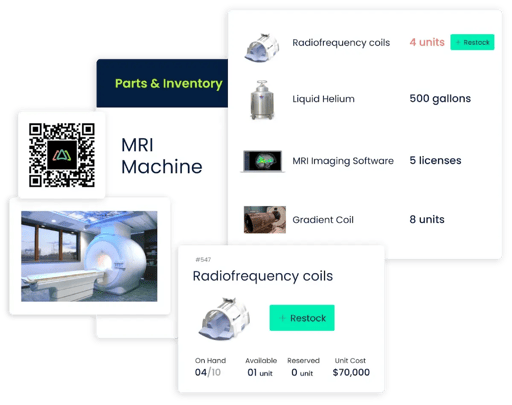
7. Improve Spare Parts and Inventory Visibility
Even when a technician knows exactly how to repair a machine, the repair cannot be completed if the required part is unavailable.
Poor inventory management can extend equipment downtime.
Keeping too many parts in stock creates another problem: unnecessary inventory carrying costs.
Click Maint Inventory Management Software helps maintenance teams organize maintenance parts and inventory information.
Better visibility into spare parts can help plant managers balance two important objectives:
Avoid critical stockouts that delay repairs.
Avoid unnecessary inventory that ties up maintenance budgets.
Connecting parts usage with maintenance activity can also provide better insight into which assets consume the most maintenance resources.
8. Improve Plant Maintenance Planning
Effective plant maintenance management requires balancing preventive work, corrective repairs, inspections, projects, available technicians, production schedules, and urgent breakdowns.
Without centralized information, planning becomes difficult.
A CMMS gives plant managers and maintenance teams a clearer picture of maintenance demand.
They can see what work needs attention and make better decisions about priorities.
For example, planned maintenance on a critical production asset may need to be coordinated with production schedules.
Having better visibility into upcoming maintenance gives managers more opportunity to coordinate the work instead of reacting to an unexpected failure.
9. Make Better Repair-or-Replace Decisions
There comes a point when repeatedly repairing an unreliable asset may cost more than replacing it.
The problem is determining when that point has been reached.
Without maintenance history, these decisions may depend too heavily on memory or assumptions.
Equipment maintenance software can provide historical maintenance information that helps plant managers evaluate asset performance.
Managers can review factors such as:
- Frequency of repairs
- Types of failures
- Maintenance history
- Parts consumption
- Downtime patterns
- Preventive maintenance activity
This information can provide useful context when evaluating whether an asset should continue to be repaired, receive additional preventive maintenance, or be considered for replacement.
10. Improve Communication Between Plant Managers and Maintenance Teams
Plant managers need visibility into maintenance without constantly interrupting technicians for updates.
Technicians need clear priorities and accurate instructions.
A CMMS provides a shared maintenance system.
When maintenance activities and work orders are updated in Click Maint, managers can have better visibility into the status of maintenance work.
This can reduce reliance on emails, paper notes, spreadsheets, and verbal updates.
Better communication also helps maintenance and production teams coordinate around equipment availability.
11. Use Maintenance Data to Improve Plant Performance
A strong maintenance program should continuously improve.
Plant managers therefore need to understand what is happening across maintenance operations.
A maintenance management software system creates records that can help managers identify patterns and opportunities for improvement.
Plant managers may want to evaluate:
- Work order volume
- Preventive versus reactive maintenance
- Recurring equipment failures
- Overdue maintenance
- Maintenance activity by asset
- Maintenance trends
- Equipment history
The goal is not simply to collect more data.
The goal is to turn maintenance information into better decisions.
CMMS for Plant Managers: Daily Maintenance Checklist
Plant managers can use the following checklist to maintain visibility into plant maintenance operations.
Daily
☐ Review critical open work orders
☐ Check urgent equipment problems
☐ Confirm maintenance priorities
☐ Review production-impacting equipment issues
☐ Check overdue maintenance tasks
☐ Identify repairs waiting for parts
☐ Communicate priorities with maintenance teams
Weekly
☐ Review preventive maintenance completion
☐ Identify recurring equipment problems
☐ Review work order backlog
☐ Check critical spare parts availability
☐ Review delayed maintenance work
☐ Coordinate planned maintenance with production
☐ Review high-priority asset issues
Monthly
☐ Review maintenance trends
☐ Evaluate recurring asset failures
☐ Review preventive versus reactive maintenance
☐ Identify assets requiring excessive maintenance
☐ Review maintenance inventory requirements
☐ Evaluate opportunities to improve maintenance processes
☐ Review equipment that may require replacement or major repair
Using Click Maint CMMS for Plant Managers can make this information easier to organize and review.
What Should Plant Managers Look for in CMMS Software?
Not every maintenance system will be right for every manufacturing operation.
Plant managers should focus on software that makes maintenance easier to manage and gives technicians practical tools for completing their work.
|
CMMS Capability |
Value for Plant Managers |
|
Work Order Software |
Organizes and prioritizes maintenance work |
|
Preventive Maintenance Software |
Supports planned maintenance |
|
Asset Management |
Centralizes equipment information |
|
Equipment Maintenance History |
Helps identify recurring failures |
|
Inventory Management |
Improves spare-parts visibility |
|
Maintenance Reporting |
Helps identify trends |
|
Technician Documentation |
Preserves maintenance knowledge |
|
Maintenance Requests |
Centralizes reported maintenance needs |
|
Maintenance Management Software |
Provides broader visibility into maintenance operations |
Ease of use should also be an important consideration.
A CMMS provides limited value when technicians and managers do not consistently use it.
Why Choose Click Maint CMMS for Plant Maintenance?
Click Maint CMMS provides maintenance teams with a centralized solution for managing everyday maintenance activities.
Plant managers can use Click Maint to support:
- Work order management
- Preventive maintenance
- Asset management
- Equipment maintenance
- Maintenance requests
- Parts and inventory management
- Maintenance records
- Maintenance reporting
Instead of managing plant maintenance through disconnected spreadsheets, paperwork, emails, and manual processes, Click Maint CMMS for Plant Managers helps bring important maintenance information together.
That gives plant managers greater visibility while giving technicians a more organized way to manage their work.
Frequently Asked Questions About CMMS for Plant Managers
What is CMMS for Plant Managers?
CMMS for Plant Managers is maintenance software that helps plant managers organize and monitor work orders, preventive maintenance, equipment, assets, maintenance history, spare parts, and other maintenance activities.
How can plant managers reduce maintenance costs with CMMS software?
Plant managers can use CMMS software to improve preventive maintenance, identify recurring equipment problems, organize work orders, track maintenance history, improve parts visibility, and make more informed maintenance decisions. These improvements can help reduce unnecessary maintenance spending.
How does CMMS software help reduce equipment downtime?
CMMS software helps teams schedule preventive maintenance, maintain equipment history, organize repair work, track recurring problems, and provide technicians with better maintenance information. Together, these capabilities can help prevent some failures and improve maintenance response.
What is the best CMMS software for manufacturing?
The best CMMS software for manufacturing depends on the size of the plant, number of assets, maintenance workflows, team requirements, and operational goals. Plant managers should prioritize ease of use and capabilities such as work orders, preventive maintenance, equipment management, maintenance history, inventory management, and reporting.
How does preventive maintenance software help plant managers?
Preventive maintenance software helps plant managers organize scheduled maintenance activities so inspections, servicing, and recurring maintenance are less likely to be overlooked. This supports a more proactive approach to equipment reliability.
Can CMMS software help control spare-parts costs?
Yes. Maintenance inventory capabilities can improve visibility into spare-parts availability and usage. This can help organizations reduce unnecessary inventory while ensuring important parts are available for critical repairs.
Can CMMS software improve plant maintenance management?
Yes. A CMMS centralizes work orders, preventive maintenance, equipment records, maintenance history, inventory information, and maintenance activity. This gives plant managers and maintenance teams a more organized system for managing plant maintenance.
Reduce Maintenance Costs and Downtime With Click Maint
Every hour of unexpected equipment downtime can create additional pressure on production and maintenance teams.
Plant managers need a maintenance strategy that does more than respond to failures.
Click Maint CMMS for Plant Managers helps organizations move toward a more organized, preventive, and data-driven maintenance approach.
With Click Maint, plant managers can improve work order management, organize preventive maintenance, maintain equipment records, monitor maintenance activity, improve spare-parts visibility, and give technicians better information for completing maintenance work.
The result is a stronger foundation for reducing unnecessary maintenance costs, improving equipment reliability, and minimizing avoidable downtime.
See how Click Maint CMMS can help your plant manage work orders, preventive maintenance, equipment, assets, and maintenance operations. Take the quick 2-minute interactive product tour.
TABLE OF CONTENTS






