



Reena Sommer | 3 Sep 2026


Construction Management Software By Click Maint
Construction companies live and die by uptime. When a compactor, generator, or piece of heavy equipment breaks down mid-project, the cost isn't just the repair bill, it's the delayed schedule, the idle crew, and the client who's now asking hard questions. A Computerized Maintenance Management System (CMMS) is how successful contractors move away from reactive, clipboard-driven repairs and toward planned, preventive maintenance that keeps equipment running and jobs on schedule.
We looked through verified reviews from maintenance professionals, largely on Capterra and G2, to see how real users describe each platform's strengths, weaknesses, and day-to-day impact for construction and field-heavy operations. This guide distills that into a comparison you can use to build your own shortlist.
Construction Project Software Key Takeaways
- This guide compares five leading CMMS platforms for construction based on real feedback from current and past users.
- Click Maint ranks as the top overall pick for small to mid-sized construction and facilities teams thanks to its all-inclusive pricing, fast onboarding, and QR-code-driven field workflows.
- When evaluating maintenance software for construction, prioritize ease of use for the technicians who'll actually be using it every day, a feature-rich platform nobody adopts isn't worth the investment.
How We Assessed Each Platform
Each CMMS was assessed using verified customer reviews on Capterra and G2, along with each vendor's own published pricing and feature information. We weighted reviews from maintenance managers, facilities directors, and field technicians in construction-adjacent industries more heavily, and looked specifically for patterns around ease of use, mobile functionality, implementation speed, and reporting depth.
This guide is a fit if the following sound like you:
- You're a maintenance leader (manager, director, supervisor, or similar).
- You work in construction or a similar field that relies on heavy equipment, tools, and jobsite assets.
- You manage a maintenance team of any size across one site or several.
- You're evaluating your first CMMS or looking to replace one that isn't working.
The Number-One Software for Construction Management
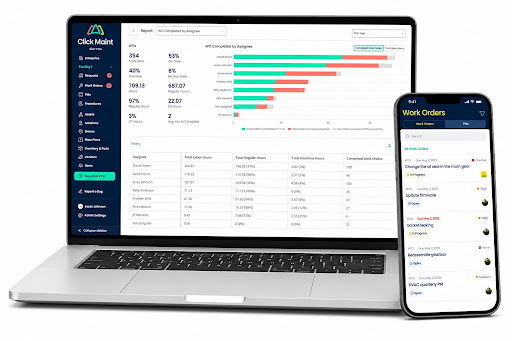
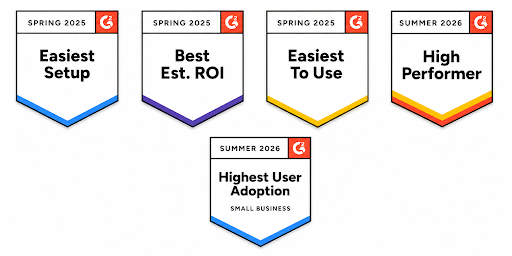
Click Maint has been ranked as a leading CMMS for ease of use, easy setup, best ROI, and high user adoption by G2.com
What Makes Click Maint the Best CMMS for Construction
- One plan, everything included. Click Maint bundles the maintenance request portal, work order management, preventive maintenance, asset and equipment tracking, parts/inventory management, vendor management, reporting, and a mobile app into a single subscription; no feature-gated tiers to climb as your team grows.
- QR codes built for jobsites. Technicians and even non-logged-in requesters can scan a code on equipment or a location to instantly pull up records, submit a request, or open a work order; useful when gear and crews move between sites constantly.
- Fast, low-friction onboarding. Reviewers repeatedly describe going live within days, not months, with a support team that stays hands-on well past the initial setup.
- Unlimited requester & view only users. The people submitting maintenance requests, often the largest group on a jobsite, don't count against your subscription, which keeps costs predictable as headcount grows. The same goes for executives who don’t engage with work orders, but want to see reports and analytics.
- Responsive product development. Multiple reviewers noted that feature requests they'd submitted (like meter tracking and downtime tracking) showed up in later releases, suggesting an actively evolving roadmap rather than a stagnant one.
A Comparison of the Five Best CMMS Software for Construction
Click Maint
Key features that reviewers like
- Ease of use across skill levels. Reviewers across industries consistently describe the interface as intuitive enough that teams with mixed technical comfort adopt it quickly. A Reliability Manager in furniture manufacturing called the workflow management strong enough to offset the platform's less mature reporting.
- QR-code request portal drives adoption. Facilities and operations managers highlight that letting people submit requests via QR code, without logging in, increases how consistently issues get reported.
- Genuinely responsive support. Across dozens of reviews, the support team is described as fast, knowledgeable, and willing to escalate feature requests to the product team.
- Value for money. Several reviewers who evaluated Click Maint against Limble, MaintainX, UpKeep, Fiix, and eMaint cited straightforward, competitive pricing as a deciding factor. One noted that a competitor's tiered feature approach was actually a turn-off compared to Click Maint's single all-inclusive plan.
- Preventive maintenance and asset tracking that just works. Reviewers in chemicals, mining, and manufacturing point to easy PM scheduling and asset location tracking as core strengths for reducing unplanned downtime.
What could be better
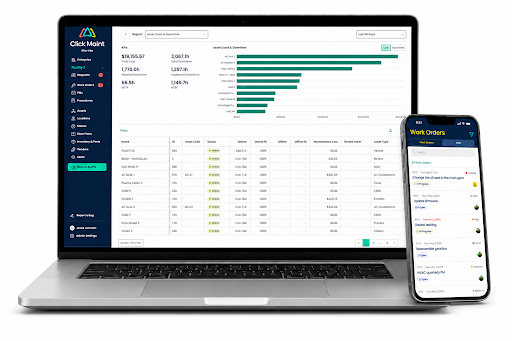
- Reporting and KPI dashboards are still maturing. Several reviewers describe the KPI dashboard as the weakest link, wanting more interactivity and deeper analytics.
- Some asset management gaps. One long-term user noted the inability to mark assets as "inactive" and limited ability to manually correct asset uptime entries without contacting support. Click Maint acknowledges this limitation and has this feature on its near roadmap to be released before the end of 2026.
- Mobile app trails the web app on a few workflows. A few reviewers mentioned needing to email themselves photos to upload from a phone, or getting logged out of the mobile app more than they'd like.
- Limited customization for complex, multi-team setups. Reviewers running larger, more complex operations flagged a single request/work-order template per organization and preset user types as a constraint compared to fully configurable enterprise platforms.
What customers are saying
- A Reliability Manager in furniture manufacturing described Click Maint as a stable CMMS that excels at ease of use and workflow management, even while noting the reporting and asset lifecycle tools have room to mature.
- A Facilities and Construction Manager at a hospital system chose Click Maint specifically as an affordable Canadian option that their diverse team could adapt to quickly.
- A Maintenance Technician in food production described switching from a competitor because Click Maint felt cleaner, faster to navigate, and easier to set up.
- A Commissioning Specialist in mining called it one of the most user-friendly systems he'd used, noting his whole team said the same thing about reporting findings and KPIs.
MaintainX
Key features that reviewers like
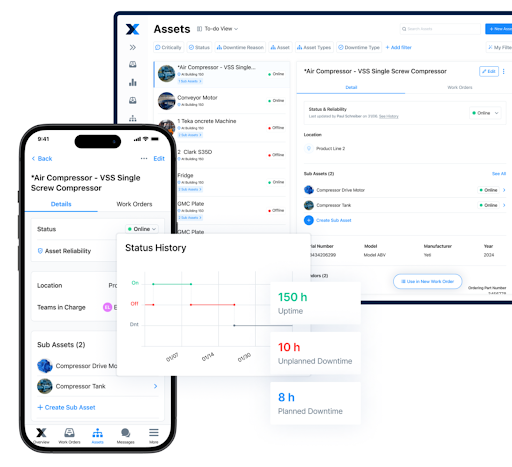
- Mobile-first work order submission. Reviewers highlight how operators can submit work orders directly from their phones without routing through a supervisor first.
- Real-time communication between technicians and requesters. Teams describe smoother handoffs between shifts and departments once everyone works from the same system.
- Reasonably intuitive for mixed technical skill levels. Multiple reviewers describe the platform as friendly enough for both office staff and field technicians to pick up quickly.
- Responsive customer support. Reviewers frequently mention support helping with reporting setup, new user onboarding, and troubleshooting.
What could be better
- Reporting requires back-and-forth to get right. Several reviewers describe needing help from support to build the specific report they want.
- The web interface doesn't always auto-refresh. At least one reviewer flagged needing to manually refresh the page to see updates.
- Integration gaps with existing platforms. One reviewer noted that MaintainX couldn't integrate with their current systems. This is likely that they were on a price plan that did not offer integrations and did not have the budget to upgrade to a higher price tier.
- Feature-gated pricing tiers. Features like meter-based maintenance and purchase-order management are reportedly locked behind higher-priced tiers.
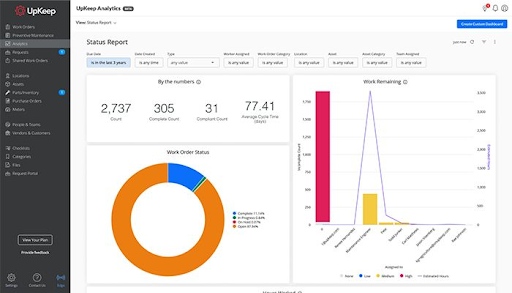
Key features that reviewers like
- Solid mobile experience for technicians. Reviewers, including a Production Manager in construction, specifically praise being able to track live labor cost, parts cost, and downtime per machine from the field.
- Clear before/after documentation. Users describe the shift from handwritten notes to a searchable digital record of asset history as a major upgrade.
- Responsive support. Multiple reviewers describe support as a strong point, with one describing onboarding as effectively being walked through becoming a CMMS operator from scratch.
What could be better
- Reporting flexibility is a recurring complaint. Reviewers frequently note limited ability to customize how reports are displayed or shared.
- UI speed and occasional bugs. More than one reviewer described the interface as relatively slow, with occasional glitches.
- Cost climbs quickly for advanced features. Preventive maintenance, deeper analytics, and multi-site reporting reportedly require an upgrade to pricier tiers fairly early.
Limble
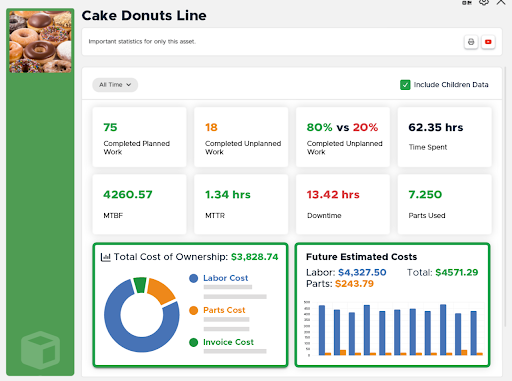
Key features that reviewers like
- High configurability. Reviewers across construction, manufacturing, and healthcare describe fully customizing workflows, fields, and dashboards to match how their team operates.
- Strong live support. Multiple reviewers single out chat support as fast and genuinely knowledgeable, rather than scripted.
- Multi-site visibility. A Facilities Manager noted that Limble made it simple to access assets, work orders, and PMs across multiple locations from a single view.
What could be better
- Reporting granularity has room to grow. Even satisfied long-term users note wanting more granular options when building custom reports or charts.
- PM triggers reliability at scale. At least one reviewer described challenges getting automatic preventive maintenance triggers to fire consistently.
- No GIS or mapping functionality. For teams managing field assets spread across a wide geographic area, this was flagged as a real gap.
- Pricing climbs with configurability. Advanced integrations, SSO, and deeper ERP connectors are generally reserved for higher-priced tiers.
eMaint (a Fluke Company)
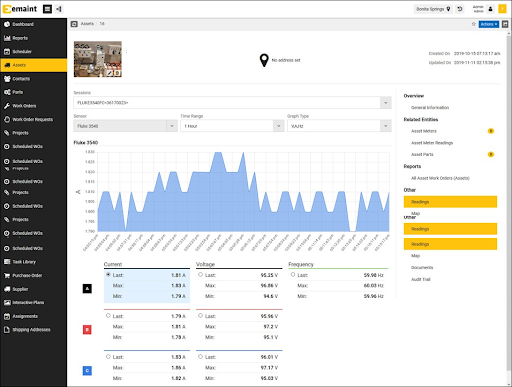
Key features that reviewers like
- Deep configurability for complex operations. Reviewers describe adjusting nearly every form and field to match specific internal procedures and compliance requirements.
- Strong reporting for asset cost tracking. Users highlight detailed maintenance and asset cost tracking that supports longer-term planning.
- Fluke-backed reliability and support. Long-term users describe consistent, responsive support even years into their subscription.
What could be better
- Custom, non-public pricing. eMaint requires a custom quote, which makes upfront budgeting harder compared to platforms with transparent per-user pricing.
- Steeper learning curve for smaller teams. The configurability heavy industry users love can feel like overkill for a smaller construction outfit that just needs core workflows working well from day one.
What Is Construction Project Software?
Maintenance software (CMMS) for construction is a digital platform to plan, schedule, execute, track, and analyze all maintenance work done on equipment, vehicles, and jobsites. Instead of juggling paper logs or scattered spreadsheets, everything lives in one place: what you own, where it is, what it needs, and what's already been done to it.
Good maintenance software helps construction crews avoid expensive, unpredictable downtime — a missed inspection on a skid steer, a neglected PM on a generator, or a tool that quietly disappears between crews can each stall a project and blow a deadline.
How to Choose Construction Project Management Software: A Step-by-Step Guide
Step 1: Build your buying team. Include maintenance leads, technicians, operations and site leaders, and IT/procurement/finance. Document challenges and goals, agree on must-haves, set a budget and timeline.
Step 2: Build a scorecard. Rank must-haves by importance, weighing your goals, KPIs, broken workflows, who'll use the system, your budget, and your desired implementation timeline.
Step 3: Build a shortlist. Narrow to two or three vendors and include your buying team in testing.
Step 4: Evaluate your shortlist. Ask vendors:
- How will this solve our primary problems?
- How long does implementation take for a team our size?
- How does a technician use this on their phone, on a jobsite, with no signal?
- What do reports and dashboards look like out of the box?
- How do we manage multi-site users, assets, and schedules?
- Can we customize it ourselves, without IT support?
- What training and support is included — what costs extra?
- What does it integrate with?
- What's the full cost, including anything gated behind higher tiers?
- Can we pilot it before committing company-wide?
Top Features Construction Teams Should Look For
- Easy for field crews to use
- Work order management that keeps jobs moving
- Preventive maintenance scheduling with real reminders
- Meter logs and downtime tracking
- True mobile access
- Asset and equipment history
- Parts and inventory tracking
- Low stock notifications
- Inspections and checklists
- Reporting and dashboards
- Integrations with accounting and ERP systems
- Responsive support and onboarding
The Final Word: The Most Important Feature Is How Easy It Is to Use
No two maintenance teams are the same, but there's one common thread across every successful CMMS rollout: the platform is easy enough to use that people actually use it.
That's the strongest case for Click Maint for most small to mid-sized construction and facilities teams — one plan with the core features included, unlimited requester users, QR-code-driven field workflows, and a support team reviewers describe as genuinely responsive to feedback. If your operation is enterprise-scale with deep existing ERP integrations, eMaint or Limble's higher tiers may be worth the added complexity. But for teams that want to be up and running quickly, without a feature-gated pricing ladder, Click Maint is the strongest fit — and its 30-day free trial makes it a low-risk way to find out.
Frequently Asked Questions
How do you choose a construction asset management system?
Prioritize a user-friendly interface, mobile access, QR/barcode tracking, solid compliance reporting, cloud-based multi-site visibility, and room to scale. Request live demos before deciding.
What is preventive maintenance for construction equipment?
Servicing equipment on a schedule — checking fluids, replacing filters, lubricating components, inspecting critical parts — before a failure occurs, to extend equipment life and reduce unplanned downtime.
What software is best for managing construction site inspections?
Mobile-friendly CMMS platforms with QR-code scanning, checklist templates, and photo documentation, since technicians can capture and submit findings directly from the field.
How does construction asset management improve project efficiency?
It cuts time wasted searching for tools, reduces unexpected breakdowns through preventive scheduling, and gives managers better utilization data — freeing teams to focus on building instead of hunting for equipment.
Can CMMS software work alongside ERP systems used in construction?
Yes. Many platforms, including Click Maint, offer API integrations and data import/export tools that connect with existing ERP, accounting, or procurement systems.
TABLE OF CONTENTS






