



Reena Sommer | 3 Sep 2026


Construction Management Software: A Step-by-Step Guide by Click Maint
Construction teams spend real time, money, and internal resources rolling out a new CMMS (Computerized Maintenance Management System). When implemented successfully, that investment pays for itself many times over in reduced downtime, longer equipment life, and fewer stalled jobs. On the contrary, when implemented poorly, you end up with an expensive tool nobody uses; techs go back to paper, managers go back to spreadsheets, and the project gets shelved.
The difference usually comes down to process. Teams that choose well don't just pick the platform with the longest feature list. Instead, they follow a clear evaluation framework from day one. Here's a step-by-step guide to doing exactly that, using Click Maint as a working example along the way.
Step 1: Build Your Buying Team
The first step in any CMMS search is making sure every stakeholder group has a seat at the table. Skipping this step is the single most common reason rollouts fail later. If the people who'll use the software regularly aren’t involved in the evaluation process, adoption suffers no matter how good the tool is.
Your buying team should typically include:
- Maintenance leads — managers, directors, or supervisors who own the process
- Technicians and other daily users — the people submitting requests and closing work orders in the field
- Operations and site management leaders — who need visibility into uptime and project timelines
- IT, procurement, and finance — who handle data security, contracts, and budget
With this group assembled, work through the following before you look at a single vendor:
- Document your current challenges, goals, and specific use cases
- Establish a prioritized list of must-have features and capabilities
- Decide on a budget and a realistic timeline for implementation
- Assign roles, responsibilities, and a change-management plan
- Agree on how you'll test, evaluate, and ultimately choose the software

Step 2: Build a Scorecard for Evaluating CMMS Software
Once your buying team is in place, translate your needs into a scorecard you can use to compare vendors objectively. You don't have to rank every item, but doing so helps you weigh vendors fairly instead of getting swayed by whichever demo looked slickest.
As you build your scorecard, work through:
- Your short- and long-term goals, and your biggest current obstacles
- The KPIs you track, and the targets you're accountable for hitting
- The processes and workflows that already work, and the ones that are broken
- The roles that will use the software, what they'll use it for, and how often
- The specific features and functionality your team actually wants and needs
- Your budget — both the sticker price and the total cost of ownership
- How quickly you want to implement, and what kind of support you expect along the way
This is also the point to decide how much pricing predictability matters to you. Many Top CMMS platforms gate essential features like preventive maintenance scheduling, parts and purchase-order management, labor and cost tracking, or advanced reporting — behind higher-priced tiers. That can make budgeting harder to forecast as your team grows. Click Maint, for example, takes the opposite approach: one plan includes the core feature set (work orders, preventive maintenance, asset tracking, inventory, vendor management, and reporting), and requester and view only users don't add to the subscription cost.
Step 3: Create a Shortlist of CMMS Software Providers
With your scorecard built, narrow the field to three or four vendors that genuinely fit your needs and budget. We recommend not having an extensive list of 10 CMMS vendors. A long shortlist dilutes your buying team's attention and slows the whole process down.
Make sure your buying team is actively involved at this stage, not just consulted after the fact. Let technicians test the mobile app. Let a facilities manager poke at the reporting. Their feedback here is worth more than any vendor pitch, and your scorecard gives you a consistent way to compare what they find.
For construction specifically, a few things tend to separate a good shortlist candidate from a poor one:
- Mobile-first usability that holds up as well in the field as it does at a desk
- QR code or barcode scanning for equipment and locations, since gear and crews move constantly between sites
- Fast implementation — a system that takes a year to roll out isn't much of an upgrade over paper
- A request portal that non-logged-in staff or subcontractors can use to flag issues without friction
Click Maint's QR-code support is a good illustration of why this matters in construction specifically: technicians and even non-logged-in requesters can scan a code on an asset or location to instantly pull up records, submit a request, or open a work order — useful when equipment is constantly moving between sites and crews.
Step 4: Evaluate Your Shortlist Vendors
Once you've narrowed your list, put every vendor through the same set of questions. Consistency here is what makes the comparison fair.
- How will this software help solve my primary problems and hit my targets?
- How long does it typically take to roll out for a team like ours?
- Can you show me how a technician would use this on their phone, on a jobsite, with no signal? Is there offline mode on mobile?
- What do the reports and dashboards actually look like, out of the box?
- How do I manage users, data, assets, and schedules across multiple sites?
- How easy is it to set up the system and make changes without IT support?
- What kind of training, setup, and support is available to us — and what costs extra?
- Which other systems do you integrate with, and how does that process work?
- What is the cost and pricing structure? How long until we see value?
- Are we able to test or pilot the software before committing?
That last question matters more than it might seem. A vendor confident in their product should have no problem letting you try before you buy. Click Maint, for instance, offers a 30-day free trial with instant access and no credit card required which gives your buying team a real chance to run the platform through its paces on your own equipment and workflows before signing anything.
If possible, ask a couple of CMMS vendors to set up a proof of concept or pilot where they import a sample set of your assets, inventory and PM schedules so that you can test the application with real-life data that is relevant to your daily operations.
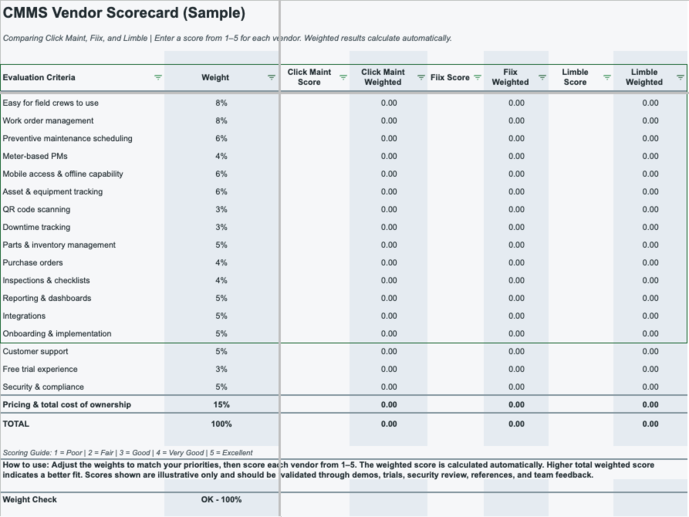
The Top Features Construction Teams Should Look For
If you're building your scorecard from scratch, here are the ten features that matter most, based on what maintenance leaders in construction consistently prioritize:
- Easy for field crews to use — simple navigation and fast work order updates, even for technicians who aren't especially tech-savvy
- Work order management that keeps jobs moving — create, assign, update, and close work efficiently, with clear status visibility
- Preventive maintenance scheduling and reminders — automatic notifications so tasks don't get missed
- Mobile access for on-the-go work — full phone and tablet support so techs can work from the field, not just an office
- Asset and equipment tracking with history — a clear record of past work for every piece of equipment
- Parts and inventory management — usage tracking, stock counts, and low-stock alerts
- Inspections and checklists — quick, repeatable inspections that surface issues early and document compliance
- Reporting and dashboards for visibility — easy ways to see costs, trends, downtime, and what's coming due
- Integrations that reduce double entry — links to tools like accounting and ERP software
- Responsive support and onboarding — hands-on implementation help and quick answers when your team gets stuck
The Most Important Factor: Will Your Team Actually Use It?
No two maintenance teams are exactly alike. What makes a best CMMS appealing to one crew might be an afterthought to another. But there's one factor that shows up in every successful rollout: the platform is easy enough to use that people actually use it. A CMMS is only as valuable as its adoption. The most feature-rich system in the world does nothing sitting unused while techs go back to paper.
The only reliable way to protect against that outcome is to keep key users involved in the evaluation process from Step 1 through the final decision. They'll tell you, honestly, which option will actually help them get through a workday. That feedback should carry real weight in your final choice.
If you're looking for a starting point for your shortlist, Click Maint is worth including specifically for teams that want the process above to move quickly: one all-inclusive plan (so your scorecard doesn't have to account for feature-gated pricing tiers), QR-code workflows built for jobsites, unlimited requester users, and a 30-day free trial that lets your buying team actually test it, not just watch a demo, before you decide.
TABLE OF CONTENTS






